Hello!
We’ve previously learned what Backstage is and why it’s needed. Now, we’re going to delve into the 5 core features of Backstage that developers most frequently access and use in the field. Let’s explore together how these features interact to create a ‘Golden Path’! 🌟
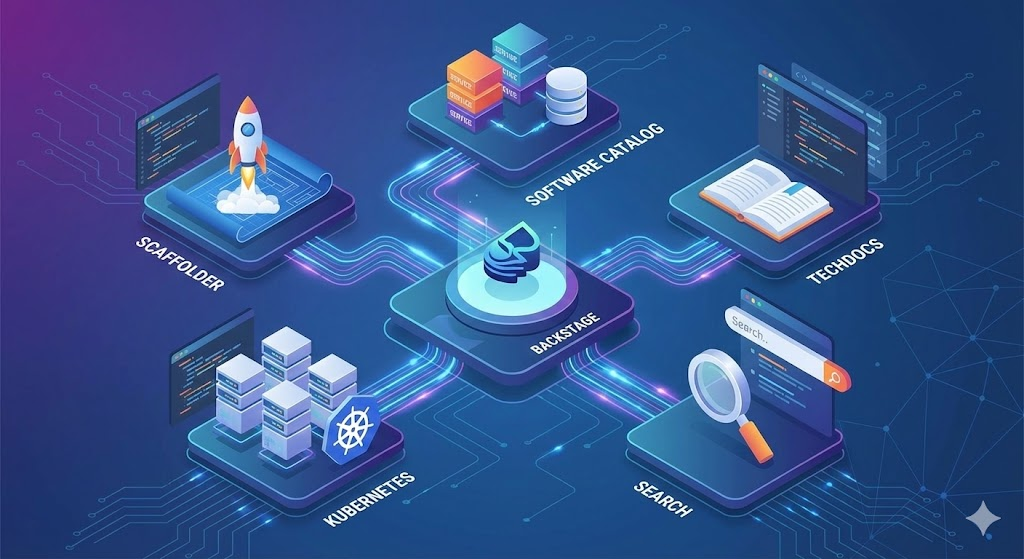
📌 Learning Objectives for This Post
After reading this article, you will fully understand the following:
- Understanding the concept and operating principles of the Software Catalog 📑
- How to create automated projects using the Scaffolder 🏗️
- Grasping the extensibility of the Search function 🔍
- Learning how TechDocs enables ‘documentation as code’ 📝
- Establishing a portal customization strategy using Plugins 🧩
1. The Beginning of Everything: Software Catalog 📑
The Software Catalog is Backstage’s most critical feature and the foundation for all other functionalities.
- Purpose: Maps all scattered software assets within an organization, such as websites, APIs, libraries, and resources, to a central directory.
- How it works: Details for each entity are defined in YAML files stored alongside the source code. This ensures that catalog information remains up-to-date when the code is updated.
- Key Benefits: * Clearly tracks asset ownership and dependencies.
- Helps clean up the system by identifying ‘orphaned entities’ that lack a parent entity.
- Becomes a source for extracting insights like security warnings or maturity metrics.
2. Standardized Start: Scaffolder 🏗️
This feature provides the most perfect answer to the question, “Where do I start?” when a new team member joins.
- Core Function: Executes predefined software templates to instantly create repositories with skeleton code and completed configurations.
- Recommending the Golden Path: Provides templates with built-in CI/CD, analytics tools, etc., allowing new developers to have a deployment-ready service with just a few clicks.
- Integration with Catalog: Services created with the Scaffolder are automatically registered in the Catalog, creating a virtuous cycle that increases discoverability.
3. Documentation as Code: TechDocs 📝
Documentation is important, but managing it is difficult. TechDocs solves this with a ‘Documentation-as-code’ approach.
- How it works: By managing Markdown files alongside source code, Backstage fetches them and converts them into beautiful static pages.
- Developer-Friendly: Developers can focus solely on writing Markdown without worrying about the documentation publishing process. TechDocs automatically configures navigation menus and UI elements.
4. Ensuring Infrastructure Visibility: Kubernetes ☸️
Backstage provides a plugin that allows developers to directly visualize the cluster status of each service.
- Status Check: Quickly grasp the health status of clusters in development, staging, and production environments at a glance.
- Catalog Integration: Based on service information registered in the Catalog, it directly fetches data from external cluster providers like GKE and displays it.
5. Ecosystem Integrated Search: Search 🔍
As an organization grows, the speed at which necessary information is found determines productivity.
- Flexible Extensibility: While it primarily supports ElasticSearch, you can integrate a search engine that suits your organization’s preference.
- Integrated Search: Collects and indexes data not only from Catalog information but also from TechDocs, Stack Overflow, etc., via a Collator, allowing for a single, unified search.
🧩 Infinite Extensibility Through Plugins
All the features mentioned above are actually core plugins maintained by the Backstage team. However, the true value of Backstage comes from community plugins.
- Vendor Integration: You can bring PagerDuty incident information or ArgoCD status into the portal.
- Custom Plugins: If your organization has specific internal requirements, you can write your own plugins to extend functionality.
By effectively utilizing the 5 features summarized today, your organization can also build a powerful development culture like Spotify. In the next chapter, we will delve deeper into how to actually configure the most important Software Catalog! 🚀
Leave a Reply