When configuring AI lab environments or GPU servers, you will often encounter commands like these.
docker run --gpus all nvidia/cuda:12.4.1-base-ubuntu22.04 nvidia-smiAlternatively, in a Kubernetes environment, you install NVIDIA drivers on GPU nodes, configure the NVIDIA Container Toolkit, and then run containers that require GPUs.
This naturally leads to a question:
“Containers are inherently isolated environments, so how can they use the host server’s GPU?”
The answer to this question lies in the architecture of the NVIDIA Container Toolkit.
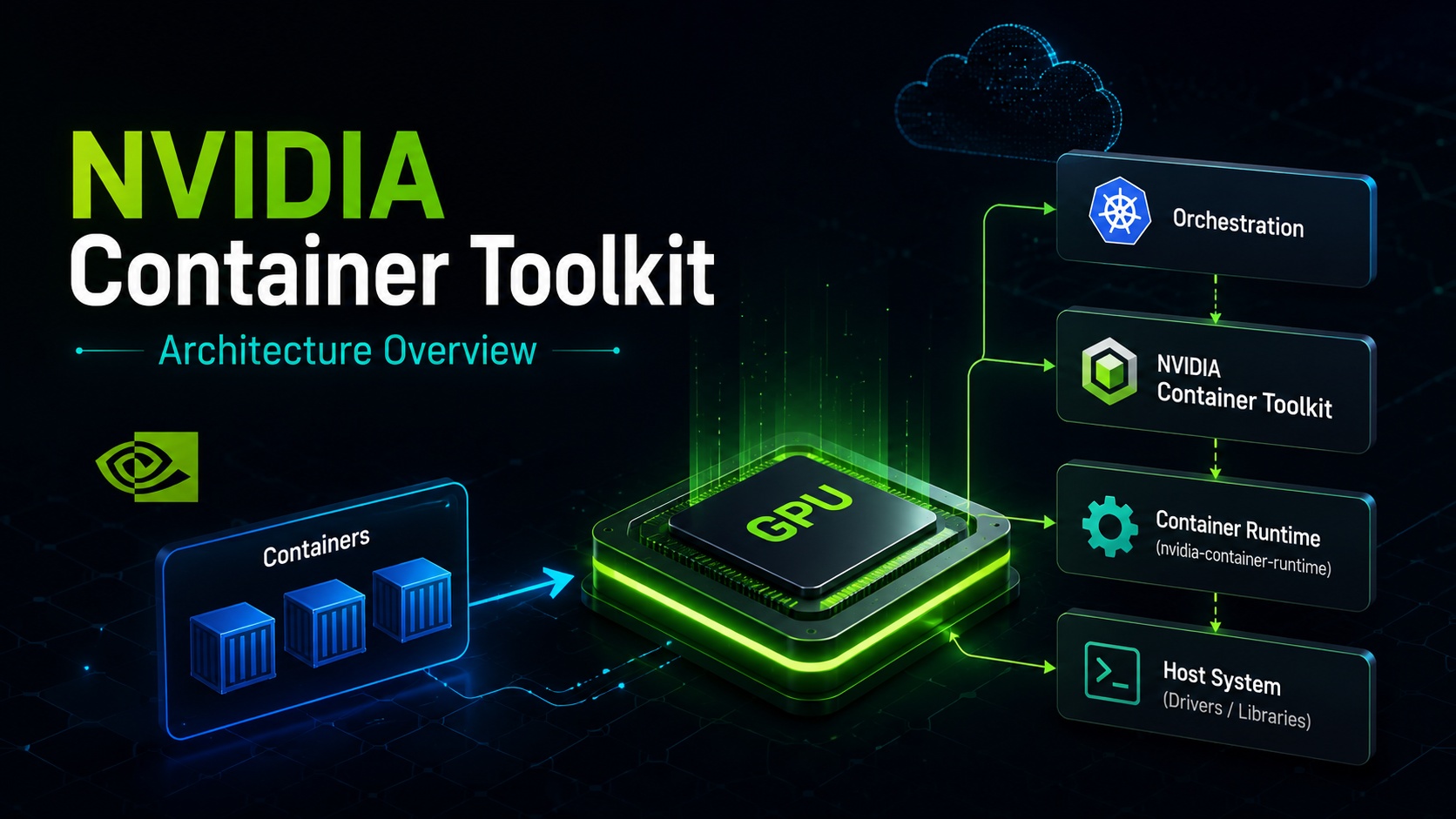
The NVIDIA Container Toolkit is a collection of components that enable NVIDIA GPUs to be used with various container runtimes such as Docker, containerd, CRI-O, and LXC. NVIDIA’s official documentation also states that the NVIDIA container stack is designed to support multiple container runtimes in the ecosystem, rather than being tied to a single runtime.
1. Why is the NVIDIA Container Toolkit necessary?
Containers are fundamentally isolated execution environments from the host. Therefore, using a GPU inside a container is not as simple as just running a CUDA image.
To use a GPU, approximately the following elements are required:
First, the NVIDIA GPU driver must be installed on the host OS.
Second, the container must be able to access GPU device files like /dev/nvidia*.
Third, NVIDIA driver-related libraries and executables must be available inside the container.
Fourth, container runtimes like Docker, containerd, and CRI-O must understand the information that “this container needs a GPU connection.”
In other words, running a GPU container is not just a matter of the container image itself. The host’s GPU device, drivers, libraries, and container runtime settings must all work together.
The NVIDIA Container Toolkit is a tool that automates and standardizes this process.
Simply put, it’s like this:
The NVIDIA Container Toolkit is a layer that connects device files, driver libraries, and runtime settings, enabling containers to use the host’s NVIDIA GPU in a safe and consistent manner.
2. Overall Structure of the NVIDIA Container Stack
The NVIDIA container stack, as described in NVIDIA’s official documentation, primarily consists of three main components:
| Component | Representative Command/Package | Role |
|---|---|---|
| NVIDIA Container Runtime | nvidia-container-runtime | Injects NVIDIA settings between runtimes like Docker/containerd and runC |
| NVIDIA Container Runtime Hook | nvidia-container-toolkit, nvidia-container-runtime-hook | Performs GPU device and library injection just before container startup |
| NVIDIA Container Library and CLI | libnvidia-container1, nvidia-container-cli | Handles actual GPU device, driver library, and mount configuration |
These components exist individually, but general users typically install the nvidia-container-toolkit package. NVIDIA documentation also states that installing the nvidia-container-toolkit package is sufficient for all use cases.
3. Understanding the Overall Flow First
Simplified, the flow of a container using a GPU based on Docker is as follows:
사용자
  ↓
docker run --gpus all ...
  ↓
Docker daemon
  ↓
nvidia-container-runtime
  ↓
runC spec 수정
  ↓
NVIDIA prestart hook 추가
  ↓
runC 실행
  ↓
nvidia-container-cli 호출
  ↓
GPU 장치와 라이브러리 컨테이너에 주입
  ↓
컨테이너 내부에서 nvidia-smi 실행 가능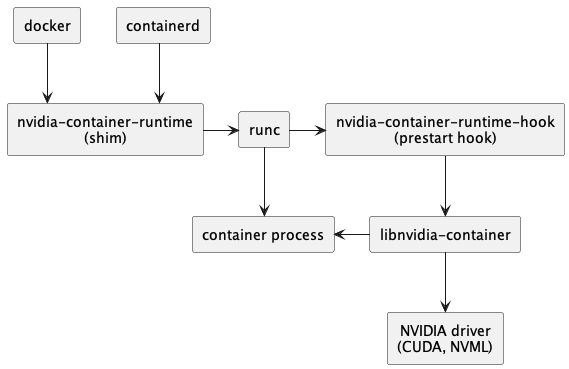
https://docs.nvidia.com/datacenter/cloud-native/container-toolkit/latest/arch-overview.html
The key here is that nvidia-container-runtime is not an independent runtime that fully executes containers directly, but rather acts as a component that injects NVIDIA-related settings in front of the existing runC.
According to NVIDIA documentation, nvidia-container-runtime was historically a forked version of runC, but since 2019, it operates as a thin wrapper around the native runC installed on the host. This runtime takes the runC spec as input, adds the NVIDIA Container Runtime Hook as a prestart hook, and then passes the modified spec to the native runC.
4. The Lowest Layer: libnvidia-container and nvidia-container-cli
At the lowest layer of the NVIDIA container stack are the core components: libnvidia-container and nvidia-container-cli.
The official documentation describes these components as a library and CLI that automatically configure GNU/Linux containers to use NVIDIA GPUs, with an implementation based on Linux kernel primitives and designed to be independent of specific container runtimes.
Simply put, this layer is the actual worker.
For example, the following must be connected inside the container:
/dev/nvidia0
/dev/nvidiactl
/dev/nvidia-uvm
NVIDIA driver library
CUDA 관련 runtime library
GPU capabilities 정보
At this point, nvidia-container-cli is the core tool that handles tasks such as “which GPU to include,” “which libraries to mount,” and “what path they should appear as inside the container.”
In other words, the container runtime does not directly know all the detailed NVIDIA GPU configurations; instead, it calls nvidia-container-cli provided by NVIDIA to inject GPU support.
5. The Middle Layer: NVIDIA Container Runtime Hook
The next important component is the NVIDIA Container Runtime Hook.
According to the official documentation, this hook is an executable that implements runC’s prestart hook interface. After runC creates a container, but before the container process starts, this hook is called. At this point, the hook reads the container’s config.json information and calls nvidia-container-cli with appropriate flags. Specifically, which GPU device to inject into the container is one of the important flags.
To explain this more simply:
During the container execution process, there is a moment when “the container has been created but not yet started.”
This exact moment is crucial.
Instead of forcibly inserting GPU devices and libraries after the container has already started, the necessary GPU settings are injected just before the container starts.
This is why it’s called a “prestart hook.”
컨테이너 생성
  ↓
아직 애플리케이션 실행 전
  ↓
NVIDIA prestart hook 실행
  ↓
GPU 장치와 라이브러리 주입
  ↓
컨테이너 애플리케이션 시작
Thanks to this structure, applications inside the container can use the GPU as if it were originally present within the container.
6. The Upper Layer: NVIDIA Container Runtime
In Docker or containerd environments, nvidia-container-runtime is configured as an OCI-compliant runtime. NVIDIA documentation also explains that when using Docker or containerd, the NVIDIA Container Runtime is configured as an OCI-compliant runtime.
Here, OCI stands for Open Container Initiative, an ecosystem that defines standards for container images and runtime behavior.
Running Docker doesn’t mean Docker handles everything alone. Docker internally works with layers like containerd and runC.
Simplified, it’s as follows:
Docker CLI
  ↓
Docker daemon
  ↓
containerd
  ↓
OCI runtime
  ↓
runC
  ↓
Linux namespace / cgroup 기반 컨테이너 실행
The NVIDIA Container Runtime intervenes at the OCI runtime stage of this flow.
When a user runs a GPU container, the NVIDIA Container Runtime modifies the runC spec, adds the NVIDIA hook, and then entrusts the actual container execution to the native runC.
Understanding this structure can reduce misunderstandings that might arise from the name “nvidia-container-runtime.”
nvidia-container-runtime does not replace Docker itself, nor does it replace runC entirely. In its current structure, it is closer to a wrapper that injects NVIDIA GPU settings in front of the existing runC.
7. Differences between Docker/containerd and CRI-O/LXC
The NVIDIA Container Toolkit’s usage flow varies depending on the type of container runtime.
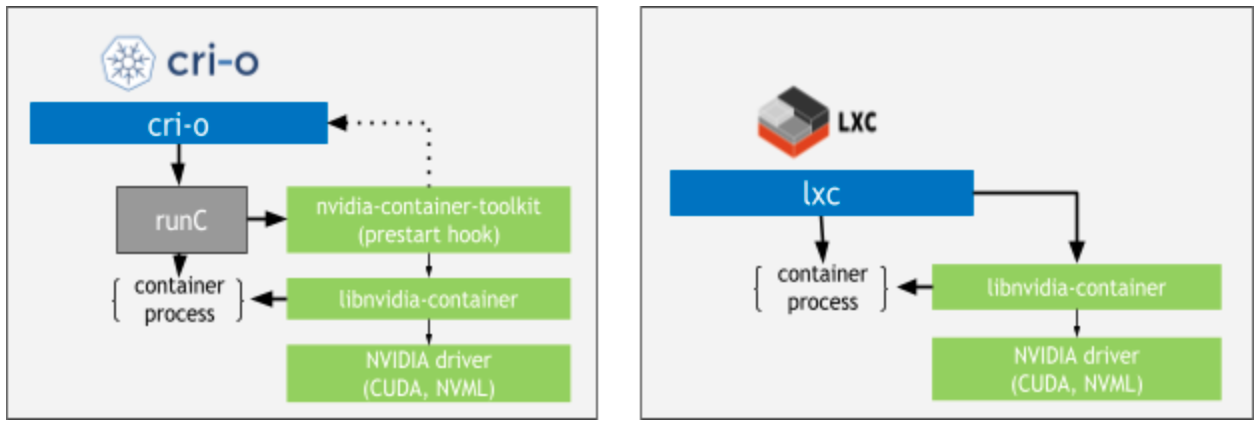
The official documentation states that for Docker or containerd, nvidia-container-runtime is configured as an OCI-compliant runtime. Conversely, for CRI-O and LXC flows, the NVIDIA Container Runtime component may not be necessary.
This difference can be summarized as follows:
| Runtime | Main Flow | Characteristics |
|---|---|---|
| Docker | Docker → NVIDIA Container Runtime → runC → NVIDIA Hook | Uses NVIDIA runtime registered with Docker |
| containerd | containerd → NVIDIA Container Runtime → runC → NVIDIA Hook | Frequently used in Kubernetes nodes |
| CRI-O | CRI-O → NVIDIA Hook/CLI Layer | Separate NVIDIA Container Runtime may not be needed |
| LXC | LXC → NVIDIA Hook/CLI Layer | Flow differs from Docker family |
| Podman | CDI usage recommended | CDI method is important recently |
In other words, the NVIDIA Container Toolkit does not enforce a single method. The path for injecting GPUs varies depending on the container runtime’s structure.
8. Understanding the Package Structure
The main packages of the NVIDIA Container Toolkit are as follows:
nvidia-container-toolkit
nvidia-container-toolkit-base
libnvidia-container-tools
libnvidia-container1
Package dependencies are roughly as follows:
nvidia-container-toolkit
 ├─ libnvidia-container-tools
 │   └─ libnvidia-container1
 └─ nvidia-container-toolkit-base

libnvidia-container-tools
 └─ libnvidia-container1

libnvidia-container1
Looking at each package by its role:
| Package | Role |
|---|---|
| libnvidia-container1 | Core library for NVIDIA GPU container support |
| libnvidia-container-tools | Provides CLI tools such as nvidia-container-cli |
| nvidia-container-toolkit-base | Includes basic tools like nvidia-container-runtime, nvidia-ctk |
| nvidia-container-toolkit | Integrated package typically installed |
In practice, rather than installing packages one by one, it is usually sufficient to install nvidia-container-toolkit.
https://docs.nvidia.com/datacenter/cloud-native/container-toolkit/latest/arch-overview.html
The official documentation also states that installing nvidia-container-toolkit is sufficient for all use cases.
9. What is nvidia-docker2 now?
In older documentation, you might frequently encounter a package called nvidia-docker2.
In the past, many documents instructed users to install nvidia-docker2 to use NVIDIA GPUs with Docker. Consequently, older blogs and installation guides still feature nvidia-docker2.
However, current NVIDIA official documentation states that nvidia-docker2 and nvidia-container-runtime packages should be considered deprecated, as their functionality has been merged into the nvidia-container-toolkit package. Nevertheless, these packages might still be provided for compatibility with older workflows.
To summarize:
과거 방식:
nvidia-docker2 중심

현재 권장 방식:
nvidia-container-toolkit 중심
Therefore, when configuring a new environment, it is better to focus on nvidia-container-toolkit and nvidia-ctk rather than nvidia-docker2.
10. What is nvidia-ctk?
nvidia-ctk is the NVIDIA Container Toolkit CLI.
The official documentation explains that this CLI includes functionalities such as configuring runtimes like Docker to work with the NVIDIA Container Toolkit, or generating CDI specifications.
For example, to configure Docker to use the NVIDIA runtime, you can use the following command:
sudo nvidia-ctk runtime configure --runtime=docker
sudo systemctl restart docker
According to NVIDIA installation documentation, this command modifies the /etc/docker/daemon.json file on the host to update Docker to use the NVIDIA Container Runtime.
When configuring containerd for Kubernetes, you can use the following command:
sudo nvidia-ctk runtime configure --runtime=containerd
sudo systemctl restart containerd
According to the official documentation, for containerd, nvidia-ctk typically creates a /etc/containerd/conf.d/99-nvidia.toml drop-in configuration file and updates the imports setting in /etc/containerd/config.toml.
In other words, nvidia-ctk can be seen as a management tool that automates the complex task of manually opening and modifying configuration files.
11. How to Understand it in Kubernetes?
When using GPUs in Kubernetes, the following configurations are generally required at the node level:
GPU가 장착된 노드
  ↓
NVIDIA GPU Driver 설치
  ↓
NVIDIA Container Toolkit 설치
  ↓
containerd 또는 Docker 런타임 구성
  ↓
NVIDIA Device Plugin 배포
  ↓
Pod에서 nvidia.com/gpu 리소스 요청
Here, the NVIDIA Container Toolkit is the “foundational layer that enables the container runtime to actually connect GPUs to containers.”
From the perspective of the Kubernetes scheduler, Pods need to be placed on nodes with GPU resources. However, for a Pod to actually use GPU devices inside a container, the container runtime must be able to inject GPU devices and libraries.
This is where the NVIDIA Container Toolkit comes in.
For example, in a Pod spec, GPU resources can be requested as follows:
apiVersion: v1
kind: Pod
metadata:
  name: gpu-test
spec:
  restartPolicy: Never
  containers:
    - name: cuda
      image: nvidia/cuda:12.4.1-base-ubuntu22.04
      command: ["nvidia-smi"]
      resources:
        limits:
          nvidia.com/gpu: 1
Having just this YAML does not automatically enable GPU usage.
The node must have NVIDIA drivers, the container runtime must be able to inject GPUs via the NVIDIA Container Toolkit, and a Device Plugin must also be configured for Kubernetes to recognize GPU resources.
12. Why has CDI (Container Device Interface) become important?
Recently, CDI (Container Device Interface) has also become important.
According to NVIDIA documentation, the NVIDIA Container Toolkit supports CDI specification generation starting from v1.12.0. CDI is an open specification designed to abstract what it means to access devices like NVIDIA GPUs and to standardize device access methods across various container runtimes.
Simply put, CDI is a “standard specification for representing devices like GPUs in containers.”
In previous approaches, there was a significant reliance on specific runtime hooks or environment variables. With CDI, GPU devices can be passed to container runtimes in a more standardized manner.
Especially in environments like Podman, NVIDIA recommends using CDI. NVIDIA’s installation documentation also states that for Podman, CDI is recommended for NVIDIA device access.
For example, in Podman, CDI devices can be specified as follows:
podman run --rm
  --device nvidia.com/gpu=all
  --security-opt=label=disable
  ubuntu nvidia-smi -L
NVIDIA documentation states that this command should display the same GPU list as when running nvidia-smi -L on the host.
Furthermore, starting from NVIDIA Container Toolkit v1.18.0, a systemd service called nvidia-cdi-refresh automatically generates and updates the CDI specification. This service creates or updates /var/run/cdi/nvidia.yaml during Toolkit installation/upgrade, GPU driver installation/upgrade, and system reboot.
13. Example of GPU Container Execution Flow in Docker
Let’s assume a user executes the following command based on Docker:
docker run --rm --gpus all nvidia/cuda:12.4.1-base-ubuntu22.04 nvidia-smiWhen this command is executed, approximately the following happens internally:
1. 사용자가 Docker CLI로 GPU 사용을 요청한다.
2. Docker daemon이 컨테이너 생성을 준비한다.
3. NVIDIA Container Runtime이 OCI runtime spec을 수정한다.
4. prestart hook에 NVIDIA Container Runtime Hook이 추가된다.
5. runC가 컨테이너 생성 후 시작 직전에 hook을 실행한다.
6. hook이 nvidia-container-cli를 호출한다.
7. nvidia-container-cli가 GPU 장치와 필요한 라이브러리를 컨테이너에 주입한다.
8. 컨테이너 내부에서 nvidia-smi가 GPU를 인식한다.
A crucial point in this structure is that it’s not about installing the entire GPU driver inside the container image.
Instead, it’s a method of connecting the NVIDIA drivers and GPU devices installed on the host so that containers can use them.
Therefore, the following sequence is important in a GPU container environment:
호스트 NVIDIA 드라이버 정상 동작 확인
  ↓
nvidia-smi 확인
  ↓
NVIDIA Container Toolkit 설치
  ↓
Docker/containerd 런타임 설정
  ↓
GPU 컨테이너 실행 테스트
14. Installation and Configuration Flow
According to the NVIDIA Container Toolkit installation documentation, the first requirement is to install the NVIDIA GPU Driver appropriate for your Linux distribution. NVIDIA recommends installing drivers using the distribution’s package manager.
For Ubuntu/Debian-based systems, you register the NVIDIA repository and then install the Toolkit packages. The official documentation provides apt-based installation examples, including nvidia-container-toolkit, nvidia-container-toolkit-base, libnvidia-container-tools, and libnvidia-container1 packages.
After installation, the typical flow for configuring Docker is as follows:
# Configure Docker to use NVIDIA Container Runtime
sudo nvidia-ctk runtime configure --runtime=docker

# Restart Docker
sudo systemctl restart docker

# Test GPU container
docker run --rm --gpus all nvidia/cuda:12.4.1-base-ubuntu22.04 nvidia-smi
If you are using containerd in Kubernetes, you can consider the following flow:
# Configure containerd to use NVIDIA Container Runtime
sudo nvidia-ctk runtime configure --runtime=containerd

# Restart containerd
sudo systemctl restart containerd
Subsequently, in Kubernetes, you deploy the NVIDIA Device Plugin and run GPU workloads by requesting nvidia.com/gpu resources in your Pods.
15. Commonly Confused Aspects in Practice
15.1 Should NVIDIA drivers be installed inside the container?
Generally, you do not approach this by installing host-specific NVIDIA drivers inside the container image.
GPU drivers operate in conjunction with the host kernel. Containers are configured to use the host’s GPU devices and driver libraries.
Container images can include CUDA runtime, cuDNN, and application code, but the actual GPU device and kernel driver are crucial on the host side.
15.2 What if nvidia-smi works on the host but not in the container?
In this case, you should check the following:
# Verify GPU recognition on host
nvidia-smi

# Check if NVIDIA Container Toolkit is installed
dpkg -l | grep nvidia-container
# or
rpm -qa | grep nvidia-container

# Check Docker runtime configuration
cat /etc/docker/daemon.json

# Check containerd configuration
cat /etc/containerd/config.toml
ls -al /etc/containerd/conf.d/
In a Docker environment, you can reapply the runtime configuration with the following command:
sudo nvidia-ctk runtime configure --runtime=docker
sudo systemctl restart docker
In a containerd environment, you can use the following command:
sudo nvidia-ctk runtime configure --runtime=containerd
sudo systemctl restart containerd
15.3 Should nvidia-docker2 be installed?
For new environments, it is generally better to approach it based on nvidia-container-toolkit rather than nvidia-docker2.
The official documentation states that nvidia-docker2 and nvidia-container-runtime packages are deprecated, and their functionality has been merged into nvidia-container-toolkit.
15.4 Why is nvidia-ctk installed on AWS GPU instance images?
AWS GPU-based images or AI/ML images often come with NVIDIA drivers, CUDA, and container execution environments pre-configured.
If nvidia-ctk is installed on such images, it’s likely for the purpose of easily configuring Docker or containerd to use GPUs in containers.
Especially for workloads like Ollama, vLLM, PyTorch, and TensorFlow running in containers, GPU devices must be properly passed to the containers. In this context, the NVIDIA Container Toolkit and nvidia-ctk play crucial roles.
16. Architecture Summary in One Diagram
The overall structure can be summarized as follows:
[사용자 명령]
docker run --gpus all ...
        │
        ▼
[Docker / containerd]
컨테이너 생성 요청 처리
        │
        ▼
[nvidia-container-runtime]
OCI runtime spec 수정
NVIDIA prestart hook 추가
        │
        ▼
[runC]
컨테이너 생성
prestart hook 실행
        │
        ▼
[nvidia-container-runtime-hook]
config.json 분석
nvidia-container-cli 호출
        │
        ▼
[nvidia-container-cli / libnvidia-container]
GPU 장치 파일 주입
드라이버 라이브러리 마운트
환경 구성
        │
        ▼
[컨테이너]
nvidia-smi
CUDA 애플리케이션
AI 모델 추론/학습
Understanding this flow makes debugging GPU container issues much easier.
For example, when a problem occurs, you can analyze it by dividing it into layers as follows:
1. 호스트 GPU 문제인가?
   - nvidia-smi가 호스트에서 동작하는가?

2. Toolkit 설치 문제인가?
   - nvidia-container-toolkit 패키지가 설치되어 있는가?

3. 런타임 설정 문제인가?
   - Docker/containerd가 NVIDIA runtime을 사용하도록 구성되어 있는가?

4. 컨테이너 실행 옵션 문제인가?
   - docker run --gpus all 옵션을 사용했는가?
   - Kubernetes Pod에서 nvidia.com/gpu 리소스를 요청했는가?

5. 애플리케이션 문제인가?
   - CUDA 버전, 프레임워크 버전, 드라이버 호환성이 맞는가?
17. Conclusion
The NVIDIA Container Toolkit is not merely a “GPU container execution tool.”
More precisely, it is a standardized configuration layer that connects container runtimes and NVIDIA GPUs.
In Docker or containerd, the NVIDIA Container Runtime integrates into the OCI runtime flow, and nvidia-container-cli is called via a runC prestart hook. The flow may differ for CRI-O or LXC, and recently, device standardization through CDI has also become important.
Practically, there are three key points to remember:
- First, GPU drivers must be installed on the host.
- Second, the container runtime must inject GPU devices and libraries into the container via the NVIDIA Container Toolkit.
- Third, in new environments, it is better to understand and use nvidia-container-toolkit and nvidia-ctk rather than nvidia-docker2.
If you are configuring AI infrastructure, GPU servers, Kubernetes GPU nodes, or LLM inference environments like Ollama/vLLM, understanding the NVIDIA Container Toolkit architecture is essential foundational knowledge.
Once you understand this structure, you can much more systematically analyze “why GPUs are visible on the host but not in containers,” “why Docker’s daemon.json needs modification,” “why containerd restart is necessary,” and “why Kubernetes GPU Pods enter a Pending or failed state.”
##
Reference:
Leave a Reply