Hello everyone! Today, we’re going to dive deep into a core component that enables one of Backstage’s powerful features, Kubernetes integration: the Kubernetes backend plugin. 🚀
In a cloud-native environment, when operating a developer portal (Backstage), it’s crucial to see at a glance how your services are running on a Kubernetes cluster (Pod status, deployment status, etc.). Let’s meet the star responsible for this magical connection right now! 💡
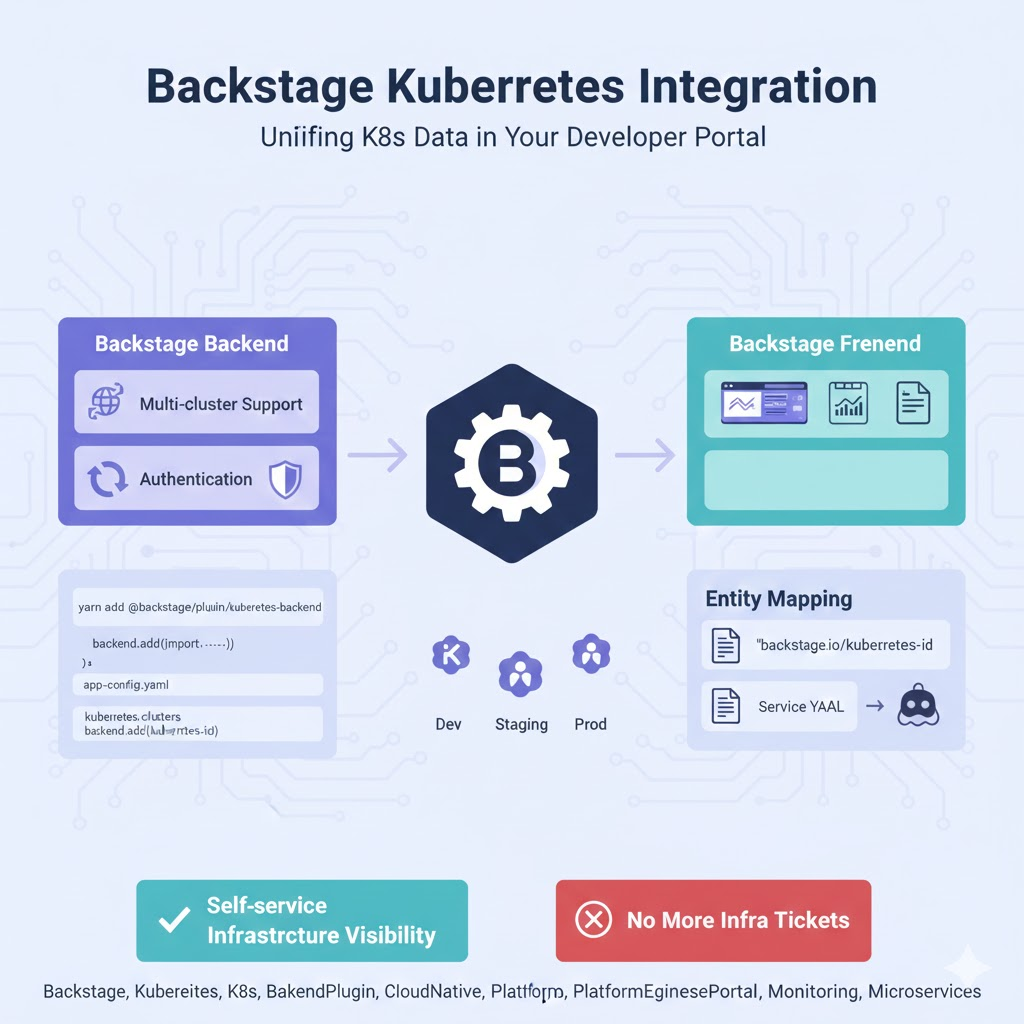
🏗️ The answer is: @backstage/plugin-kubernetes-backend ☸️
The core backend plugin that integrates Kubernetes resource data into the Backstage portal and provides APIs is @backstage/plugin-kubernetes-backend.
This plugin plays a pivotal role in querying actual Kubernetes resources (Pods, Deployments, Services, Ingress, etc.) related to each service (Entity) and delivering them to the frontend.
🌟 Key Roles of the Kubernetes Backend Plugin
Beyond simply fetching data, this plugin performs the following complex tasks:
1. Multi-cluster Data Collection (Multi-cluster Support) 🌐
Most enterprises operate multiple Kubernetes clusters for development, staging, production, etc. This plugin connects to all configured clusters and gathers relevant data.
2. Entity Mapping (Service-to-Cluster Mapping) 🔗
This is the most important feature! It matches a specific ‘service’ registered in the Backstage catalog with its corresponding ‘resource’ on Kubernetes. Data is usually filtered based on the backstage.io/kubernetes-id label set in the YAML file.
3. Authentication and Security (Authentication) 🔐
It handles authentication methods such as Service Account tokens, cluster certificates, or cloud provider (AWS EKS, GCP GKE, etc.) authentication to securely access each cluster.
🛠️ How to Install and Configure?
Here’s how to enable this plugin in a Backstage monorepo structure:
Step 1: Install Package 📦
Add the library to your backend package in the terminal.
Bash
yarn workspace backend add @backstage/plugin-kubernetes-backendStep 2: Register Backend Code ⚙️
For the latest Backstage system (New Backend System), add the following to packages/backend/src/index.ts.
TypeScript
backend.add(import('@backstage/plugin-kubernetes-backend/alpha'));Step 3: Configure app-config.yaml 📝
This is the most crucial part. You need to specify which clusters to connect to and how.
YAML
kubernetes:
  serviceLocatorMethod:
    type: 'multiTenant'
  clusterLocatorMethods:
    - type: 'config'
      clusters:
        - url: https://<apiserver-url>
          name: my-cluster
          authProvider: 'serviceAccount'
          skipTLSVerify: false
          # ... other authentication settings
🔍 Perfect Match with Frontend: plugin-kubernetes
While the backend plugin fetches data, the dazzling dashboard users see is handled by @backstage/plugin-kubernetes (the frontend plugin). 🎨
- Backend: Communicates with cluster APIs to fetch JSON data.
- Frontend: Visualizes Pod status (Running, Error, etc.) and displays logs based on the fetched data.
💡 Practical Tip: Why Can’t I See My Service? 🤔
If you’ve installed the plugin but can’t see any data, check these two things:
- Check Label: Does your service’s Kubernetes resource (Deployment, etc.) have the
backstage.io/kubernetes-id:label? - Check Annotation: Is the
backstage.io/kubernetes-id:annotation added to your Backstagecatalog-info.yamlfile?
These two IDs must match for the backend plugin to recognize, “Ah! This Pod belongs to this service!” ✨
🏁 Conclusion: Completing Infrastructure Visibility
@backstage/plugin-kubernetes-backend is a key tool for integrating fragmented infrastructure information into a developer-centric view. Through this plugin, developers can build a Self-service environment where they can check the status of their services themselves without having to contact the infrastructure department! 🚀
Leave a Reply