Hello! If you’ve been using ArgoCD, a core tool for infrastructure operations and deployment automation, you’ve probably experienced the frustration of seeing “OutOfSync” not appear in the ArgoCD UI even after clearly reflecting changes in Git, or changes taking too long to apply. 😅
Today, we’ll delve deep into ArgoCD’s Cache system, which optimizes its performance, and Hard Refresh, which forcibly updates it to ensure consistency.
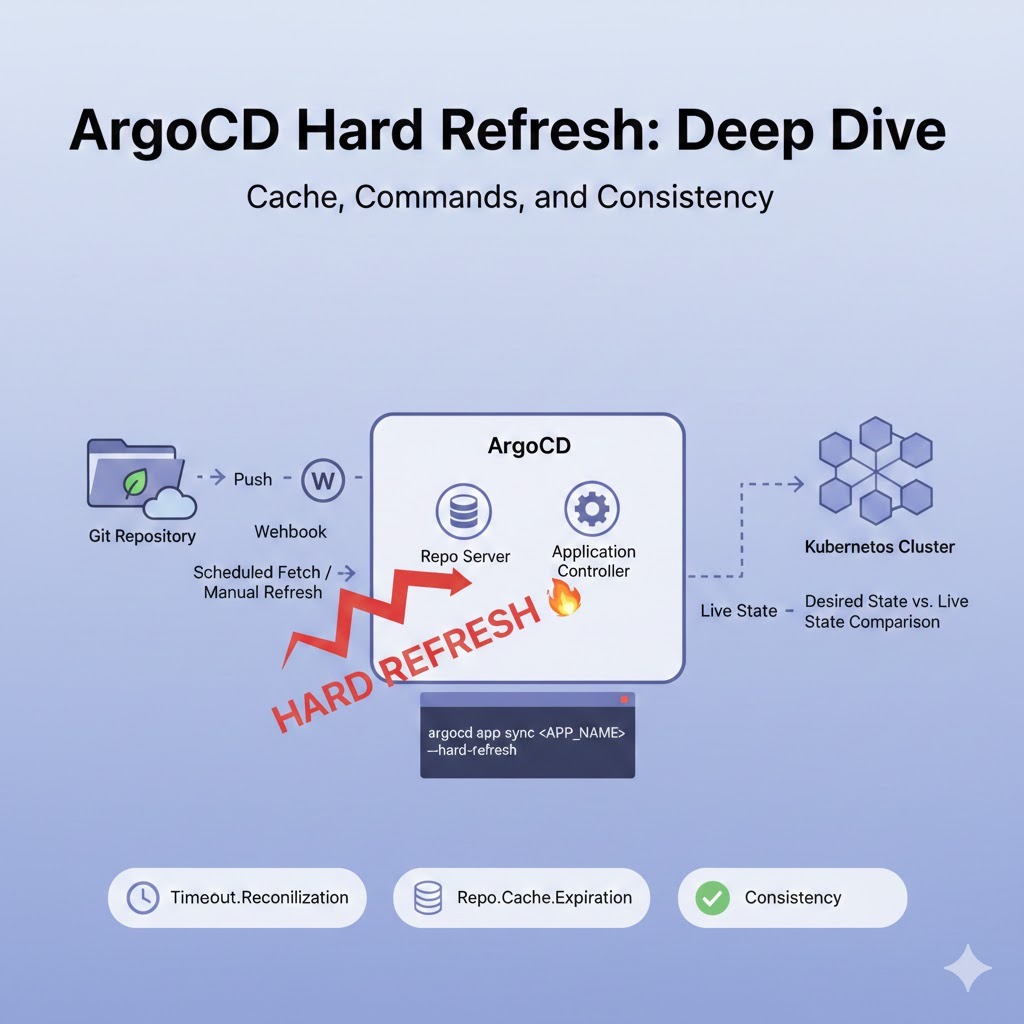
🔍 1. Why ‘Hard Refresh’ and not just ‘Refresh’?
ArgoCD uses multi-stage caching strategies for efficient resource management. Understanding the difference between a regular Refresh and a Hard Refresh is key.
✅ Soft Refresh (Regular Refresh)
- How it works: ArgoCD compares the cluster’s state based on the cached Git repository data it already possesses.
- When to use: Useful for checking if there are manual changes in the cluster.
- Limitations: If a new commit has been pushed to the Git repository but ArgoCD is not yet aware of it, a regular Refresh will not resolve the issue.
🔥 Hard Refresh
- How it works: It completely deletes the existing Git manifest cache, re-fetches data from the Git repository (Refetch). Then, it re-renders Helm charts or Kustomize templates and compares them with the cluster state.
- When to use: Use when the latest Git commit is not reflected, when there are Helm Chart dependency issues, or when manifest generation logic is tangled.
⚙️ 2. Understanding ArgoCD’s Cache Mechanism
To understand why ArgoCD needs a Hard Refresh, we need to look a little deeper into its internal structure. 🧐
- Repo Server: Clones the Git repository and executes helm template or kustomize build commands to generate the final YAML. This output is cached in memory or Redis.
- Application Controller: Compares the cluster’s actual state (Live State) with the desired state created by the Repo Server.
- Timeout Setting: By default, ArgoCD checks Git every 3 minutes (timeout.reconciliation). This time difference can make users feel, “Why isn’t it changing immediately?”
💻 3. Executing Hard Refresh via Command Line (CLI)
Clicking a button in the UI is one way, but CLI is much more powerful for automation scripts or terminal tasks.
🛠️ Basic Command
ArgoCD CLI must be installed and logged in.
Bash
# Hard Refresh a specific application
argocd app get <APP_NAME> --hard-refresh
🐍 Python Script Automation Example
Useful when you need to Hard Refresh multiple apps at once, or want to integrate it at the end of a deployment pipeline (CI).
Python
import subprocess
import json

def hard_refresh_app(app_name):
    """
    특정 ArgoCD 애플리케이션에 대해 Hard Refresh를 수행하는 함수
    """
    print(f"🔄 '{app_name}' 애플리케이션 하드 리프레시 시작...")

    try:
        # Fetching app info with --hard-refresh option triggers a refresh.
        result = subprocess.run(
            ["argocd", "app", "get", app_name, "--hard-refresh"],
            capture_output=True,
            text=True,
            check=True
        )
        print(f"✅ '{app_name}' 갱신 성공!")

    except subprocess.CalledProcessError as e:
        print(f"❌ 에러 발생: {e.stderr}")

# Example of execution
if __name__ == "__main__":
    target_app = "my-kubernetes-service"
    hard_refresh_app(target_app)
📦 4. Advanced Cache Settings (Controller & Repo Server)
If you find yourself needing to press Hard Refresh too often, it’s a good idea to adjust the system settings themselves. You can modify argocd-cm (ConfigMap) to adjust the cache retention period. 🛠️
argocd-cm Modification
Reducing the cache retention period will make ArgoCD check Git more frequently, but it can increase server load.
YAML
apiVersion: v1
kind: ConfigMap
metadata:
  name: argocd-cm
  namespace: argocd
data:
  # Set Git scan interval (default 3 minutes)
  timeout.reconciliation: "180s"
  # Set cache validity period for repository server
  repo.cache.expiration: "24h"
💡 5. Summary & Best Practices
- When to use? 🤔
- When Git commits are confirmed but not reflected in the ArgoCD UI.
- When Helm template results are an older version after values.yaml changes.
- When Webhooks are not working correctly and manual refresh is needed.
- Cautions ⚠️
- Too frequent Hard Refreshes can put a load on Git Servers (GitHub, GitLab, etc.) and risk hitting API Rate Limits.
- Configuring Webhooks to allow ArgoCD to be notified immediately upon Git Push is the most elegant solution.
📝 Conclusion
ArgoCD’s Hard Refresh means more than just a simple ‘reload’. I hope this post sheds a little light for those who have been struggling in the cache swamp, wondering “Why isn’t my deployment working?” ✨
If you have any further questions or your own ArgoCD tips, please share them in the comments below! 👇
Leave a Reply