Hello everyone! Today, we will delve into ArgoCD ApplicationSet and its core, the Generator, which dramatically streamlines multi-cluster and multi-application management in Kubernetes environments.
Beyond simply deploying a single application, this tool provides a one-stop solution for concerns like “What if there are 100 clusters?” or “What if staging and production environments are different?”
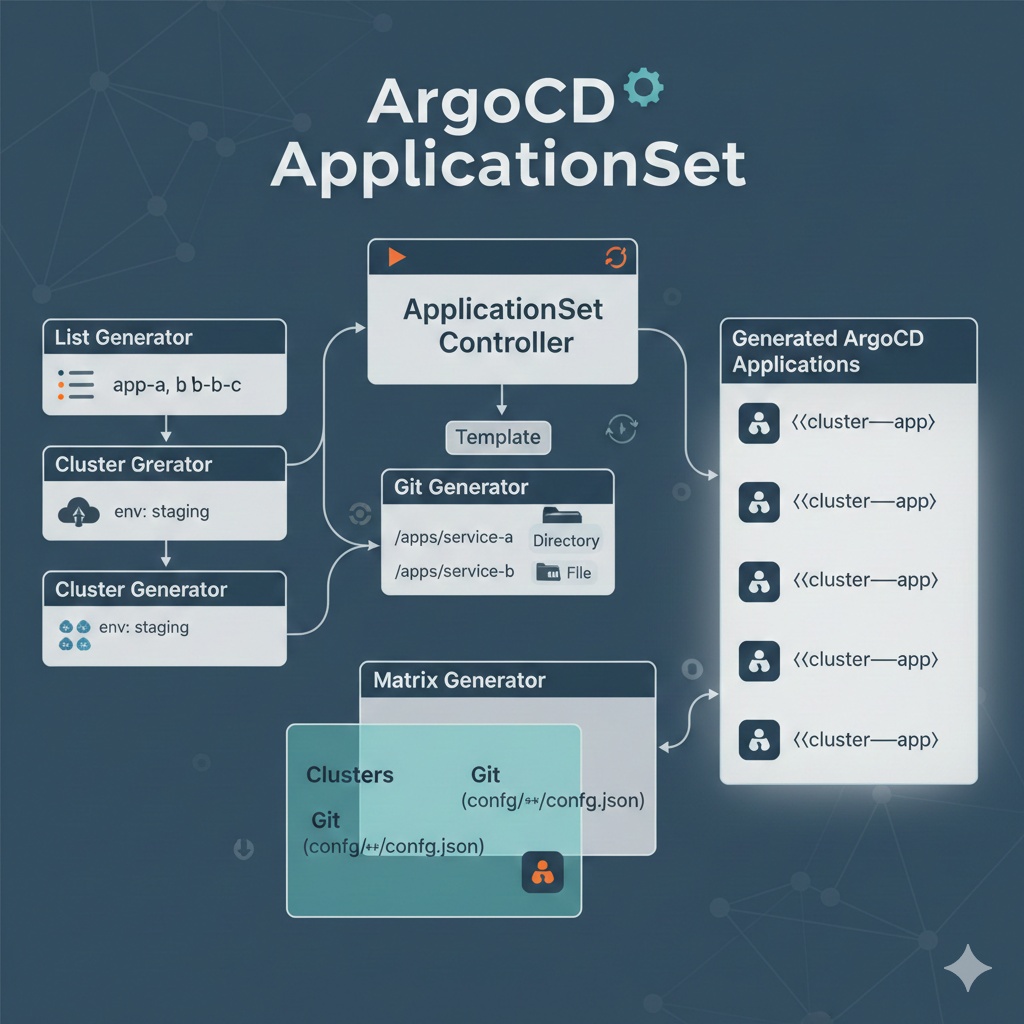
1. What is ApplicationSet? 🤔
The Application resource, a basic unit of ArgoCD, connects a single source (Git) to a single destination (Cluster). However, as the number of services to manage increases, the number of Application YAML files also grows exponentially.
ApplicationSet is like a ‘fish-shaped pastry mold’. It dynamically generates multiple Applications through an engine called Generator.
2. Detailed Analysis of Generator Types 🔍
A Generator determines “what data to use to create an Application.” We will focus on the four most commonly used types.
① List Generator: The Most Intuitive Start 📋
In its simplest form, you directly specify the list of items to be generated within the YAML.
- Usage: When the number of managed targets is small and clear.
- Pros: Intuitive and easy to configure.
📝 Code Example and Explanation
YAML
apiVersion: argoproj.io/v1alpha1
kind: ApplicationSet
metadata:
  name: my-apps
  namespace: argocd
spec:
  generators:
    - list:
        # Defines the elements to be generated as a list.
        elements:
          - cluster: engineering-dev
            url: https://kubernetes.default.svc # Local cluster
          - cluster: engineering-prod
            url: https://1.2.3.4 # Remote cluster
  template:
    metadata:
      # Dynamically uses the {{cluster}} variable defined in the elements above.
      name: '{{cluster}}-guestbook'
    spec:
      project: default
      source:
        repoURL: https://github.com/argoproj/argocd-example-apps.git
        targetRevision: HEAD
        path: guestbook
      destination:
        server: '{{url}}' # The {{url}} variable is substituted here.
        namespace: guestbook
② Cluster Generator: The Core of Multi-Cluster Management ☸️
It automatically reads cluster information registered in ArgoCD and deploys applications.
- Usage: When you want to automatically deploy applications whenever a cluster is added.
- Features: You can select specific clusters using a label selector.
📝 Code Example and Explanation
YAML
apiVersion: argoproj.io/v1alpha1
kind: ApplicationSet
metadata:
  name: cluster-scoped-app
spec:
  generators:
    - clusters:
        # Targets only clusters with the 'env: staging' label in ArgoCD.
        selector:
          matchLabels:
            env: staging
  template:
    metadata:
      # {{name}} is automatically mapped to the cluster name registered in ArgoCD.
      name: '{{name}}-monitoring'
    spec:
      project: default
      source:
        repoURL: https://github.com/my-repo/monitoring.git
        targetRevision: main
        path: charts/prometheus
      destination:
        # {{server}} is substituted with the cluster's API server address.
        server: '{{server}}'
        namespace: monitoring
③ Git Generator: Git Repository Structure as Configuration 📂
It detects file content or directory structure within a Git repository to generate applications.
- Usage: When managing applications with a folder structure, like apps/app-a, apps/app-b.
- Types:
- Directory: Explores subdirectories of a specific path.
- File: Reads JSON/YAML file content and uses it as variables.
📝 Code Example (Directory-based)
YAML
spec:
  generators:
    - git:
        repoURL: https://github.com/my-org/infra.git
        revision: HEAD
        # Finds all directories in the 'services/*' path.
        directories:
          - path: services/*
  template:
    metadata:
      # The directory name (e.g., auth-service) becomes the app name.
      name: '{{path.basename}}'
    spec:
      source:
        repoURL: https://github.com/my-org/infra.git
        targetRevision: HEAD
        path: '{{path}}' # Use the actual path within Git.
      destination:
        server: https://kubernetes.default.svc
        namespace: '{{path.basename}}'
④ Matrix Generator: The Ultimate Combination 🧬
Combines (multiplies) two or more Generators. For example, it’s used when you want to deploy
“all applications (Git Gen)
” to
“all clusters (Cluster Gen)
“.
- How it works: If you have list A [1, 2] and list B [a, b], the result will be [1-a, 1-b, 2-a, 2-b].
📝 Code Example (Cluster x Git Combination)
YAML
apiVersion: argoproj.io/v1alpha1
kind: ApplicationSet
metadata:
  name: matrix-deploy
spec:
  generators:
    - matrix:
        generators:
          # 1. Select target clusters (development, production)
          - clusters:
              selector:
                matchLabels:
                  tier: backend
          # 2. List of applications to deploy (Git file-based)
          - git:
                repoURL: https://github.com/my-repo/configs.git
                revision: HEAD
                files:
                  - path: "config/**/config.json"
  template:
    metadata:
      # Result: 'dev-cluster-api-server', 'prod-cluster-api-server', etc. created
      name: '{{name}}-{{customer}}'
    spec:
      project: default
      source:
        repoURL: https://github.com/my-repo/apps.git
        targetRevision: HEAD
        path: app-chart
        helm:
          # Parameters defined in the JSON file can be passed as Helm values!
          parameters:
            - name: "customerName"
              value: "{{customer}}"
      destination:
        server: '{{server}}'
        namespace: '{{customer}}'
⑤ Merge Generator: Conditional Overwrite 🔗
Similar to Matrix, but it merges data based on the same key. It’s useful when you want to slightly change settings only in specific environments.
3. Practical Tips: When to Use Which Generator?💡
| Situation | Recommended Generator |
| — | — |
| Just starting with ArgoCD and dislike manual management | List |
| In a multi-cluster environment where clusters are continuously increasing | Clusters |
| Have multiple microservice codes in a single Git Repo | Git (Directory) |
| Need to deploy to different clusters per customer (SaaS) | Matrix |
—
4. Precautions and Best Practices ⚠️
- Utilize Dry-run: Before deploying an ApplicationSet, check the argocd-appset-controller logs or test with a small unit first. Otherwise, hundreds of incorrect applications could be created simultaneously.
- Namespace Management: While the ApplicationSet itself should reside in the argocd namespace, ensure that the destinations for the generated Applications are appropriately separated.
- Preserve Resources: When deleting an ApplicationSet, you can decide whether to also delete the actually deployed resources (Pod, Service etc.) through policy settings. Caution is advised in production environments.
5. Conclusion 🏁
ApplicationSet goes beyond simply reducing repetitive tasks; it is a core tool that enables
complete control of infrastructure as code
. While the complexity of the Matrix Generator might seem unfamiliar at first, once set up, operational efficiency will increase tenfold.
Which Generator is right for your environment? Try it now! 🛠️
Leave a Reply