Hello everyone! Today, we’re going to explore Volumes, a crucial topic for any Kubernetes application developer. Kubernetes Pods are ‘ephemeral’ entities that can die and be reborn at any time. So, what happens to the data stored within them? Let’s master how to save data even if a Pod dies, and how to efficiently manage data that’s only needed temporarily, all in just 15 minutes!
📑 Table of Contents
- Overview: Why are Volumes needed? (Stateless vs Stateful)
- The Epitome of Ephemeral Volumes: emptyDir
- The Core of Persistent Data: PV (Persistent Volume) and PVC (Claim)
- The Magic of Dynamic Provisioning: StorageClass
- CKAD Practical Tips: Common Mistakes when Configuring Volumes
- Hands-on: Practical Exercises
0. Overview: Why are Volumes needed? 🤔
Containers within Kubernetes Pods are fundamentally **ephemeral**. If a container crashes and restarts, all files created during its execution disappear.
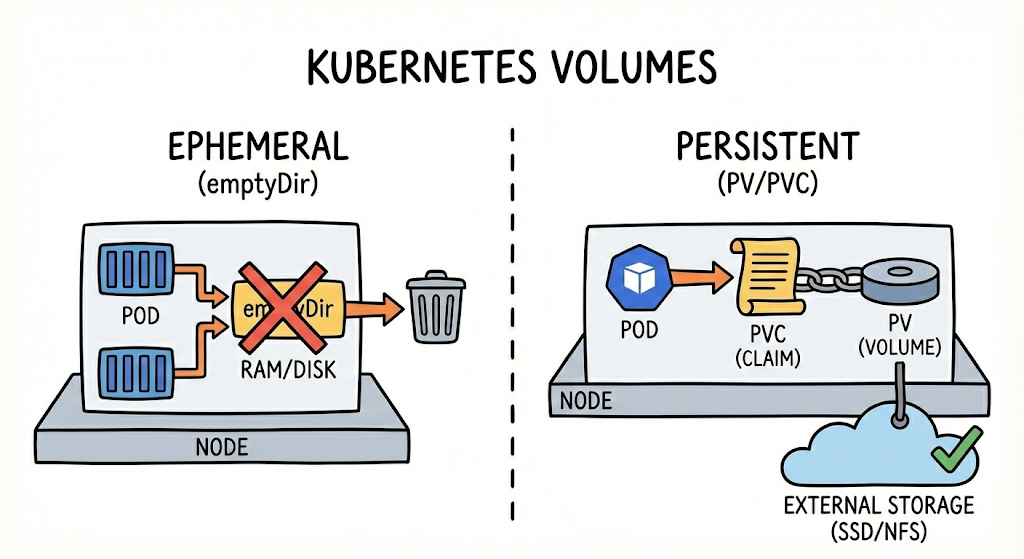
- Ephemeral Volumes: For cases where data only needs to persist while the Pod is running (e.g., cache, scratch space). When the Pod is deleted, the data is also deleted.
- Persistent Volumes: For cases where data must be safely stored outside the cluster (cloud storage, NFS, etc.) even if the Pod is deleted (e.g., databases, user-uploaded files).
1. The Epitome of Ephemeral Volumes: emptyDir 🧹
An emptyDir is first created when a Pod is assigned to a node and exists only as long as that Pod is running on that node.
- Features: Can be shared by all containers within a Pod. Often used in ‘sidecar’ patterns where one container writes and another reads.
- Caution: If the Pod is removed (deleted) from the node, the data in emptyDir is permanently deleted.
💡 emptyDir YAML Example
apiVersion: v1
kind: Pod
metadata:
  name: sidecar-pod
spec:
  containers:
  - name: main-container
    image: nginx
    volumeMounts:
    - name: shared-data
      mountPath: /usr/share/nginx/html
  - name: helper-container
    image: busybox
    command: ["/bin/sh", "-c", "while true; do date >> /data/index.html; sleep 5; done"]
    volumeMounts:
    - name: shared-data
      mountPath: /data
  volumes:
  - name: shared-data
    emptyDir: {} # Set up here!
2. The Core of Persistent Data: PV and PVC 💾
In enterprise or production environments, data preservation is essential. For this, Kubernetes uses two resources: PV (Persistent Volume) and PVC (Persistent Volume Claim).
- PV (Persistent Volume): Defines the actual storage space (SSD, NFS, etc.). It’s like a ‘physical pipe’ pre-prepared by the infrastructure administrator.
- PVC (Persistent Volume Claim): This is a ‘request form’ where a developer asks, “I need this much storage space!”
💡 Key Parameter: AccessModes
- ReadWriteOnce (RWO): Read/write possible from a single node only.
- ReadOnlyMany (ROX): Read-only possible from multiple nodes.
- ReadWriteMany (RWX): Read/write possible simultaneously from multiple nodes (supported by NFS, etc.).
3. The Magic of Dynamic Provisioning: StorageClass ✨
It’s inefficient for administrators to pre-create PVs every time. Therefore, in practice (especially in enterprise or cloud environments), StorageClass is used.
When a developer requests a specific storageClassName in a PVC, Kubernetes requests the cloud provider (AWS, GCP, Azure, etc.) to create a PV in real-time. This is called **Dynamic Provisioning**.
4. CKAD Practical Tips: Save Time and Prevent Mistakes ⏱️
Volume problems in the exam often involve many settings, making typos easy.
- Specify in both places: Define the volume in spec.volumes, and you must connect it in spec.containers.volumeMounts within the container. If either is missing, the Pod will not move past ContainerCreating.
- AccessMode Match: The accessModes of PV and PVC must match for binding to occur.
- Quick YAML Generation: Volume configuration is difficult to do entirely with commands. Extract a basic Pod YAML and then manually type in the volume section.
5. Hands-on: Practical Exercises 🛠️
Scenario:
- Create a PVC named safedata-pvc. (Capacity: 1Gi, Mode: ReadWriteOnce, StorageClass: standard)
- Create a Pod named data-app using the nginx image.
- Mount the created PVC to the /var/www/html path of the Pod.
[Solution Guide]
# 1. Create PVC (pvc.yaml)
apiVersion: v1
kind: PersistentVolumeClaim
metadata:
  name: safedata-pvc
spec:
  accessModes:
    - ReadWriteOnce
  resources:
    requests:
      storage: 1Gi
  storageClassName: standard
---
# 2. Create Pod (pod.yaml)
apiVersion: v1
kind: Pod
metadata:
  name: data-app
spec:
  containers:
  - name: nginx
    image: nginx
    volumeMounts:
    - name: storage-vol
      mountPath: /var/www/html
  volumes:
  - name: storage-vol
    persistentVolumeClaim:
      claimName: safedata-pvc
Wrapping Up 🏁
Volumes are one of the coolest features in Kubernetes architecture, “hiding infrastructure complexity from developers.” Use emptyDir to create efficient collaborative Pods and build secure data storage with PV/PVC.
I hope today’s content greatly helps you pass the CKAD and enhance your practical skills! 🌟
Leave a Reply