📑 Table of Contents
- Job: The Beginning of a Finite Task
- Job’s Core Parameters: Completions and Parallelism
- CronJob: Schedule-Driven Batch Processing
- CKAD Practical Tip: Save Time with a Single Command Line
- Hands-on: Practical Exercises
Overview: What are Batch Jobs in Kubernetes? 🤔
Applications running on a Kubernetes cluster can be broadly categorized into two types based on their nature:
- Service-type (Long-running): These are applications like web servers and API servers that run 24/7, waiting for user requests that may come at any time. (Mainly managed by Deployment)
- Batch-type (Batch): These are applications that run to achieve a specific purpose and ‘successfully terminate (Completed)’ themselves once all tasks are done.
Batch jobs are, simply put, “one-time tasks with a clear beginning and end.”
- Examples:
- Database backup performed daily at 3 AM
- Analyzing large volumes of accumulated log data to generate a report
- Database schema migration performed before a new version deployment
Kubernetes provides dedicated resources called Job and CronJob to reliably handle such batch-oriented tasks. The CKAD exam asks whether you clearly understand the differences between these two and their detailed configuration methods.
##
##
1. Job: The Beginning of a Finite Task 🏁
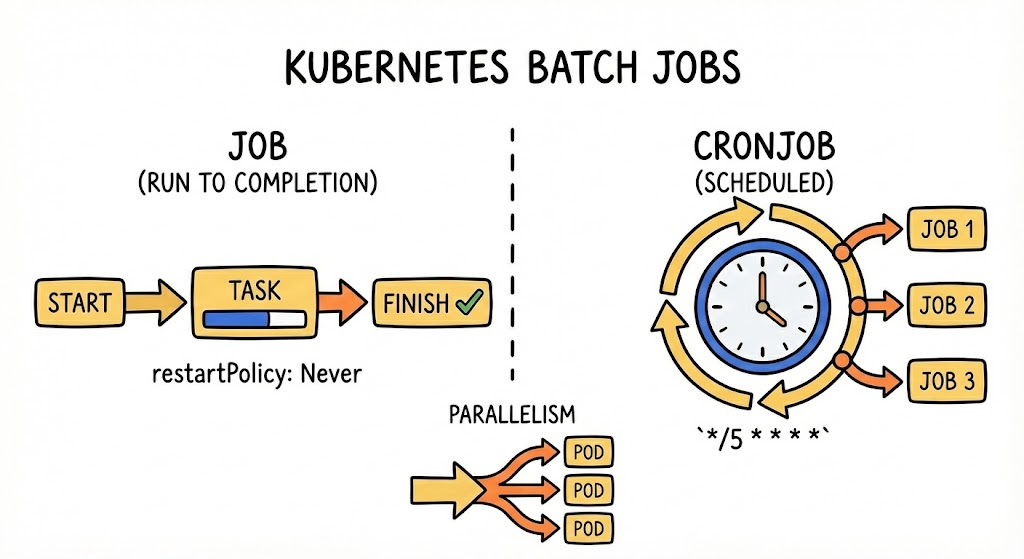
If a typical Deployment is a “service that must run 24/7 without dying,” a Job is a “task that gracefully terminates once its assigned work is done.”
- Purpose: Database migration, batch report generation, image processing, etc.
- Key: A Pod belonging to a Job enters a Completed state and terminates once the task is successfully finished.
💡 Basic YAML Structure
apiVersion: batch/v1
kind: Job
metadata:
  name: pi-calculator
spec:
  template:
    spec:
      containers:
      - name: pi
        image: perl
        command: ["perl",  "-Mbignum=bpi", "-wle", "print bpi(2000)"]
      restartPolicy: Never # For Jobs, always use Never or OnFailure
  backoffLimit: 4 # Maximum retries on failure
⚠️ Caution: The restartPolicy within a Job’s Pod template can never be Always. This is because the task must terminate when it’s finished!
2. Job’s Core Parameters: Completions and Parallelism ⚙️
The CKAD exam not only asks you to create a Job but also requires you to make it succeed a specific number of times or run multiple instances concurrently.
| Parameter | Description |
| — | — |
| completions | How many successful Pod completions are required in total? (Default 1) |
| parallelism | How many Pods should run concurrently? (Default 1) |
| activeDeadlineSeconds | Forcefully terminates the job if it exceeds this time (seconds). |
| backoffLimit | Number of retries on failure. If exceeded, it’s considered a failure. |
—
3. CronJob: Schedule-Driven Batch Processing ⏰
A CronJob is a resource that periodically creates Jobs at a specified time, similar to Linux’s crontab.
💡 Cron Schedule Syntax (Linux Standard)
* * * * * (minute hour day month weekday)
- */5 * * * *: Runs every 5 minutes
- 0 0 * * *: Runs daily at midnight
💡 Key Configuration Points
- concurrencyPolicy: What to do if the next job’s time arrives but the previous job hasn’t finished?
- Allow (default): Just launch another one (duplicate execution)
- Forbid: Skip this run until the previous one finishes
- Replace: Kill the previous one and launch a new one
- successfulJobsHistoryLimit: Determines how many successful records to keep (default 3).
CronJob YAML Example
apiVersion: batch/v1
kind: CronJob
metadata:
  name: etcd-backup-cronjob
  namespace: kube-system # System management resource, so usually deployed in kube-system
spec:
  schedule: "0 3 * * * " # Runs daily at 3:00 AM (minute hour day month weekday)
  concurrencyPolicy: Forbid # If the previous backup hasn't finished, skip this run (to prevent data conflicts)
  successfulJobsHistoryLimit: 5 # Keep only the latest 5 successful backup records (Jobs)
  failedJobsHistoryLimit: 2     # Keep only 2 failed records
  jobTemplate:
    spec:
      template:
        spec:
          containers:
          - name: etcd-backup
            image: busybox # In a real environment, use an image that includes etcdctl
            command:
            - /bin/sh
            - -c
            - echo "Starting etcd backup..."; date; echo "Backup to MetaKage completed!"
          restartPolicy: OnFailure # Retry only on failure
4. CKAD Practical Tip: Save Time with a Single Command Line ⏱️
The exam is a race against time! Don’t type YAML from scratch.
1) Create Job (Imperative)
# 1. Create a basic Job
kubectl create job my-job --image=busybox -- echo "Hello"

# 2. Extract to YAML and modify options (e.g., completions)
kubectl create job complex-job --image=busybox --dry-run=client -o yaml > job.yaml
2) Create CronJob
kubectl create cronjob my-cron --image=busybox --schedule="*/1 * * * *" -- echo "Time to work!"5. Hands-on: Practical Exercises 🛠️
Try to implement the following conditions directly in your terminal.
Scenario:
- Create a namespace named batch-ns.
- Create a Job named ping-job using the busybox image.
- This Job must succeed a total of 5 times (completions) and run 2 instances concurrently (parallelism).
- The execution command is ping -c 3 google.com.
# Solution
kubectl create ns batch-ns
kubectl create job ping-job --image=busybox -n batch-ns --dry-run=client -o yaml -- ping -c 3 google.com > job.yaml

# Edit vi job.yaml
# Add completions: 5, parallelism: 2 directly under spec

kubectl apply -f job.yaml
kubectl get pods -n batch-ns -w # Check if 2 Pods are starting and terminating!
Leave a Reply