One of the most crucial factors for maintaining service stability in a Kubernetes environment is appropriate resource allocation based on load. Manually increasing the number of Pods when traffic surges has its limitations. The core feature that automates this is the HPA (Horizontal Pod Autoscaler).
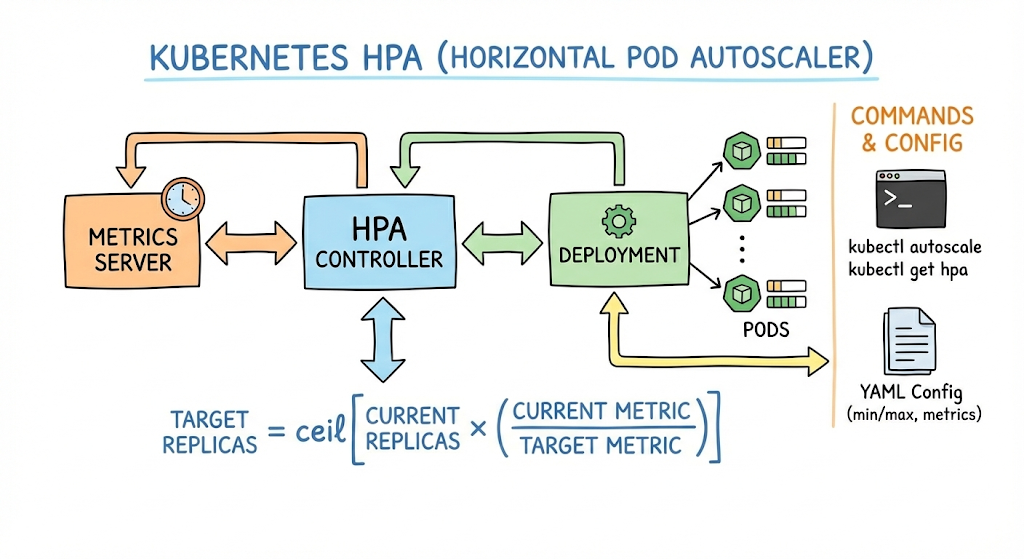
1. What is HPA? 🤔
HPA is a feature that automatically increases or decreases the number of Pods by monitoring CPU usage or custom metrics. It works by increasing replicas to secure processing capacity when the load increases, and scaling them down again when the load decreases, thereby preventing resource waste. 📈
2. Essential Prerequisites for HPA Operation 🛠️
For HPA to function correctly, the following configurations are absolutely necessary within the cluster:
- Metrics Server: The metrics-server, which collects resource usage data within the cluster, must be installed. HPA retrieves metric data from this server.
- Resource Requests: Each container must define requests for CPU and memory. HPA calculates the current usage ratio against these requested amounts to determine whether to scale.
# Resource requests must be included when defining Pods
resources:
  requests:
    cpu: "100m"
    memory: "128Mi"
  limits:
    cpu: "500m"
    memory: "256Mi"
3. HPA Operating Principle (Algorithm) ⚙️
HPA calculates the desired number of replicas using the following formula:
Desired Replicas = ceil[Current Replicas × (Current Metric Value / Desired Metric Value)]
For example, if the current CPU utilization is 100% and the target value is 50%, it attempts to scale to twice the current number of Pods.
4. How to Create and Manage HPA 💻
HPA can be quickly created using kubectl commands or defined via YAML files.
Creating with Commands (Imperative):
# Set scaling for deployment 'web-server' based on 50% CPU utilization, between 2 and 10 replicas
kubectl autoscale deployment web-server --cpu-percent=50 --min=2 --max=10
Defining with YAML Files (Declarative):
apiVersion: autoscaling/v2
kind: HorizontalPodAutoscaler
metadata:
  name: web-server-hpa
spec:
  scaleTargetRef:
    apiVersion: apps/v1
    kind: Deployment
    name: web-server
  minReplicas: 2
  maxReplicas: 10
  metrics:
  - type: Resource
    resource:
      name: cpu
      target:
        type: Utilization
        averageUtilization: 50
5. Checking HPA Status and Troubleshooting 🔍
To check if the configured HPA is working correctly, use the following command:
# Check HPA list and current usage
kubectl get hpa

# Check detailed information (important when checking event logs)
kubectl describe hpa web-server-hpa
If the TARGETS column shows
6. Cooldown Policy for Stability 🧊
To prevent Pods from being created and deleted too frequently (Thrashing) when traffic fluctuates, Kubernetes inherently has a policy of waiting for a certain period after scaling. In the latest versions, the speed of scaling up and scaling down can be finely controlled through the behavior field.
Summary 📝
HPA is an essential tool that goes beyond simple automatic scaling, maximizing cluster cost efficiency and availability. In practice, it is recommended to use a combination of CPU usage, memory usage, and custom metrics tailored to the application’s characteristics.
Leave a Reply