Hello! Following up on Kustomize last time, today we’ll explore Helm, the most widely used package manager in the Kubernetes ecosystem. 🚢
As Kubernetes applications become more complex, the number of YAML files to manage grows exponentially. Helm is a powerful tool that allows you to bundle and manage these numerous manifest files as a single ‘package’.
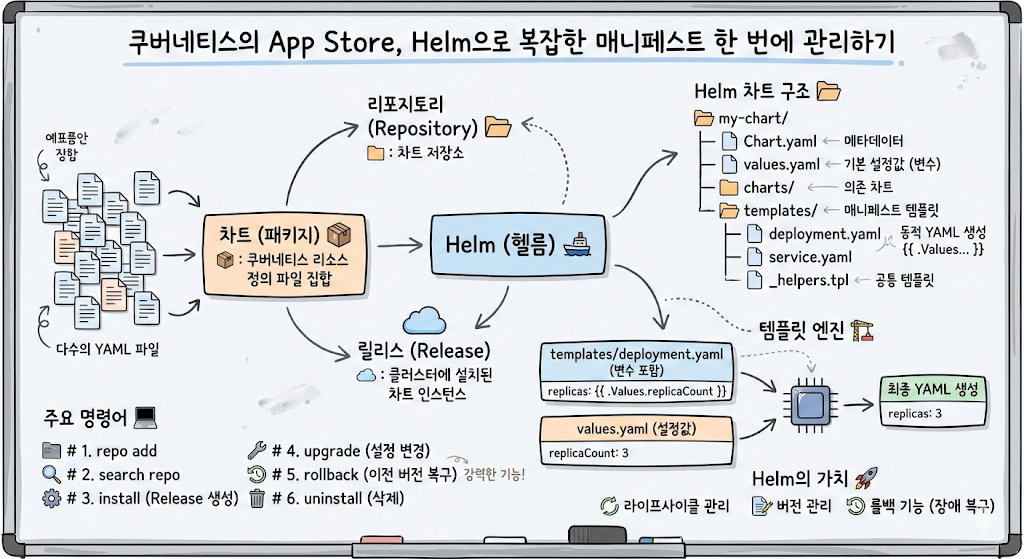
1. What is Helm? 📦
Helm is a package manager for Kubernetes. It’s easy to understand if you think of it as performing the same role in Kubernetes as apt or yum in Linux, or npm in Node.js.
- Chart: A collection of files (package) that define Kubernetes resources.
- Repository: A storage location for storing and sharing Charts.
- Release: A specific running instance of a Chart installed on a cluster. If the same Chart is installed multiple times, each will have a unique release name.
2. Helm’s Core Structure: Template Engine 🏗️
While Kustomize uses an ‘overlay’ method to apply configurations on top of existing YAML, Helm uses a ‘template’ method, inserting variables directly into YAML. It dynamically generates YAML based on the situation using Go template syntax.
3. Components of a Helm Chart 📂
The standard directory structure of a Helm Chart is as follows:
my-chart/
├── Chart.yaml          # Chart metadata (name, version, etc.)
├── values.yaml         # Default configuration values to inject into the template
├── charts/             # Other charts this chart depends on
└── templates/          # Actual Kubernetes manifest templates
    ├── deployment.yaml
    ├── service.yaml
    └── _helpers.tpl    # Template code to be used in common
🔹 Template Example (templates/deployment.yaml)
Variables are used in the form of {{ .Values.replicaCount }}.
apiVersion: apps/v1
kind: Deployment
metadata:
  name: {{ include "my-chart.fullname" . }}
spec:
  replicas: {{ .Values.replicaCount }}
  template:
    spec:
      containers:
        - name: my-app
          image: "{{ .Values.image.repository }}:{{ .Values.image.tag }}"
🔹 Configuration Value Example (values.yaml)
Defines the actual values to be injected into the template.
replicaCount: 3
image:
  repository: my-repo/my-app
  tag: "1.0.0"
4. Key Command Usage 💻
These are the basic commands for managing applications using Helm.
# 1. Add chart repository
helm repo add bitnami https://charts.bitnami.com/bitnami

# 2. Search for charts
helm search repo nginx

# 3. Install chart (Create Release)
helm install my-web bitnami/nginx

# 4. Upgrade by changing configuration values
helm upgrade my-web bitnami/nginx --set replicaCount=5

# 5. Rollback to a previous version (Helm's powerful feature!)
helm rollback my-web 1

# 6. Delete installed release
helm uninstall my-web
5. Helm vs Kustomize: Which to Use? ⚖️
| Comparison Item | Helm | Kustomize |
| — | — | — |
| Method | Template-based (Go Templates) | Overlay-based (Pure YAML) |
| Complexity | Higher initial learning curve | Very easy to learn |
| Flexibility | Powerful logic possible (conditionals, loops, etc.) | Limited to static changes |
| Version Control | Built-in rollback functionality per release | Relies on external tools like Git |
| Purpose | Deploying complex commercial applications | Fine-tuning configuration values per environment |
—
6. Concluding: The Value of Helm 🚀
Helm is more than just a tool to aid installation; it takes responsibility for application lifecycle management. In particular, its version control and rollback features are key advantages that enable rapid recovery in the event of an operational failure.
If you are operating a complex microservice architecture or need to deploy open-source software to your cluster, Helm is not an option, but a necessity! 🌟
Leave a Reply