Hello, everyone interested in network security and remote access! 🌐 Today, we’re going to dive deep into Tailscale, a VPN solution that’s as easy as magic and incredibly powerful. Many of you might think of VPNs as either building your own server like OpenVPN or accessing remotely through a specific server like TeamViewer. Tailscale cleverly combines the advantages of these two methods to offer a completely new experience.
So, how exactly does Tailscale work, and what makes it different from existing solutions? Let’s find out in detail now! 🕵️♀️
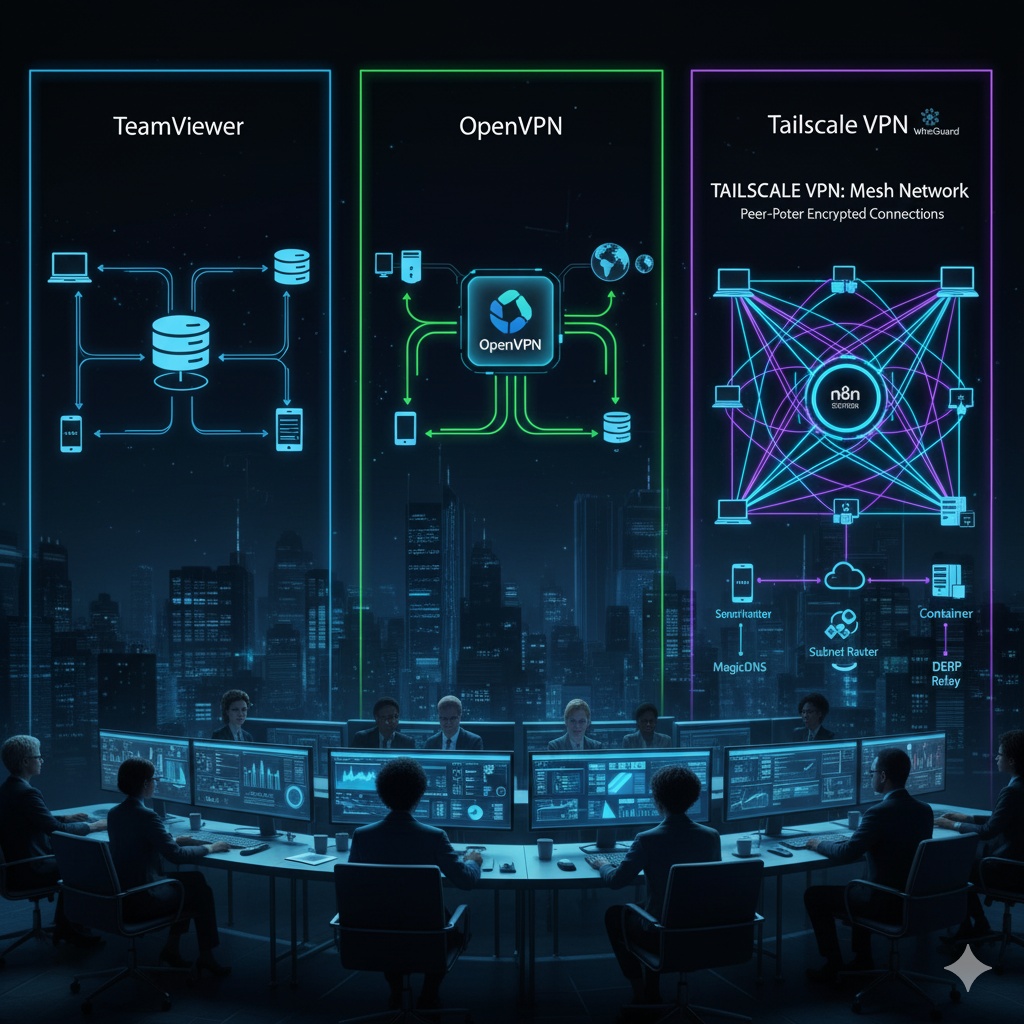
❓ What is Tailscale?
Tailscale is a WireGuard®-based decentralized VPN service. Simply put, with just a few clicks and no complex setup, it connects all your devices into a single, secure private network (Mesh VPN). It makes it seem as if all your devices are connected to the same office LAN. 💻📱🖥️
The biggest difference from traditional VPNs is the concept of a ‘central server’. While typical VPNs route all traffic through a central server, Tailscale uses a ‘control server’ only to coordinate connections between devices. The actual data traffic is mostly transmitted directly (Peer-to-Peer) and encrypted between devices.
🤝 TeamViewer Method vs. OpenVPN Method vs. Tailscale Method
Based on your questions, I’ll explain how Tailscale differs from existing remote access and VPN methods by comparing them.
1. TeamViewer Method: Remote Control via a Central Server 📡
- How it Works: TeamViewer establishes connections by having both the client (the device performing remote control) and the host (the device being remotely controlled) connect to TeamViewer’s central server. All communication, including actual screen data, is transmitted via the TeamViewer server.
- Main Purpose: Primarily focuses on remotely ‘operating’ specific devices for tasks like remote desktop control, file transfer, and online meetings.
- Advantages: Easily connects even in firewall or NAT environments.
- Disadvantages:
- All traffic passes through a central server, which can lead to performance degradation.
- Requires complete reliance on the security of the central server.
- Focuses more on ‘control’ than ‘connection’ of the network.
2. OpenVPN Method: Direct VPN Server Setup for Access 🚪
- How it Works: Users set up their own VPN server (e.g., on a router, cloud VM), and clients (PC, smartphone) connect to this server to create an encrypted tunnel. All client internet traffic exits to the outside via this VPN server.
- Main Purpose: Used for securely accessing a specific network (e.g., a company’s internal network) or enhancing security by encrypting internet traffic on public Wi-Fi.
- Advantages:
- Offers high security and flexible configuration.
- Since all traffic goes through a central server, it’s useful for hiding IP addresses or accessing content from specific regions.
- Disadvantages:
- Server setup and management are complex (certificate management, firewall configuration, port forwarding, etc.).
- If the server has an issue, all VPN connections are lost.
- Focuses more on client-server connections rather than direct client-to-client connections.
3. Tailscale Method: Separation of Control Plane and Data Plane 🧠↔️📦
Tailscale takes a somewhat different approach from TeamViewer or OpenVPN.
- Control Plane:
- Tailscale’s control server (Coordination Server) plays a role similar to TeamViewer’s central server. However, this server does not handle actual data traffic.
- Its main role is to handle authentication and authorization for each device to join the VPN network, and to help establish P2P connections by exchanging connection information (IP addresses, keys, etc.) between devices.
- Once a connection is established, the control server no longer participates in communication.
- Data Plane:
- Actual data traffic is transmitted directly (Peer-to-Peer) and encrypted between each device using the WireGuard® protocol. This is the biggest difference from OpenVPN.
- If a direct P2P connection between devices is not possible due to firewall or NAT issues, Tailscale’s relay servers (DERP – Detour Everything Rather than Proxy) relay the traffic. However, this is merely a supplementary measure, and P2P connections are prioritized whenever possible.
- The vision of “all devices being on the same LAN” comes from this. Each device has a 100.x.y.z IP address assigned by Tailscale, and they communicate directly with each other using this IP.
- Main Purpose: To connect all devices (PCs, servers, containers, cloud instances, mobile devices) into a single, secure, and flexible private network, allowing access to resources and collaboration as if they were on a local network, anywhere.
- Advantages:
- Extreme Simplicity: Installation and connection are completed with a few clicks, without server setup or firewall configuration.
- Strong Security: Based on WireGuard®, it provides fast and powerful encryption, and excellent data security with end-to-end encryption.
- Excellent Performance: Since most connections are P2P, there is almost no performance degradation due to central server routing. 🚀
- Easy Access Control: Uses account-based authentication (Google, Microsoft, Okta, etc.), and ACL (Access Control List) settings are very convenient for granting access permissions only to specific devices or users.
- Decentralized Architecture: Reduces single points of failure.
- Subnet Routing: Allows devices on physically different networks (e.g., an office NAS) to be exposed to the Tailscale network for access. 📡
Tailscale’s Core Concepts ✨
- WireGuard®: The next-generation VPN protocol that Tailscale is based on. Known for being fast, secure, and having concise code.
- Mesh VPN: Refers to a network structure where all devices can connect directly to each other without a central server.
- MagicDNS: Provides DNS services for devices within the Tailscale network, allowing access by device name instead of IP address (e.g., access 100.x.y.z as my-server).
- Subnet Routers (formerly Exit Nodes): By setting a specific device (e.g., an office server) as a subnet router, the entire local network to which that device belongs can be extended to the Tailscale network. This allows external access to devices where Tailscale is not installed, such as office NAS or printers. 🏠
- DERP (Detour Everything Rather than Proxy): A relay server that relays traffic when P2P connections are not possible. It is distributed worldwide, allowing traffic to be routed through the nearest server.
- ACL (Access Control List): A policy that allows precise control over who can access which devices. It is configured based on user accounts (Google, Azure AD, etc.).
🌟 Tailscale, great for these scenarios!
- Remote Work Environment: When you want to securely and easily access internal office servers or resources from home.
- Cloud Server Management: When you want to group servers distributed across multiple clouds like AWS, Azure, GCP into a single private network for management.
- Personal NVR, NAS Access: When you want to securely access your home NAS or CCTV server from outside. 🏡
- Development and Testing Environment: When allowing team members secure access to development servers or testing environments.
- Family File Sharing: When you want to connect family members’ devices for secure file sharing or media streaming.
- Security While Traveling: When you want to use the internet securely via the Tailscale network while using public Wi-Fi (utilizing the Exit Node feature).
Conclusion
Tailscale sheds the complexity of traditional VPNs and presents a new approach optimized for modern cloud and distributed environments. It’s neither a remote control method via a central server like TeamViewer, nor a method of building your own server and routing all traffic through it like OpenVPN.
Instead, it’s an innovative Mesh VPN where each device connects directly P2P, coordinated by a control server, and data is transmitted encrypted with WireGuard®. Thanks to this, you can build ‘your own secure network’ that is easy to set up, strong in security, and excellent in performance.
If you’re tired of complex network configurations, experience the world of easy and secure networking with Tailscale! Your digital life will become even more convenient. 😊
Tags: Tailscale, VPN, WireGuard, Mesh VPN, Network Security, Remote Access, Open Source, Cloud, Security, Private Network, TeamViewer, OpenVPN, DERP, Subnet Router, MagicDNS
Leave a Reply