“I know both create AMIs, but which one should I choose in practice?”
This article answers that question.
<

🎯 What This Article Covers
- Comparison of core concepts and operating methods of AWS Image Builder and Packer
- Ease of use and learning curve — which one is quicker to master
- Selection criteria by practical scenario (CI/CD pipeline integration, multi-cloud, compliance environment)
- Differences in security and compliance perspectives
- Comparison of build cost and speed
- Conclusion: What fits which team
📌 Introduction / Background
An AMI (Amazon Machine Image) is the golden image for an EC2 instance. You capture an instance with specific configurations, and then each time you deploy, you launch instances based on this image. Auto Scaling, Blue/Green deployments, and Immutable Infrastructure strategies all presuppose automated golden AMI builds.
The problem is how to create these golden images.
Before AWS launched Image Builder in 2019, most DevOps teams used HashiCorp’s Packer. Now, both tools coexist, and every team starting a new project faces a choice.
This article aims not just to list the two tools, but to provide clear criteria for which one an engineer with practical CI/CD experience should choose.
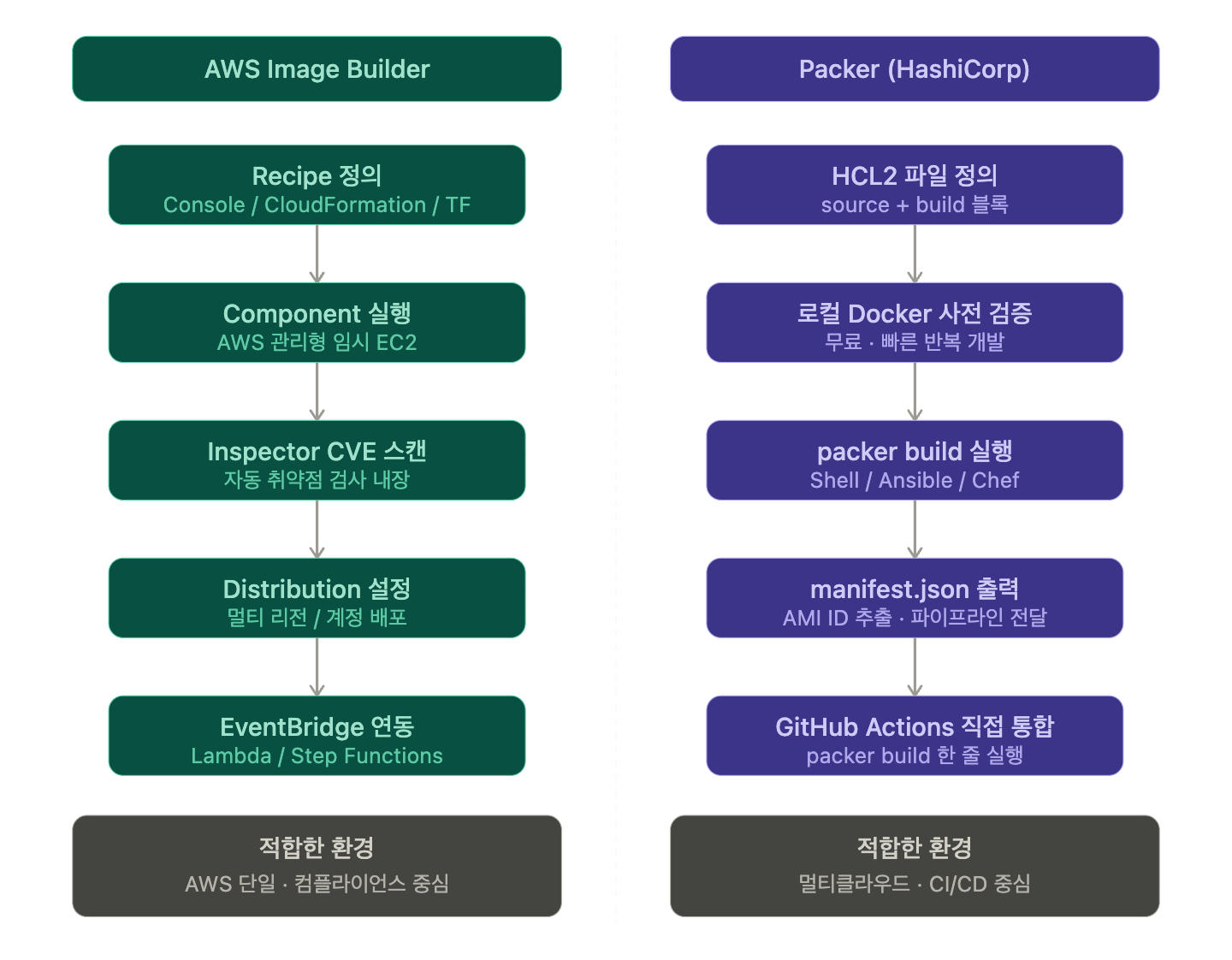
🔍 First, Grasp the Concepts of the Two Tools
AWS Image Builder
This is a managed service created directly by AWS. When you declare a pipeline using the console, CloudFormation, or Terraform, AWS automatically handles the entire process: launching a temporary EC2 instance → executing components (installation scripts) → creating an AMI → terminating the instance.
Key Components:
| Component | Role |
| Recipe | Defines the base image + component combination |
| Component | Unit of installation/configuration scripts (YAML) |
| Pipeline | Sets build schedule and deployment targets |
| Distribution | Where to distribute the completed AMI (region/account) |
Packer
An open-source CLI tool created by HashiCorp. You define build configurations in JSON or HCL2 files and execute them with a single `packer build` command. It can create images for AWS, Azure, GCP, VMware, and even Docker in the same way.
Key Components:
| Component | Role |
| Builder | Defines which platform to create the image on (e.g., amazon-ebs) |
| Provisioner | Performs internal configurations using Shell, Ansible, Chef, etc. |
| Post-processor | Post-build processing (e.g., Manifest file generation, tagging) |
| Variable | Parameterizes builds (e.g., region, AMI name, version) |
—
🔍 Ease of Use / Learning Curve
AWS Image Builder
Initial entry feels easy due to its console-based nature. However, this convenience doesn’t last long.
The component YAML syntax is proprietary, and upon build failure, you need to dig into S3 or CloudWatch Logs to find logs. There’s no way to test locally beforehand, and even a single component modification requires re-running the entire pipeline to see results. This means a slow iteration cycle for development.
Learning Difficulty: Easy for the first 3 days, then gets stuck with debugging and fine-grained control.
Packer
Being CLI-based, it has an initial barrier to entry, but DevOps engineers familiar with Terraform will find the HCL2 syntax familiar. `packer validate` allows syntax validation, and `packer build -debug` enables interactive debugging. A common pattern is to first validate provisioner scripts locally with a Docker builder before applying them to AWS builds.
# Basic structure of packer build (HCL2)
packer {
  required_plugins {
    amazon = {
      version = ">= 1.2.0"
      source  = "github.com/hashicorp/amazon"
    }
  }
}

variable "aws_region" {
  type    = string
  default = "ap-northeast-2"
}

variable "app_version" {
  type = string
}

source "amazon-ebs" "golden_ami" {
  region        = var.aws_region
  instance_type = "t3.micro"

  # Base image: Automatically discover the latest Amazon Linux 2023
  source_ami_filter {
    filters = {
      name                = "al2023-ami-*-x86_64"
      root-device-type    = "ebs"
      virtualization-type = "hvm"
    }
    owners      = ["amazon"]
    most_recent = true
  }

  ssh_username = "ec2-user"

  ami_name        = "my-app-golden-${var.app_version}-{{timestamp}}"
  ami_description = "Golden AMI for my-app v${var.app_version}"

  tags = {
    Name        = "my-app-golden"
    Version     = var.app_version
    BuildDate   = "{{timestamp}}"
    ManagedBy   = "Packer"
  }
}

build {
  sources = ["source.amazon-ebs.golden_ami"]

  # Step 1: System update
  provisioner "shell" {
    inline = [
      "sudo dnf update -y",
      "sudo dnf install -y amazon-cloudwatch-agent"
    ]
  }

  # Step 2: Configure app with Ansible
  provisioner "ansible" {
    playbook_file = "./ansible/app-setup.yml"
    extra_arguments = [
      "--extra-vars", "app_version=${var.app_version}"
    ]
  }

  # Step 3: Save build result manifest (for AMI ID reference in next deployment stage)
  post-processor "manifest" {
    output     = "manifest.json"
    strip_path = true
  }
}
Learning Difficulty: 1-2 days for initial setup, then rapidly scalable once Ansible/Shell combinations are mastered.
🔍 Practical CI/CD Pipeline Integration
This is the most crucial comparison point.
Packer + GitHub Actions
Packer is a CLI tool, so you simply execute a single command in your pipeline. The AMI ID is recorded in `manifest.json` and can be directly passed to subsequent Terraform deployment stages.
# .github/workflows/build-ami.yml
name: Build Golden AMI

on:
  push:
    branches: [main]
    paths:
      - 'packer/**'
      - 'ansible/**'

jobs:
  build-ami:
    runs-on: ubuntu-latest
    permissions:
      id-token: write   # OIDC-based AWS authentication
      contents: read

    steps:
      - uses: actions/checkout@v4

      # Authenticate AWS with OIDC (no long-term credentials needed)
      - name: Configure AWS credentials
        uses: aws-actions/configure-aws-credentials@v4
        with:
          role-to-assume: arn:aws:iam::123456789012:role/GitHubActionsPackerRole
          aws-region: ap-northeast-2

      # Install Packer
      - name: Setup Packer
        uses: hashicorp/setup-packer@main
        with:
          version: "1.10.0"

      # Initialize plugins
      - name: Packer Init
        run: packer init ./packer/

      # Validate configuration
      - name: Packer Validate
        run: packer validate -var "app_version=${{ github.sha }}" ./packer/

      # Build AMI
      - name: Packer Build
        run: |
          packer build
            -var "app_version=${{ github.sha }}"
            ./packer/

      # Pass built AMI ID to the next job
      - name: Extract AMI ID
        id: ami
        run: |
          AMI_ID=$(jq -r '.builds[-1].artifact_id' manifest.json | cut -d: -f2)
          echo "ami_id=$AMI_ID" >> $GITHUB_OUTPUT

      # Trigger immediate deployment with Terraform
      - name: Trigger Deployment
        run: |
          echo "Built AMI: ${{ steps.ami.outputs.ami_id }}"
          # Subsequent Terraform apply or Auto Scaling Group update
AWS Image Builder + EventBridge
Image Builder uses a pattern where you trigger pipeline execution via the console or CLI, receive completion events with EventBridge, and then connect Lambda → Terraform. While it works, the pipeline configuration is distributed across multiple AWS services, reducing visibility.
Conclusion: Packer offers overwhelming advantages in terms of CI/CD integration simplicity and visibility.
🔍 Security · Compliance Perspective
Strengths of AWS Image Builder
Image Builder has Inspector integration built-in. It can run CVE scans within the build pipeline and automatically block AMI distribution if vulnerabilities are found. When combined with SCPs (Service Control Policies) in an AWS Organizations environment, it can prevent the use of unauthorized images altogether.
Furthermore, AWS directly provides STIG (Security Technical Implementation Guide) components. This is useful when needing to quickly meet compliance requirements in financial or public sector environments.
Packer’s Security Approach
Packer itself does not have scanning capabilities. Instead, it involves directly calling tools like Trivy, Lynis, or OpenSCAP during the provisioner stage. This is more flexible but requires manual configuration.
# Example of scanning for vulnerabilities with Trivy in Packer
provisioner "shell" {
  inline = [
    # Install Trivy
    "curl -sfL https://raw.githubusercontent.com/aquasecurity/trivy/main/contrib/install.sh | sh -s -- -b /usr/local/bin",

    # Scan OS package vulnerabilities
    "trivy rootfs --exit-code 1 --severity HIGH,CRITICAL /",

    # Save results to S3 (for audit logs)
    "trivy rootfs --format json / > /tmp/trivy-report.json",
    "aws s3 cp /tmp/trivy-report.json s3://my-compliance-bucket/trivy-reports/$(date +%Y%m%d)/report.json"
  ]
}
Compliance environments (finance, public sector, healthcare): Image Builder is advantageous. Teams with their own security pipelines already in place: Packer is more flexible.
🔍 Cost · Speed Perspective
Both tools use temporary EC2 instances during the build. There are no additional costs for the tools themselves. The difference lies in build time.
| Item | AWS Image Builder | Packer |
| Tool Cost | Free (EC2 costs only) | Free (EC2 costs only) |
| Build Instance Startup Overhead | Approx. 3-5 minutes (including service initialization) | Approx. 1-2 minutes |
| Retry Cost on Build Failure | Instance restarts every time | Can keep instance alive with -debug mode |
| Local Pre-testing | Not possible | Possible with Docker builder (free) |
| Parallel Multi-Region Build | Supported by distribution configuration | Supported by parallel block |
Packer’s local pre-testing pattern is advantageous for actual cost savings. Catching script errors in a local Docker container before an AWS build prevents unnecessary EC2 costs.
🔍 Multi-Cloud / Hybrid Environment
This is Packer’s strongest card.
You can manage AWS AMIs, Azure Managed Images, GCP Custom Images, and VMware vSphere Templates with a single HCL file.
# Example of multi-cloud concurrent build
source "amazon-ebs" "aws_golden" {
  region        = "ap-northeast-2"
  instance_type = "t3.micro"
  # ... AWS configuration
}

source "azure-arm" "azure_golden" {
  location        = "Korea Central"
  vm_size         = "Standard_B1s"
  # ... Azure configuration
}

build {
  # Concurrent build for both platforms
  sources = [
    "source.amazon-ebs.aws_golden",
    "source.azure-arm.azure_golden"
  ]

  # Apply the same provisioner to both
  provisioner "ansible" {
    playbook_file = "./ansible/golden-base.yml"
  }
}
AWS Image Builder is AWS-specific. The moment multi-cloud or on-premise images are needed, it disappears as an option.
⚠️ Cautions / Common Mistakes
① Neglecting Image Builder component version management Components cannot be modified once created. A new version must be created for every change. Operating without a versioning policy makes it difficult to track which version is in production.
② Not manually cleaning up temporary key pairs and security groups in Packer If a build is forcibly terminated, temporary resources created by Packer might remain in AWS. Include a cleanup script in your CI with the `–on-error=abort` option for `packer build`.
③ Not including version information in AMI names Using overwritable names like `golden-ami-latest` makes rollback impossible. Immutable names like `app-v1.2.3-20240327` are recommended.
④ Granting excessive IAM permissions for builds Sometimes, `AdministratorAccess` is attached to the build Role. Adhere to the principle of least privilege; define only the necessary permissions for AMI creation, tagging, S3 access, etc.
✅ Summary / Conclusion
Let’s draw a frank conclusion.
| Situation | Recommendation |
| Single AWS environment + emphasis on compliance (finance, public sector) | AWS Image Builder |
| AWS Organizations + need for automated Inspector scans | AWS Image Builder |
| Full integration into CI/CD pipeline, desire for code management | Packer |
| Multi-cloud or on-premise image coexistence | Packer |
| Team already using Terraform, familiar with HCL | Packer |
| Prioritizing fast iterative development, debugging convenience | Packer |
For most practical DevOps teams, Packer is the better choice. CI/CD integration, code visibility, multi-cloud flexibility, and fast iterative development — Packer excels in these four aspects.
AWS Image Builder truly shines when you need to automate compliance by bundling Inspector, SCPs, and Organizations within the AWS ecosystem. Some teams also use a hybrid approach: creating base images with Packer and adding a compliance validation layer with Image Builder.
Ultimately, the key is not the superiority of the tool, but what fits your team’s workflow and environment. 🎯
Leave a Reply