“If you bought a Mac, shouldn’t you just use Safari?” — Most general users.
“No, that’s for general users…” — Most developers.

##
##
🎯 What this article covers
- Latest global browser market share (as of 2025-2026)
- Safari vs Chrome on macOS, actual performance differences
- Comparison in terms of compatibility, extensibility, and developer tools
- Which browsers IT professionals and developers use
- Optimal choice guide by situation
📌 Introduction — Why is this a debate?
When you buy a Mac, Safari is pre-installed. But many people install Chrome as soon as they turn on their Mac. Why?
Conversely, more and more developers are talking about “switching back to Safari.” Battery, performance, privacy… something has changed.
This debate isn’t just a matter of taste. 🔧 Developer tool completeness, 🌐 Web standard compatibility, 🔋 Battery and RAM efficiency, 🔒 Security and privacy — all of these are intertwined.
📊 2025-2026 Browser Market Share Status
Let’s start with the numbers.
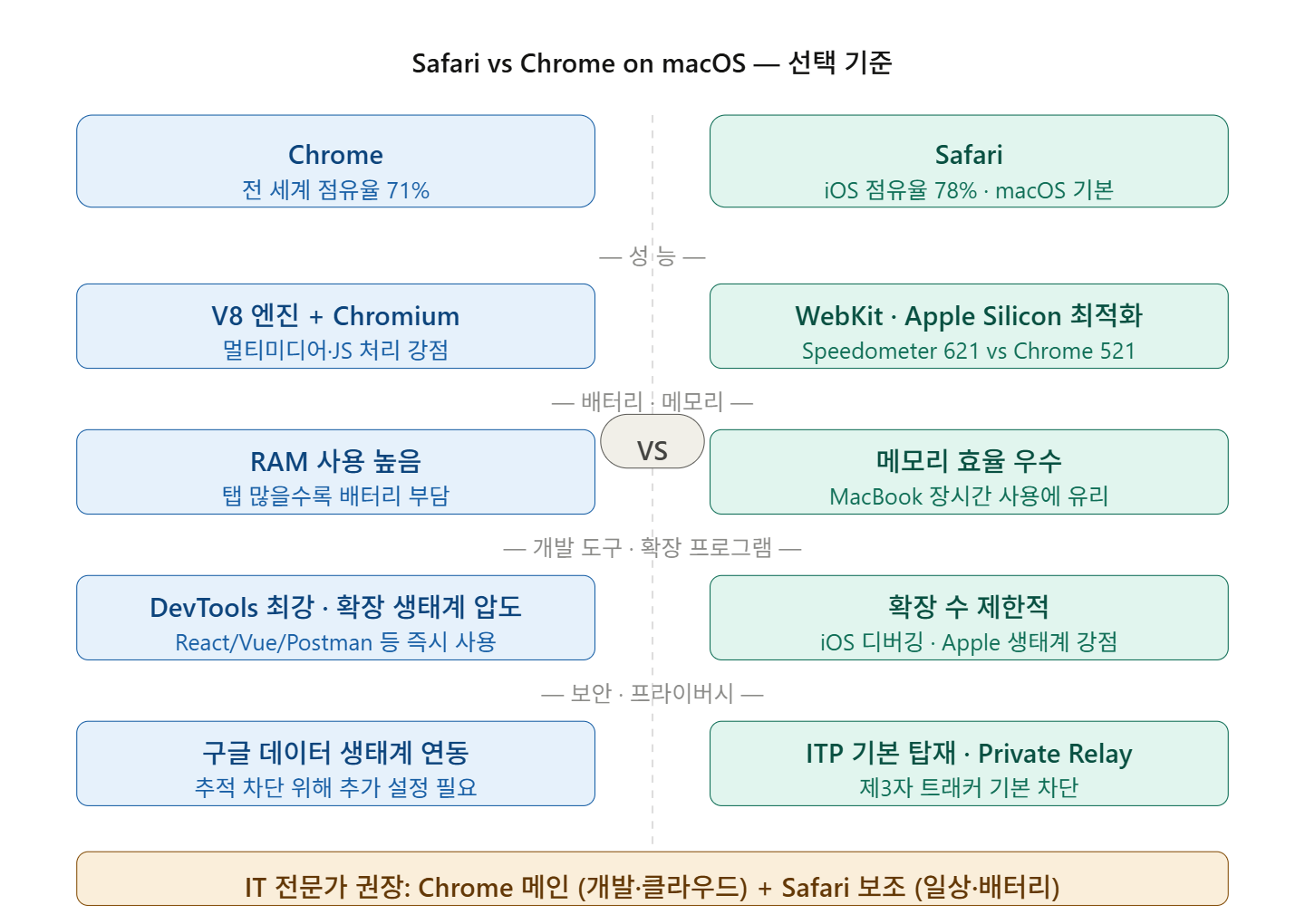
As of 2026, Chrome holds an overwhelming 71.37% of the global market share, making it the undisputed No. 1, with Safari in second place at 14.75%. Edge follows with 4.65%, and Firefox with 2.23%.
According to Cloudflare’s Q3 2025 report, which analyzed traffic from over 25 million internet assets, Chrome accounts for 66.3% of global web traffic, Safari 15.1%, Edge 7.5%, and Firefox 3.8%.
However, the story changes when broken down by OS.
Looking only at iOS devices, Safari is the overwhelming No. 1 with 77.8%, rising to a staggering 81.1% in the US iOS market. This means most iPhone/iPad users use Safari.
The desktop (including macOS) market is different. For desktops, Chrome accounts for about 65%, Edge about 13%, Safari about 10%, and Firefox about 6%.
💡 Summary: The overall market is dominated by Chrome, mobile (iOS) by Safari, and desktop is Chrome > Edge > Safari.
🔍 Safari vs Chrome — Key Comparison
⚡ Performance & Battery
This is the strongest reason to use Safari on macOS.
In Speedometer 2.1 tests on an M2 MacBook Air, Safari recorded 621 runs/min, while Chrome only managed 521 runs/min. On iPhone 15 Pro Max, the difference was Safari 513 vs Chrome 381.
When opening many tabs or visiting resource-intensive sites, Safari uses less memory and consumes less battery, making it more advantageous for long MacBook work sessions.
Chrome, on the other hand, uses a lot of RAM. This is noticeable for multitaskers who keep 30 or more tabs open.
🧩 Extensions
Chrome is the clear winner here.
Chrome offers a vast library of extensions for ad blocking, browser personalization, developer tools, and more. While Safari also has extensions, the options are far fewer compared to Chrome.
Extensions commonly used in the IT industry — such as Wappalyzer (tech stack detection), Postman interceptor, React DevTools, Redux DevTools, Lighthouse — are typically released and updated first on Chrome/Chromium-based browsers.
🛠️ Developer Tools (DevTools)
Chrome excels in its extensive DevTools, cross-platform testing, and extension ecosystem, while Safari boasts optimized performance on Apple devices, energy efficiency, and native iOS debugging.
Honest evaluation from the developer community:
// 2025 Developer's perspective browser check
const browserReport = {
  chrome: {
    devTools: 'excellent',    // DevTools completeness is top-notch
    privacy: 'questionable',  // Google data collection issue
    cssSupport: 'best'        // Best support for latest CSS specs
  },
  safari: {
    batteryLife: 'unmatched', // Unrivaled battery efficiency
    appleOnly: true,          // Apple ecosystem limited
    pwaLimits: 'frustrating'  // Limited PWA support
  }
};
Safari sometimes receives criticism as “the new IE.” Some developers point out that Safari doesn’t fully support certain APIs, leading to situations where features built in Chrome need to be re-worked for Safari.
🔒 Privacy & Security
Safari inherently blocks third-party trackers and offers Intelligent Tracking Prevention, and it integrates with iCloud+ to actively protect user data with features like Private Relay and Hide My Email. Chrome, on the other hand, is connected to Google’s data ecosystem and inherently allows more tracking.
However, there are also differences in terms of security vulnerabilities. As of 2025, 56 security vulnerabilities were reported in Safari, with an average severity score of 6.8/10.
🌐 Compatibility (Web Standards)
This is the most sensitive area in the IT industry.
Chrome offers powerful developer tools and broad compatibility with the latest web standards, and its flexibility across various platforms and widespread adoption make it frequently used for testing and debugging.
In actual work, enterprise SaaS tools, financial services, and cloud consoles sometimes do not function fully in Safari. While AWS Console and Azure Portal both work well, some third-party security solution management screens or legacy enterprise web apps are often tested only against Chrome.
💼 Which browser do IT professionals use?
To start with the conclusion: Chrome (or Chromium-based) is overwhelmingly dominant, but there’s a growing trend of macOS heavy users returning to Safari.
Job Role | Primary Browser | Reason
| Frontend Developer | Chrome (Essential) | DevTools, React/Vue extensions |
| Backend Developer | Chrome or Firefox | API testing, standard compatibility |
| DevOps/Cloud Engineer | Chrome | AWS/Azure/GCP console compatibility |
| Information Security Specialist | Chrome or Firefox | Burp Suite integration, extension tools |
| General Office/Planning macOS User | Safari or Chrome | Productivity app integration |
—
⚠️ Cautions — Be careful in these situations
Points to note when using Safari:
- Need to separately check for rendering bugs that occur only in Safari during web development
- PWA (Progressive Web App) support is limited compared to Chrome
- Some corporate internal systems may be built exclusively for Chrome
- If macOS is not updated, Safari’s version also falls behind (Chrome updates automatically)
Points to note when using Chrome:
- RAM usage is quite high (especially affecting battery on M1/M2 MacBooks)
- Data tracking by Google (may be restricted by corporate security policies)
- Excessive installation of extensions can degrade performance
✅ Summary — Choice Guide by Situation
| Situation | Recommendation |
| Web development/frontend debugging | ✅ Chrome |
| AWS/Azure/GCP cloud console work | ✅ Chrome |
| Long battery life work on MacBook | ✅ Safari |
| Continuity between Apple devices (iPhone↔Mac) | ✅ Safari |
| Prioritizing privacy | ✅ Safari |
| Need various extensions | ✅ Chrome |
| Reproducing/testing iOS/Safari-specific bugs | ✅ Safari (Absolutely) |
Realistic Conclusion: For IT professionals, the Chrome main + Safari secondary combination is the wisest. Use Safari for everyday browsing to save battery and protect privacy, and use Chrome for development and cloud tasks to leverage its extensibility and DevTools.
Leave a Reply