Codex Cloud is a service that allows you to delegate code modification and command execution on cloud computers managed by OpenAI. By preparing an environment with development tools installed, you can continue working even while your computer is asleep and review results on web, mobile, and desktop. Official Introduction
The first distinction to make is between environment setup and individual tasks. An environment is the set of prerequisites for multiple tasks, and a task is an activity that proceeds separately, starting from those prerequisites. Sharing an environment does not mean everyone uses the same modified files together.
This article is a user guide based on official documentation verified on October 4, 2026. It does not include actual user repositories, accounts, or settings. The projects and requests below are virtual examples and not actual user reviews measuring performance directly.
Conceptual image generated by AI. Not an actual product screen or execution result.
1. What Can Be Delegated?
Codex is a coding agent that reads source code, modifies necessary files, and verifies them with project tools. Cloud is an option that changes the execution location from the user’s computer to a managed cloud. Basic uses include tasks where results can be confirmed with code and verification records, such as bug investigation, feature addition, and test enhancement. Codex Cloud Usage Guide
For example, in a virtual project sample-notes, you can request to “reproduce the issue where empty titles are saved, and add input validation and tests.” A good result should include not only a response indicating modification but also reproduction conditions, changed files, executed checks, and remaining issues. The user reviews this and decides whether to reflect it in the repository.
Choosing Cloud is not merely about renting a larger computer. It has operational significance in allowing multiple requests to start under the same installation conditions, separating modification states per task, and enabling review across different devices. However, delegating a task does not guarantee test success or product release completion.
2. Understanding Environments, Workspaces, and VMs Separately
A VM is a Virtual Machine, a virtual computer composed of software. A Cloud environment is a reusable bundle of repositories, dependencies, tools, and access settings, and new tasks obtain an isolated workspace from the published environment. Environment Documentation
| Category | What it contains | Questions to check |
| — | — | — |
| Reusable Environment | Ready state to start a project | Are the necessary tools and settings ready? |
| Individual Task | Modified files and execution results from the request | What did this request change? |
| Work VM | Computing resources where the program runs | Is there enough memory and disk? |
| Git Repository · Result Files | Deliverables to preserve and share | Have important results been saved separately? |
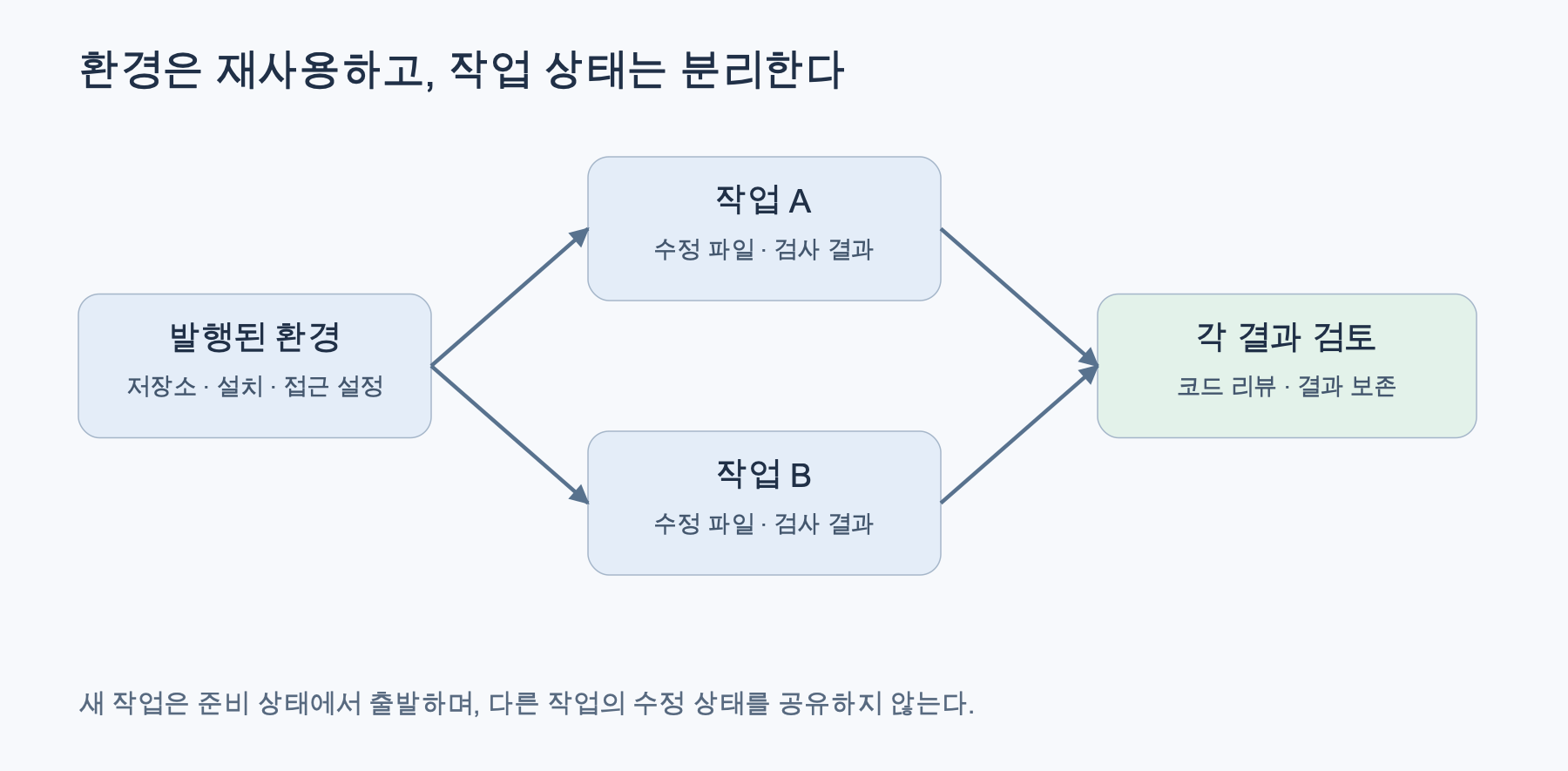
Conceptual diagram reconstructed based on official documentation. Distinction between environments and tasks
Save means saving settings, and Publish means publishing the ready file state for new tasks. Existing tasks continue with their own state, and new tasks after an environment is Republished use the updated ready state. Publishing an environment does not mean public deployment of a website or app. Saved State Guide
In practice, it is better to manage changes in installation conditions separately from changes in feature code. The former affects the starting point of subsequent tasks, while the latter affects the review of the specific modification. Temporary files created during the preparation phase can also enter the published state, so it is best not to leave unnecessary data.
3. Getting Started Sequence
Environment creation is done on web or desktop, and on mobile, you select a prepared environment to start a task. The official flow is as follows: Getting Started Guide
- Log in with your ChatGPT account.
- On web or desktop, open Work in → Cloud → Select environment → Create environment.
- Select the required GitHub repository and connect GitHub if prompted.
- After Get started, review the installation and verification process and provide any missing information or access.
- Review and save settings and test results, then click Publish.
- After confirming Environment published, start actual coding work with Start a new task.
On mobile, select an environment available in Codex. If you reopen the same task, you can continue giving instructions, and new tasks start separately. Web/Mobile Task Guide
It is better to verify that a small test runs successfully rather than requesting a large change from the start. Separately checking installation success, test execution, source modification, and result review makes it easier to pinpoint where a failure originated. When continuing on a different device, first confirm that you have opened the same task.
4. Dependency Installation and Start Skill Have Different Roles
Dependencies are libraries or tools required for a project to run. An environment’s Install script records commands for installation and preparing development assets, while Start skill records instructions for service startup and readiness checks. You can adjust installation conditions by conversing with Codex, so you don’t necessarily have to write scripts from scratch. Installation/Startup Settings
The installation conditions for a virtual project can be described as follows:
가상 sample-notes 프로젝트의 개발환경을 준비해 주세요.
저장소에 기록된 런타임 버전과 lockfile을 우선 사용하세요.
의존성을 설치하고 테스트와 빌드가 실행되는지 확인하세요.
개발 서버의 시작 방법과 준비 상태 확인 방법을 정리하세요.
빠진 접근이나 설정은 임의로 만들지 말고 알려 주세요.
This statement is a request example, not an executed command or guaranteed output. Actual commands should be determined by checking the project’s documentation and package settings. If non-existent test commands are included merely by convention, the verification step may fail even if the installation is correct.
After changing the environment, ensure that the necessary tools are also prepared in new tasks. If tools were manually installed only in existing tasks, there might be a difference in the readiness state for subsequent tasks. It is best to document decisions required for installation reproducibility in repository documentation and environment settings.
5. VM Resources and Saved State Lifespan
As of the verification date, the basic specifications are 2 vCPU, 8 GiB memory, and 8 GiB disk for Plus·Edu Plus, and 4 vCPU, 16 GiB memory, and 32 GiB disk for Pro·Business·Enterprise·Edu·Edu Pro. Larger configurations for Enterprise are subject to separate inquiry. The default work VM state is stated to be recoverable for up to 7 days after the last turn starts or resumes. Official VM Specifications
vCPU refers to virtual CPU resources, and GiB is a binary unit for memory and storage capacity. It is difficult to estimate specific build speeds based solely on these specifications. Dependency downloads, number of tests, and project size also affect the time taken.
“Recoverable for up to 7 days” is not a guarantee that the program will run continuously for 7 days, nor is it a promise of permanent backup. VM state recovery and conversation/artifact retention policies should not be treated as the same concept. Important code and results need to be preserved through Git commits or separate deliverables.
When reviewing, look at the changed files and test results together. If tests could not be executed, state the reason why instead of marking them as successful. Final integration should align with the team’s code review, branching, and deployment procedures. The convenient saved state of the workspace does not replace these procedures.
6. Costs Are Divided into Three Categories
In the policy at the time of release, verified on October 4, 2026, standard Codex Cloud environments do not incur separate VM fees. Model usage is reflected in general Codex limits and applicable credits/billing. Therefore, “no separate fee for standard VMs” should not be interpreted as “permanently free” or “unlimited model usage.” Official Pricing Plan Help
For instance, if a virtual test repeatedly calls a paid external analysis API, you must check the costs from that provider separately. Dividing the test into parts that can be verified with fake responses and parts that require actual external calls helps reduce both costs and data exposure. This article did not execute external calls and did not measure fees.
7. Network, Secrets, and Permissions Are Separate Gates
Domain access permission does not substitute for service login. The current environment has internet allowance and destination settings, and direct environment variables and Network secret have different delivery methods. The latter is a method where a proxy applies the actual secret to an allowed HTTPS 443 destination. Environment Service/Secret Settings
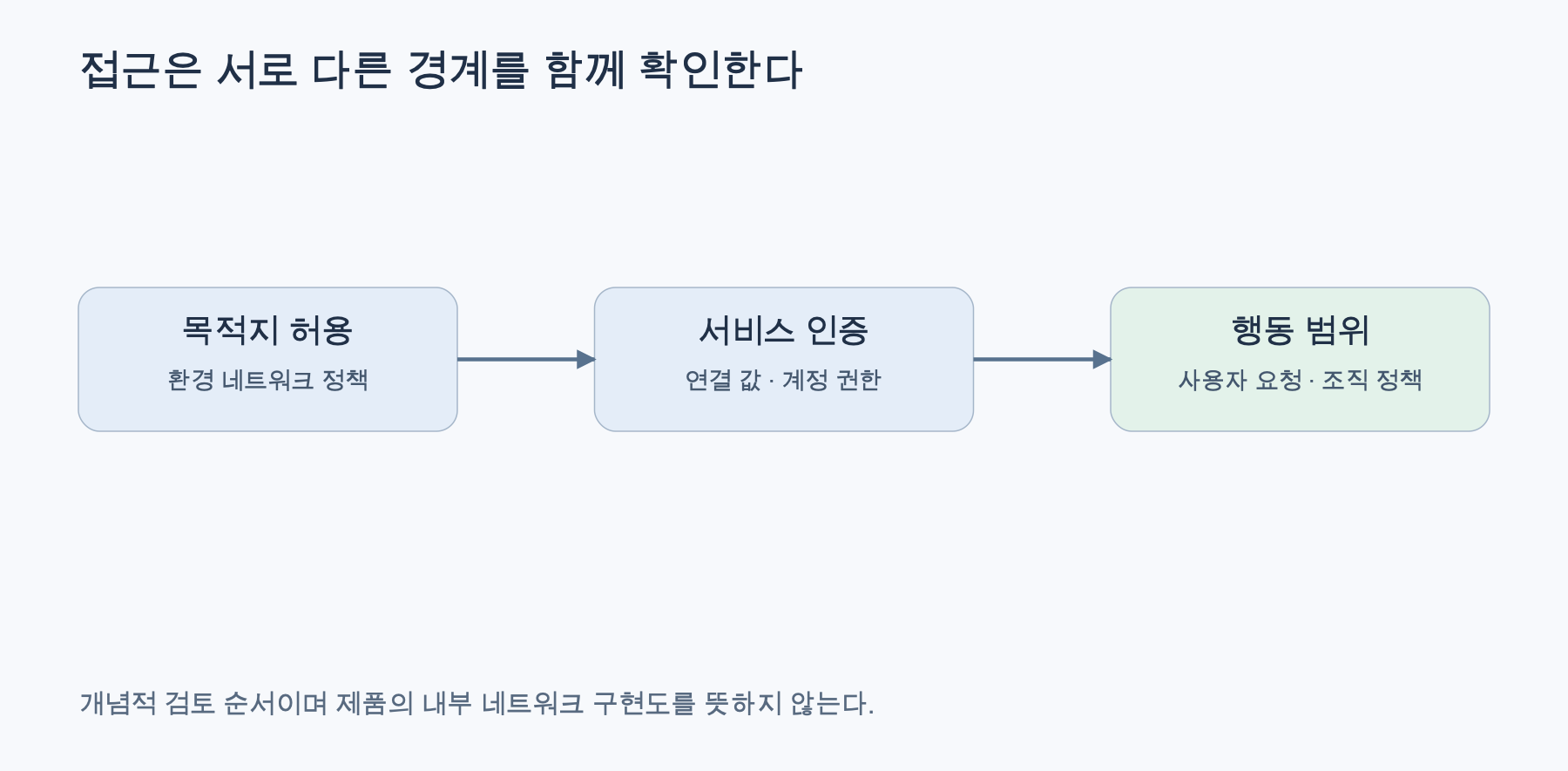
Reconstructed based on official documentation. Environment Settings · Agent Security
When connecting to a virtual private package repository, separately verify whether the destination domain is open, if the authentication method is correct, and if the account has download permissions. If a download redirects to another host, that destination must also be reviewed. Allowing all internet access and broad account permissions first to resolve connection issues can lead to unnecessary exposure.
It is fundamental not to embed sensitive values in conversations, source code, or installation logs. Also, check if values directly passed are exposed in program output. Before sharing the ready state, verify remaining files and shared access. Even an isolated workspace does not automatically secure the data provided for the task and connected services.
In Enterprise, environment domain settings and organizational Agent Security requirements are applied together. Allowing something on one side does not remove other restrictions. Instead of circumventing administrator policies, verify the actual allowed paths and request the minimum necessary access. Enterprise Policy Guide
There are also advanced connections like VPN and OIDC. OIDC is a standard that receives short-lived credentials based on trust settings instead of long-term secrets. Such connections require network, authentication, and permission design, so first confirm the scope of support and organizational approval. For initial setup of general projects, it is better to add them only when necessary. Advanced Connection Guide
8. How Is It Different from Local, Remote, and dot?
WRIMO-MD-TABLE-2]A local environment configures worktree preparation and common actions for desktop Codex. Remote is a path to start, approve, and review tasks on your computer from a mobile phone, requiring the computer to remain available. [Local Environment · Remote Guide
dot is a continuous work agent that can also delegate coding tasks to a prepared Codex Cloud environment. The functionality of selecting a Cloud environment and dot itself are not the same product roles. dot Task Delegation
9. Current Limitations and FAQ
Can I click through to test service screens in a browser? Current Codex Cloud environment documentation indicates that computer/browser usage is an unsupported item. It should not be assumed that dot’s cloud browser or local browser features are also available in this environment. GitLab and self-hosted GitHub Enterprise Server are also explicitly stated as currently unsupported. Skills within the repository can be used, but local skills on a personal computer are not automatically synchronized. Current Limitations
Can it be used with all ChatGPT accounts? General Codex usage and Cloud eligibility are different. Official help states that Cloud is provided to eligible Plus·Pro·Business·Enterprise·Healthcare·Education accounts, follows deployment/workspace settings, and is not included in Free·Go. Actual access should be verified through the account screen and administrator settings. Eligible Accounts
Why is this different from previous Codex Cloud descriptions? Current documentation separately distinguishes Legacy paths. Old container/installation step descriptions do not directly apply to current VM/Network secret operations. Current/Legacy Distinction
If dependency installation fails, should I discard the environment? Investigate by separating failed commands, destinations, and authentication. For a virtual project, you can request to “only tell me the cause of the failed test and necessary corrections,” then re-verify the ready state in a new task. It is important to leave reproducible conditions rather than increasing arbitrary workarounds.
Can it be used as a production server or permanent file storage? This service is an option for coding tasks and review workflows. Service uptime guarantees or permanent storage cannot be assumed based solely on the maximum recovery period and current support conditions. Public deployment is determined by separate hosting and approval procedures.
When starting with Codex Cloud, it’s best to first verify environment setup and testing on a small project. Afterwards, by managing environment settings, task-specific changes, and results to be preserved separately, and by checking costs and access scope, you can create a reviewable development workflow even when devices change.
Leave a Reply