Despite its name, Kubernetes’ confidential data management is full of holes.
>

##
🎯 What this article covers
- Why etcd stores Secrets in plaintext (Base64) without encryption by default, and its risks
- An attack path where a single permission to create a Pod bypasses the entire Secret RBAC control
- The structural reason why audit logs are virtually blank even when a Pod reads a Secret repeatedly
- Practical countermeasures for each vulnerability
📌 Introduction — etcd is the heart and Achilles’ heel of Kubernetes
All state information of a Kubernetes cluster is stored in a distributed key-value store called etcd. Deployment information, ConfigMaps, and the Secrets we’ll focus on today are all located here.
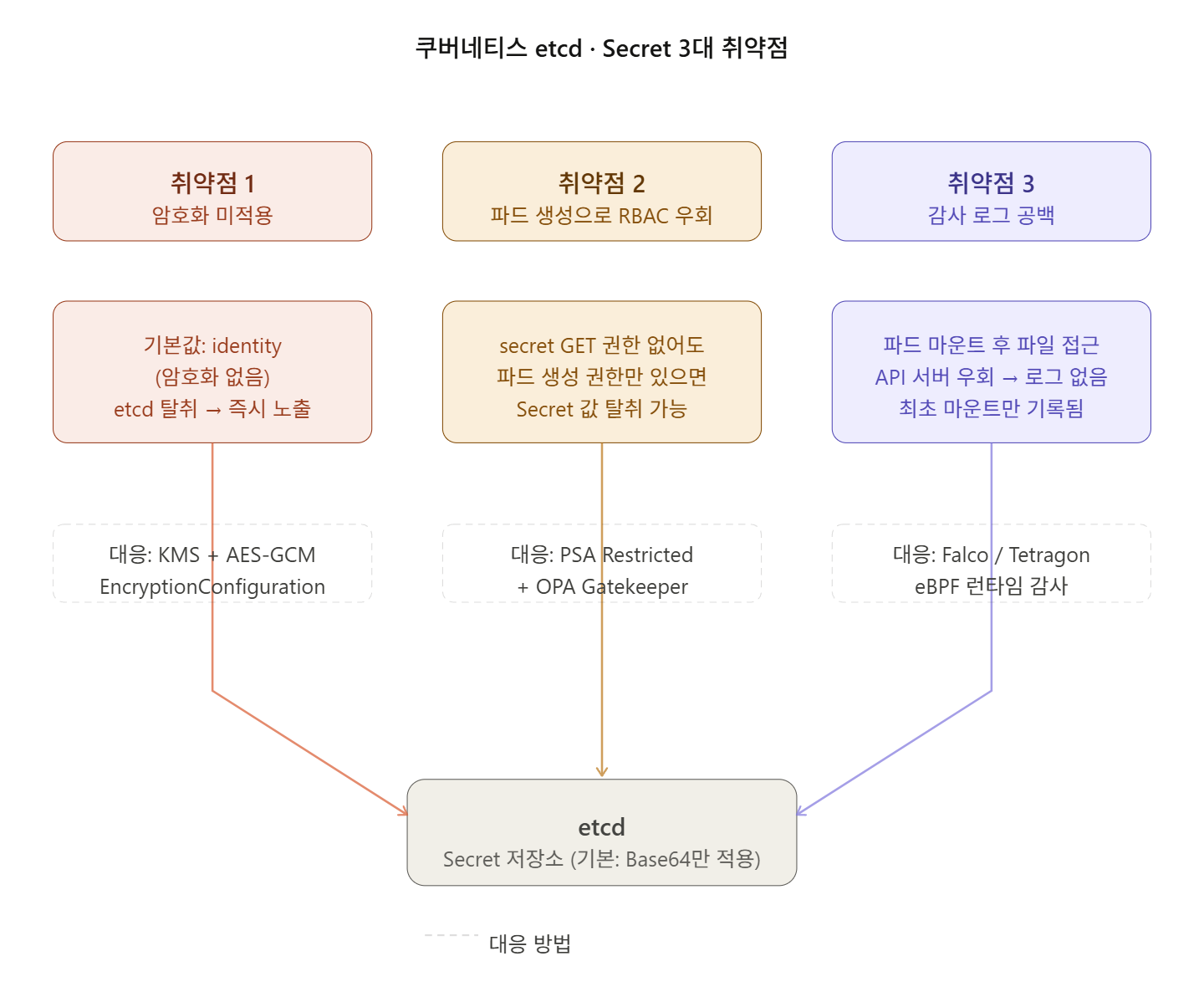
If etcd is compromised, it’s as good as taking control of the entire cluster. However, this crucial store has three structural vulnerabilities. These are not simple configuration mistakes, but structural problems born from design decisions and operational convenience.
🔍 Vulnerability 1 — etcd encryption, why isn’t it the default?
The core of the problem
Kubernetes Secret values are by default Base64 encoded and stored in etcd without encryption. Base64 is not encryption; it’s just a transformation into another form. A single line like echo “bXlwYXNzd29yZA==” | base64 -d will reveal the original text.
Anyone with direct access to etcd can easily decrypt and read this data. This is why at-rest encryption must be enabled.
Why isn’t it the default?
There are practical reasons why Kubernetes does not enable encryption by default.
① Key management complexity: Where should encryption keys be stored? Encrypting Secret data with local keys can protect against etcd compromise, but not if the host itself is breached. This is because encryption keys are stored in the EncryptionConfiguration YAML file, and a skilled attacker could access that file.
② Existing data migration: Even if encryption is enabled, already stored Secrets are not automatically encrypted. All existing Secrets must be re-written.
③ Performance overhead: Encryption/decryption is added to every read/write operation.
Currently provided encryption methods
Kubernetes offers several encryption providers. identity is the default and provides no encryption at all. AES-CBC is no longer secure due to padding oracle vulnerabilities and is vulnerable to host compromise as keys are stored on control plane nodes. AES-GCM is an improvement over AES-CBC but still has the limitation of keys being on the host.
Correct response
# /etc/kubernetes/enc.yaml
apiVersion: apiserver.config.k8s.io/v1
kind: EncryptionConfiguration
resources:
  - resources:
      - secrets
    providers:
      - kms:               # ✅ Production Recommended: External key management with KMS integration
          name: myKmsPlugin
          endpoint: unix:///tmp/socketfile.sock
          apiVersion: v2
      - identity: {}       # fallback — Use only for decryption
Add kube-apiserver configuration:
# /etc/kubernetes/manifests/kube-apiserver.yaml
spec:
  containers:
  - command:
    - kube-apiserver
    - --encryption-provider-config=/etc/kubernetes/enc.yaml  # Add this line
In production, integrating with external KMS like AWS KMS, GCP KMS, or Azure Key Vault to manage keys outside the cluster is the correct approach.
🔍 Vulnerability 2 — Bypassing Secret RBAC with Pod creation privileges
The most subtle vulnerability
This is the most subtle of the three. Even if a user does not have `get` permission for `secrets` resources, they can access Secrets if they can create Pods.
The RBAC system enforces that only authorized users can create Pods, but it does not control what that user puts inside the Pod definition. Without proper Admission Control, a user with Pod creation privileges can create containers with arbitrary images and arbitrary permissions.
3 Attack Scenarios
Scenario A: Exfiltrating Secrets via environment variables
# Even without Secret get permission, if you create a pod like this...
apiVersion: v1
kind: Pod
metadata:
  name: secret-stealer
spec:
  containers:
  - name: attacker
    image: busybox
    command: ["sh", "-c", "echo $DB_PASSWORD && sleep 3600"]
    env:
    - name: DB_PASSWORD
      valueFrom:
        secretKeyRef:
          name: db-credentials  # The Secret you want to access
          key: password
The DB_PASSWORD value is printed directly in the Pod logs.
Scenario B: Service Account token exfiltration
A user can create a Pod that uses a malicious image designed to exfiltrate the token of a highly privileged Service Account. The attacker can then use this token to perform API actions and escalate privileges.
# Check the mounted token inside the pod
cat /var/run/secrets/kubernetes.io/serviceaccount/token
# Request to API server with this token
curl -H "Authorization: Bearer $(cat /var/run/secrets/...)" https://k8s-api/api/v1/secrets
Scenario C: Direct etcd access via hostPath mount
If a user can schedule a Pod on a control plane node using a node selector and mount the host filesystem, they can chroot into that node, gain root privileges, and directly read the etcd database.
Countermeasures
# Block privileged pods with Admission Controller
apiVersion: admissionregistration.k8s.io/v1
kind: ValidatingWebhookConfiguration
# Or use Pod Security Admission
---
# Apply PSA label to namespace
kubectl label namespace production
  pod-security.kubernetes.io/enforce=restricted
  pod-security.kubernetes.io/enforce-version=latest
Key principles:
- Set automountServiceAccountToken: false by default
- Policy to prohibit hostPath, hostPID, hostNetwork mounts
- Admission Controller (OPA Gatekeeper, Kyverno) for image source and permission validation
🔍 Vulnerability 3 — Structural gap in Secret access audit logs
This is the core issue. Audit logs are not generated every time a Pod reads a mounted Secret. Why?
How Kubernetes Audit Logs work
Kubernetes audit logs originate within the kube-apiserver component. An audit event is generated for each request to the API server.
Here lies the core problem. Audit logs are only recorded for requests made through the API server.
How Secrets are delivered to Pods
[파드 생성 시]
API Server → kubelet → 파드 볼륨 마운트
              ↑
        이 시점에 1번만 Secret GET 요청 발생 → 로그 기록됨

[파드 실행 중]
파드 컨테이너 → /var/run/secrets/... 파일 직접 읽기
                ↑
        이건 그냥 파일시스템 read() 시스템 콜
        → API 서버를 거치지 않음 → 감사 로그 없음
The same applies when a Secret is injected as an environment variable. The container runtime fetches the value once at Pod startup and sets it as an environment variable; subsequent access occurs at the process level. The API server is not involved.
Kubernetes does not provide detailed audit logs for Secret access by default. This makes it difficult to monitor who accessed a Secret and when.
Leave a Reply