“What if an AWS expert with 17 years of experience could advise you 24/7?”
Amazon Q is a service built with exactly that goal in mind.
>

🎯 What This Article Covers
- What product families Amazon Q consists of
- How to utilize Q Developer for coding, security, and infrastructure automation
- How to turn internal company data into an AI assistant with Q Business
- Q features within specialized services like QuickSight, Connect, and Supply Chain
- Pricing structure and practical usage tips
📌 What is Amazon Q?
“Isn’t it just like ChatGPT made by AWS?”
It might seem similar, but the approach is different. Amazon Q is a generative AI assistant that helps all employees—software developers, BI analysts, customer service agents, supply chain analysts, and more—gain insights from data and accelerate their work. It’s not a general-purpose AI chatbot; the key is that it’s an enterprise-specific AI deeply integrated with the AWS ecosystem.
Amazon Q is built on Amazon Bedrock and operates by using multiple foundation models to complete tasks, routing each task to the most suitable model.
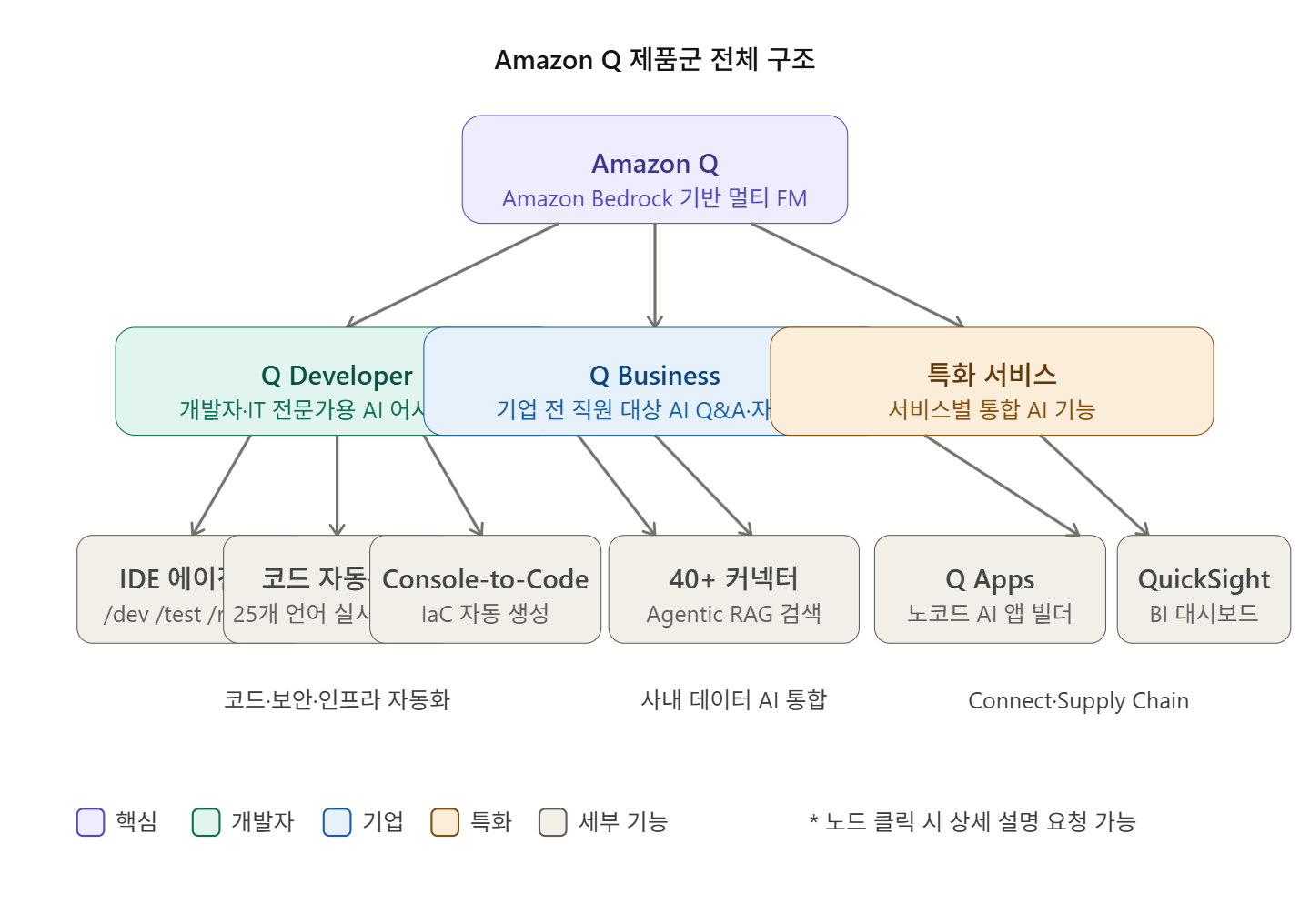
Amazon Q is not a single product but a product family. It is broadly divided as follows:
| Product | Target Audience | Key Role |
| Q Developer | Developers · IT Professionals | Coding · Infrastructure · Security AI Assistant |
| Q Business | All Enterprise Employees | AI Q&A · Automation based on internal data |
| Q in QuickSight | BI Analysts | Generate dashboards · visualizations with natural language |
| Q in Connect | Call Center Agents | Real-time customer interaction AI support |
| Q in Supply Chain | Supply Chain Managers | Supply chain data analysis · insights |
🔍 Q Developer — AI Companion for Developers
💡 Inline Code Suggestions
Amazon Q Developer generates real-time code suggestions, from code snippets to entire functions, based on comments and existing code in over 25 languages. It supports Java, Python, JavaScript, TypeScript, and even SAP’s ABAP.
Actual performance figures are impressive. BT Group accepted 37% of Q Developer’s code suggestions, and National Australia Bank reported a 50% acceptance rate.
🛠️ IDE Slash Commands — Key Features
In VSCode or JetBrains, typing / in the chat window opens powerful agent commands:
/dev    → 기능 개발 구현 계획 + 코드 자동 생성
/test   → 단위 테스트 자동 생성
/review → 보안 취약점 및 코드 품질 검토
/doc    → README 및 데이터 흐름 다이어그램 자동 생성
/transform → 코드 언어 버전 업그레이드 (예: Java 8 → Java 17)
/clear  → 대화 컨텍스트 초기화
/help   → 사용 가능한 명령 안내
The /doc command automatically generates comprehensive documentation like README.md and data flow diagrams based on the codebase, if it’s within the code folder. Teams that spend a lot of time on documentation will find the impact significant.
🔒 Security Scan (/review)
If you ask Amazon Q to “scan my AWS IAM role for overly permissive access rights,” it will find issues and guide you through corrections. Catching security vulnerabilities at the code review stage is fundamental to DevSecOps, and Q Developer automates this role.
🏗️ Code Transformation (/transform)
You can automatically convert an entire project’s code to a newer version, such as upgrading Java 8 and Java 11 code to Java 17. This is particularly useful for legacy system modernization projects.
☁️ AWS Console Integration Features
Amazon Q assists with network troubleshooting by using VPC Reachability Analyzer to verify connectivity and inspect network configurations to identify potential issues.
Amazon Q Developer also helps make quick and cost-effective decisions to find the optimal EC2 instance type before building workloads. If you ask, “Which instance family is suitable for my web app server?”, you’ll receive a customized recommendation list.
🧩 Console-to-Code
It records actions performed in the AWS console (e.g., EC2 creation) and automatically converts them into Terraform, CloudFormation, or CDK code. Currently, it provides functionality to convert operations in EC2, VPC, and RDS into code.
🎨 Customizing Internal Codebases
You can customize Amazon Q to generate specific code recommendations from private code repositories in the IDE code editor and chat. This feature allows you to train it on your company’s internal library styles and proprietary algorithms to receive recommendations tailored to your team’s style.
You can connect code repositories from GitHub, GitLab, BitBucket, or upload data sources via Amazon S3, supporting Java, JavaScript, Python, and TypeScript.
🖥️ Automated IaC Generation
Amazon Q can generate Terraform, AWS CloudFormation, or AWS CDK templates for your requested architecture, and the generated templates follow AWS best practices.
🏢 Q Business — AI Assistant for the Entire Enterprise
This is an enterprise-grade AI that can be used by general employees, not just developers.
📂 Connect Internal Data with 40+ Connectors
Amazon Q Business offers over 40 fully managed connectors that bring data from popular enterprise applications, document repositories, chat applications, and knowledge management systems into a single index.
Examples of supported integrations:
- Documents: SharePoint, Confluence, Google Docs, S3
- Collaboration: Slack, Microsoft Teams
- CRM: Salesforce
- Databases: Amazon RDS, Redshift (via QuickSight)
🔎 Agentic RAG — Accurate Answers to Complex Questions
Amazon Q Business introduces Agentic RAG to provide more accurate and explainable responses to complex multi-step RAG queries. Agentic RAG breaks down complex queries into simpler ones, executes them in parallel to retrieve data, intelligently invokes data retrieval tools, and synthesizes the data to generate comprehensive responses.
🤖 Q Apps — No-Code AI App Builder
Amazon Q Apps is a lightweight app creation feature of Amazon Q Business that automates prompt automation, content generation, workflows, and tasks. For example, a sales team can build an app that drafts customer emails from meeting notes and updates customer records.
🔐 Permission-Aware Responses
Amazon Q Business supports access control for data, ensuring that the right users access the right content, and responses to user questions are based on the content they have access to. It integrates with IAM Identity Center, thus leveraging existing organizational permission structures.
💬 Multimedia Data Understanding
Amazon Q Business users can get answers from visual elements embedded in PDFs, Microsoft PowerPoint, Word, Google Docs, and Google Slides.
🌐 External App Integration
You can use Amazon Q Business directly within your everyday work tools via Slack, Microsoft Outlook, Word for Microsoft 365, Microsoft Teams, and browser extensions for Google Chrome, Mozilla Firefox, and Microsoft Edge.
📊 Q in QuickSight — Natural Language Dashboards for BI Analysts
Amazon Q in QuickSight allows business analysts to build BI dashboards, visualizations, and complex calculations in minutes using natural language.
If you say something like, “Show me the revenue change by region this quarter compared to last quarter,” a chart will be automatically generated. No SQL knowledge is required.
📞 Q in Connect — AI Co-pilot for Call Centers
Amazon Q in Connect automatically detects customer issues in conversations and uses generative AI to provide personalized real-time responses and recommended actions, leveraging customer information and content from knowledge repositories and external websites. Agents receive real-time draft answers during calls without needing to search separately.
⚠️ Caveats / Things to Know in Practice
Limited Korean Support: Amazon Q does not yet fully support Korean recognition, so chat input needs to be written in English. Korean support is gradually expanding, so it’s advisable to check the latest announcements.
Free vs Pro Differences: Q Developer offers core features like inline code suggestions and basic chat in its free tier. However, features such as internal codebase customization, code transformation (/transform), and advanced security scans require a Pro subscription ($19/user/month).
Q Business Pricing: Amazon Q Business offers two subscription models: Lite and Pro. Lite starts at $3 per user per month, with index capacity costs charged separately.
Data Security: Codebases shared with Amazon Q are only exposed internally within your organization and are not used to train AWS’s foundation models. Q Developer Pro does not use customer content for service improvement.
✅ Summary / Conclusion
Amazon Q is not just a simple AI chatbot. It is a role-specific AI platform for all developers, IT professionals, and enterprise employees working in the AWS environment.
Key Usage Points by Role
| Role | Key Usage Points |
| Developer | Code autocompletion, security scans, test generation, IaC automation |
| DevOps/Cloud | Infrastructure troubleshooting, Console-to-Code, CloudWatch analysis |
| Security Officer | IAM permission review, automated code vulnerability detection |
| BI Analyst | Natural language dashboard creation (QuickSight integration) |
| General Enterprise Employee | Internal document Q&A, email/report drafting, workflow automation |
As a next step, we recommend installing the Q Developer free tier in VSCode to directly experience actual code review and automated unit test generation. If you are considering enterprise adoption, a 60-day free trial of Q Business is also available.
Leave a Reply