“Docker is dead!”
In late 2020, when this news spread, the community fell into a panic.
But what actually happened?
>

🎯 What this article covers
- Why Kubernetes excluded Docker (the real reasons)
- What dockershim is and why it became a problem
- What alternative runtimes like containerd, CRI-O are
- Whether Docker images (docker build) can still be used
- What developers and operators actually need to change
📌 Introduction / Background
In December 2020, a bombshell article was published on the official Kubernetes blog.
“Kubernetes is deprecating Docker as a container runtime.”
This single sentence set Twitter, Reddit, and Slack channels ablaze. Even Kubernetes co-founder Joe Beda tweeted:
“Fascinating how this docker/docker-shim deprecation has created mass confusion.”
Many people panicked, asking, “Can’t I use Docker anymore?”, “Are all my images built with docker build going to die?”
To cut to the chase: There’s no need to panic. But you need to understand exactly what happened.
🔍 What is dockershim?
Early Kubernetes: There was only Docker
When Kubernetes first emerged (around 2014), Docker Engine was the only container runtime available. So, Kubernetes hardcoded Docker support into its code, and this component was called dockershim.
A shim originally refers to a thin wedge used in machine assembly to fill gaps between two parts. In software, it similarly acts as an adapter connecting different APIs.
The advent of CRI: The beginning of standardization
Over time, various container runtimes like rkt, CRI-O, and containerd appeared. To support all of them, Kubernetes created a standard API called CRI (Container Runtime Interface).
The problem was that Docker did not support CRI. This was natural, as Docker predated CRI.
So the call path became this:
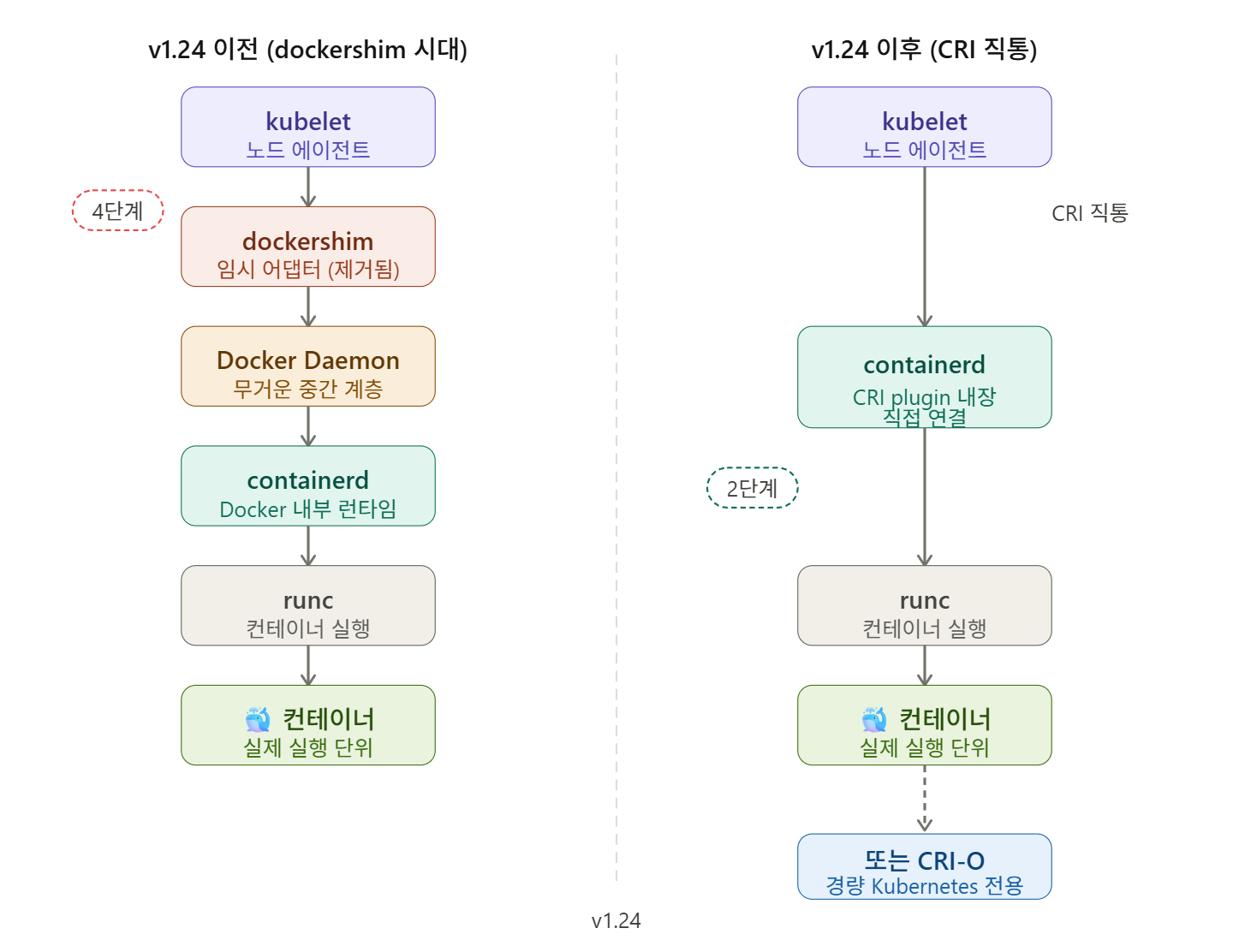
kubelet → dockershim → Docker Daemon → containerd → runc → 컨테이너Docker doesn’t actually download images or start containers directly. Its internal containerd does that job. This meant Kubernetes had to go through a long intermediate process: kubelet → dockershim → Docker → containerd to run a container.
🔍 Why was Docker removed? 3 real reasons
1️⃣ Maintenance burden became too heavy
dockershim was always a temporary solution (hence the name: shim). As the maintenance burden grew, Kubernetes maintainers began to question, “Do we have to keep carrying this burden just because Docker doesn’t implement the CRI standard?”
2️⃣ Unnecessary intermediate steps
One of the big reasons Kubernetes developers wanted to remove Docker was the excessive number of intermediate steps. Too many messages were passed from app to app just to start a single container.
Directly connecting to containerd simplifies the path like this:
kubelet → containerd (CRI plugin 내장) → runc → 컨테이너Even saving just 0.1 seconds per container can lead to a noticeable performance difference in environments dealing with hundreds of containers.
3️⃣ Incompatibility with new technologies
New features like cgroups v2 and user namespaces were largely incompatible with dockershim. Removing dockershim support enables further development in these areas.
🗓️ Timeline: When did all this happen?
| Timeframe | Event |
| 2016 | Kubernetes CRI spec announced |
| December 2020 | Kubernetes v1.20: dockershim officially deprecated |
| 2021 | Removal schedule postponed once due to community backlash |
| April 2022 | Kubernetes v1.24: dockershim completely removed |
Although deprecation was formalized in v1.20, the announcement was not properly communicated, leading to panic in the community. Much of the confusion stemmed from misunderstandings like “Is the company Docker disappearing?” or “Will images built with Docker no longer run?”
🔍 So what do we use now?
containerd — The de facto standard
containerd is a general-purpose container runtime originally developed by Docker and then donated to the CNCF (Cloud Native Computing Foundation). It manages the lifecycle of containers and can be used both inside and outside Kubernetes.
Major managed Kubernetes services like AWS EKS, Azure AKS, and Google GKE already use containerd as their default runtime. If you’re using Azure, your AKS nodes are already running containerd.
CRI-O — Lightweight runtime exclusively for Kubernetes
A Red Hat-led project, CRI-O is a lightweight runtime built specifically for use with Kubernetes. It is primarily seen in OpenShift environments.
cri-dockerd — If you still want to use Docker
Mirantis and Docker decided to maintain cri-dockerd as an independent open-source CRI interface even after dockershim was removed from Kubernetes. Installing cri-dockerd still allows you to use Docker as a runtime, but it adds an extra installation burden.
💻 What has actually changed? (Operator’s perspective)
Container checking command changes
# ❌ Nothing will show up if you run this on a node now
docker ps

# ✅ In a containerd environment, you should use this
crictl ps

# ✅ Or by specifying a namespace
ctr -n k8s.io containers list
How to check runtime
# Check the runtime in use on the node
kubectl get node -o wide
# Can be checked in the CONTAINER-RUNTIME column
# e.g.: containerd://1.7.x
containerd installation and basic configuration (Ubuntu-based)
# Install containerd
sudo apt-get update
sudo apt-get install -y containerd

# Generate default configuration file
sudo mkdir -p /etc/containerd
containerd config default | sudo tee /etc/containerd/config.toml

# Enable systemd cgroup driver (recommended by Kubernetes)
sudo sed -i 's/SystemdCgroup = false/SystemdCgroup = true/'
  /etc/containerd/config.toml

sudo systemctl restart containerd
sudo systemctl enable containerd
Image builds can still be done with Docker ✅
# This is still perfectly valid
docker build -t myapp:v1.0 .
docker push myregistry.io/myapp:v1.0

# Image format is the same when deploying to Kubernetes
kubectl apply -f deployment.yaml
⚠️ Precautions / Common Mistakes
1. Don’t try to debug pods with docker ps
On nodes using containerd, running docker ps will not show pod containers. When using other runtimes like containerd, you cannot get container information with docker ps or docker inspect commands. Use kubectl exec, kubectl logs, or crictl ps instead.
2. Tools dependent on Docker daemon need review
If scripts or daemons that execute Docker commands outside the Kubernetes infrastructure, such as monitoring agents or security agents, are installed, they need to be checked.
3. Private registry configuration location is different
Private registry mirror settings, which were managed by daemon.json in Docker, must be configured in /etc/containerd/config.toml in containerd.
# /etc/containerd/config.toml
[plugins."io.containerd.grpc.v1.cri".registry]
  [plugins."io.containerd.grpc.v1.cri".registry.mirrors]
    [plugins."io.containerd.grpc.v1.cri".registry.mirrors."myregistry.io"]
      endpoint = ["https://myregistry.io"]
✅ Summary / Conclusion
Docker is not dead. Its role has simply been separated.
| Role | Tool | Status |
| Image build | docker build | ✅ Still valid |
| Image push | docker push | ✅ Still valid |
| Local development | Docker Desktop | ✅ Still valid |
| K8s Container Runtime | containerd / CRI-O | ✅ Current standard |
| dockershim | Removed | ❌ Not available from v1.24 |
Docker offers many UX improvements that make it very easy for humans to interact with during development. However, Kubernetes is not human, so it doesn’t need those UX improvements. That’s why Kubernetes chose to communicate directly with containerd, Docker’s core engine.
Recommended next steps:
- Check the runtime of your currently running Kubernetes cluster: kubectl get node -o wide
- Familiarize yourself with crictl commands (essential for debugging containerd environments)
- Check default runtime documentation when using AKS/EKS/GKE
Leave a Reply