“It’s great that AI writes code…
But if you just tell it to, it’ll dump everything into a single main.tf,
and make all IAM policies ‘*’.”
— A common experience for all DevOps engineers
>

🎯 What this article covers
- Why Agent Skills are necessary when using Terraform with Claude Code
- 5 Skill/Agents that are de facto standards in the industry
- The difference between MCP Server vs Agent Skill, and how to use them together
- Actual installation methods and usage examples
📌 Introduction: “Code that runs” and “Code that can be deployed to production” are different
When you entrust Terraform to Claude Code, you get results quickly. However, if you instruct it without any guidance, the results can be quite problematic.
- All resources are dumped into a single main.tf file
- Minimal effort patterns like default VPC, latest AMI are chosen
- Wildcards like “Action”: “*” are overused in IAM policies
This isn’t because the AI is bad. It’s because there’s no context. AI aims for “code that works,” not “code that can be maintained three years from now.” Bridging this gap is precisely what Agent Skill and MCP Server do.
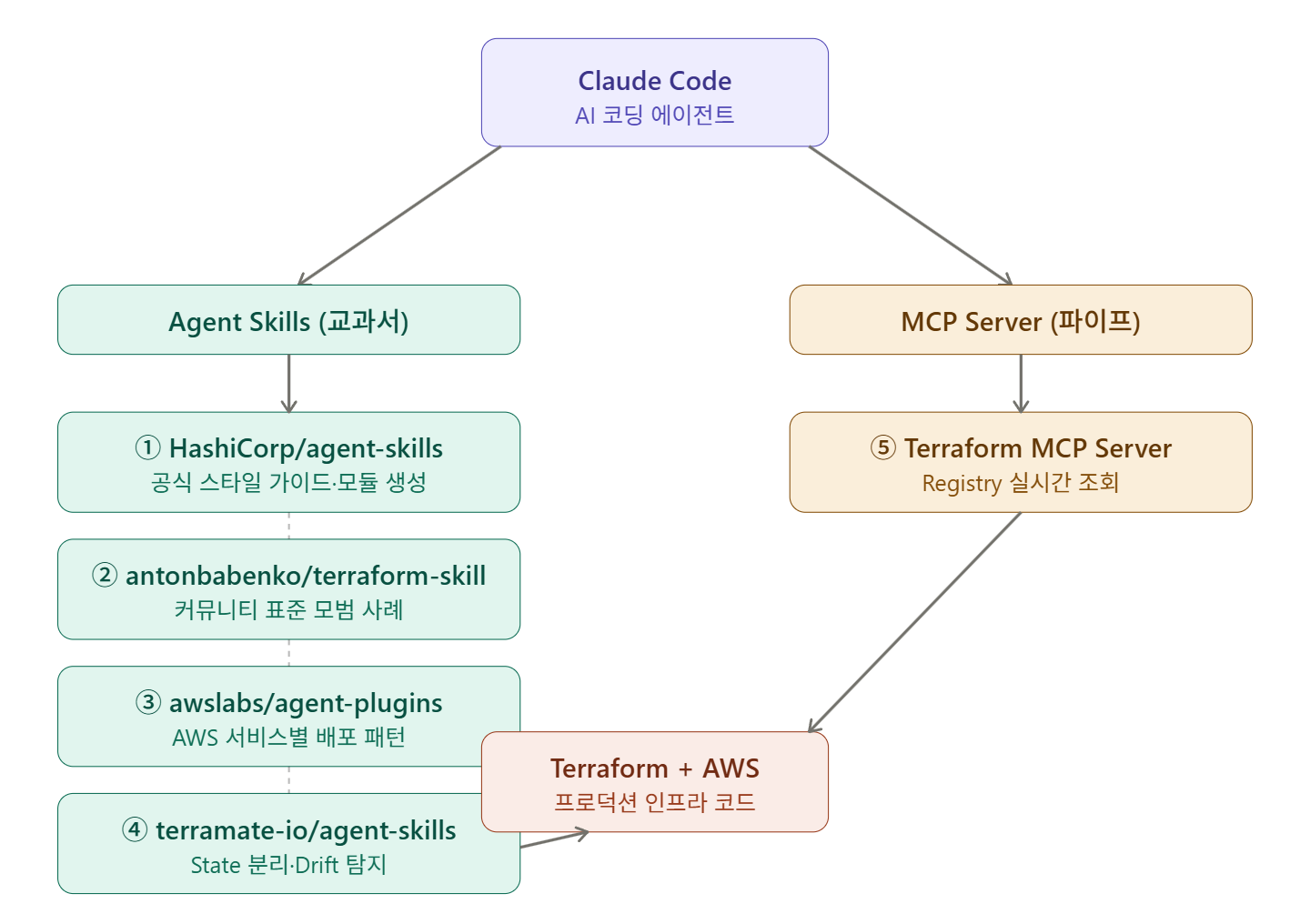
🔍 Concept Clarification: Agent Skill vs MCP Server — What’s the difference?
HashiCorp clearly defined the relationship between the two in their official blog. MCP is a “pipe” that connects data to AI, and Agent Skill is a “textbook” that injects knowledge into AI. The most powerful context-aware assistant is created when both are used together.
To summarize simply:
| Category | MCP Server | Agent Skill |
| Role | Real-time data access (Registry, API lookup) | Injecting best practice knowledge (coding rules, patterns) |
| Analogy | Internet connection | Specialized textbook |
| Example | Querying latest provider specs from Terraform Registry | Adhering to HashiCorp style guide |
In a real workflow, it’s best to install both.
💎 5 Agent Skills that have become de facto standards
1️⃣ HashiCorp Agent Skills — Official Standard
This is a collection of Agent Skills directly released by HashiCorp, including skills for Terraform and Packer. It is designed to help AI assistants understand HashiCorp’s plugin framework architecture, schema definitions, and the latest best practices. Generating Terraform code according to the HashiCorp style guide is one of its core features.
There are two installation methods:
# Claude Code plugin method
claude plugin marketplace add hashicorp/agent-skills
claude plugin install terraform-code-generation@hashicorp
claude plugin install terraform-module-generation@hashicorp

# npx method (compatible with other agents like GitHub Copilot, Cursor, etc.)
npx skills add hashicorp/agent-skills
Individual skills can also be installed. You can choose and install them based on purpose, such as terraform-style-guide, terraform-module-generation, packer-builders.
Why this is a standard: As an official HashiCorp source, consistency with documentation is guaranteed. It also includes Packer Skill, which is good for integration with image build pipelines.
2️⃣ antonbabenko/terraform-skill — Community Champion
This skill is for Claude Code, encompassing best practices for Terraform and OpenTofu, providing immediate guidance on testing strategies, module patterns, CI/CD workflows, and production-grade infrastructure code. It is distributed via the Claude Code marketplace and uses .claude-plugin/marketplace.json.
Anton Babenko is the de facto maintainer of the Terraform community, operating the terraform-aws-modules organization. As a skill he created himself, it embodies practical experience.
# Install from marketplace
/plugin marketplace add antonbabenko/terraform-skill
/plugin install terraform-skill@antonbabenko

# Or clone directly
git clone https://github.com/antonbabenko/terraform-skill ~/.claude/skills/terraform-skill
Why this is a standard: It is based on the content of terraform-best-practices.com. It goes beyond simple code style guides to include a decision-making framework for “when and why to use this pattern.”
3️⃣ HashiCorp Terraform MCP Server — Real-time Registry Integration
The Terraform MCP server enables AI models to access the latest provider documentation, modules, and policies from the Terraform Registry in real-time. This allows AI to generate Terraform configurations based on accurate and up-to-date information, rather than potentially outdated training data.
# Run with Docker (most recommended method)
claude mcp add terraform --transport stdio --
  docker run -i --rm hashicorp/terraform-mcp-server:0.3.0
Team-shared configurations can also be set up with .mcp.json in the Claude Code project root.
{
  "mcpServers": {
    "terraform": {
      "command": "docker",
      "args": ["run", "-i", "--rm", "hashicorp/terraform-mcp-server"]
    }
  }
}
Why this is a standard: As of 2025, the most effective Terraform workflow utilizes the HashiCorp Terraform MCP server, ensuring that AI suggestions are based on currently validated configuration patterns from the Terraform Registry, not outdated training data.
4️⃣ awslabs/agent-plugins — AWS Official Agent Plugin
Released directly by AWS, this plugin provides the skills necessary for AI coding agents to design, deploy, and operate AWS infrastructure. It is currently supported by Claude Code and Cursor. Instead of repeatedly pasting lengthy AWS guides into prompts, this approach encodes those guides into reusable, version-controlled capabilities that agents can invoke when needed.
Included skills:
- deploy-on-aws — Lambda, API Gateway, EventBridge, Step Functions
- aws-amplify — Full-stack app building (authentication, storage)
- aws-database — Schema design, multi-tenant patterns
- amazon-sagemaker — AI/ML workloads
- gcp-to-aws-migration — GCP Terraform resources → AWS mapping
# Install from Claude Code marketplace
claude plugin marketplace add awslabs/agent-plugins
claude plugin install deploy-on-aws@awslabs
Why this is a standard: It’s an official AWS Labs source. When configuring AWS services with Terraform, the latest best practices for each service are automatically applied.
5️⃣ terramate-io/agent-skills — State Separation and Drift Detection
This agent skill for Terraform, OpenTofu, and Terramate covers state separation using stacks, testing, modules, CI/CD, drift reconciliation, and production-level best practices. It includes 37 rules divided into 10 categories with assigned priorities.
# Full installation
npx skills add terramate-io/agent-skills

# Install individual skills only
npx skills add terramate-io/agent-skills --skill terraform-best-practices
npx skills add terramate-io/agent-skills --skill terramate-best-practices
Why this is a standard: It goes beyond general Terraform best practices to cover enterprise-level patterns such as Drift Detection, State Separation, and Multi-environment Orchestration. It shines as scale increases.
⚙️ Practical Setup: A combination of 5 skills
The configuration below is the most robust combination at this point.
# Step 1: HashiCorp Official Skill (Code generation rules)
claude plugin marketplace add hashicorp/agent-skills
claude plugin install terraform-code-generation@hashicorp

# Step 2: antonbabenko Skill (Best practice decision making)
/plugin install terraform-skill@antonbabenko

# Step 3: Terraform MCP Server (Real-time Registry lookup)
claude mcp add terraform --transport stdio --
  docker run -i --rm hashicorp/terraform-mcp-server

# Step 4: AWS Plugin (Service-specific Best Practice)
claude plugin install deploy-on-aws@awslabs

# Step 5: Terramate Skill (State separation, Drift management)
npx skills add terramate-io/agent-skills --skill terraform-best-practices
⚠️ Precautions
AI-generated code must be reviewed. Even with an MCP server, AI can generate configurations that are not optimized or do not meet requirements. Linters, policy checks, and peer reviews should be performed concurrently.
Be aware of security risks. The MCP ecosystem introduces new attack surfaces. Vulnerabilities such as tool invocation by LLMs and credential exposure have been found in various MCP servers.
Version pinning is essential. Even if AI generates modules based on the latest information, consistency among teams will break if provider versions are not pinned. Always specify version ranges in the required_providers block.
terraform {
  required_providers {
    aws = {
      source  = "hashicorp/aws"
      version = "~> 5.0"  # Pin major version
    }
  }
}
✅ Summary
| Skill/Tool | Source | Key Role |
| hashicorp/agent-skills | HashiCorp Official | Style guide, module generation rules |
| antonbabenko/terraform-skill | Community | Best practice decision framework |
| hashicorp/terraform-mcp-server | HashiCorp Official | Real-time Registry lookup |
| awslabs/agent-plugins | AWS Official | AWS service-specific deployment Best Practices |
| terramate-io/agent-skills | Terramate | State separation, Drift, Multi-environment |
What can be called a de facto standard is the combination of HashiCorp Official Skills + Terraform MCP Server. The rest can be optionally added depending on the team’s scale and complexity.
As a next step, it is recommended to commit the AGENTS.md file to the repository to learn how the entire team can share the same AI context.
Leave a Reply