“I want to build an agent, but what should I use?”
This article will solve that dilemma.
>

🎯 What This Article Covers
- 10 open-source agents/frameworks that can utilize the Claude API as a backend
- Summary of each tool’s key features, architecture, and pros & cons
- Optimal recommendation guide by use case
- Includes actual installation and getting started code examples
📌 Introduction / Background
The AI agent ecosystem is experiencing explosive growth. According to GitHub’s State of Open Source (2025) report, the number of agent framework repositories with over 1,000 GitHub Stars increased by 535%, from 14 in 2024 to 89 in 2025.
Agents are no longer just a topic for research labs. From code writing, debugging, testing, deployment, to security audits — agents are integrating across the entire development pipeline. Notably, the Claude model is consistently referred to as “the most trusted model” in the coding agent community, and it receives the most agreement when “the best AI coding model” is abstractly asked in community discussions.
In this article, we will practically compare 10 open-source agents that can be integrated with various LLMs, including Claude.
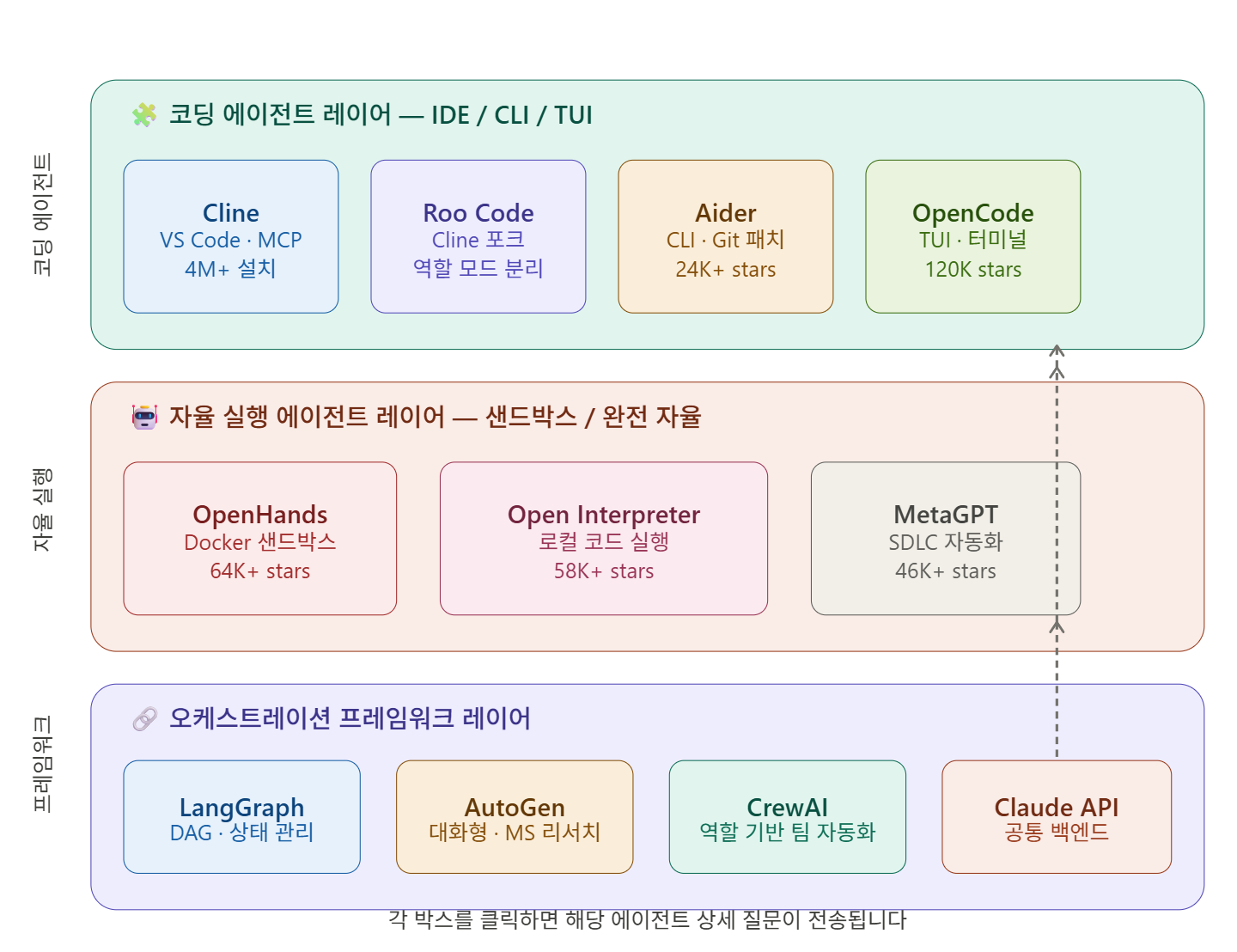
🔍 Detailed Comparison of 10 Open-Source Agents
1. 🧠 Cline (formerly Claude Dev)
GitHub Stars: 4M+ installs | Language: TypeScript | Environment: VS Code Extension
Cline is the closest open-source alternative to the Claude Code agent experience, offering greater flexibility in models and deployment methods. It has become the go-to tool for teams seeking Claude-level coding assistance without vendor lock-in.
Key Features:
- Plan Mode: Separates the step of reviewing and approving plans before execution
- Native integration of MCP (Model Context Protocol)
- Permission Guard: Access control for file/terminal operations
- Multi-backend support including GPT, Gemini, and local Ollama models
# Install from VS Code Extension Marketplace
# Or via CLI:
npm install -g cline
Suitable for teams: VS Code-based development teams, local-first workflows, startups where cost control is crucial
2. 🤝 OpenHands (formerly OpenDevin)
GitHub Stars: 64K+ | Language: Python | Environment: Docker + Web UI / CLI
OpenHands (formerly OpenDevin) is a fully autonomous coding agent that opens browsers, writes code, runs tests, and debugs until completion. It’s easy to understand it as an AI developer with its own sandbox.
OpenHands uniquely combines native remote execution and secure sandboxing, a built-in production server with REST+WebSocket APIs, LLM-based action-level security analysis, and model-agnostic multi-LLM routing that supports even models without function calling.
# Run instantly with Docker
docker run -it --rm
  -e LLM_API_KEY="your-claude-api-key"
  -e LLM_MODEL="claude-sonnet-4-20250514"
  -v $(pwd)/workspace:/opt/workspace_base
  -p 3000:3000
  ghcr.io/openhands/openhands:latest
Suitable for teams: Fully autonomous development tasks, research purposes, end-to-end software engineering automation
3. 🔗 LangGraph
GitHub Stars: LangChain ecosystem 47M+ PyPI downloads | Language: Python/JavaScript
LangGraph reached v1.0 by the end of 2025 and has become the default runtime for all LangChain agents. It features durable execution (agents can withstand failures and automatically resume), Human-in-the-loop support, and a comprehensive memory system including short-term working memory and long-term persistent memory.
Key Features:
- DAG (Directed Acyclic Graph)-based workflow design
- Precise control over state management and conditional branching
- Ability to leverage thousands of integrated libraries from the LangChain ecosystem
from langgraph.graph import StateGraph
from langchain_anthropic import ChatAnthropic

llm = ChatAnthropic(model="claude-sonnet-4-20250514")

def agent_node(state):
    response = llm.invoke(state["messages"])
    return {"messages": [response]}

graph = StateGraph(dict)
graph.add_node("agent", agent_node)
graph.set_entry_point("agent")
app = graph.compile()
Suitable for teams: Complex multi-step pipelines, systems requiring production durability, LangChain-based teams
4. 🤖 AutoGen (Microsoft Research)
GitHub Stars: 43K+ | Language: Python | Environment: Local/Azure
AutoGen, born from Microsoft Research, frames everything as asynchronous conversations between specialized agents. Each agent can be a ChatGPT-style assistant or a tool executor, orchestrating how messages are exchanged.
⚠️ Note: Microsoft has transitioned AutoGen to maintenance mode and is moving towards favoring the broader Microsoft Agent Framework. For new projects, we recommend considering the Microsoft Agent Framework.
import autogen

claude_config = {
    "model": "claude-sonnet-4-20250514",
    "api_key": "your-api-key",
    "api_type": "anthropic"
}

assistant = autogen.AssistantAgent(
    name="coder",
    llm_config={"config_list": [claude_config]}
)
user_proxy = autogen.UserProxyAgent(
    name="user",
    human_input_mode="TERMINATE"
)
user_proxy.initiate_chat(assistant, message="FastAPI 서버를 작성해줘")
Suitable for teams: Multi-agent conversational systems, group discussion-based decision making, existing AutoGen legacy teams
5. 👥 CrewAI
GitHub Stars: 29K+ | Language: Python | Environment: Local/Cloud
CrewAI is the most intuitive framework for understanding role-based abstraction in business workflow automation. Choose CrewAI if you want an intuitive way to model agent teams with clear roles and get started quickly.
from crewai import Agent, Task, Crew
from langchain_anthropic import ChatAnthropic

llm = ChatAnthropic(model="claude-sonnet-4-20250514")

researcher = Agent(
    role="보안 연구원",
    goal="ISMS-P 최신 동향 분석",
    llm=llm
)
writer = Agent(
    role="기술 작가",
    goal="분석 결과를 블로그 포스트로 작성",
    llm=llm
)
crew = Crew(agents=[researcher, writer], tasks=[...])
Suitable for teams: Business automation with clear role separation, rapid prototyping, HR/marketing/security report automation
6. 🖥️ Aider
GitHub Stars: 24K+ | Language: Python | Environment: CLI (Git integration)
Aider is an open-source AI coding assistant that interacts with your codebase via Git patches. Rather than operating as a fully autonomous agent, it focuses on precise, reviewable edits based on conversational prompts.
pip install aider-chat

# Use with Claude
aider --model claude-sonnet-4-20250514
      --anthropic-api-key $ANTHROPIC_API_KEY
      main.py utils.py
Suitable for teams: CLI-preferring developers, Git workflow-centric teams, organizations where code review processes are crucial
7. 🌐 OpenCode
GitHub Stars: 120K+ | Language: TypeScript | Environment: Terminal TUI + IDE
OpenCode is an open-source agent used by over 5 million developers monthly. It does not store code or context data, making it suitable for security-sensitive environments. A notable feature is the ability to log in directly with a Claude Pro account.
# Install with npm or Homebrew
npm install -g opencode-ai
# Or
brew install opencode

opencode  # Run TUI
Suitable for teams: Terminal-centric workflows, security/privacy-sensitive environments, teams requiring multi-LLM support for over 75 models
8. 🗺️ MetaGPT
GitHub Stars: 46K+ | Language: Python | Environment: Local/Cloud
MetaGPT takes a unique approach by simulating a software development organization as agents. PMs, architects, engineers, QAs — agents for each role collaborate to automate the entire SDLC, from requirements analysis to code generation.
import asyncio
from metagpt.software_company import SoftwareCompany
from metagpt.roles import ProjectManager, Architect, Engineer

async def main():
    company = SoftwareCompany()
    company.hire([ProjectManager(), Architect(), Engineer()])
    await company.run(
        idea="개인정보 처리방침 자동 생성 웹 서비스 개발"
    )

asyncio.run(main())
Suitable for teams: Experimenting with full SDLC automation, software development process research, large-scale documentation automation
9. 🐍 Open Interpreter
GitHub Stars: 58K+ | Language: Python | Environment: Local CLI
Open Interpreter allows LLMs to directly execute code on your local computer. It implements a ChatGPT Code Interpreter-like experience in your terminal, without internet access and without file limitations.
from interpreter import interpreter

interpreter.llm.model = "claude-sonnet-4-20250514"
interpreter.llm.api_key = "your-api-key"

# Manipulate local environment with natural language
interpreter.chat("AWS S3 버킷 목록을 CSV로 저장해줘")
Suitable for teams: Data analysis and automation scripts, daily DevOps task automation, offline environments
10. 🧩 Roo Code (Cline Fork)
GitHub Stars: Rapidly growing | Language: TypeScript | Environment: VS Code Extension
Roo Code is a fork of Cline that adds role-based AI modes (Architect, Coder, Debugger, custom modes) to VS Code. It features BYOK (Bring Your Own Key) model support, allowing you to choose your preferred provider, and a privacy design that lets you exclude sensitive code from AI using a .rooignore file.
Suitable for teams: Teams requiring role-based AI mode switching, enterprises where secure code isolation is crucial, VS Code-based teams
📊 10 Agents at a Glance
| Agent | Environment | Claude Support | Multi-Agent | Autonomy | Suitable For |
| Cline | VS Code | ✅ Native | ❌ | Medium | General Dev Teams |
| OpenHands | Docker/Web | ✅ | ✅ | 🔴 Highest | Autonomous Engineering |
| LangGraph | Python | ✅ | ✅ | Medium | Complex Pipelines |
| AutoGen | Python | ✅ | ✅ Conversational | Medium | Multi-Agent Conversation |
| CrewAI | Python | ✅ | ✅ Role-based | Medium | Business Automation |
| Aider | CLI/Git | ✅ | ❌ | Low (Precise) | Git-centric Teams |
| OpenCode | TUI/Terminal | ✅ Pro Direct | ❌ | Medium | Terminal Developers |
| MetaGPT | Python | ✅ | ✅ SDLC | 🔴 Highest | Full SDLC Automation |
| Open Interpreter | Local CLI | ✅ | ❌ | Medium | Local Automation |
| Roo Code | VS Code | ✅ | Limited | Medium | Role-separated Teams |
—
⚠️ Cautions / Common Mistakes
🔐 Security: Agents that execute code on local systems, such as OpenHands and Open Interpreter, must be run in a sandbox environment. Do not mount paths outside of WORKSPACE_DIR.
💸 Cost Overruns: Multi-agent conversational structures like AutoGen or MetaGPT can lead to exponentially increasing token consumption. Be sure to set API consumption limits.
🔄 Model Pinning: If you don’t specify a particular model version, like claude-sonnet-4-20250514, its behavior might change after an update. Pin the model version in production.
⚠️ AutoGen Maintenance Mode: As Microsoft has transitioned AutoGen to maintenance mode, for new projects, we recommend considering the Microsoft Agent Framework or LangGraph.
✅ Summary / Conclusion
As of 2026, the open-source agent ecosystem is clearly divided into three layers:
- Coding Agents (IDE/CLI): Cline, Roo Code, Aider, OpenCode — immediately integrate into daily development workflows
- Autonomous Execution Agents: OpenHands, Open Interpreter — fully autonomous task execution, sandbox required
- Multi-Agent Frameworks: LangGraph, AutoGen, CrewAI, MetaGPT — design complex orchestrations
If you’re just starting, installing just Cline in VS Code and connecting it to the Claude API is sufficient. As your needs grow, you can expand your architecture with LangGraph or CrewAI.
Next step: Learn how to build your own MCP (Model Context Protocol) server to add custom tools to your agents.
Leave a Reply