#
Migrating a 10-year-old legacy system to the cloud is not a relocation; it’s a surgical operation.
>

🎯 What this article covers
- 6 strategies for migrating legacy apps to AWS (6 R’s)
- Comparison of the most common choices — Lift & Shift vs Replatform
- Practical overview of dedicated DB migration tools (AWS DMS, SCT)
- Migration sequence and common failure patterns
📌 Introduction / Background
Have you ever heard something like this at your company?
This system has no one who built it. No documentation. But we have to move it to the cloud.
A legacy application refers to a system that is old, no longer actively developed, or barely maintained. This includes .NET Framework 3.5 apps running on Windows Server 2008, ERP systems dependent on Oracle 11g, and even IBM mainframes.
The reasons for moving them to AWS are simple:
- ☁️ Pressure from maintenance costs and license renewals for on-premise servers
- 📉 Threat of security patch end-of-life (EoL)
- 🚀 Business demands requiring scaling
But the problem is — legacy systems cannot simply be copied and pasted.
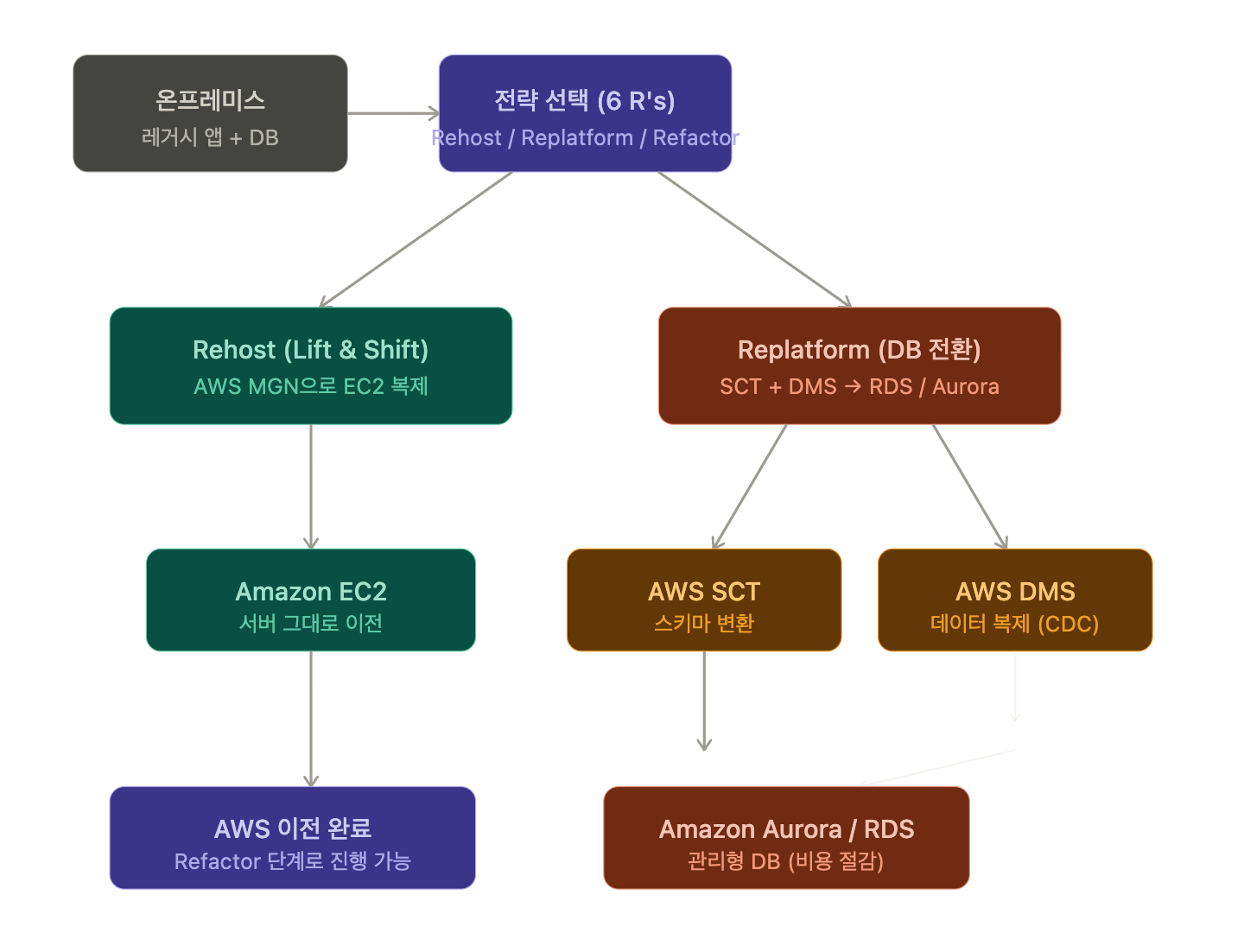
🔍 6 Strategies for AWS Migration — “6 R’s”
This is a cloud migration strategy framework established by AWS and Gartner.
| Strategy | Alias | Description |
| Rehost | Lift & Shift | Move to EC2 as-is. Minimal changes. |
| Replatform | Lift, Tinker & Shift | Maintain core functionality but optimize some parts (e.g., switch to RDS). |
| Refactor | Re-architect | Redesign the architecture itself to be cloud-native. |
| Repurchase | Drop & Shop | Replace with a SaaS solution (e.g., Salesforce). |
| Retire | — | Decommission systems that are no longer needed. |
| Retain | — | Leave as-is for now. |
For legacy systems, approaching with Rehost (Stage 1) → Replatform (Stage 2) is usually more realistic.
🚚 Stage 1: Rehost — Just get it onto EC2
This is the fastest and lowest-risk method. It involves copying the entire server to an EC2 instance.
🛠️ Key Tool: AWS Application Migration Service (MGN)
Formerly known as CloudEndure Migration, it is now integrated into AWS MGN.
How it works:
- Install the MGN agent on the source server.
- Continuously replicate server disks to AWS (real-time synchronization).
- When ready, perform a Cutover — switch traffic.
- Verify booting on the EC2 instance.
# MGN Agent Installation Example (Linux)
sudo ./aws-replication-installer-init.py
  --region ap-northeast-2
  --aws-access-key-id <ACCESS_KEY>
  --aws-secret-access-key <SECRET_KEY>
Pros: Minimal downtime, no code modification required.
Cons: Structural issues (OS dependency, licensing issues) are carried over.
💡 For Windows Server BYOL (Bring Your Own License) issues, it is essential to check AWS licensing policies in advance.
⚙️ Stage 2: Replatform — Half the battle is won by just changing the DB
The biggest pain point of legacy systems is the DB. Oracle, MS SQL, Sybase… licensing costs are enormous.
Switching these to Amazon RDS or Aurora can significantly reduce costs and operational burden.
🗄️ 2 Dedicated DB Migration Tools
1) AWS DMS (Database Migration Service)
This is a tool for migrating actual data.
- Replicates data from source DB to target DB.
- Supports heterogeneous DB migration (e.g., Oracle to Aurora PostgreSQL).
- Supports CDC (Change Data Capture) — enables real-time synchronization even during operation.
소스: Oracle 11g (온프레미스)
    ↓  [DMS Replication Instance]
타겟: Amazon Aurora PostgreSQL (AWS)
In practice, it’s used like this:
# Create DMS Replication Instance (AWS CLI)
aws dms create-replication-instance
  --replication-instance-identifier my-legacy-migration
  --replication-instance-class dms.t3.medium
  --allocated-storage 50
  --region ap-northeast-2
Source DBs supported by DMS:
- Oracle, MS SQL Server, MySQL, PostgreSQL, MongoDB, SAP ASE, IBM Db2, etc.
2) AWS SCT (Schema Conversion Tool)
This is a tool for converting schemas (structures). While DMS migrates data, SCT converts table structures, indexes, stored procedures, triggers, etc.
- Converts Oracle PL/SQL to PostgreSQL PL/pgSQL.
- Identifies and reports unconvertible items (requires manual modification).
- GUI-based tool (free download).
[SCT 워크플로우]
1. 소스 DB 연결 → 스키마 분석
2. 변환 리포트 생성 (호환성 평가)
3. 자동 변환 실행
4. 수동 수정 필요 항목 확인 및 처리
5. 타겟 DB에 변환된 스키마 적용
💡 DMS vs SCT Summary
>
– SCT = Schema (structure) conversion
– DMS = Data replication and transfer
– They are usually used together.
💻 Practical Migration Flow Example
Scenario: Oracle 11g → Aurora PostgreSQL migration:
[1단계] AWS SCT 설치 및 스키마 분석
  → 변환 가능 항목 자동 변환
  → 수동 수정 목록 확인

[2단계] Aurora PostgreSQL 인스턴스 생성
  → RDS 콘솔 또는 Terraform으로 프로비저닝

[3단계] DMS 복제 인스턴스 생성
  → 소스/타겟 엔드포인트 설정

[4단계] 전체 로드(Full Load) 실행
  → 기존 데이터 전체 복제

[5단계] CDC 활성화
  → 실시간 변경사항 동기화 (운영 중 마이그레이션)

[6단계] 애플리케이션 DB 접속 정보 변경
  → 컷오버 및 모니터링
# Simple DMS Endpoint Creation Example (boto3)
import boto3
dms = boto3.client('dms', region_name='ap-northeast-2')
# Source Endpoint (Oracle)
response = dms.create_endpoint(
EndpointIdentifier='source-oracle',
EndpointType='source',
EngineName='oracle',
Username='migration_user',
Password='your_password',
ServerName='192.168.1.100',
Port=1521,
DatabaseName='ORCL'
)
print(response['Endpoint']['EndpointArn'])⚠️ Cautions / Common Mistakes
1. License Trap 🪤 Windows Server, Oracle DB, etc., have different pricing for License Included and BYOL (Bring Your Own License) on AWS. If you migrate without knowing this, costs can explode.
2. Overlooking Network Latency 😵 In on-premise days, the DB and app were in the same IDC, but now they have to traverse the internet (or VPN/Direct Connect). Legacy apps, in particular, often make hundreds of DB queries, so latency differences can be critical.
3. Ignoring SCT Report ⛔ If you ignore items marked “manual conversion required” by SCT and only run DMS — data will be migrated, but procedures may not work.
4. Insufficient Validation Before Cutover Even during CDC synchronization, a phase of testing (parallel operation) by connecting the actual app to the target DB is absolutely necessary. Testing for the first time on cutover day is too late.
5. Inadequate IAM Permission Settings The DMS replication instance must be able to access both the source and target DBs. Carefully check VPC security groups, subnets, and IAM Role settings in advance.
✅ Summary / Conclusion
Migrating legacy systems to AWS is not a one-shot deal. A phased approach is key.
| Stage | Strategy | Tool |
| 1 | Rehost (Lift & Shift) | AWS MGN |
| 2 | Replatform (DB Conversion) | AWS SCT + DMS |
| 3 | Refactor (Optional) | Lambda, ECS, Aurora Serverless, etc. |
To move forward:
- ✅ Practice with AWS Application Migration Service (MGN) official documentation.
- ✅ Download AWS SCT and try converting a sample Oracle schema.
- ✅ AWS DMS Workshop (official free AWS hands-on).
Migrating legacy systems to AWS can be daunting — but with the right tools and a structured approach, it can be done more systematically than you might think. 🚀
Leave a Reply