If ‘what an agent can do’ is a skill, then ‘how it operates’ is a harness.
>

🎯 What this article covers
- OpenAI’s Harness Engineering Experiment — 1 million lines of code, 0 lines written by humans
- Anthropic’s defined long-running agent harness structure
- Fundamental differences between Skill and Harness
- Why these two concepts are confused and how to distinguish them
- How to design a harness in practice
📌 Introduction — Why this distinction has become important
From late 2025 to early 2026, two important articles emerged in the world of AI agents.
One was OpenAI’s “Harness Engineering” post, which summarized an internal experiment where the Codex agent completed approximately 1 million lines of code without human intervention. The other was an engineering blog by Anthropic, introducing a methodology designed to enable agents to consistently continue tasks across multiple context windows using the Claude Agent SDK.
Both articles used the term “Harness.” However, in practice, this concept is often confused and used interchangeably with “Skill.”
Engineers who design or operate agents directly must accurately understand the difference between these two concepts.
🔍 What is Skill?
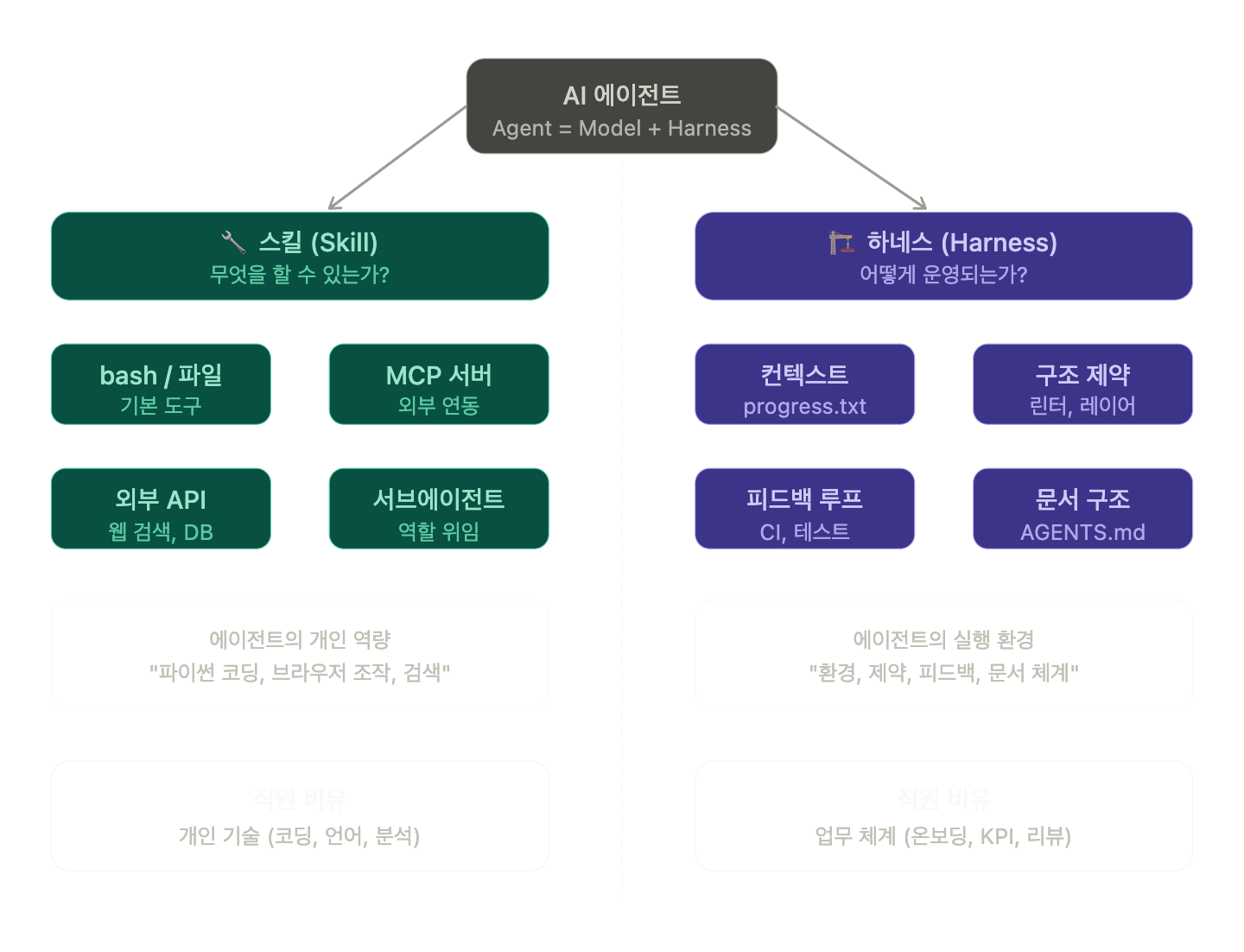
A skill is a unit capability through which an agent interacts with the external world. Simply put, it’s a list of “what an agent can do.”
| Category | Example |
| Basic Tools | bash execution, file read/write, git operations |
| MCP Server | Puppeteer (browser automation), Slack, Google Drive |
| External API | web search, database query, code execution |
| Sub-agent | delegation to a sub-agent specialized in a specific role |
Skills can be seen as an agent’s runtime or peripherals — they define how the model interacts with its environment.
To draw a human analogy, a skill is an individual’s capability. Being able to code in Python, communicate in English, analyze data — these are skills.
🔍 What is Harness?
A harness is the entire execution environment surrounding an agent. An agent harness wraps an AI model and is an infrastructure layer that manages its lifecycle, context, tool access, validation, and safety. If a model generates text, the harness determines what the model sees, what it can do, when it should stop, and what happens when it goes wrong.
A harness is a collection of constraints, tools, documentation, and feedback loops that keep an agent productive and on the right track.
To draw a human analogy again, if a skill is “individual capability,” then a harness is like a company’s onboarding system, code review process, KPIs, and documentation framework. Even an employee with outstanding individual capabilities cannot consistently produce good results without a proper work environment.
🔍 Key Differences Between the Two Concepts
| Category | Skill | Harness |
| Definition | Agent’s individual unit of capability | Execution environment surrounding the agent |
| Question | “What can it do?” | “How does it operate?” |
| Components | Tools, MCP server, API, functions | Constraints, feedback loops, context management, document structure |
| Application Time | When the agent acts | Throughout the agent’s existence |
| Designer | Tool provider (developer) | Environment designer (engineering team) |
| Analogy | Employee’s personal skills | Company’s work system/process |
🔍 OpenAI’s Harness Engineering
In OpenAI’s 5-month internal experiment, engineers did not write code directly. What they designed was an environment that enabled reliable code generation, and that environment was named Harness.
The components of OpenAI’s harness are as follows:
1. AGENTS.md — Knowledge Map acting as a Table of Contents
Instead of a single large document, a short AGENTS.md of about 100 lines is injected into the context and used as a table of contents. The actual knowledge base resides in a structured docs/ directory, where design documents, execution plans, and architecture maps are managed as a single source of truth.
2. Enforced Hierarchical Architecture
Strict dependency layers in the order of Types → Config → Repo → Service → Runtime → UI are enforced with custom linters and structural tests. Agents cannot violate these module boundaries.
3. Drift Detection Agent
A background agent periodically scanned outdated documents and opened cleanup PRs — a structure where agents wrote documentation for agents.
🔍 Anthropic’s Harness — Solving Long-Running Agent Problems
Anthropic’s core challenge was for agents to maintain consistent progress across multiple context windows. Each new session starts with no memory of what happened before. It’s like shift engineers working without handovers.
Anthropic’s solution was to separate roles into two agents:
Initializer Agent
Operates in the initial session, setting up the init.sh script, claude-progress.txt progress log, and initial git commit.
Crucially, the feature list is written in JSON format.
{
  "category": "functional",
  "description": "New chat button creates a fresh conversation",
  "steps": [
    "Navigate to main interface",
    "Click the 'New Chat' button",
    "Verify a new conversation is created"
  ],
  "passes": false
}
JSON was chosen because agents are less likely to improperly modify or overwrite JSON files than Markdown files.
Coding Agent
In all subsequent sessions, it is asked to work on only one feature at a time. At the end of a session, it cleans up the environment by committing to git and updating the progress file, allowing the next agent to quickly grasp the context.
🔍 Agent Failure Modes and Harness Solutions
There were two main failure patterns for agents. First, the problem of trying to implement too much at once, leading to termination in the middle of the context, and the next session inheriting only partially completed code. Second, the problem of declaring all features complete once some were finished.
It is the role of the harness to prevent such failures.
| Failure Pattern | Initializer Agent Response | Coding Agent Response |
| Premature completion declaration | JSON feature list file creation | Check feature list at session start |
| Undocumented progress | Initial git + progress note setup | Update at session start/end |
| Completion without testing | Browser automation tool setup | Manually verify all features then mark as passed |
| Wasted effort exploring app execution methods | init.sh script creation | Execute init.sh at session start |
—
💻 Building a Harness Structure Yourself
Below is an example of a minimal harness structure, referenced from the Anthropic blog.
project/
├── AGENTS.md            # Table of contents for agents (under 100 lines)
├── docs/
│   ├── architecture.md  # System Architecture
│   ├── decisions/       # Design Decision History
│   └── api-contracts/   # Interface Contracts
├── init.sh              # Development server startup script
├── feature_list.json    # Feature list (passes: false → true)
└── claude-progress.txt  # Handover file between sessions
Example of updating feature_list.json feature items:
import json

def mark_feature_done(feature_id: str):
    with open("feature_list.json", "r+") as f:
        data = json.load(f)
        for feature in data["features"]:
            if feature["id"] == feature_id:
                feature["passes"] = True
                feature["completed_at"] = "2026-04-14"
        f.seek(0)
        json.dump(data, f, indent=2)
        f.truncate()
claude-progress.txt writing pattern:
## Session 2026-04-14

### Completed
- [FEAT-012] 로그인 폼 유효성 검사 구현
- [FEAT-013] JWT 토큰 발급 로직 추가

### Current State
- 개발 서버 정상 동작 중 (port 3000)
- 기본 인증 플로우 동작 확인 완료

### Next Priority
- [FEAT-014] 리프레시 토큰 처리 로직 (미시작)
⚠️ Cautions — Common Design Mistakes
The misconception that more skills make a harness stronger
When Vercel reduced the number of tools by 80%, performance actually improved. Production harnesses dynamically restrict available tools based on the task stage. Skill overload confuses agents.
The trap of a single monolithic instruction file
A single large manual becomes a graveyard of outdated rules. Agents cannot distinguish what is still valid, humans stop maintaining it, and the file quietly becomes a harmful impediment.
Context overload
Performance degrades when context utilization exceeds approximately 40%. Filling an agent with tools, verbose documentation, and accumulated history actually reduces performance.
✅ Summary
| Item | Skill | Harness |
| Key Question | What can it do? | How does it operate? |
| Main Components | Tools, MCP, API | Document structure, constraints, feedback loops, context management |
| Design Target | Agent’s capabilities | Agent’s environment |
| Symptoms of Failure | Inability to perform specific tasks | Inconsistent results, drift, loops |
The field of engineering in the age of agents is shifting from writing code to designing environments. The most effective engineers are not the fastest coders, but the best environment designers who understand how to structure repositories so that agents can reason within them.
Skills give agents wings, and a harness is the air traffic control system that ensures those wings fly in the right direction.
Leave a Reply