“Isn’t it just a matter of lifting the server as is to AWS?”
— This is the most common, and most dangerous, misconception heard at migration sites.
>

🎯 What this article covers
- Essential compatibility analysis before migrating legacy apps to the cloud
- Why AWS migration tool (MGN) does not solve kernel issues
- Cases solvable with containers and concrete Dockerfile examples
- Cases where KVM is unavoidable and how to configure AWS Bare Metal
- Final decision tree summarizing judgment criteria
📌 Introduction — “Lifting” and “Running” are different
A common scenario in legacy system migration projects is this: you replicate an entire server to EC2 using AWS MGN (Application Migration Service), but the app doesn’t even start.
The reason is simple. A migration tool is merely a means of transport. Its sole role is to replicate disks block by block and attach them to EC2. Compatibility issues inherent in legacy apps from the kernel 2.x, 3.x era remain even after migration.
Furthermore, if MGN detects an older kernel during the replication process, it automatically replaces it with a Nitro-compatible kernel. While the /boot/vmlinuz-3.x file is replicated, the older kernel lacks the ENA (network) and NVMe (storage) drivers required by the Nitro hypervisor. Consequently, booting with the original kernel becomes impossible.
Therefore, there is a crucial task that must be performed before migration: compatibility analysis.
🔍 Key Question — “Kernel-dependent” or “Userspace-dependent”?
When you hear “this app only runs on kernel 3.x” in the field, you should first be suspicious. In reality, cases that are truly dependent on the kernel itself are rarer than you might think. Most are userspace issues.
"커널 3.x에서만 됩니다"
          ↓ 실제 원인 분석
┌─────────────────────────────────┐
│ glibc 버전 종속       ← 90% 이 케이스 (userspace)
│ .so 라이브러리 종속   ← userspace
│ 런타임 버전 종속      ← userspace
│ 실제 커널 syscall 종속 ← 진짜 커널 문제 (희귀)
└─────────────────────────────────┘
The quickest way to distinguish this is with the following two commands.
# Trace the list of syscalls used by the app
strace -c ./legacy-app

# Check the libraries linked by the app and the required glibc version
ldd ./legacy-app
objdump -p ./legacy-app | grep GLIBC
If version symbols like GLIBC_2.12, GLIBC_2.17 appear in the ldd output, it’s a userspace dependency. In this case, it can be solved with containers.
🐳 Case 1 — Userspace (glibc) dependency: Solved with containers
Understanding the core structure of containers immediately reveals why this works.
┌──────────────────────────────────┐
│  컨테이너 이미지 내부             │
│  ┌────────────────────────────┐  │
│  │  레거시 앱                  │  │
│  │  glibc 2.12 (구버전)        │  │  ← 이미지 안에 격리
│  │  필요한 .so 라이브러리들     │  │
│  └────────────────────────────┘  │
├──────────────────────────────────┤
│  호스트 커널 (5.x / 6.x)         │  ← glibc와 무관
└──────────────────────────────────┘
Containers only share the kernel, and all userspace libraries, including glibc, are independently packaged within the image. Even if the host kernel is 6.x, glibc 2.12 inside the container will still function.
Criteria for selecting older glibc base images
| Base Image | glibc version | Notes |
| centos:6 | 2.12 | Userspace from kernel 2.6 era |
| centos:7 | 2.17 | Most commonly used legacy base |
| ubuntu:14.04 | 2.19 | |
| ubuntu:16.04 | 2.23 | |
| debian:jessie | 2.19 |
###
Practical Example — Containerizing a glibc 2.12 dependent app
First, check the glibc version required by the app.
objdump -p ./legacy-app | grep GLIBC
# Example output:
# GLIBC_2.12
# GLIBC_2.5
If GLIBC_2.12 is the maximum version, use the centos:6 base.
# Containerize a legacy app requiring glibc 2.12 environment
FROM centos:6

# Install necessary dependency libraries (adjust per app)
RUN yum install -y
    libstdc++
    libgcc
    openssl
    && yum clean all

# Copy app binary
COPY ./legacy-app /opt/app/legacy-app
RUN chmod +x /opt/app/legacy-app

# Copy configuration files if any
COPY ./config /opt/app/config

WORKDIR /opt/app
CMD ["./legacy-app"]
If additional libraries are needed — Direct .so packaging
If the app directly depends on specific .so files that cannot be installed via a package manager, you can copy the files directly.
FROM centos:7

# Directly copy required .so files from the existing server
COPY ./libs/liblegacy.so.1.2.3 /usr/lib64/liblegacy.so.1.2.3
RUN ldconfig  # Update dynamic linker cache

COPY ./legacy-app /opt/app/legacy-app
RUN chmod +x /opt/app/legacy-app

CMD ["/opt/app/legacy-app"]
Container operation verification
# Build image
docker build -t legacy-app:v1 .

# Verify library links with ldd inside the container
docker run --rm legacy-app:v1 ldd /opt/app/legacy-app

# Actual execution test
docker run --rm legacy-app:v1

# Verify syscall normal operation with strace (for debugging)
docker run --rm --cap-add SYS_PTRACE legacy-app:v1
  strace -c /opt/app/legacy-app
Up to AWS ECS deployment
Once containerization is complete, upload to ECR and deploy with ECS.
# ECR login
aws ecr get-login-password --region ap-northeast-2 |
  docker login --username AWS
  --password-stdin <account-id>.dkr.ecr.ap-northeast-2.amazonaws.com

# Tag and push image
docker tag legacy-app:v1
  <account-id>.dkr.ecr.ap-northeast-2.amazonaws.com/legacy-app:v1
docker push
  <account-id>.dkr.ecr.ap-northeast-2.amazonaws.com/legacy-app:v1
🖥️ Case 2 — True kernel dependency: When KVM is unavoidable
The following cases cannot be solved with containers.
- Apps requiring direct loading of kernel modules (insmod)
- Apps directly calling removed syscalls in modern kernels
- Apps accessing /dev, /proc in a kernel version-specific hardcoded manner
- Kernel 2.x dependency (Nitro hypervisor itself requires 4.x+ drivers)
In these cases, EC2 Bare Metal + KVM nested virtualization is the standard approach.
┌─────────────────────────────────┐
│      EC2 Bare Metal             │
│   (i3.metal, m5.metal 등)       │
│                                 │
│  ┌───────────────────────────┐  │
│  │  Host OS (Amazon Linux 2) │  │
│  │  KVM + QEMU               │  │
│  │  ┌─────────────────────┐  │  │
│  │  │  Guest VM            │  │  │
│  │  │  커널 3.x 직접 설치   │  │  │
│  │  │  레거시 앱 실행       │  │  │
│  │  └─────────────────────┘  │  │
│  └───────────────────────────┘  │
└─────────────────────────────────┘
While regular EC2 (Nitro VM) does not allow kernel changes, Bare Metal instances provide direct hardware access without a hypervisor, allowing KVM to be run directly.
# Install KVM on Amazon Linux 2
yum install -y qemu-kvm libvirt libvirt-python libguestfs-tools
systemctl enable --now libvirtd

# Check KVM support
lscpu | grep Virtualization

# Start VM with legacy OS image
qemu-system-x86_64
  -enable-kvm
  -m 4096
  -cpu host
  -drive file=/var/lib/libvirt/images/legacy.qcow2,format=qcow2
  -net nic -net user
However, Bare Metal instances are considerably expensive.
| Instance | Specs | On-demand cost |
| m5.metal | 96 vCPU, 384GB | Approx. $5/hr |
| i3.metal | 72 vCPU, 512GB | Approx. $4.99/hr |
It is necessary to evaluate whether this cost is reasonable for a single legacy app. In the long run, app porting is often more economical.
⚠️ Cautions — Common Mistakes
1. Deciding “Let’s go with KVM” without strace/ldd analysis There are surprisingly many cases where VMs are configured for userspace dependencies. Analysis must come first.
2. Lack of awareness of CentOS 6 base image EOL CentOS 6 reached EOL in November 2020. Since there are no security patches, it is necessary to apply the principle of minimizing external exposure and operating within an internal network.
3. Skipping glibc version symbol verification Don’t just rely on ldd. You need to verify symbol versions with `objdump -p | grep GLIBC` to accurately select the base image.
4. Misconception that AWS MGN solves compatibility issues MGN is a copying tool. Compatibility issues still need to be resolved manually.
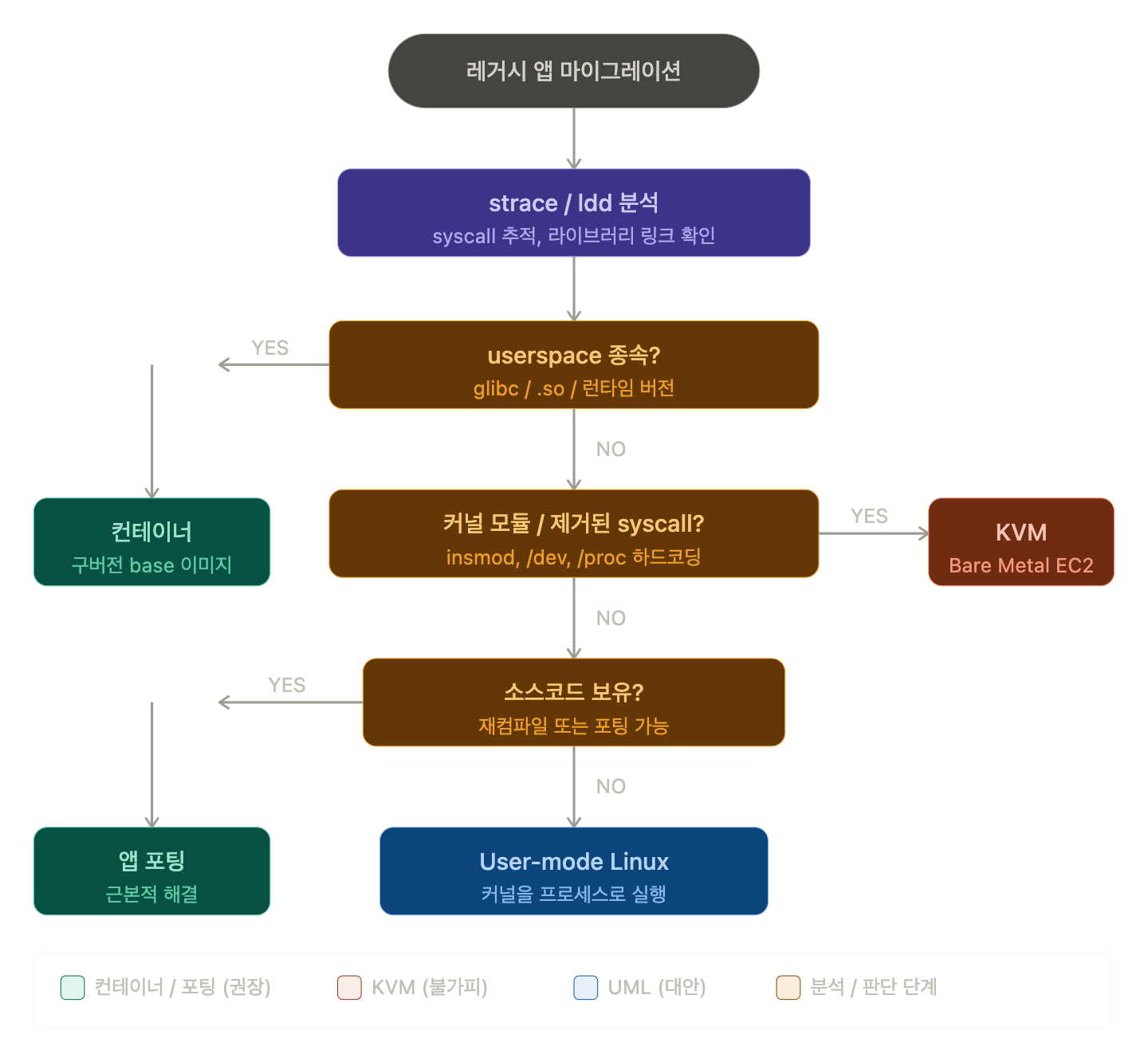
✅ Final Decision Tree
레거시 앱 클라우드 이전
          ↓
   strace / ldd 분석
          ↓
userspace 종속?
(glibc, .so, 런타임)
   ↓ YES
   컨테이너 (구버전 base 이미지) ✅
          ↓ NO
커널 모듈 / 제거된 syscall?
   ↓ YES
   EC2 Bare Metal + KVM ✅
          ↓ NO
소스코드 있음?
   ↓ YES
   재컴파일 / 포팅 (근본 해결) ✅
          ↓ NO
User-mode Linux (UML) 검토 △
🏁 Summary
The core of legacy migration is that there is no migration without analysis.
When you hear “the kernel version must match,” don’t immediately jump to VM configuration. Instead, use strace and ldd to first identify the nature of the dependency. In reality, containers solve far more cases, and they come with much lighter costs and operational burdens.
If it’s a true kernel-dependent case requiring kernel modules or removed syscalls, KVM is unavoidable, but even then, keep in mind that app porting is the correct long-term solution.
Leave a Reply