When looking into Claude’s paid plans, the options can be more complex than expected. There are personal Pro and Max plans, and for organizations, the Team plan offers both Standard and Premium seats. At first glance, Team Standard might seem similar in price to Pro, leading one to wonder, “If I use it a lot, wouldn’t it be better to use Team even if I’m alone?”
To get straight to the point, Max is the more natural choice for individuals with high usage, while Team is better suited for two or more people who need to share common business knowledge and management systems. This is because Team is not an upgraded personal plan from Pro, but an organizational product that includes shared workspaces and central management features.
This article compares Pro, Max, and Team based on Anthropic’s official pricing and help documentation as of July 31, 2026. Displayed prices do not include taxes, and the actual KRW billing amount may vary depending on the exchange rate at the time of payment and credit card company policies.

First, the Conclusion: Which Plan is Right for Whom?
The quickest selection criteria are the number of users and the need for management.
- If you use it regularly alone, Pro
- If you use it intensively all day alone and hitting limits directly impacts your productivity, Max 5x or Max 20x
- If two or more people need to manage projects, internal knowledge, and payments within a single organizational space, Team Standard
- For team members within Team who use Claude Code and complex analysis very frequently, Team Premium
In other words, the criterion for choosing Team is not “high individual usage” but rather “the need for organizational ownership and control.”
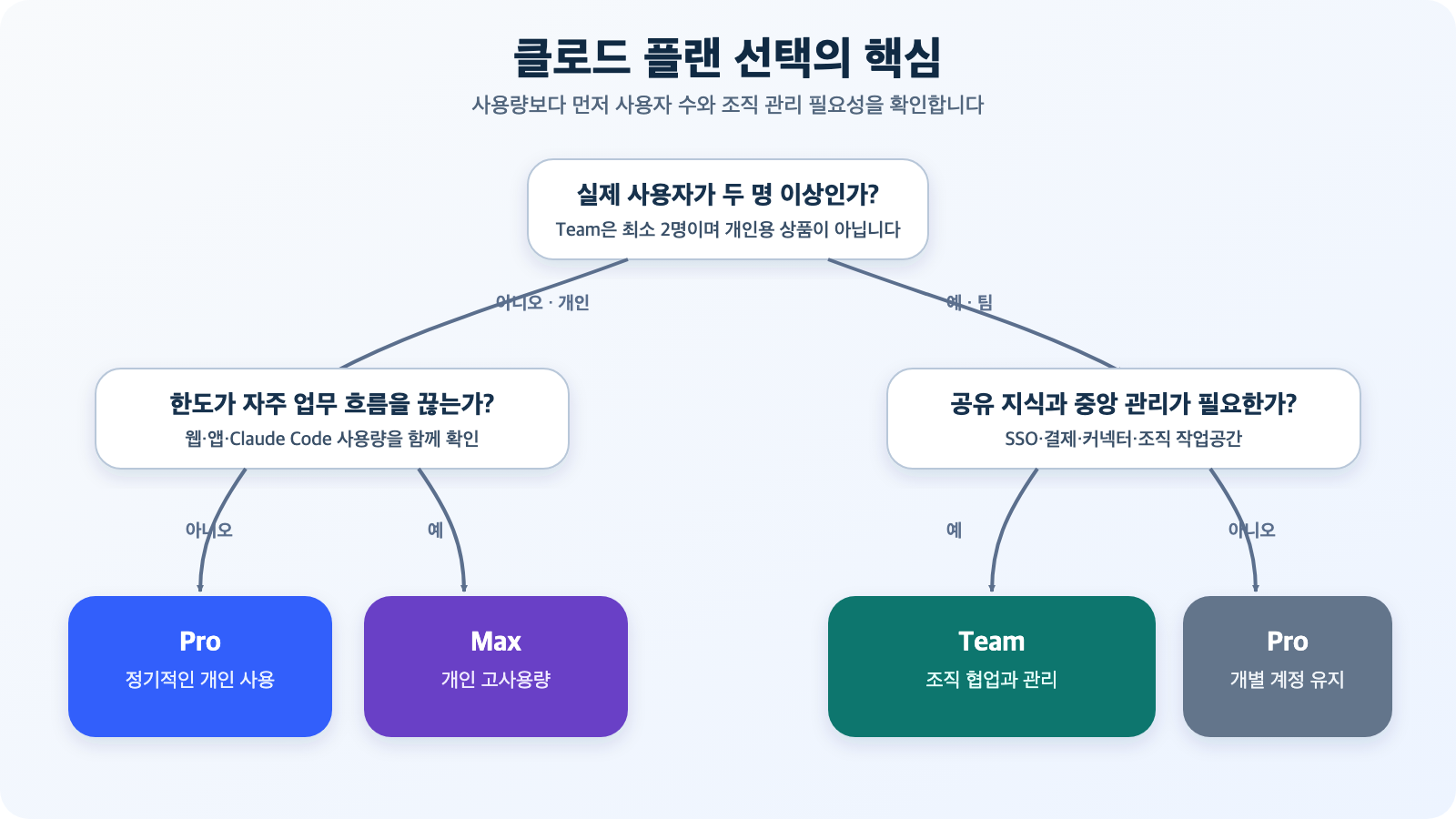
Figure: Plan selection flow based on number of users, usage intensity, and organizational management needs · Reconstructed based on Claude Pricing Guide and Choose a Claude plan
Claude Pricing as of 2026
Here’s a summary of the key points from Anthropic’s official pricing table.
| Plan | Price | Payment Method | Usage Basis | Primary Target |
| — | — | — | — | — |
| Pro | $20/month or $200/year | Monthly/Annually | Standard personal usage | Individuals who use it regularly |
| Max 5x | $100/month | Monthly | 5x Pro’s usage per session | Individuals who use Claude frequently |
| Max 20x | $200/month | Monthly | 20x Pro’s usage per session | Individuals who do most of their work with Claude |
| Team Standard | $25/seat/month or $20/seat/month (annual equivalent) | Monthly/Annually | More usage than Pro | Teams of 2-150 people |
| Team Premium | $125/seat/month or $100/seat/month (annual equivalent) | Monthly/Annually | 5x Standard’s usage | High-usage members within a team |
Pro’s annual payment is $200 upfront, which translates to approximately $16.67 per month. For Team Standard, annual payment is $20 per seat per month, and for Team Premium, it’s $100 per seat per month. Team requires a minimum of 2 users, so the minimum cost for two Standard seats is $50 per month for monthly billing, or $480 per year for annual billing.
Team allows for a mix of Standard and Premium seats. For example, general users can be assigned Standard seats, while developers who frequently use Claude Code and perform complex analysis daily can be assigned Premium seats. The ability to avoid assigning the most expensive seat to all members is important for actual cost management.
Prices may change, so it is always safer to reconfirm on the official Claude pricing page just before subscribing.
How is Team Different from Buying Multiple Pro Accounts?
Even if you purchase Pro accounts for multiple individuals, each remains a personal account. While a billing manager can collect receipts, organizational policies, data ownership, and member management are not unified under a single boundary.
When you subscribe to Team, a separate Claude organization is created. Personal Free, Pro, and Max accounts are distinct from organizational accounts, and users can switch between them. While conversations, projects, files, and memories from a personal account can be transferred to a Team organization, according to official help documentation, content moved to an organization cannot be reverted to a personal account.
| Comparison Item | Personal Pro·Max | Team |
| — | — | — |
| Basic Unit | Personal account | Organization and seats |
| Minimum Users | 1 person | 2 people |
| Billing Management | Individual billing | Centralized billing and management |
| Workspace | Focused on personal projects | Shared workspace and project collaboration |
| Internal Knowledge Connection | Connected by individuals | Organizational connectors and enterprise search |
| SSO | Not applicable | Provided |
| Connector Control | Focused on individual settings | Admin controls remote/local connectors |
| Model Training with Content | Consumer product policies and opt-in settings apply | Not used for training by default |
| Account Data Management | Managed by individuals | Primary Owner of the organization manages Work accounts |
The value of Team is not fully apparent if evaluated solely by the message limit of a single seat. It is more accurate to view it as a product that reduces recurring management costs in operational processes, such as member onboarding/offboarding, connecting company data, integrated billing, and applying organizational policies.
Differences Between Team Standard and Premium
The two seat types share the same functional foundation. They both include Claude Code and Claude Cowork, and offer shared workspaces and central management features. The biggest difference is the included usage.
Anthropic states that Standard provides more usage than Pro, and Premium offers 5 times the usage of Standard. However, it does not provide fixed numbers like “exactly how many messages per day.”
Available usage depends on the following factors:
- Cumulative length of conversations and size of attached files
- Selected model
- Use of features like expanded reasoning and research
- Amount of code Claude Code reads and processes
- Usage consumed across web, desktop, mobile, and Claude Code combined
Claude’s paid plans apply both a 5-hour rolling session limit and a weekly limit. If the same person uses web chat and Claude Code concurrently, usage is deducted from the same plan’s allowance, not from separate free pools. Therefore, it’s more important to measure how often limits interrupt the actual workflow rather than “how many messages can be sent.”
It is more reasonable to start with Standard and then upgrade only some seats to Premium based on usage screens and actual interruption frequency, rather than configuring everyone with Premium from the outset.
Max and Team Premium both offer 5x usage, but what’s the difference?
Max 5x is described as 5 times Pro’s usage, and Team Premium as 5 times Team Standard’s usage, so the numbers might seem similar. However, they should not be compared as the same product because their base plans and product objectives are different.
Max is a personal plan designed for individuals to perform longer tasks without interruption. Its core features are higher output limits, priority access during peak hours, and early access to advanced features.
Team Premium is a seat that provides more capacity to high-usage members within an organizational boundary. It is combined with the organization’s centralized billing, SSO, shared projects, connector control, and default non-training policy.
Therefore, if a developer uses Claude Code extensively alone, Max is simpler. If company code and documents are handled under the same policy with team members, Team Premium is appropriate. Misunderstanding Team as a discounted version of personal Max based solely on usage multipliers will lead to a mismatch in subscription purpose.
Comparing Actual Costs
Let’s consider a scenario with two users.
| Configuration | Monthly Billing Basis | Monthly Equivalent for Annual Billing | Features |
| — | — | — | — |
| 2 Pro users | $40 | Approx. $33.33 | Cheapest, but two individual accounts |
| 2 Team Standard users | $50 | $40 | Includes organizational space and central management |
| 2 Max 5x users | $200 | No separate annual discount indicated | Both are high-usage individuals |
| 1 Team Standard user + 1 Premium user | $150 | $120 | Mix of regular and high-usage users |
For two users, the difference between Pro and Team Standard is $10 for monthly billing, and approximately $6.67 when annualized. This difference essentially buys organizational space, centralized billing and management, SSO, connector control, and a default non-training policy.
Conversely, if two people are performing separate personal tasks and not sharing company data, Team’s management features might not provide significant value. In this case, two Pro accounts would be simpler and cheaper.
Strengths of the Team Plan
1. Organizational Workspace is Separated
If work conversations and files continue to accumulate in personal accounts, ownership becomes ambiguous upon employee departure or account changes. Team provides a boundary as an organizational Work account, and the Primary Owner manages that account and its data.
This does not mean that administrators routinely read all conversations. However, official help documentation states that the Primary Owner can request access to user data, including conversations, uploaded files, and usage patterns, through data export. This point should be transparently communicated to members, and company policies should be established together.
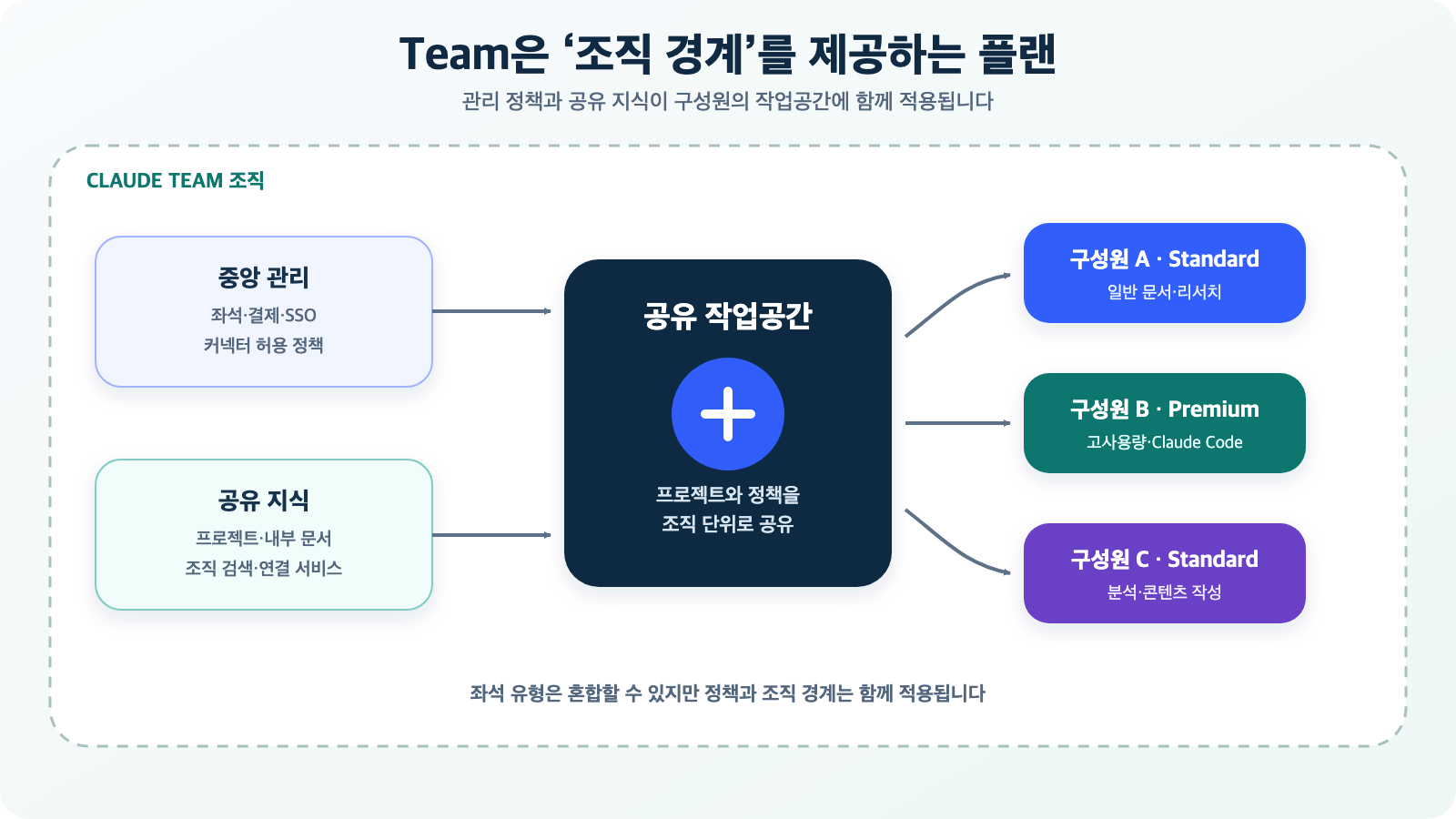
Figure: Structure connecting central management, shared knowledge, and member workspaces in a Team organization · Reconstructed based on Updates to Claude Team and Who owns and manages the data of my team?
2. Easy Shared Projects and Internal Knowledge Connection
Instead of team members repeatedly uploading the same documents individually, they can use context and materials together in shared projects. With integration features like Microsoft 365 and organizational search, a workflow can be created where Claude references approved internal information.
However, connecting does not automatically complete permission design. Access rights of existing document systems, recovery of departed employee accounts, and the scope of external connector allowances must be managed together.
3. Centralized Billing and Seat Management are Possible
It is easier for an organization to manage seats and costs at once than to reconcile subscription fees paid by individual cards each month. The ability to assign a mix of Standard and Premium seats to members with different work intensities is also advantageous for cost optimization.
4. Work Data is Not Used for Model Training by Default
Anthropic explicitly states that Team content is not used for model training by default. This is a significant policy difference from personal plans for organizations handling business data.
However, “not used for training” does not automatically mean all security requirements are met. Personal information, trade secrets, and regulated data should only be entered after confirming the company’s classification policies, contractual terms, and retention policies.
Drawbacks and Precautions of the Team Plan
1. Not for Individual Users
Team requires a minimum of 2 users and is not designed for individual use. If you want to increase your usage alone, it’s better to compare with Max rather than forcing a Team seat configuration.
2. Company Email and Allowed Domain Required
The organization creator must use a business email. Public domains like Gmail, Yahoo, or Hotmail cannot be used for the creator account. When inviting other members, the organization’s allowed email domain is also required.
3. Account Migration Between Personal and Organizational Accounts Requires Caution
Subscribing to Team does not simply overwrite an existing personal account; it creates a new organization. Personal data transferred to an organization cannot be reverted, so personal and work conversations should be separated before migration.
4. API Usage Fees Are Not Included
Claude subscriptions like Pro, Max, and Team, and the Claude API Console are separate products. Paying for Team does not automatically include API key and token usage fees for service development. If you plan to build in-house chatbots or automation systems using the API, you need to budget for Console accounts and API costs separately.
5. Security Features of Team and Enterprise Are Not Identical
While Team includes features like SSO, central management, and connector control, advanced controls such as granular role-based access control, SCIM, audit logs, Compliance API, custom data retention, and IP whitelisting are part of the Enterprise tier.
One should not assume that “since it’s for company use, Team will have all compliance features.” If there are requirements for auditing, retention, or automatic account recovery, you should first compare the Team feature list with the Enterprise feature list.
Evaluation from a Claude Team Plan Review Perspective
The core of “Claude Team Plan reviews” found in searches lies more in the operational experience than in answer quality. If the same model can be used, Claude doesn’t suddenly become smarter based on the plan; rather, usage and collaboration/management conditions change.
The positive points are clear. After the 2026 price reduction, the price difference between Standard and Pro is small, and if two or more people are genuinely collaborating, the cost-effectiveness of shared workspaces and management features has improved. Especially when developers and non-developers use Claude Code, document analysis, and research together, providing a single organizational boundary is a strong advantage.
On the other hand, if you subscribe simply to increase usage, your expectations might not be met. A minimum number of users and a company domain are required, and advanced auditing and provisioning features remain in Enterprise. For individual high-usage users, Max is a more direct choice.
Checklist Before Subscribing
Answering the following questions will make your choice easier.
- Are there actually two or more users?
- Do you need a workspace owned and managed by the company, not a personal account?
- Do team members need to use projects and internal documents together?
- Do you need SSO, centralized billing, and connector control?
- Have you distinguished between those for whom Standard usage is sufficient and those who need Premium?
- Have you decided whether to migrate personal account data to the organization?
- Have you factored in that API usage is billed separately?
- Do you need to compare with Enterprise due to requirements for SCIM, audit logs, retention policies, or IP restrictions?
If most answers to questions 1 through 4 are “Yes,” then Team Standard is a good starting point. If the answer to question 1 is “No,” then Pro or Max is more suitable. If the answer to question 8 is “Yes,” then you should not decide based on Team alone and need to review Enterprise requirements.
Final Conclusion
Claude Team is not merely a plan that offers slightly more usage than Pro. It is a product designed to transform personal accounts into an organizational workspace and to manage shared knowledge, members, billing, and policies in one place.
If two or more people handle company data together, the additional cost of Team Standard is not significant, and the operational benefits are clear. By assigning only high-usage members within the team to Premium, costs can also be controlled.
Conversely, for individuals using it alone, Team is not the optimal workaround. For general use, Pro is simpler, and for high usage, Max is more straightforward.
The key is to choose Pro/Max to boost individual productivity, and Team to manage organizational knowledge and accounts together.
Prices and features may change, so please reconfirm with the official documents below before making an actual payment.
Leave a Reply