When collecting logs in an AWS environment, most people initially use CloudWatch Logs.
This is because it’s easy to set up, integrates naturally with AWS services, and features like alarms and Logs Insights can be used immediately.
However, the story changes when log volumes start to increase.
Specifically, if all high-volume logs, such as application logs, container logs, web server access logs, VPC Flow Logs, and WAF logs, are sent to CloudWatch Logs, the cost burden can quickly become substantial.
This is precisely why you hear people in the field say, “We use OpenSearch separately because of CloudWatch log costs.”
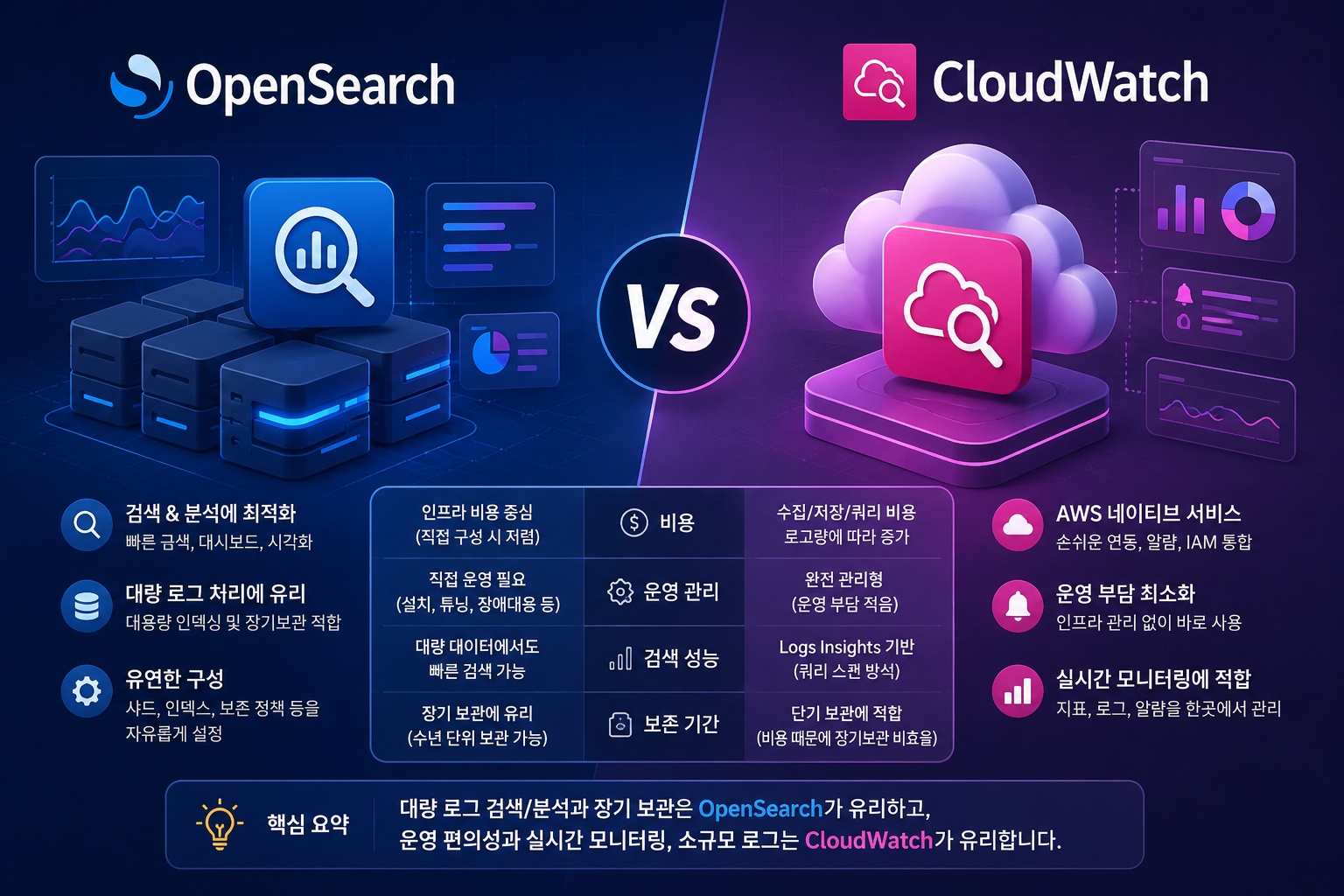
What Feels Expensive in CloudWatch
Many people only consider CloudWatch costs as “storage costs.”
However, the part that actually becomes a significant burden is usually the ingestion cost when logs are first sent to CloudWatch Logs.
In other words, as soon as logs enter CloudWatch Logs, GB-based billing occurs.
Subsequently, if these logs are forwarded to other services like Lambda, Firehose, OpenSearch, or S3, additional downstream costs may be incurred.
The structure looks like this:
애플리케이션 로그
  → CloudWatch Logs
  → Subscription Filter / Lambda / Firehose
  → OpenSearch 또는 S3
In this structure, you pay the CloudWatch Logs ingestion cost once, and then incur costs for other services again.
Therefore, from a cost optimization perspective, routing everything through CloudWatch is not always the best choice.
Hence, a structure for sending directly to OpenSearch emerges
In high-volume log environments, the following structures are often considered:
EC2 / ECS / EKS / 온프레미스
  → Fluent Bit / Vector / Logstash
  → OpenSearch
Alternatively, considering long-term storage, it can be divided as follows:
최근 검색용 로그
  → OpenSearch

장기 보관용 로그
  → S3
This way, not all logs need to be sent to CloudWatch Logs.
CloudWatch is used primarily for essential operational metrics, alarms, and some core logs, while high-volume search logs are separated and centered around OpenSearch or S3.
However, Amazon OpenSearch Service is also expensive
The problem is that Amazon OpenSearch Service is not a cheap service either.
OpenSearch is fundamentally a cluster structure that runs continuously.
Considering data nodes, master nodes, storage, snapshots, and multi-AZ configurations, the fixed costs are quite substantial.
If log volumes are not high, operating a managed OpenSearch Service might feel even more expensive than CloudWatch.
Therefore, some organizations choose to install and operate OpenSearch directly on EC2 instances instead of using Amazon OpenSearch Service.
Is Self-Hosting OpenSearch on EC2 Really Cheaper?
Looking solely at infrastructure costs, self-hosting on EC2 might appear cheaper.
For example, you only bear the costs of EC2 instances and EBS volumes instead of managed service fees.
However, there are hidden costs involved.
With a self-hosted approach, you must directly manage the following:
- OpenSearch 버전 관리
- 보안 패치
- JVM 튜닝
- 샤드 설계
- 인덱스 rollover
- 디스크 워터마크 관리
- 장애 복구
- 스냅샷 백업
- TLS / 인증 / 권한 설정
- 노드 증설 및 축소
- 멀티 AZ 구성
If you have sufficient operational staff and experience in managing log platforms, self-hosting on EC2 can lead to cost savings.
However, considering the operational burden, it’s difficult to simply conclude that “EC2 is cheaper.”
Realistic Log Architecture
In practice, rather than processing all logs with a single service, they are usually divided according to their purpose.
CloudWatch
  → 알람, 주요 운영 로그, AWS 네이티브 모니터링

OpenSearch
  → 최근 로그 검색, 장애 분석, 대시보드

S3
  → 장기 보관, 감사 대응, 저비용 아카이빙
This structure is good for balancing cost and operational convenience. For example, logs from the last 30 or 90 days are stored in OpenSearch for quick searching, and older logs are moved to S3 for long-term archival.
CloudWatch can be optimized by not putting all logs into it, but rather keeping only essential logs needed for alarms and operations.
Which Choice is Right?
If log volumes are low and AWS native operational convenience is important, CloudWatch Logs is the simplest option.
It has low operational overhead and easy integration with alarms and dashboards.
However, if log volumes grow to TBs, a structure that puts all logs into CloudWatch Logs can lead to significant cost burdens.
In such cases, it’s advisable to consider a structure that uses OpenSearch or S3 in conjunction.
However, OpenSearch is not free either.
Managed OpenSearch Service offers good operational convenience but comes with high costs, while self-hosting on EC2 can reduce infrastructure costs but increases operational responsibility.
Conclusion
The statement “CloudWatch is expensive, so we use OpenSearch” is true to some extent.
However, more accurately, it should be “a structure that puts all high-volume logs into CloudWatch Logs can become expensive, so search logs and long-term archival logs are separated.”
Furthermore, the idea that “OpenSearch Service is expensive, so we self-host OpenSearch on EC2” can also arise in practice.
However, this choice is only feasible when you have sufficient operational staff and incident response capabilities.
The most realistic conclusion is as follows:
CloudWatch는 운영 알람과 핵심 로그 중심으로 사용하고,
OpenSearch는 최근 로그 검색과 분석용으로 사용하며,
S3는 장기 보관과 감사 대응용으로 분리하는 것이 좋다.
A log platform is not just about efficient collection.
It requires considering costs, search performance, retention period, incident response, security, and operational staff.
Therefore, it’s necessary to start simply with CloudWatch, but as log volumes grow, a strategy of separating CloudWatch, OpenSearch, and S3 by purpose becomes essential.
Leave a Reply