When automating Kubernetes workflows, you’ll eventually notice countless completed Pods accumulating in your cluster. When you start wondering, “Do I have to delete these one by one?”, you’ll encounter two key settings: ttlStrategy and podGC.
Today, we’ll delve into the usage and crucial differences between these two features that help keep resources tidy in Argo Workflows! 🚀
Hello! When operating Kubernetes-based workflows, you quickly realize how important resource management is. Especially in environments where thousands of Jobs are running, if completed resources aren’t cleaned up in time, the API server can become overloaded and management becomes impossible.
Argo Workflows provides two cleanup tools for this purpose. Let’s take 10 minutes to fully understand the differences between them!
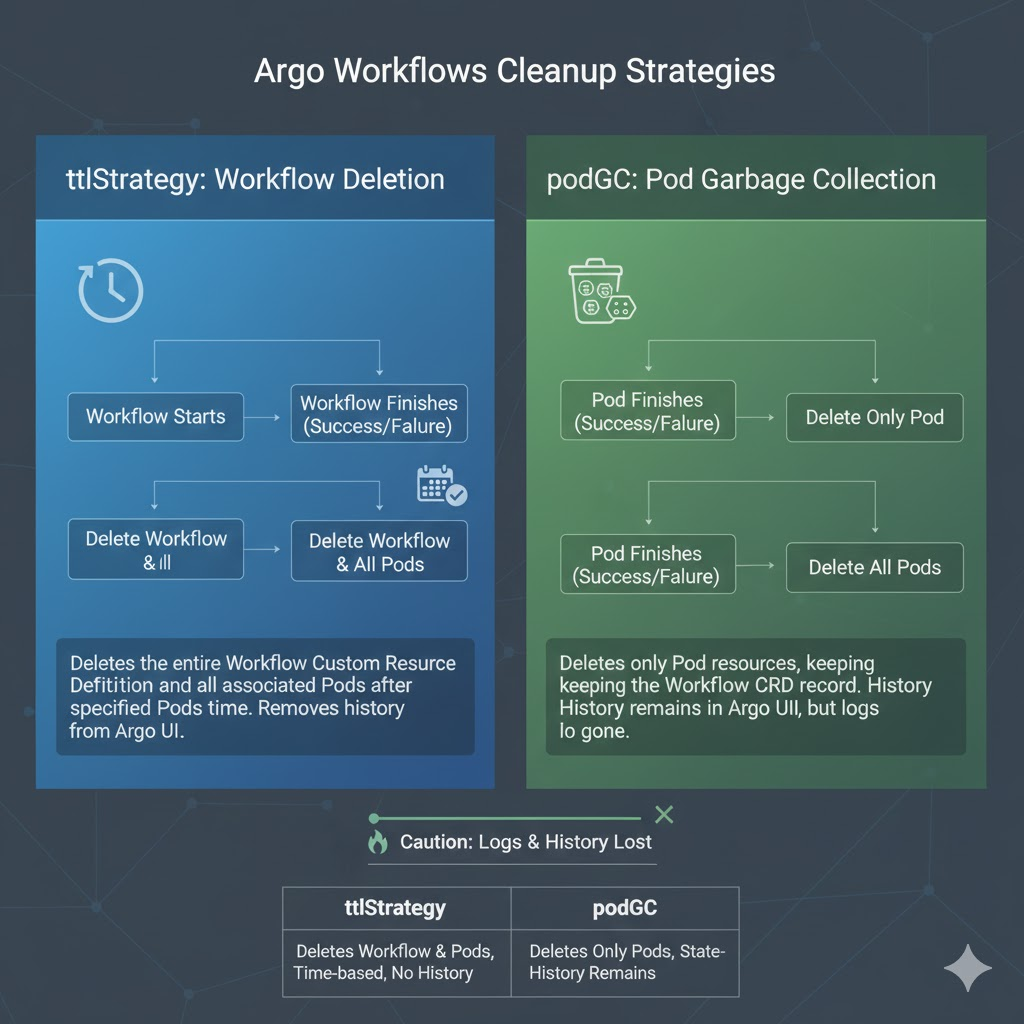
1. ttlStrategy: Deleting the Workflow Itself ⏳
ttlStrategy (Time To Live Strategy) determines when to delete the Workflow resource itself. When a Workflow is deleted, its associated Pods are also deleted.
✅ How to Use
ttlStrategy offers two options based on the Workflow’s outcome:
- secondsAfterCompletion: Deletes N seconds after completion, regardless of success or failure.
- secondsAfterSuccess: Deletes N seconds after successful completion only.
- secondsAfterFailure: Deletes N seconds after failure only (often set longer for debugging purposes in case of failure).
📝 Code Example and Explanation
YAML
apiVersion: argoproj.io/v1alpha1
kind: Workflow
metadata:
  generateName: ttl-strategy-example-
spec:
  entrypoint: main
  # Set automatic deletion strategy after workflow completion
  ttlStrategy:
    secondsAfterSuccess: 300 # Delete workflow resource 5 minutes (300 seconds) after success
    secondsAfterFailure: 3600 # Delete 1 hour (3600 seconds) after failure for debugging

  templates:
  - name: main
    container:
      image: alpine:latest
      command: [sh, -c]
      args: ["echo 'Hello, Clean World!'; sleep 10"]
2. podGC: Deleting Only Specific Pods 🗑️
podGC (Pod Garbage Collection) is a feature that leaves the Workflow resource intact but cleans up only the individual Pods that constituted the Workflow.
✅ How to Use
podGC is controlled via a deletion policy (strategy):
- OnPodCompletion: Deletes the Pod immediately after it successfully finishes.
- OnPodSuccess: Deletes only successful Pods.
- OnWorkflowCompletion: Deletes all Pods when the entire Workflow completes (most recommended).
- OnWorkflowSuccess: Deletes all Pods only when the Workflow successfully completes.
📝 Code Example and Explanation
YAML
apiVersion: argoproj.io/v1alpha1
kind: Workflow
metadata:
  generateName: pod-gc-example-
spec:
  entrypoint: main
  # Pod garbage collection settings
  podGC:
    strategy: OnWorkflowCompletion # When the workflow finishes, delete only the Pods regardless of the outcome

  templates:
  - name: main
    container:
      image: alpine:latest
      command: [echo, "Pods will be deleted, but Workflow CRD stays!"]
3. Key Differences: What’s Different? ⚖️
I’ve summarized the most confusing aspects in a table.
| Category | ttlStrategy | podGC |
| — | — | — |
| Deletion Target | Entire Workflow resource (including Pods) | Only Pod resources |
| Argo UI Visibility | Record disappears from UI after deletion | Record remains, but logs/results are not viewable |
| Main Purpose | Prevent Kubernetes API server overload and complete cleanup | Clean up node resources while preserving Workflow records |
| Time Setting | Detailed control possible in seconds | Operates immediately based on state |
—
4. Practical Operation Tips: When to Use Which? 💡
Scenario A: Build/Deployment Environment where Records are Important
In this case, use podGC. Keep Workflow records in the Argo UI to check “when a deployment succeeded,” and delete only Pods to keep the cluster clean.
Scenario B: Short Batch Jobs Executing Tens of Thousands of Times
In this case, use ttlStrategy. If even records become too numerous, Argo CD or the Kubernetes dashboard will slow down. It’s best to completely delete records after a certain period.
Scenario C: The Most Perfect Combination (Hybrid)
The most recommended approach is to use both!
- podGC: Delete Pods immediately with OnWorkflowCompletion, and
- ttlStrategy: Delete records after 24 hours with secondsAfterCompletion: 86400.
5. Precautions and Limitations ⚠️
- Difficulty in Checking Logs: If Pods are deleted by podGC, you cannot view logs with the kubectl logs command. Be sure to integrate archiving (Artifact Repository) settings or an external logging system (ELK, Loki, etc.).
- Resource Persistence: If ttlStrategy is not set, Workflow resources will remain permanently until manually deleted by the user. This is a major cause of increased API server memory usage.
6. Conclusion 🏁
- Want to delete records too? → ttlStrategy
- Want to keep records but clean up only Pods? → podGC
By combining these two features effectively, the ‘cleanliness’ of your Kubernetes cluster will be completely transformed. Set up the optimal cleanup strategy according to the nature of your workflows! 🛠️
Leave a Reply