resources-finalizer.argocd.argoproj.io is one of the most important features to handle in Argo CD’s Application resources.
I will detail in a blog post format whether this feature is inherent to the Application resource itself, and why it is essential to understand it in an operational environment. 🚀
Have you ever been puzzled when using Argo CD, deleting an application, only to find that the Pods or Services within it remained? Or, conversely, have you had the chilling experience of deleting an application and seeing all cluster resources vanish in an instant?
At the heart of all these behaviors is the setting resources-finalizer.argoproj.io. Today, let’s master the true nature of this feature and its correct usage!
1. What is a Finalizer? 🤔
In Kubernetes, a Finalizer is like a “pre-deletion checklist.” If a Finalizer is attached to a resource, even if a user issues a delete command, it won’t disappear immediately; instead, its deletion will be pending until specific conditions (clean-up tasks) are completed.
When you register this Finalizer to an Argo CD Application resource, it’s like instructing the Argo CD controller as follows:
When deleting this Application, take responsibility for deleting all managed sub-resources as well!
2. Why is this feature necessary? (Cascade Deletion) 🌊
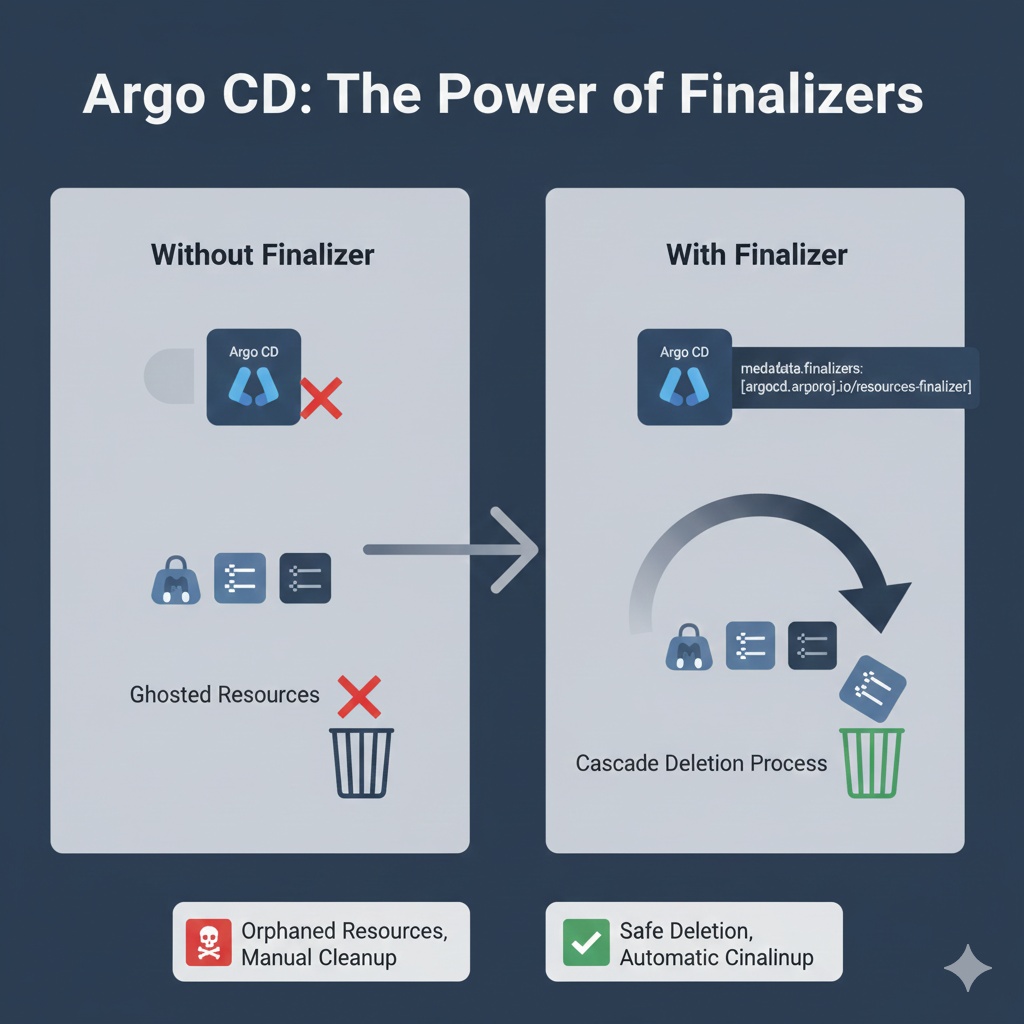
By default, when you delete an Application resource in Argo CD, only the Application configuration file itself is deleted. The actual resources deployed in the cluster become ‘orphaned’ and remain as they are.
However, using resources-finalizer activates
Cascade Deletion
.
- Without Finalizer: Application deletion → Only Argo CD configuration deleted → Actual infrastructure resources remain (messy 🧹)
- With Finalizer: Application deletion → Argo CD starts deleting actual resources → All resources deletion confirmed → Application finally deleted (clean ✨)
3. Practical Code: How to Apply? 💻
Simply add it to the finalizers field of the Application manifest.
📝 Application YAML Example
YAML
apiVersion: argoproj.io/v1alpha1
kind: Application
metadata:
  name: my-safe-app
  namespace: argocd
  finalizers:
    # This line is key!
    # Instructs to delete sub-resources along with the Application deletion.
    - resources-finalizer.argocd.argoproj.io
spec:
  project: default
  source:
    repoURL: https://github.com/my-repo/manifests.git
    targetRevision: HEAD
    path: app-folder
  destination:
    server: https://kubernetes.default.svc
    namespace: my-app-ns
4. Operational Considerations and Tips (Best Practices) 🚨
① Resource Deletion Order and Dependencies
When a Finalizer is active, Argo CD attempts deletion by considering resource dependencies. However, sometimes specific resources (e.g., Namespace) might get stuck in a Terminating state and fail to delete, which can also cause the Application resource to get stuck and not delete.
② Caution During Manual Deletion
If you wish to retain the infrastructure resources and only delete the Argo CD configuration, you must first remove the corresponding entry from the metadata.finalizers list before issuing the delete command. Otherwise, actual resources might disappear unexpectedly.
③ Background vs. Foreground Deletion
By default, Argo CD attempts background deletion, but you can achieve more precise control through Kubernetes’ propagationPolicy setting.
5. Summary Table 📊
| Feature | Description |
| — | — |
| Applicable to | Argo CD Application Custom Resource |
| Key Role | Simultaneous deletion of sub-resources (Deployment, SVC, etc.) upon application deletion |
| Operating Method | Deletion delay and cleanup using Kubernetes Finalizer mechanism |
| Recommended Usage | Test environments and anywhere clean resource cleanup is required |
—
🏁 Conclusion
resources-finalizer.argocd.argoproj.io is a very powerful feature responsible for the lifecycle management of Argo CD Application resources. It is recommended to include it by default in almost all Applications to keep the infrastructure clean and prevent resource leakage.
However, always remember that deletion requires caution! 🛠️
Leave a Reply