When people think of firewalls in AWS, many first recall Security Groups or AWS WAF. However, Security Groups are closer to resource-level access control, and AWS WAF is a web application firewall that inspects web requests.
In this article, we will exclude AWS WAF, which is a web application firewall, and focus on AWS Network Firewall, which inspects and controls VPC network traffic.
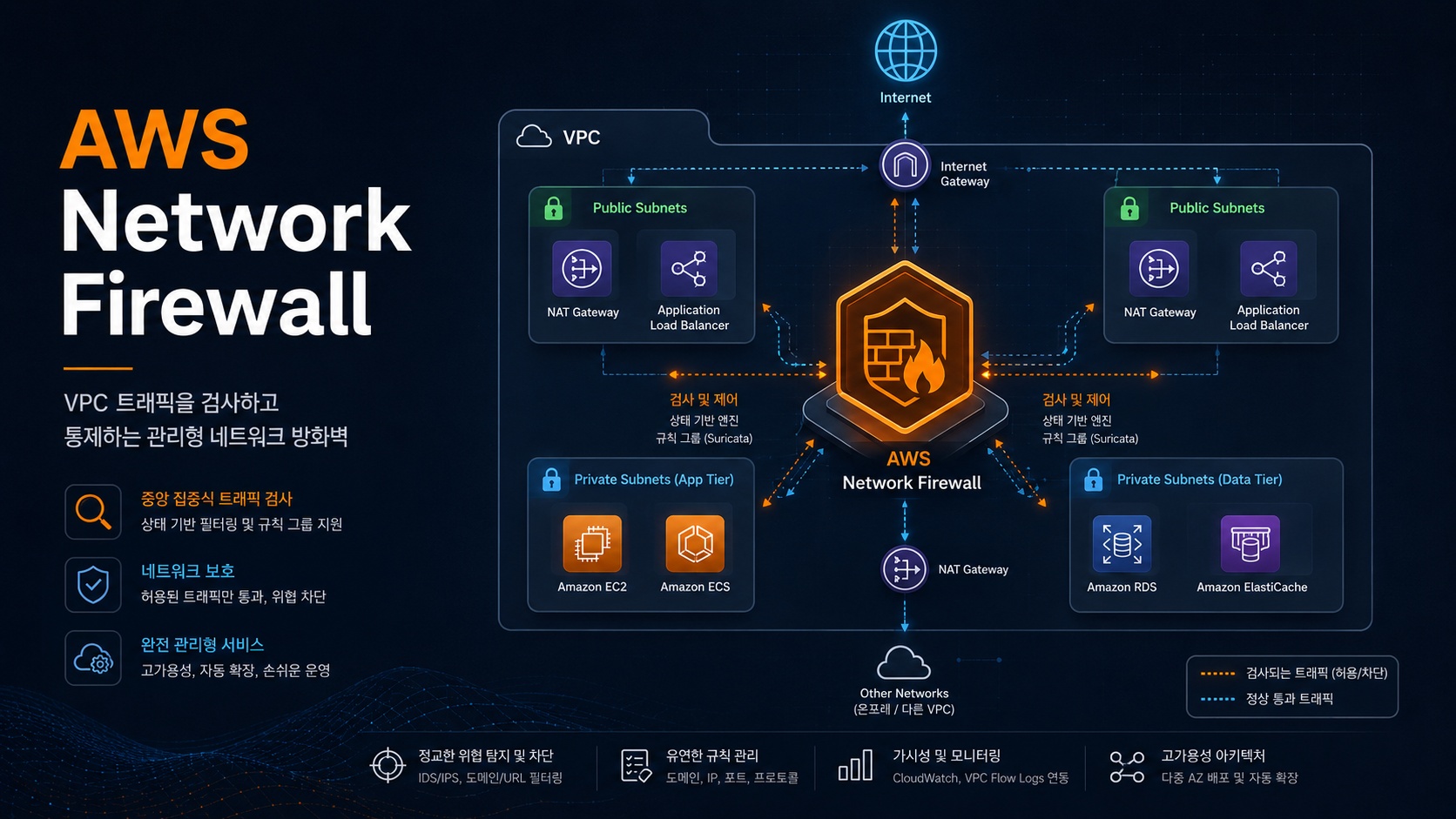
What is AWS Network Firewall?
AWS Network Firewall is a managed network firewall service that operates within Amazon VPC.
Simply put, it’s a service that centrally inspects, allows, or blocks traffic moving in and out of your VPC. It can be seen as providing the concepts of firewalls, IDS, and IPS used in traditional on-premises environments as a managed service tailored for the AWS VPC environment.
AWS Network Firewall is used in the following situations:
| Purpose of Use | Description |
|---|---|
| Internet Outbound Control | Inspects traffic from servers in Private Subnets going to the external internet |
| Inbound Traffic Inspection | Filters traffic entering the VPC from the internet |
| Inter-VPC Traffic Inspection | Centrally inspects communication between multiple VPCs |
| Blocking Malicious Domains/IPs | Blocks known malicious IPs, suspicious domains, and botnet communications |
| Intrusion Detection/Prevention | IDS/IPS-like inspection using Suricata-compatible rules |
| Central Security Architecture | Configures a central inspection VPC with Transit Gateway |
How is it different from Security Groups?
When first learning AWS, Security Groups might seem like a firewall. However, Security Groups and AWS Network Firewall have different purposes.
| Category | Security Group | AWS Network Firewall |
|---|---|---|
| Application Unit | Resource unit like EC2, ENI, RDS, ALB | VPC traffic path |
| Operation Method | Stateful access control | Stateless + Stateful traffic inspection |
| Main Purpose | Controls who can access which resource | Inspects and blocks network flows themselves |
| Rule Level | IP, port, protocol-centric | IP, port, protocol, domain, Suricata rules, etc. |
| Logging | Limited | Supports Flow Log, Alert Log, TLS Log |
| Typical Use Case | Allow EC2 access only from ALB | Inspects all outbound internet traffic |
Security Groups are strong in resource access control, such as “Port 443 on this server is only accessible from the ALB.”
AWS Network Firewall, on the other hand, is closer to “Inspect all traffic leaving this VPC for external destinations and block malicious domains or suspicious patterns.”
In other words, it’s not a service that replaces Security Groups, but rather an additional network security layer on top of Security Groups.
Key Components of AWS Network Firewall
To understand AWS Network Firewall, you need to know its four key components.
AWS Network Firewall
 ├─ Firewall
 ├─ Firewall Policy
 ├─ Rule Group
 │   ├─ Stateless Rule Group
 │   └─ Stateful Rule Group
 └─ Firewall Endpoint
1. Firewall
A Firewall is the actual firewall resource deployed in your VPC.
When you create a firewall, firewall endpoints are created in the selected VPC and Availability Zones. These endpoints act as inspection points through which traffic must pass.
It’s important to note that creating an AWS Network Firewall does not automatically mean traffic is inspected.
You must modify your Route Tables to direct traffic through the firewall endpoints.
2. Firewall Policy
A Firewall Policy defines which rules to apply to the firewall.
Within a Firewall Policy, you can associate Stateless Rule Groups and Stateful Rule Groups.
Simply put, if the Firewall is the physical device, the Firewall Policy is the bundle of security policies applied to that device.
Firewall
  ↓
Firewall Policy
  ↓
Rule Group
3. Rule Group
A Rule Group is a collection of actual inspection rules.
AWS Network Firewall’s Rule Groups are broadly divided into two types:
| Category | Description |
|---|---|
| Stateless Rule Group | Inspects each packet independently |
| Stateful Rule Group | Inspects traffic while tracking connection flows |
Stateless Rule
Stateless Rules inspect each packet independently.
For example, you can create rules like these:
- 특정 출발지 IP 차단
- 특정 목적지 IP 차단
- 특정 프로토콜 차단
- 특정 포트 차단
Stateless Rules operate quickly but do not deeply understand connection states. Therefore, they are suitable for simple IP, port, and protocol-based filtering.
Stateful Rule
Stateful Rules inspect traffic while tracking its flow.
For example, it understands that a client initiated a connection to a server and that the response belongs to that flow. This allows for more sophisticated security policies than simple packet filtering.
Stateful Rules can use Suricata-compatible rules. Suricata is an open-source IDS/IPS engine frequently used for network threat detection and prevention.
For example, you can configure policies like these:
- 특정 도메인으로 나가는 트래픽 차단
- 악성 IP와의 통신 차단
- 알려진 공격 시그니처 탐지
- 의심스러운 네트워크 패턴 차단
4. Firewall Endpoint
A Firewall Endpoint is the actual inspection point through which traffic passes.
When you deploy AWS Network Firewall to a VPC, firewall endpoints are created per Availability Zone. You then need to specify these endpoints as the next hop for traffic in your Route Tables.
For example, let’s consider a scenario where an EC2 instance in a Private Subnet accesses the internet.
The typical structure is as follows:
Private Subnet EC2
  ↓
NAT Gateway
  ↓
Internet Gateway
  ↓
Internet
With AWS Network Firewall, it changes as follows:
Private Subnet EC2
  ↓
AWS Network Firewall Endpoint
  ↓
NAT Gateway
  ↓
Internet Gateway
  ↓
Internet
In other words, the firewall operates by being inserted into the traffic path.
Representative Architecture 1: Outbound Traffic Inspection
The most commonly used architecture is to have servers in a Private Subnet pass through AWS Network Firewall when accessing the internet.
Private Subnet
  ↓
Network Firewall Endpoint
  ↓
NAT Gateway
  ↓
Internet Gateway
  ↓
Internet
In this architecture, EC2, ECS, EKS nodes, Lambda ENIs, etc., pass through the firewall when going to the external internet.
Examples of use cases include:
| Example | Description |
|---|---|
| Blocking Malicious Domains | Prevents servers from communicating with C2 servers or malicious domains |
| Blocking Unauthorized Ports | Restricts external communication to ports other than 80, 443 |
| Controlling External API Access | Allows access only to approved API domains |
| Preventing Data Exfiltration | Detects suspicious outbound traffic to external destinations |
Especially in production environments, an architecture where “servers can access any external internet destination” is risky. AWS Network Firewall allows you to centrally control such outbound traffic.
Representative Architecture 2: Inbound Traffic Inspection
You can also inspect traffic entering your VPC from the internet.
Internet
  ↓
Internet Gateway
  ↓
Network Firewall Endpoint
  ↓
Public 또는 Private Subnet
  ↓
Application
However, when using this architecture, routing design is crucial. If only inbound traffic passes through the firewall and response traffic takes a different path, asymmetric routing issues can occur.
Since firewalls track traffic flows, the inbound and outbound paths must be designed consistently.
Representative Architecture 3: Central Inspection VPC
Organizations operating multiple VPCs often configure a central inspection VPC rather than having a separate firewall for each VPC.
Spoke VPC A
Spoke VPC B
Spoke VPC C
   ↓
Transit Gateway
   ↓
Inspection VPC
   ↓
AWS Network Firewall
   ↓
NAT Gateway / Internet Gateway
The advantage of this architecture is that security policies can be managed centrally.
Even with multiple application VPCs, outbound internet traffic can be routed to a central inspection VPC and then uniformly inspected by AWS Network Firewall.
However, this architecture is more complex than a single VPC setup because it requires designing Transit Gateway, Route Tables, NAT Gateway, and firewall endpoint routing together.
Security Policies Available in AWS Network Firewall
AWS Network Firewall allows you to control traffic in various ways.
| Policy Type | Example |
|---|---|
| IP-based Control | Block or allow specific IP ranges |
| Port-based Control | Block dangerous ports like 22, 3389 |
| Protocol-based Control | Control TCP, UDP, ICMP, etc. |
| Domain-based Control | Block traffic going to specific domains |
| Signature-based Detection | Detect known attack patterns |
| Using Managed Rules | Use Managed Rule Groups provided by AWS |
| Using Suricata Rules | Apply custom IDS/IPS rules |
For example, you can create policies like these for production servers accessing external destinations:
허용:
- 회사에서 사용하는 패키지 저장소
- AWS API 엔드포인트
- 운영에 필요한 외부 SaaS API

차단:
- 알려진 악성 IP
- 의심 도메인
- 불필요한 외부 포트
- 비인가 국가 또는 네트워크 대역
Logging and Monitoring
For firewalls, logs are as important as blocking.
AWS Network Firewall can generate the following types of logs:
| Log Type | Description |
|---|---|
| Flow Log | Traffic flow information that passed through the firewall |
| Alert Log | Events detected or blocked by Stateful Rules |
| TLS Log | Events related to TLS inspection |
Logs can typically be sent to the following destinations:
- Amazon CloudWatch Logs
- Amazon S3
- Amazon Data Firehose
In production environments, it is recommended to enable at least Alert Logs. This allows you to identify the source and destination of communication attempts when a security event occurs.
In large-scale environments, it is common to store logs in S3 for analysis with Athena, or to forward them to a SIEM via Firehose.
Considerations when Designing
AWS Network Firewall is powerful, but improper design can lead to increased costs and operational complexity.
1. Routing is Key
AWS Network Firewall does not operate merely by being created.
You must configure your Route Tables to ensure traffic passes through the firewall endpoints.
잘못된 생각:
방화벽을 만들면 자동으로 VPC 트래픽이 검사된다.

정확한 이해:
방화벽 엔드포인트를 트래픽 경로에 넣어야 검사된다.
2. Consider Symmetric Routing
When using Stateful inspection, you must design your routing so that requests and responses pass through the same firewall path.
Asymmetric routing can prevent the firewall from properly tracking traffic flows.
3. Design per Availability Zone
AWS Network Firewall uses endpoints per Availability Zone.
In production environments, it is recommended to deploy firewall endpoints across multiple AZs, not just a single AZ, and design traffic within each AZ to pass through the firewall endpoint in the same AZ.
This increases availability and can reduce unnecessary cross-AZ traffic costs.
4. Always Consider Costs
AWS Network Firewall incurs charges for firewall endpoint hours and data processing throughput.
Additionally, you must consider the costs of NAT Gateway, Transit Gateway, and log storage.
Especially in architectures where all outbound traffic is sent through the firewall, costs can increase significantly with higher data throughput.
Therefore, it is recommended to design based on the following criteria:
- 모든 트래픽을 검사할 것인가?
- 인터넷 방향 트래픽만 검사할 것인가?
- VPC 간 트래픽도 검사할 것인가?
- 로그를 전부 저장할 것인가, Alert Log만 저장할 것인가?
- 중앙 검사 VPC를 둘 것인가, 각 VPC에 분산 배치할 것인가?
When to Use AWS Network Firewall?
Consider adopting AWS Network Firewall in the following situations:
| Situation | Necessity of Adoption |
|---|---|
| Need to control internet outbound traffic from production servers | High |
| Need to centrally inspect external communication for multiple VPCs | High |
| Security audits require network traffic inspection | High |
| Need to block malicious IP/domain communication | High |
| Only need to open/close EC2 ports simply | Low |
| Only want to block web attacks | AWS WAF domain, consider separately |
In other words, AWS Network Firewall is more suitable for “VPC network traffic inspection” than “web request defense.”
You can understand that AWS WAF handles SQL Injection, XSS, and URI-based blocking for web applications, while AWS Network Firewall handles controlling network communication for internal VPC resources.
Practical Recommended Configuration
In typical production environments, the following configuration is recommended:
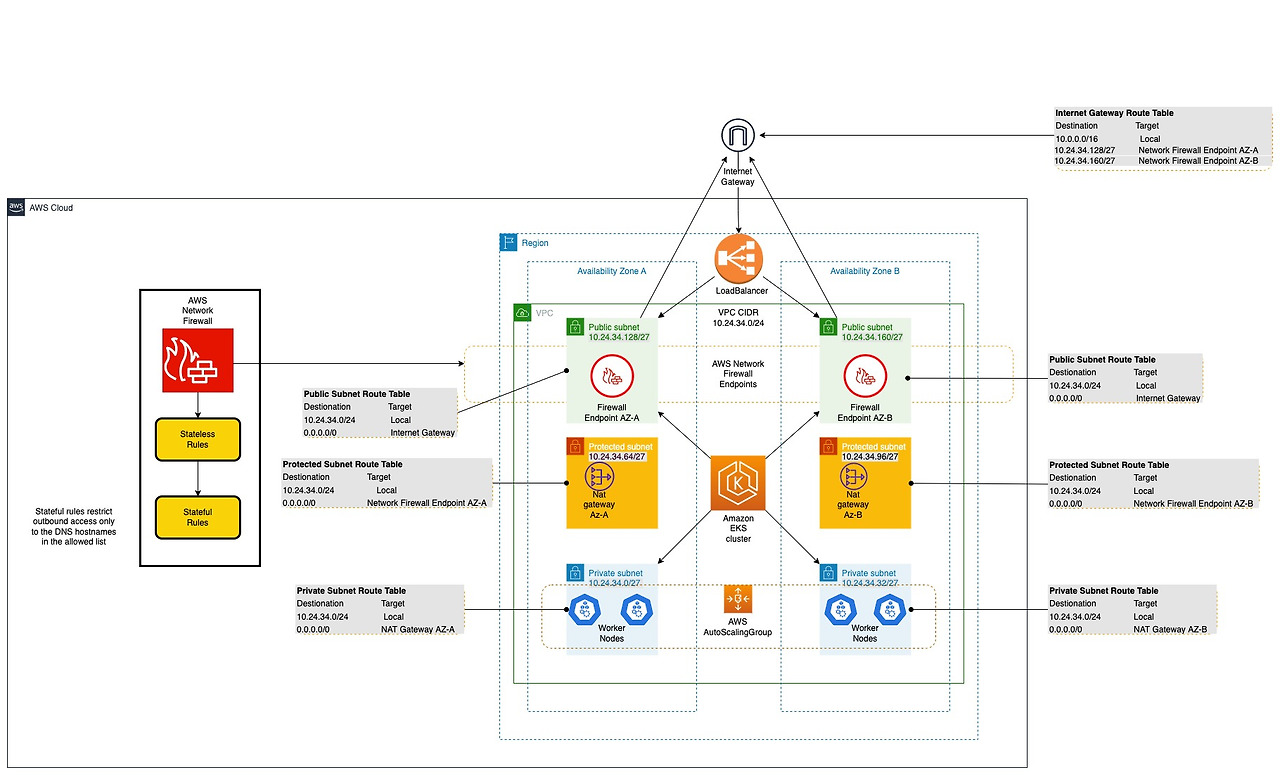
https://aws.amazon.com/ko/blogs/security/use-aws-network-firewall-to-filter-outbound-https-traffic-from-applications-hosted-on-amazon-eks/
Public 영역
- ALB, NAT Gateway, Internet Gateway

Private 영역
- EC2, ECS, EKS, RDS 등 실제 워크로드

보안 영역
- AWS Network Firewall Endpoint
- Firewall Policy
- Stateful Rule Group
- Alert Log 저장
An outbound-centric configuration is as follows:
Private Subnet Workload
  ↓
Route Table
  ↓
AWS Network Firewall Endpoint
  ↓
NAT Gateway
  ↓
Internet Gateway
  ↓
Internet
With this configuration, all outbound traffic from servers in a Private Subnet can be inspected by the firewall.
Operational Checklist
When operating AWS Network Firewall, it is recommended to check the following items:
[ ] 보호할 트래픽 범위가 명확한가?
[ ] Route Table이 방화벽 엔드포인트를 경유하도록 설정되어 있는가?
[ ] 요청과 응답 경로가 대칭으로 구성되어 있는가?
[ ] AZ별 방화벽 엔드포인트가 구성되어 있는가?
[ ] Stateful Rule과 Stateless Rule의 역할이 구분되어 있는가?
[ ] Alert Log가 활성화되어 있는가?
[ ] 로그 저장 위치와 보관 기간이 정해져 있는가?
[ ] 비용 산정에 엔드포인트, 데이터 처리량, NAT Gateway, 로그 비용이 포함되어 있는가?
[ ] 보안 정책 변경 절차가 정해져 있는가?
[ ] 테스트 환경에서 차단 정책을 먼저 검증했는가?
Conclusion
AWS Network Firewall is a managed firewall service designed to centrally inspect and control network traffic in a VPC environment.
While Security Groups provide basic resource-level access control, AWS Network Firewall is a security layer that inspects the VPC traffic flow itself.
Especially in production environments, if you need to restrict outbound internet traffic or centrally inspect traffic from multiple VPCs, AWS Network Firewall is a very useful option.
However, more important than creating the firewall is the routing design. You must accurately configure Route Tables to ensure traffic passes through the firewall endpoints, and symmetric routing must be considered when using Stateful inspection.
In summary, AWS Network Firewall can be understood as follows:
Security Group       = 리소스 단위 접근 제어
Network ACL          = 서브넷 단위 보조 통제
AWS Network Firewall = VPC 트래픽 검사 및 차단
If a web application firewall inspects web requests, AWS Network Firewall inspects VPC network flows. Understanding this difference allows for a much clearer design of AWS security architectures.
Leave a Reply