When operating AWS EC2, you often encounter the terms IMDSv1 and IMDSv2.
IMDS stands for Instance Metadata Service, a service that allows an EC2 instance to query its own metadata from within the instance.
For example, inside an EC2 instance, you can query the following information:
- Instance ID
- AMI ID
- Region
- Availability Zone
- Network information
- IAM Role name
- IAM Role temporary credentials
Among these, the most important from a security perspective are the IAM Role temporary credentials.
If an IAM Role is attached to an EC2 instance, applications do not need to store Access Keys directly in code or environment variables.
Instead, they can obtain temporary credentials via IMDS and call AWS APIs.
This structure itself is a very good security design.
However, if the application has vulnerabilities like SSRF, the story changes.
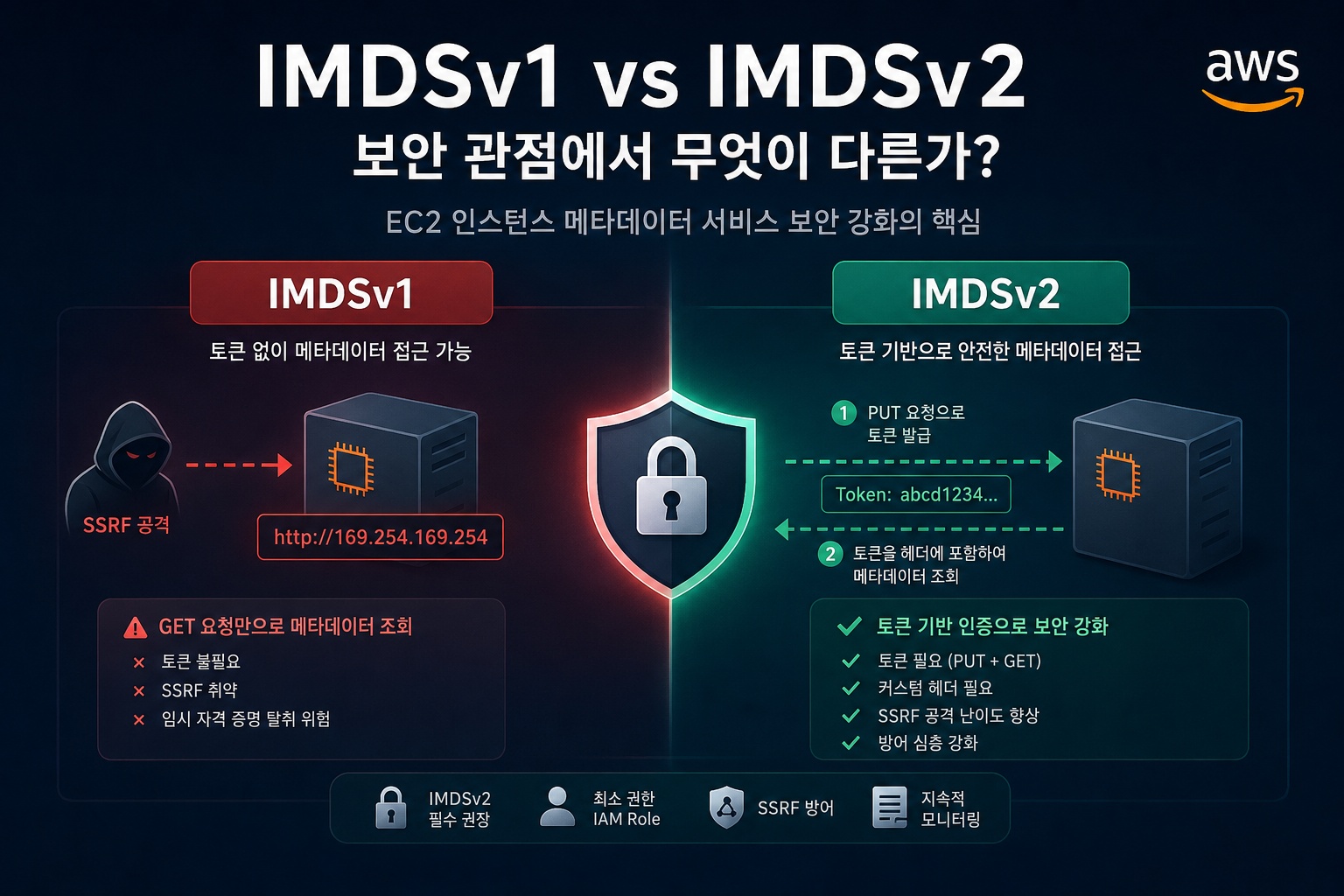
1. Where is IMDS located?
Inside an EC2 instance, IMDS can be accessed at the following link-local address:
http://169.254.169.254/latest/meta-data/For example, to query the instance ID, you would run the following:
curl http://169.254.169.254/latest/meta-data/instance-idIf an IAM Role is attached to the instance, you can check the Role name at the following path:
curl http://169.254.169.254/latest/meta-data/iam/security-credentials/Knowing the Role name allows you to query the temporary credentials for that Role.
curl http://169.254.169.254/latest/meta-data/iam/security-credentials/ROLE_NAMEThe information returned here includes the following values:
- AccessKeyId
- SecretAccessKey
- Token
- Expiration
In other words, applications running inside an EC2 instance can obtain the temporary credentials needed to call AWS APIs via IMDS.
2. How IMDSv1 Works
IMDSv1 has a very simple structure.
Metadata can be queried with just an HTTP GET request, without the need for a separate token.
Here’s an example:
curl http://169.254.169.254/latest/meta-data/IAM Role temporary credentials can also be queried as follows:
curl http://169.254.169.254/latest/meta-data/iam/security-credentials/The advantages of IMDSv1 are its simplicity and compatibility.
It works easily with older AWS SDKs, older agents, and older scripts.
However, from a security perspective, this simplicity can be a problem.
3. Security Issues with IMDSv1
The biggest problem with IMDSv1 is that requests do not require a separate token.
IMDS is originally a service accessible only from within an EC2 instance.
Therefore, external users cannot directly access 169.254.169.254 from the internet.
However, if a web application has an SSRF vulnerability, an attacker can make the application server access IMDS on their behalf.
For example, let’s assume a web service has a feature where you input a URL, and the server fetches that URL on your behalf.
https://example.com/fetch?url=http://example.org/image.pngIf this feature operates without URL validation, an attacker can make a request like this:
https://example.com/fetch?url=http://169.254.169.254/latest/meta-data/iam/security-credentials/In this case, the external attacker does not directly access IMDS, but the web application inside the EC2 instance accesses IMDS on their behalf.
This is a typical scenario where SSRF and IMDSv1 combine to become dangerous.
4. Why is it Dangerous When SSRF and IMDSv1 are Combined?
If an attacker can access IMDS via SSRF, the following information may be exposed:
- IAM Role name attached to the EC2 instance
- Temporary Access Key
- Temporary Secret Key
- Session Token
- Credential expiration time
If the EC2 Role has excessive permissions, the scope of damage increases.
For example, if the Role includes the following permissions, it is very dangerous:
- Full S3 access
- Full Secrets Manager access
- Full DynamoDB access
- EC2 creation/deletion permissions
- IAM PassRole
- Administrator privileges
Ultimately, the problem is not simply “whether IMDSv1 was used.”
From the perspective of an actual security incident, the following factors interact:
- Does the application have an SSRF vulnerability?
- Is IMDSv1 allowed on the EC2 instance?
- Are the EC2 Role permissions excessive?
- Has access to the metadata address not been blocked at the network or application level?
5. How IMDSv2 Works
IMDSv2 was introduced to mitigate the security weaknesses of IMDSv1.
The core is a token-based session.
With IMDSv2, you cannot query metadata directly.
First, you must obtain a token using a PUT request.
TOKEN=$(curl -X PUT "http://169.254.169.254/latest/api/token"
  -H "X-aws-ec2-metadata-token-ttl-seconds: 21600")
Then, you must include the token as a header in your metadata request.
curl -H "X-aws-ec2-metadata-token: $TOKEN"
  http://169.254.169.254/latest/meta-data/instance-id
The same applies to querying IAM Role credentials.
ROLE_NAME=$(curl -H "X-aws-ec2-metadata-token: $TOKEN"
  http://169.254.169.254/latest/meta-data/iam/security-credentials/)

curl -H "X-aws-ec2-metadata-token: $TOKEN"
  http://169.254.169.254/latest/meta-data/iam/security-credentials/$ROLE_NAME
In other words, IMDSv2 requires the following two steps:
- Obtain a token with a PUT request
- Include the obtained token in the header and query metadata
6. How IMDSv2 Enhances Security
IMDSv2 increases the difficulty of attacks in the following ways:
1) Blocking simple GET requests
In IMDSv1, metadata could be retrieved with just a GET request.
curl http://169.254.169.254/latest/meta-data/However, in IMDSv2 Required state, requests without a token will fail.
This means that if an SSRF vulnerability only allows URL manipulation, it is difficult to bypass IMDSv2.
2) Requiring PUT requests
IMDSv2 tokens are obtained via PUT requests.
Many SSRF vulnerabilities only allow simple GET requests or do not permit changing HTTP methods.
In such cases, attackers find it difficult to obtain a token.
3) Requiring custom headers
IMDSv2 requires the following header when querying metadata:
X-aws-ec2-metadata-token: <TOKEN>For SSRF vulnerabilities that only allow URL manipulation, it is difficult to add this header.
4) Hop Limit control
IMDSv2 has an HttpPutResponseHopLimit setting.
This value limits how many network hops an IMDSv2 token response can traverse.
In a typical standalone EC2 environment, a value of 1 can be used.
However, in container environments, an additional network hop might occur, so a value of 2 may be necessary.
7. IMDSv1 vs IMDSv2 Comparison
| Category | IMDSv1 | IMDSv2 |
|---|---|---|
| Metadata Retrieval Method | GET request | PUT to get token, then GET request |
| Token Required | No | Yes |
| SSRF Defense Capability | Low | Relatively High |
| Custom Header Required | No | Yes |
| HTTP Method | Mainly GET | PUT + GET |
| Operational Recommendation | For legacy compatibility | Recommended for production environments |
| Setting Value | Usable with HttpTokens=optional | Can be enforced with HttpTokens=required |
| Main Advantages | Simplicity, compatibility | Enhanced security |
| Main Disadvantages | Vulnerable to SSRF | Requires checking compatibility with older SDK/Agent versions |
—
8. Key Settings for EC2 Metadata Options
| Setting | Description | Recommendation |
|---|---|---|
| HttpEndpoint | Whether to use IMDS | disabled if not needed |
| HttpTokens | Whether IMDSv2 token is required | required recommended |
| HttpPutResponseHopLimit | IMDSv2 token response hop limit | 1 for regular EC2, consider 2 for containers |
| InstanceMetadataTags | Whether to expose instance tags as metadata | disabled if not needed |
In production environments, the following directions are generally recommended:
- Instances that do not require IMDS: HttpEndpoint disabled
- Instances that require IMDS: HttpTokens required
- Regular EC2: Consider Hop Limit 1
- ECS/EKS/Container environments: Consider Hop Limit 2
- If instance tag lookup is not needed: InstanceMetadataTags disabled
9. Checking Current EC2 IMDS Settings
You can check the metadata options of current instances using the AWS CLI.
aws ec2 describe-instances
  --query 'Reservations[].Instances[].{
    InstanceId:InstanceId,
    State:State.Name,
    HttpEndpoint:MetadataOptions.HttpEndpoint,
    HttpTokens:MetadataOptions.HttpTokens,
    HopLimit:MetadataOptions.HttpPutResponseHopLimit,
    MetadataTags:MetadataOptions.InstanceMetadataTags
  }'
  --output table
Look at the HttpTokens value in the result.
- optional: Both IMDSv1 and IMDSv2 are allowed
- required: Only IMDSv2 is allowed
Therefore, if HttpTokens=optional, it is a candidate for transition review from a security perspective.
10. Changing Existing EC2 to IMDSv2 Required
To change an existing EC2 instance to IMDSv2 Required, you can use the following command:
aws ec2 modify-instance-metadata-options
  --instance-id i-xxxxxxxxxxxxxxxxx
  --http-tokens required
  --http-endpoint enabled
After the change, verify with the following command:
aws ec2 describe-instances
  --instance-ids i-xxxxxxxxxxxxxxxxx
  --query 'Reservations[].Instances[].MetadataOptions'
  --output json
If you need to set the hop limit to 2 in a container environment, you can apply it as follows:
aws ec2 modify-instance-metadata-options
  --instance-id i-xxxxxxxxxxxxxxxxx
  --http-tokens required
  --http-put-response-hop-limit 2
  --http-endpoint enabled
11. Applying IMDSv2 by Default to New EC2 Instances
In production environments, it is better to configure new instances to require IMDSv2 from the start, rather than modifying them after creation.
You can specify the following settings in a Launch Template:
{
  "MetadataOptions": {
    "HttpTokens": "required",
    "HttpEndpoint": "enabled",
    "HttpPutResponseHopLimit": 2
  }
}
You can also set account/region-wide default values using the AWS CLI.
However, if existing applications, agents, or SDKs do not support IMDSv2, failures may occur.
Therefore, in production environments, it is necessary to check for IMDSv1 usage before enforcing IMDSv2 immediately.
12. Checking for IMDSv1 Usage
Before transitioning to IMDSv2, you must check if there are any processes still using IMDSv1.
Typical verification methods are as follows:
Check CloudWatch MetadataNoToken metric
The MetadataNoToken metric is used to identify requests that accessed IMDS without a token.
Simply put, it’s a metric that can confirm if IMDSv1-style requests have occurred.
If this metric continues to increase, it means there are still applications or agents using IMDSv1.
Use IMDS Packet Analyzer
The IMDS Packet Analyzer provided by AWS can be used to identify which processes inside an instance are calling IMDSv1.
Before transitioning, it is recommended to check the following items:
- Outdated AWS CLI
- Outdated AWS SDK
- Older SSM Agent versions
- Older CloudWatch Agent versions
- Custom curl scripts
- Older application libraries
13. Recommended Transition Procedure from a Security Perspective
In a production environment, it is safe to transition in the following order:
- Identify instances with HttpTokens=optional in the entire EC2 list
- Check CloudWatch MetadataNoToken metric
- Identify IMDSv1 calling processes with IMDS Packet Analyzer
- Update AWS CLI, SDK, SSM Agent, CloudWatch Agent
- Test IMDSv2 Required in development environment
- Apply to staging environment
- Apply sequentially to production instances
- Reflect IMDSv2 Required in Launch Templates, Auto Scaling Groups, and AMI build pipelines
- Set default for new instances to IMDSv2 Required
- If organization-wide enforcement is needed, review SCP or account defaults
14. Is IMDSv2 Alone Sufficient?
IMDSv2 is a very important defense mechanism.
However, applying IMDSv2 alone does not eliminate all risks.
From a security perspective, the following countermeasures should be applied together:
IAM Role Least Privilege
The most critical information that can be exfiltrated via IMDS is IAM Role temporary credentials.
Therefore, EC2 Roles should be granted only the minimum necessary permissions.
A bad example is as follows:
{
  "Effect": "Allow",
  "Action": "*",
  "Resource": "*"
}
A good example is to restrict only the necessary services and resources.
{
  "Effect": "Allow",
  "Action": [
    "s3:GetObject"
  ],
  "Resource": [
    "arn:aws:s3:::example-bucket/app/*"
  ]
}
SSRF Defense
Features in web applications that accept external URLs and have the server directly make requests should be handled with caution.
The following addresses are generally targets for blocking:
- 169.254.169.254
- fd00:ec2::254
- 127.0.0.1
- localhost
- RFC1918 private IP ranges
- Link-local addresses
- Internal DNS names
- Cloud metadata endpoints
Furthermore, if a redirection occurs, the final destination must also be re-validated.
DNS Rebinding attacks should also be considered.
Container Environment Privilege Separation
In ECS or EKS environments, you should check if containers can use the Instance Profile permissions of the EC2 node.
If possible, it is recommended to use the following structure:
- ECS: Use Task Role
- EKS: Use IRSA or EKS Pod Identity
- Minimize Node Role permissions
- Review the necessity of IMDS access from Pods or containers
If containers can access the node’s IMDS and the node’s Role permissions are excessive, a container compromise could lead to an escalation of AWS account privileges.
15. IMDSv2 from a CIS Benchmark Perspective
CIS AWS Foundations Benchmark and cloud security assessment standards consider EC2 metadata service settings as important security items.
Specifically, they can be checked from the following perspectives:
- Is IMDSv1 allowed?
- Is IMDSv2 Required applied?
- Are excessive permissions granted to the EC2 Role?
- Is it necessary to expose instance metadata tags?
- Is there a possibility of node Role permissions being exposed in container workloads?
Automated diagnostic scripts typically check the MetadataOptions value in the describe-instances result.
For example, diagnostics can be performed based on the following criteria:
HttpTokens == required 이면 양호
HttpTokens == optional 이면 취약 또는 개선 필요
However, in a production environment, checking application compatibility takes precedence over simply changing settings with commands.
16. Practical Conclusion
IMDSv1 is an older method that allows metadata retrieval with simple GET requests.
Because of this, when combined with SSRF vulnerabilities, EC2 IAM Role temporary credentials can be exposed.
IMDSv2 uses token-based sessions.
First, a token must be obtained with a PUT request, and then the token header must be included in subsequent requests.
Thanks to this structure, it becomes difficult to exfiltrate metadata with simple SSRF attacks.
In production environments, the following criteria are recommended:
- Apply IMDSv2 Required if possible
- Disable IMDS for instances that do not require it
- Design EC2 IAM Roles with least privilege
- Apply SSRF defense logic
- In container environments, use Task Role, IRSA, or EKS Pod Identity
- Before transition, check MetadataNoToken metric and agent compatibility
To summarize in one sentence:
IMDSv1 is a legacy method focused on compatibility, while
IMDSv2 is a security enhancement method designed to reduce the risk of SSRF and metadata exfiltration.
In production environments, it is safer to set IMDSv2 Required as the default, unless there is a specific reason not to.
Reference Links
AWS EC2 User Guide – Instance Metadata Service
AWS EC2 User Guide – Configure instance metadata options
AWS Security Blog – Add defense in depth against SSRF vulnerabilities
AWS Security Blog – Get the full benefits of IMDSv2 and disable IMDSv1
Leave a Reply