When operating EC2, there are repetitive tasks.
These tasks include installing operating systems, applying security patches, installing agents, configuring logs, reflecting company standard security settings, and then creating and distributing AMIs. While this can be done manually on a small scale, as accounts, regions, and operating environments grow, image management itself becomes an operational burden.
The AWS service designed to solve this problem is EC2 Image Builder. EC2 Image Builder is a fully managed service that helps you automatically create, test, distribute, and manage custom AMIs or container images. AWS official documentation also describes it as a service that automates the creation and distribution of “customized, secure, and up-to-date server images.”
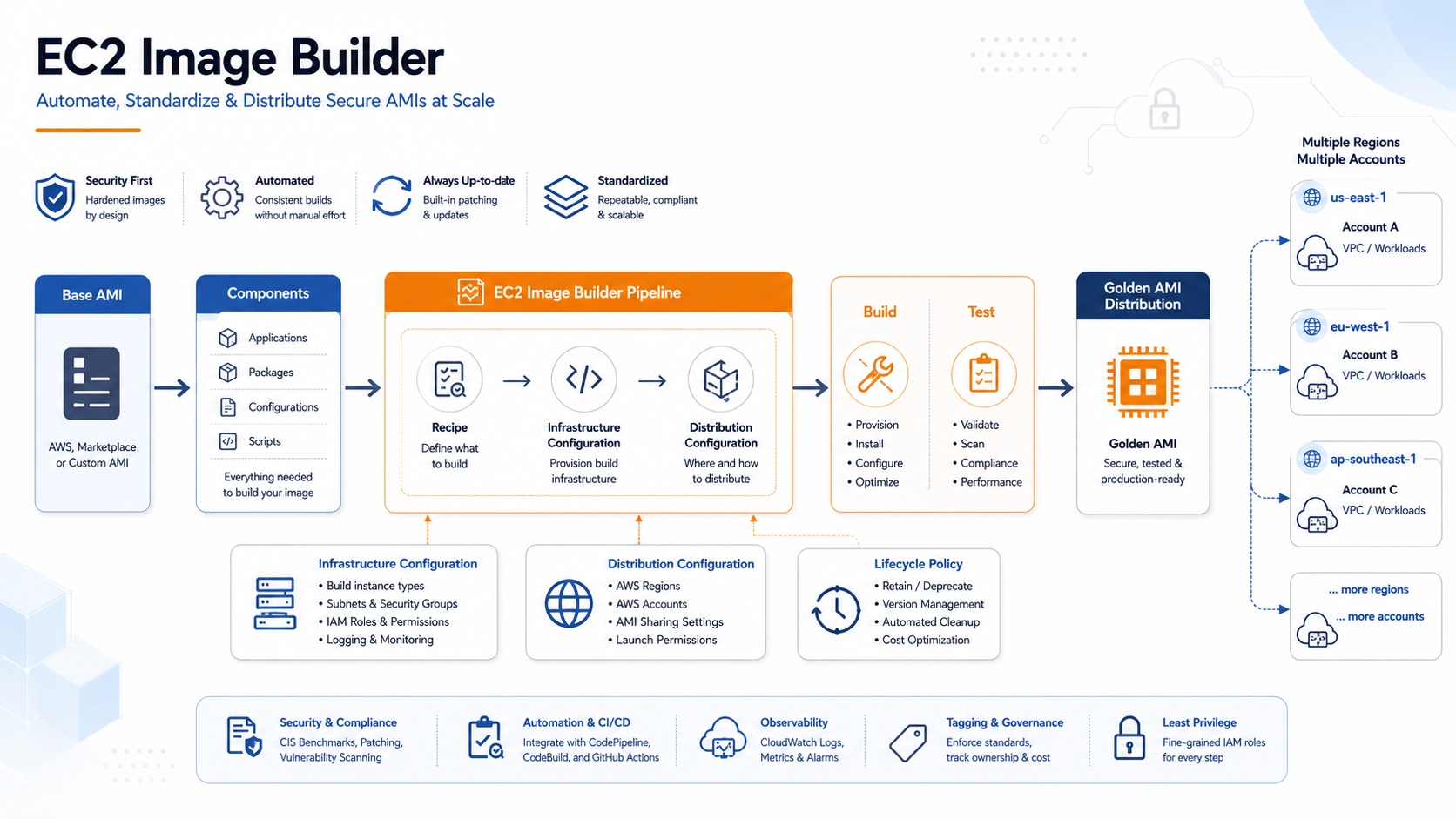
Why EC2 Image Builder is Needed
Let’s consider repeating the following tasks every time a new EC2 instance is created:
Operating system patch application, security agent installation, CloudWatch Agent configuration, SSM Agent verification, company standard account settings, removal of unnecessary packages, CIS or STIG-based hardening, application runtime installation, pre-deployment testing.
If this process is done manually, the following problems can arise:
- First, settings may vary slightly from image to image.
- Second, security patches may be missed.
- Third, it is difficult to track which image was created based on what criteria.
- Fourth, it is difficult to distribute the same AMI across multiple accounts and regions.
- Fifth, old AMIs may persist, creating cost and security risks.
EC2 Image Builder defines these processes as a pipeline. That is, it manages “which base image to use,” “which packages and settings to apply,” “which tests must be passed,” and “to which accounts and regions to distribute” through code and configuration.
Core Concepts of EC2 Image Builder
To understand EC2 Image Builder, you need to know a few components.
1. Image Pipeline
An Image Pipeline is central to image build automation. A pipeline defines the entire flow for creating an AMI or container image. According to AWS documentation, an Image Pipeline is associated with an image recipe or container recipe and defines the build, validation, and test stages of the image build lifecycle. It can also link infrastructure configurations and distribution configurations.
Simply put, a pipeline answers the following questions:
“When, by what criteria, where to build the image, how to test it, and where to distribute it?”
2. Image Recipe
An Image Recipe is a blueprint for creating an AMI. It defines which base AMI to start from and which components to apply. According to AWS documentation, an Image Recipe defines a base image and components, and typically, a single recipe can apply up to 20 components, including build and test components. Once created, a recipe cannot be directly modified; to make changes, you must create a new recipe or a new version.
For example, you can create a recipe like this:
Base Image: Amazon Linux 2023
Build Components:
- yum update
- nginx 설치
- CloudWatch Agent 설치
- 보안 설정 적용

Test Components:
- nginx 서비스 상태 확인
- 80 포트 응답 확인
- SSM Agent 동작 확인
3. Component
A Component is a unit of work that actually runs inside the image. It is responsible for installing packages, modifying configuration files, enabling services, or executing test commands.
Image Builder components can be written as YAML or JSON documents and are executed using the AWS Task Orchestrator and Executor, or AWSTOE. According to AWS documentation, AWSTOE is used to orchestrate complex workflows, change system configurations, and test systems with YAML-based script components.
A simple example is as follows:
name: InstallNginx
description: Install and enable nginx
schemaVersion: 1.0

phases:
  - name: build
    steps:
      - name: InstallNginx
        action: ExecuteBash
        inputs:
          commands:
            - sudo dnf update -y
            - sudo dnf install -y nginx
            - sudo systemctl enable nginx

  - name: validate
    steps:
      - name: ValidateNginx
        action: ExecuteBash
        inputs:
          commands:
            - nginx -v

  - name: test
    steps:
      - name: TestNginxService
        action: ExecuteBash
        inputs:
          commands:
            - sudo systemctl start nginx
            - systemctl is-active nginx
This component is an example of installing nginx on Amazon Linux 2023, verifying its installation, and testing the service’s running status.
4. Infrastructure Configuration
Infrastructure Configuration defines which EC2 instance environment to use when building and testing an image.
This includes IAM role, instance type, VPC, subnet, security group, SNS notifications, log storage location, and whether to retain instances upon failure. AWS documentation explains that Image Builder uses instance profile permissions to download and run components on build and test instances, upload logs to CloudWatch, and perform additional tasks required by the recipe.
In practice, this configuration is quite important. For example, if files need to be retrieved from an internal private package repository or S3 bucket, the build instance must have the appropriate network access and permissions.
5. Distribution Configuration
Distribution Configuration defines where to distribute the completed image.
For example, the following distribution is possible:
- us-east-1 리전에 AMI 생성
- ap-northeast-2 리전으로 AMI 복사
- 운영 계정에 AMI 공유
- 특정 AWS Organizations OU에 공유
- KMS 키로 AMI 암호화
- Launch Template과 연결
According to AWS documentation, an Image Builder pipeline allows you to specify the AWS regions where AMIs or container images will be distributed. For AMIs, you can also configure KMS key encryption, sharing with AWS accounts and Organizations, License Manager integration, and Launch Template settings.
EC2 Image Builder Workflow
The image creation process in EC2 Image Builder can be broadly divided into three stages:
Stage 1: Build
In the Build stage, an EC2 build instance is launched based on a base image, and build components are applied to it. Tasks such as package installation, OS configuration changes, security hardening, and agent installation are performed in this stage.
Stage 2: Test
After the Build stage, Image Builder creates a snapshot or container image and proceeds to the Test stage. In the AMI workflow, a new EC2 instance for testing is launched from the created snapshot, and test components are executed. If tests fail, the image is not distributed. AWS documentation also states that Image Builder distributes images only if all configured tests succeed.
Stage 3: Distribution
If tests succeed, the Distribution stage deploys the final image to the specified regions, accounts, and organizational units. According to AWS documentation, Image Builder’s image creation workflow includes build, test, and distribution stages, with tasks such as AMI copy, image attribute modification, and image sharing performed in the distribution stage.
Advantages from a Security Perspective
The biggest advantage of EC2 Image Builder is that “security standards can be standardized from the image creation stage.”
Applying security settings to running EC2 instances later is prone to omissions. In contrast, using Image Builder allows you to first create an AMI with standard security settings reflected and then deploy instances using only that AMI.
For example, the following security standards can be included in the image:
- 최신 OS 패치 적용
- 불필요한 패키지 제거
- SSH root 로그인 차단
- IMDSv2 사용 권장
- CloudWatch Agent 설치
- SSM Agent 활성화
- EDR 또는 백신 에이전트 설치
- CIS/STIG 기반 하드닝
- Inspector 기반 취약점 검증
AWS documentation also explains that Image Builder can create images that reduce exposure to security vulnerabilities, provides a collection of settings for regulated industries, and can be used to create STIG-compliant images.
However, using Image Builder does not automatically guarantee all compliance. AWS security best practices documentation also states that while Image Builder pipelines run cleanup scripts to help with security best practices, users can skip parts of the script or override user data, so the resulting image cannot be guaranteed to meet specific regulatory standards.
Cost Structure
The EC2 Image Builder service itself does not incur separate costs for creating custom AMIs or container images. However, standard charges apply to other AWS resources used during the image creation process. AWS documentation mentions items that may incur costs, such as EC2 instance execution, S3 log storage, Amazon Inspector validation, EBS Snapshot storage, ECR image storage, and ECR push/pull.
To practically reduce costs, you should consider the following:
- 빌드 인스턴스 타입을 과도하게 크게 잡지 않기
- 빌드 실패 시 인스턴스 유지 옵션을 켜두고 방치하지 않기
- 오래된 AMI와 EBS Snapshot 정리하기
- 필요 없는 리전 복사 줄이기
- 컨테이너 이미지라면 ECR lifecycle policy도 함께 관리하기
Cleaning Up Old Images with Lifecycle Policy
A frequently overlooked aspect of image automation is “deletion automation.” If AMIs are continuously created without cleanup, EBS Snapshot costs can steadily increase.
EC2 Image Builder can automatically deprecate, disable, and delete old images through Lifecycle Policy. According to AWS documentation, an Image Builder lifecycle management policy can automate the deprecating, disabling, and deleting of old images and associated resources, and can include resources distributed to other AWS accounts, Organizations, OUs, and regions within its management scope.
In February 2026, wildcard pattern support was added to lifecycle policies. For example, using patterns like my-recipe-1.x.x allows applying policies to multiple recipe versions, reducing operational burden in environments with many recipes.
Common Configuration Examples in Practice
The following are common EC2 Image Builder configurations used in enterprise environments.
1. Base Image
   - Amazon Linux 2023 또는 Windows Server 2022

2. Build Components
   - OS 최신 패치
   - CloudWatch Agent 설치
   - SSM Agent 확인
   - 보안 에이전트 설치
   - 공통 운영 스크립트 배치
   - SSH 또는 RDP 보안 설정

3. Test Components
   - 서비스 상태 확인
   - 포트 응답 확인
   - SSM 연결 확인
   - 로그 수집 확인
   - 취약점 검사 결과 확인

4. Infrastructure Configuration
   - 빌드용 private subnet
   - S3, SSM, ECR, CloudWatch 접근 권한
   - 로그 저장용 S3 bucket
   - 실패 시 인스턴스 유지 여부 선택

5. Distribution Configuration
   - 개발 계정, 운영 계정에 AMI 공유
   - 서울 리전 및 DR 리전에 AMI 복사
   - KMS 암호화 적용
   - Launch Template과 연계

6. Lifecycle Policy
   - 최신 3개 이미지만 유지
   - 90일 지난 이미지는 deprecate
   - 180일 지난 이미지는 delete
Differences from Packer
When discussing EC2 Image Builder, it is often compared with HashiCorp Packer.
Packer is strong in multi-cloud image building and suitable for teams familiar with code-based image build automation. In contrast, EC2 Image Builder has strong integration with AWS native services. It can naturally connect with AWS Organizations, RAM, Inspector, ECR, KMS, SSM, CloudWatch, SNS, and more.
Therefore, for AWS-centric operating environments, EC2 Image Builder offers the advantage of being a managed service, while Packer might be more suitable if multi-cloud or complex custom build chains are required. It’s not a matter of choosing only one; you can select based on your organization’s operational approach.
When to Adopt EC2 Image Builder
EC2 Image Builder is particularly useful in the following situations:
- 매월 정기적으로 패치된 AMI를 만들어야 하는 경우
- 개발, 검증, 운영 계정에 동일한 표준 AMI를 배포해야 하는 경우
- 보안 하드닝 기준을 이미지에 미리 반영해야 하는 경우
- 수동 AMI 생성 작업을 줄이고 싶은 경우
- 오래된 AMI와 Snapshot 정리까지 자동화하고 싶은 경우
- Auto Scaling Group, Launch Template, EKS Managed Node Group 등에 표준 AMI를 쓰고 싶은 경우
Conversely, if you are operating only a few one-off test instances, configuring Image Builder from scratch might be overkill. However, for organizations with multiple operational accounts and clear security standards, creating a standard AMI pipeline is much more stable in the long run.
Conclusion
EC2 Image Builder is not just a tool for automatically creating AMIs. It is an image management automation service that bundles OS patching, security configuration, agent installation, testing, distribution, and lifecycle management into a single standard pipeline.
What’s important in cloud operations is not “creating instances quickly” but “creating them safely and consistently according to the same standards.” EC2 Image Builder allows you to manage these standards with code and pipelines. It is especially worth considering for organizations where security standards are critical, those operating multiple accounts and regions, and those with frequent AMI creation tasks.
Leave a Reply