Hello! This is the third installment of our GitOps series. We’ve previously looked at the definition and use cases of GitOps. Today, we’ll delve deeper into its foundations, exploring the four absolute principles that underpin GitOps and the realistic challenges encountered when applying them in real-world scenarios.
Beyond simple theory, I’ll guide you in detail from a practitioner’s perspective! 🚀
The difference between GitOps and typical CI/CD lies precisely in these ‘principles’. Shall we break down the standard principles defined by the OpenGitOps project one by one?
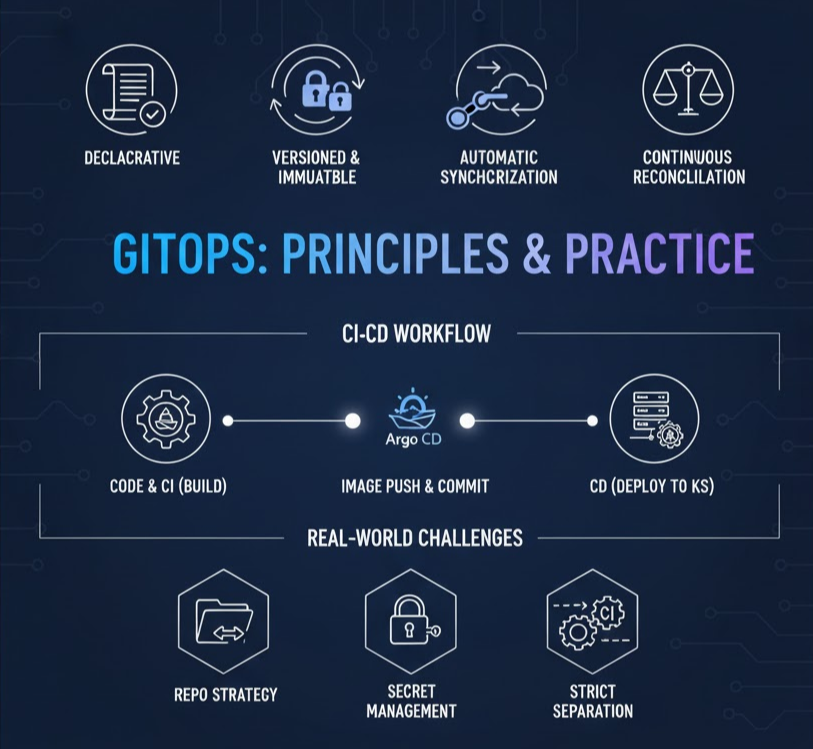
1. Declarative State Definition (Declarative) 📜
All system states must be declarative.
- Imperative: “Connect to the server, install nginx, and open port 80.” (Process-oriented)
- Declarative: “The final state of this system should be ‘nginx installed and port 80 open’.” (Result-oriented)
- Reason: The declarative approach is reproducible and allows the system to determine what it needs to do itself. It is typically written in YAML or JSON files.
2. Versioned and Immutable 🔄
All declared states must be stored in a version control system like Git.
- Reason: It keeps a history of who, when, and why changes were made. Furthermore, ‘immutability’ means that once code is deployed, it is not modified; if changes are needed, a new version is created and redeployed. This is key to enabling ‘Rollback’, the most reliable solution in case of failure.
3. Pulled Automatically 🤖
The ‘Desired State’ stored in Git must be automatically reflected in the actual operating environment.
- Reason: The moment a person manually enters commands to deploy, there’s a risk that the contents of Git and the actual server state will diverge. Software (agents) perform this role instead, preventing human error.
4. Continuous Reconciliation ⚖️
The system must continuously monitor whether ‘Git’s state’ and ‘the actual environment’s state’ are consistent in real-time.
- Core Concept: If someone accidentally manually changes a setting on a production server (Configuration Drift), GitOps tools detect this and revert it to what’s written in Git. This is called ‘Self-healing’.
🛠️ GitOps in Practice: Realistic Issues to Consider During Implementation
Theory is beautiful, but actual application presents several high hurdles. Here are the issues you will inevitably face in practice.
1. Git Repository Strategy 📂
This is the problem of where to put application source code and deployment YAML files.
- Mono Repo: Keeps code and infrastructure configurations in one place. Management is convenient, but deployment records can get mixed up each time a CI build runs, making management complex.
- Separate Repo (Recommended): Separates code repositories and configuration repositories. Security management and deployment history management become much cleaner.
2. Secret Management 🔑
The grand principle of Git is “store everything”, but you cannot upload passwords or API keys as they are.
- Solutions: * Sealed Secrets: Upload encrypted to Git and decrypt only within the cluster.
- External Secrets Operator: Fetches values from external stores like AWS Secrets Manager or HashiCorp Vault and connects them.
3. Separation of CI and CD ✂️
GitOps tends to strictly distinguish between CI and CD.
- CI (Build): Tests code, builds images, and pushes them to a registry. (e.g., GitHub Actions, Jenkins)
- CD (Deploy): Detects updated YAML with new image tags and applies them to the production environment. (e.g., Argo CD, Flux)
- Actual Flow: When a developer merges code, CI builds an image and automatically updates (commits) the image version in the configuration repository. The CD tool then detects this and completes the deployment.
📈 Workflow Changes After GitOps Adoption
Once GitOps is established, a development team’s day changes like this:
- Develop: Develop features locally. 💻
- PR Request: If infrastructure changes are needed, modify YAML files and open a PR. 📑
- Review and Approval: Colleagues and the operations team review the code to verify changes. ✅
- Merge: The PR is approved and merged into the main branch. 🤝
- Automated Deployment: Argo CD detects this and updates the production environment in real-time. 🚀
- Monitoring: Check for a green light (Synced) on the dashboard and comfortably leave for the day. ☕
🏁 Conclusion: GitOps is a Technology of ‘Trust’
The true value of GitOps lies in providing the belief that ‘the production environment is 100% consistent with what I wrote in Git’. As this trust builds, the fear of deployment disappears, and teams can innovate faster.
Keep the four principles we discussed today in mind and try to integrate them into your projects one by one.
Leave a Reply