Hello everyone! Today, we’re going to take an in-depth look at ConfigMap, one of the core elements of Kubernetes operations. When deploying applications, how can we smartly manage configuration values that vary by environment? Let’s dive in right now! 🚀
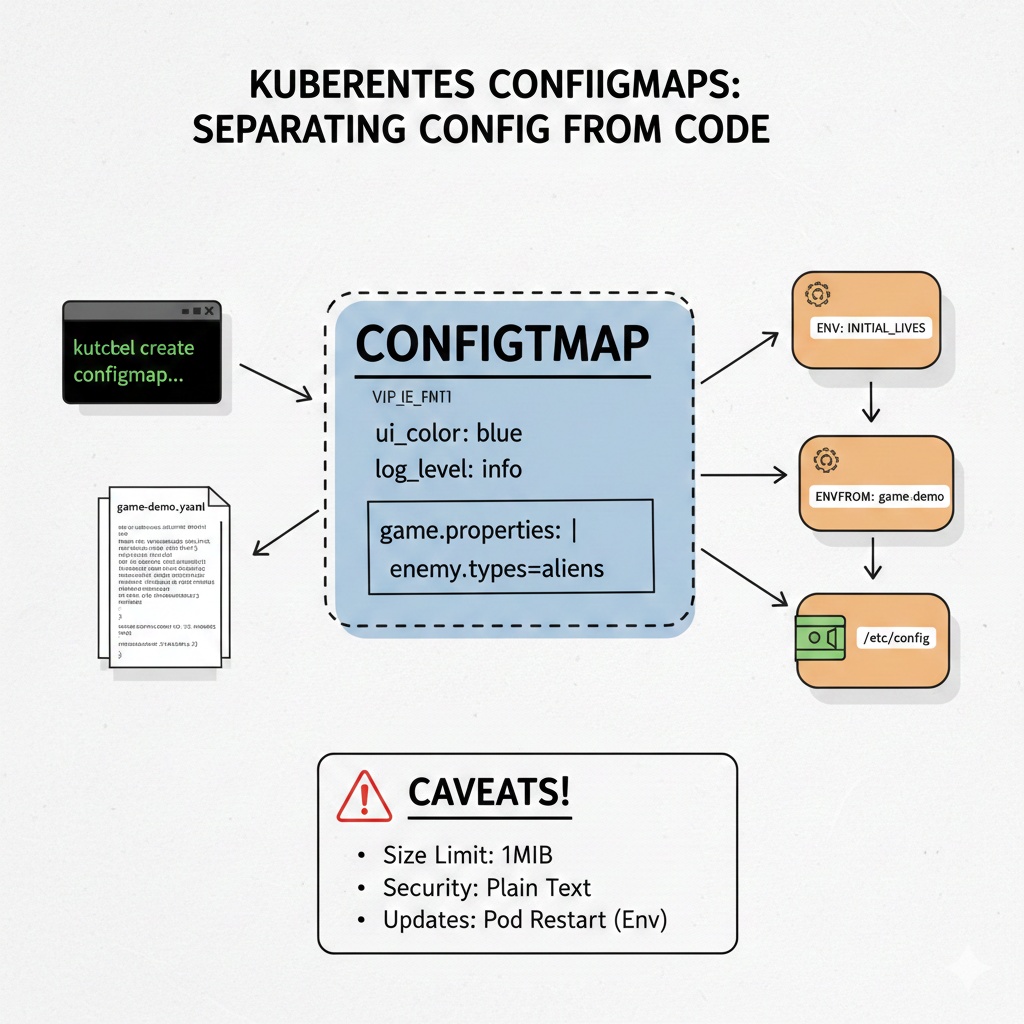
1. What is ConfigMap? 🤔
A ConfigMap is a Kubernetes API resource used to store non-confidential data in key-value pairs.
If you hardcode configuration values like database connection information or API endpoints within your application’s source code, you face the hassle of rebuilding the image every time the environment changes. ConfigMap solves this problem by separating configuration information from the container image.
💡 Key Summary:
>
Separation: Separates code and configuration to increase portability.
>
– Flexibility: Allows configuration changes without recompiling the application.
– Usage: Used as environment variables, command-line arguments, or configuration files within a volume.
2. Creating a ConfigMap 🛠️
There are two main ways to create a ConfigMap: directly using kubectl commands and defining a YAML file.
A. Creating with kubectl commands (Imperative)
You can create a ConfigMap directly from a file, directory, or specific values with a single command line.
# Create from literal value
kubectl create configmap my-config --from-literal=ui_color="blue" --from-literal=log_level="info"

# Create from file
kubectl create configmap app-config --from-file=config.properties
B. Defining with a YAML file (Declarative)
This is the most recommended method. It’s easy for version control and clear.
apiVersion: v1
kind: ConfigMap
metadata:
  name: game-demo
data:
  # Property-style keys; each key maps to a simple value
  player_initial_lives: "3"
  ui_properties_file_name: "user-interface.properties"

  # File-style keys
  game.properties: |
    enemy.types=aliens,monsters
    player.maximum-lives=5
3. Connecting ConfigMap to a Container 🔗
There are three main ways to apply the created ConfigMap to a container inside a Pod.
① Injecting as Environment Variables
Retrieves the value of a specific key as an environment variable in the container.
apiVersion: v1
kind: Pod
metadata:
  name: configmap-pod
spec:
  containers:
    - name: test-container
      image: k8s.gcr.io/busybox
      command: [ "/bin/sh", "-c", "env" ]
      env:
        # Assign the value of the key 'player_initial_lives' to the 'INITIAL_LIVES' environment variable
        - name: INITIAL_LIVES
          valueFrom:
            configMapKeyRef:
              name: game-demo
              key: player_initial_lives
② Injecting all ConfigMap data as Environment Variables
Using envFrom, you can retrieve all data within a ConfigMap at once.
spec:
  containers:
    - name: test-container
      image: k8s.gcr.io/busybox
      envFrom:
        - configMapRef:
            name: game-demo
③ Mounting as a Volume
This method embeds the configuration file itself as a file at a specific path. It’s useful when dealing with large configuration files (e.g., nginx.conf).
apiVersion: v1
kind: Pod
metadata:
  name: configmap-volume-pod
spec:
  containers:
    - name: test-container
      image: nginx
      volumeMounts:
      - name: config-volume
        mountPath: /etc/config
  volumes:
    - name: config-volume
      configMap:
        name: game-demo
4. Precautions ⚠️
- Size Limit: A ConfigMap cannot exceed 1MiB. For large-scale data, consider other storage options.
- Security: ConfigMaps are stored in plain text. For sensitive information like passwords or API keys, always use a Secret resource.
- Updates: ConfigMaps mounted as volumes automatically update the files inside the container when their values change, but values injected as environment variables require a Pod restart to take effect.
Wrapping Up 🎁
ConfigMap is an indispensable tool when building cloud-native applications. Manage environment-specific configurations flexibly to create a safer and more efficient deployment pipeline!
Leave a Reply