Compose’s profile is a feature that allows you to select only certain services within the same configuration file when needed. For example, the main application is always included, and debugging tools can be added only when the debug profile is enabled. If you immediately get an “unknown option” error when adding –profile, you should first check the executable and version that interpreted that option, rather than the YAML.
podman compose, podman-compose, and docker compose may look similar, but they are not the same commands. In particular, podman compose is a wrapper that calls an external Compose tool. Even if Podman itself has been updated to the latest version, if the tool that actually interprets the options is old, the same error may continue to occur. Podman Compose Official Documentation

Finding which tool caused the error
Start by distinguishing the presence or absence of hyphens.
The command to check which executable the current shell is looking for is as follows:
# First, check the path and version of the installed tool.
command -v podman
command -v podman-compose
command -v docker-compose
command -v docker
podman --version
podman-compose --version

# The wrapper links to the actual provider's help.
podman compose --help

# If using a Docker Compose plugin, check separately.
docker compose version
docker compose --help
Commands that are not installed may fail. This should not be seen as a profile unsupported issue. If a different executable than expected was selected due to a separate virtual environment, package manager, or shell alias, correct the path first. It’s best to check in a new practice directory before changing services in production.
To fix the provider selection for comparison, you can apply an environment variable to a single command instead of changing the current provider’s global setting.
# Specify podman-compose provider only for this help lookup.
PODMAN_COMPOSE_PROVIDER=podman-compose podman compose --help
This example assumes that the provider is searched in PATH. The actual operational path should be selected according to the installation environment. Do not paste output containing user directory paths or entire internal configuration files directly into diagnostic documents.
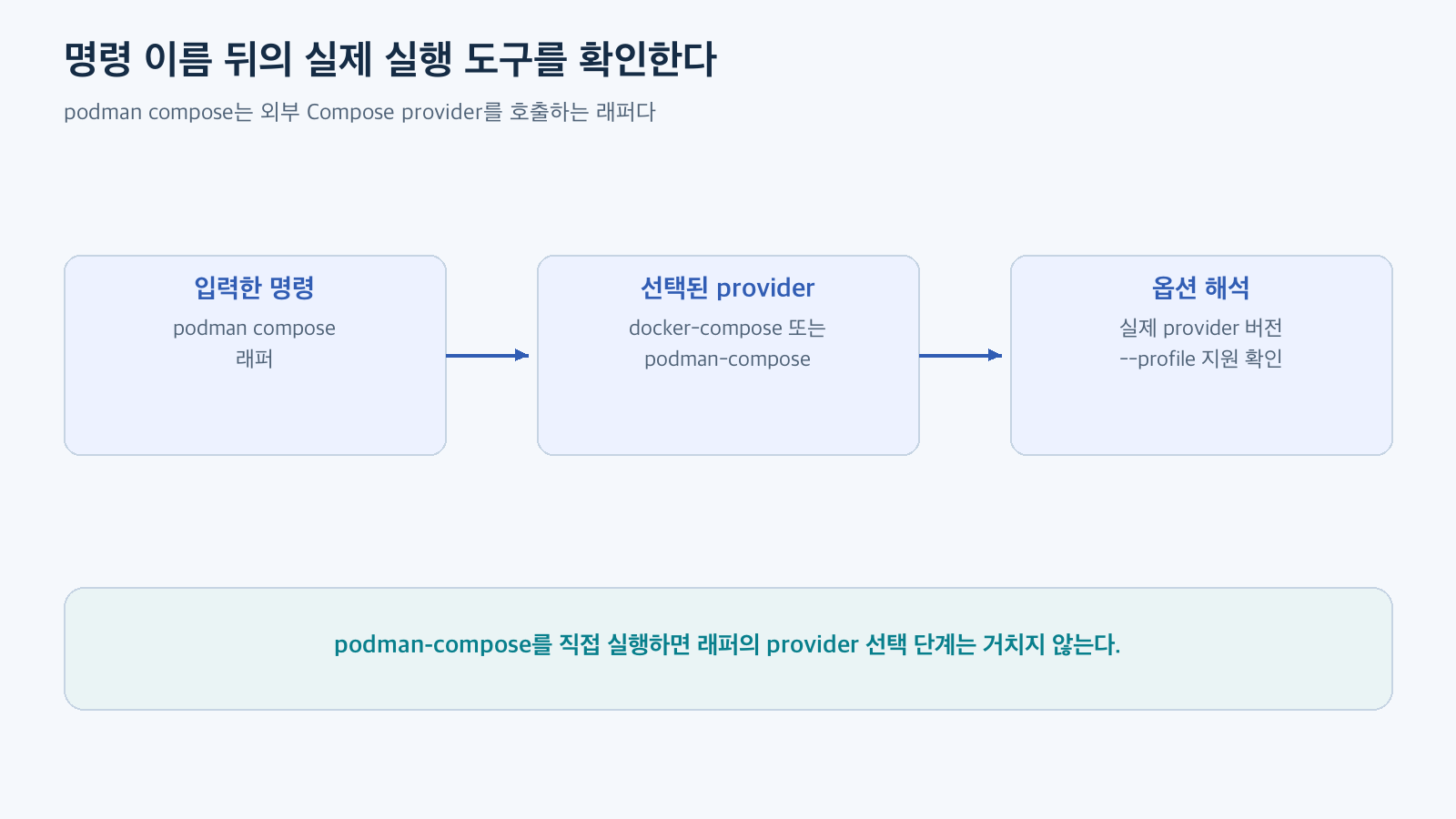
Figure: podman compose is a wrapper that calls an external Compose provider · Reconstructed based on official documentation
Differences between podman-compose 1.0.6 and 1.1.0
The official v1.1.0 release of podman-compose records that profile argument support has been added. The argument definition in v1.0.6 source does not have –profile, while v1.1.0 registers it as a global option. Therefore, if podman-compose 1.0.6 actually interpreted the option, the inability to accept –profile in that version is not a problem to be solved by fixing the YAML file’s syntax. v1.1.0 Release, v1.0.6 Source, v1.1.0 Source
This version comparison is based on official releases and source verification. This article was prepared without running containers in 1.0.6 or reproducing past error logs. For safe local configuration checks, Podman 5.7.1 and podman-compose 1.5.0, currently installed, were used.
After checking if –profile is in the provider’s help, check the option’s position. Since this option is a global option in podman-compose, first check it by placing it before the command, as follows:
# Check the selected configuration without starting containers.
podman-compose -f compose.yaml --profile debug config
Different providers may have different supported options and subcommand behaviors. Do not infer podman-compose command format by reading Docker Compose help, or vice versa. Base it on the help of the tool actually executed.
Checking service selection only with a new virtual configuration
Save the following file as compose.yaml in a new practice directory. Do not use actual project service names, ports, paths, or secret settings. Here, only configuration interpretation is checked, so image download and container startup are not required.
services:
  app:
    image: docker.io/library/alpine:3.22
    command: ["sh", "-c", "sleep 300"]
  inspector:
    image: docker.io/library/alpine:3.22
    command: ["sh", "-c", "sleep 300"]
    profiles: ["debug"]
    depends_on: ["app"]
The ‘app’ without a profile is the default selection, and ‘inspector’ is included when ‘debug’ is selected. This relationship is also explained in Docker Compose’s profile documentation. This is a small example to use when checking the dependency relationship between default and selected services. Compose profiles
First, compare the following two commands:
podman-compose -f compose.yaml config
podman-compose -f compose.yaml --profile debug config
To avoid depending on the output order or the overall YAML structure, compare the set of service names. Save the following content as check_services.py in an environment with PyYAML. If the package is not present, install PyYAML in a new virtual environment and run it.
import subprocess
import yaml

def services(*flags):
    # Pass arguments individually. Read only the config result of the new virtual file.
    result = subprocess.run(
        ["podman-compose", "-f", "compose.yaml", *flags, "config"],
        check=True, capture_output=True, text=True,
    )
    return set(yaml.safe_load(result.stdout)["services"])

assert services() == {"app"}
assert services("--profile", "debug") == {"app", "inspector"}
print("합성 구성 검사 통과: 기본=app, debug=app+inspector")
While preparing this article, I ran python3 check_services.py with podman-compose 1.5.0, and the two set comparisons passed. The output was as follows:
합성 구성 검사 통과: 기본=app, debug=app+inspectorThis result means that profile selection in the virtual configuration was confirmed in that version. Container startup, network connection, and application normal operation were not checked. The podman compose wrapper and Docker Compose plugin paths were also not included in this measurement.
What to decide before removing the option
If the error message disappeared after removing –profile, the command may have changed, but the root cause might not have been resolved. The tool intended to be selected by the profile might be missing, or the service configuration might change depending on how the provider interprets that YAML key. Separate the fact that the error is gone from the fact that the configuration is as intended.
If the cause is an old provider, update that provider to a supported version according to how it was installed, and re-check the version and help in the same shell. If you overwrite it globally with a different package manager, path confusion may be added, so also check the installation source. This article did not actually execute update commands.
In environments where updating is difficult, you can consider separating configuration files for selected services. However, this is not a solution that automatically provides equivalent behavior to the profile option. The order of merging files, dependent services, and default execution scope must be re-verified in a new virtual configuration.
Docker Compose documentation explains that explicitly running a specific service with a profile can automatically select that service. This should not be assumed to be implemented identically by all providers and all versions. The full profile selection and specifying a single service are also not the same scope. Verify based on the actual commands and dependencies to be used. Relationship between specific services and profiles
The shortest sequence to narrow down errors
The –profile issue can be resolved in the following sequence to reduce unnecessary changes:
- Check the presence/absence of hyphens and the actual execution path.
- If a wrapper was used, check the selected provider.
- Check the version, help, and option position of that provider.
- Compare default services and profile-selected services in a new virtual configuration.
- After confirming that the configuration interpretation is correct, check startup in a separately approved practice environment.
A profile is not a mere decoration that can be replaced by removing one option; it is a rule for selecting services to run. Finding the executor and its version, confirming the service selection result, and then modifying it is the way to resolve errors while preserving the intent of the configuration.
Leave a Reply