Hello, aspiring security professionals! 🌱
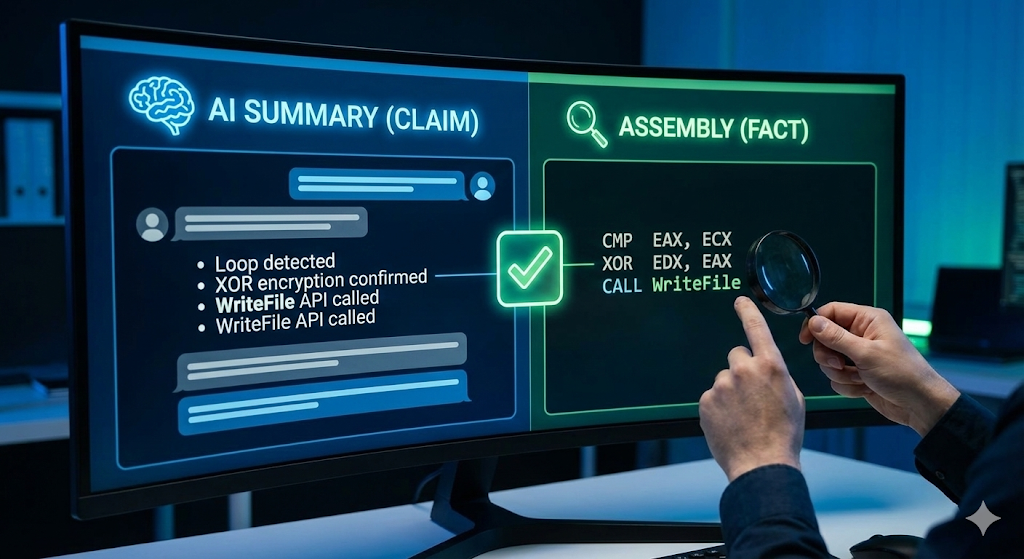
Last time, we used a cheat code: throwing complex code at AI and asking, “What does this function do?” It was really convenient when AI just told us, “This is ransomware encryption logic!”
But wait a minute! ✋
“A security analyst’s job is to be suspicious.”
AI is very smart, but sometimes it fabricates facts (Hallucination) or misinterprets nuances. AI might say “encryption” when it’s actually just “encoding,” or “deletion” when it’s “movement.”
So today, we’re going to learn how to use AI’s explanation as ‘reference material’ and cross-reference it with the actual ‘room of truth,’ the Assembly code. Only after this process can we stamp it with “Analysis Complete!”
Assembly language isn’t difficult. You only need to check 3 key points! 🧐
1. Why do we need to look at Assembly? (Even though there’s C code…)
Ghidra’s decompiled (C-form) screen sometimes deceives us.
- Omitted Information: Important variables can disappear during compiler optimization.
- AI’s Misunderstanding: AI often concludes “This is AES encryption” just by looking at variable names or function structures, but when you actually dissect it, it’s often simple XOR.
“Fact-checking AI’s claims” is the core competency of reverse engineering.
2. Preparation: Screen Setup 🖥️
View the Ghidra screen in dual mode.
- Left: Listing View -> Assembly Language (Truth)
- Right: Decompile View -> C Language (Interpretation)
- Outside the window: AI chat window -> Summary (Claim)
3. Practical Verification: AI’s Claim vs. Assembly Fact 🥊
Let’s verify using the ransomware example from last time.
💬 AI’s Claim (Result from last time)
“This function performs encryption by XORing file data with a key value in a loop.”
Now, open your eyes wide and let’s find the evidence in the left Listing View (Assembly).
✅ Check Point 1. Is there really a loop? (Loop)
AI said there was a “loop.” In assembly, loops usually appear as a combination of comparison (CMP) and jump (JMP/JNZ).
- Find Assembly Code:
LAB_1400012f0:              ; 반복 시작 지점 라벨
   ...
   INC  EAX                ; EAX (카운터 i) 값을 1 증가 (++i)
   CMP  EAX, ECX           ; EAX(i)와 ECX(파일크기)를 비교 (i < size ?)
JL LAB_1400012f0 ; i가 더 작으면(JL) 다시 라벨로 점프(Jump)- Verification Result: We see CMP (compare) and JL (Jump If Less) instructions. It is indeed a looping structure. (Matches AI explanation! ⭕)
✅ Check Point 2. Is it really performing XOR operation? (Logic)
This is the most important part. AI said “XOR encryption.” If ADD or SUB appears here, AI is wrong.
- Find Assembly Code:
MOV  EDX, [RBP + local_var] ; 데이터를 레지스터로 가져옴
MOV  EAX, [RBP + key_var]   ; 키 값을 가져옴
XOR  EDX, EAX               ; ⭐ 여기다! XOR 연산 수행!
MOV [RBP + local_var], EDX ; 결과를 다시 메모리에 저장- Verification Result: There’s a clear XOR instruction. If this were AESENC (AES encryption instruction), it would be “advanced encryption”; if it’s just XOR, it’s “simple encryption.” Confirmed with our own eyes, it’s definite. (Matches AI explanation! ⭕)
✅ Check Point 3. Check Function Call (API Call)
AI said it “overwrites the file at the end.” To write a file, we need to ask the operating system, right?
- Find Assembly Code:
PUSH ...                    ; 파라미터 넣기
CALL dword ptr [->WriteFile] ; ⭐ WriteFile API 호출!
TEST EAX, EAX ; 성공했는지 확인- Verification Result: The Windows API name WriteFile is clearly visible after the CALL instruction. The act of writing a file is proven to be a fact. (Matches AI explanation! ⭕)
4. What if AI was wrong? (Hallucination Example) ⚠️
Sometimes this happens.
- AI: “This code generates an RSA asymmetric key.”
- Actual Assembly:
CALL rand      ; 랜덤 숫자 생성
MOV [key], EAX- Analyst’s Judgment: “No? It’s just using the rand() function to generate a single random number? It’s not something grand like RSA!”
👉 This is the moment you beat AI. You should write this in your analysis report as “AI Misdiagnosis Correction: Not RSA, simple random key generation.”
5. Assembly Mapping Table for Beginners 📝
These are common instruction pairs used when verifying AI’s explanations. Just memorizing these will get you 80% of the way there!
| AI Explanation (C Language) | Assembly Instruction to Find (Opcode) | Meaning |
| — | — | — |
| Function Call (Call) | CALL | Jump to another function |
| Conditional Statement (If) | CMP, TEST + JZ, JNZ | Compare and jump |
| Loop (For/While) | JMP, LOOP | Return to a specific location |
| Variable Assignment (=) | MOV, LEA | Copy value/Get address |
| Arithmetic Operation (+, -) | ADD, SUB, INC, DEC | Add, Subtract |
| Logical Operation (&, ^) | AND, OR, XOR | Bitwise operation (Important in encryption!) |
| Termination (Return) | RET | End function and return |
—
🎉 Practice Wrap-up
Today, we learned how to cross-validate by not blindly trusting the words of an AI interpreter, but by checking the original text, assembly.
- Listen to the overall picture from AI. 👂
- Visually identify if key instructions (XOR, CALL, CMP) are present in the assembly view. 👀
- If they match, pass; if not, trust your own eyes. 👁️
If you develop this habit, you will no longer be a “script kiddie who just runs tools,” but a “true analyst who sees through the truth of the code.”
Next time, we’ll move on to the Dynamic Analysis stage, where we’ll visually confirm what we’ve understood through static analysis by actually executing it.
Don’t be afraid of assembly! It’s nothing once you dig into it! Fighting! 💪
Leave a Reply