Hello everyone! Today, I’d like to talk about some “unfamiliar IP ranges” that you might encounter when working with cloud-native environments.
When operating Kubernetes, you might sometimes wonder, “Huh? Our company’s VPC range is 10.0.0.0/16, so why am I seeing 34.x.x.x?” or “Why are AWS EKS Pod IPs 100.64.x.x?”
These two cases arose for different reasons, but they ultimately share a common theme: structural limitations of cloud networks and IP resource management. Let’s delve into how GKE and EKS each handle networking in detail! 🚀
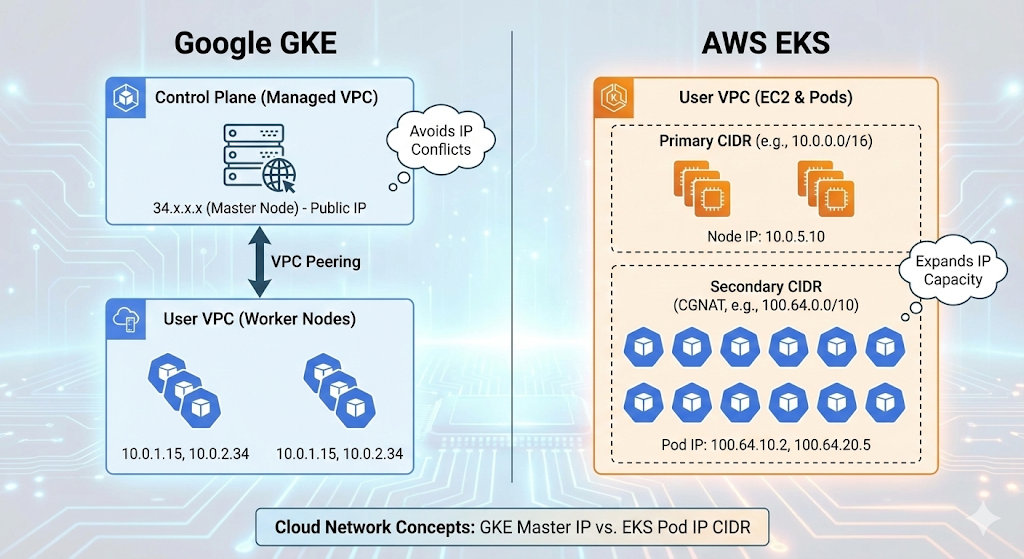
1. GKE (Google Kubernetes Engine) and the Secret of the 34.x.x.x Range 🇬
“My cluster is Private, so why does the master node use a public IP?”
When you create a GKE cluster and run `kubectl cluster-info`, you’ll see that the master (Control Plane) address is assigned a Google public IP, such as 34.118.x.x.
🏗️ Structural Reason: Separation of Management Domains
GKE has a unique architecture.
- User VPC (Worker Nodes): This is the area we pay for and control. Actual Pods run here.
- Google Managed VPC (Control Plane): The master nodes reside in a separate project/VPC managed by Google.
These two networks are physically isolated and connected via VPC Peering for communication.
🧐 Why a Public IP (34.x) specifically?
Here lies the dilemma. What if Google used a private IP like 10.x or 192.168.x for the master nodes?
If a user created their VPC with the same 10.x range, an IP conflict (Overlap) would occur, making peering impossible.
Therefore, Google assigned a public IP (Public IP) range (such as Google-owned 34.x) to the master nodes, an IP that “won’t overlap anywhere in the world.”
💡 Key Summary
- Conflict Prevention: To connect regardless of which private range the user’s VPC uses.
- Accessibility: Acts as an endpoint for developers to issue `kubectl` commands from outside (the internet).
- Security: Even with the Private Cluster option enabled, this public IP range is used internally for routing, such as for tunneling between master and worker nodes.
2. AWS EKS and the Identity of 100.64.x.x (Secondary CIDR) 🅰️
“VPC IP addresses are running out! We need a dedicated range for Pods!”
When operating AWS EKS, you often see Pod IPs in the 100.64.x.x range. This is closely related to the characteristics of the AWS VPC CNI plugin.
😱 Problem: IP Exhaustion
The AWS VPC CNI assigns a real VPC IP to each Pod. While performance is excellent, IP consumption is enormous.
For example, even if you create a VPC with 10.0.0.0/16 (65,536 addresses), by splitting subnets and launching EC2, ELB, RDS, etc., you’ll run out of IPs to launch thousands of Pods.
🛠️ Solution: Adding a Secondary CIDR
The technique used here is to attach a Secondary IP range (Secondary CIDR) to the VPC. The most recommended range for this is 100.64.0.0/10.
🧐 What is 100.64.x.x? (CGNAT)
This range is the CGNAT (Carrier Grade NAT) range defined in RFC 6598 standard.
- Not a Public IP: It is not routed on the internet.
- Not a typical Private IP (10.x, 192.168.x) either: The probability of it overlapping with ranges commonly used in corporate internal networks is very low.
In other words, it’s an “ideal, conflict-free reserve range for private network expansion.” EKS allocates this range exclusively for Pods, separating the IP range used by nodes (EC2) from the IP range used by Pods, and solving the IP shortage problem.
💡 Key Summary
- IP Acquisition: Allows for the creation of an infinite(?) number of Pods beyond the limits of the existing VPC bandwidth.
- Ease of Management: Node IPs and Pod IPs are clearly separated, making management easier.
- Standard Compliance: Utilizes the CGNAT range to avoid private IP conflicts.
🥊 At a Glance Comparison
| Category | GKE (Google) | EKS (AWS) |
|---|---|---|
| Observed IP | 34.118.x.x (Example) | 100.64.x.x |
| IP Type | Public IP | CGNAT IP (Shared Address) |
| Target Resource | Control Plane (Master Node) | Pod (Inside Worker Node) |
| Purpose of Use | IP conflict prevention with user VPC and external access | Solving VPC IP exhaustion and securing a dedicated range for Pods |
| Network Architecture | Google Managed VPC ↔ User VPC Peering | Secondary CIDR expansion within a single VPC |
—
📝 Conclusion
When using the cloud, it can be perplexing when “IPs you didn’t configure” appear. However, behind this lies the deep consideration of Cloud Service Providers (CSPs) for conflict prevention and scalability.
- GKE’s 34.x: It’s a Google-managed area, so you can rest assured, “Ah, it’s the master node!”
- EKS’s 100.64.x: Think of it as an “expansion slot” to solve the Pod IP shortage.
Understanding these differences will allow you to handle hybrid cloud or multi-cloud network design much more flexibly! 👍
If this was helpful, please give it a like! 👏
Leave a Reply