Hello everyone! Today, we’re going to dive deep into Service Accounts, the fundamental core of Kubernetes security.
If you simply thought, “Isn’t that what’s used to grant permissions to Pods?”, you’ll gain a deeper understanding from today’s post. In particular, the concepts of Projected Volumes and Bound Tokens, which have become the standard in recent Kubernetes versions, are crucial for security and must be understood.
Invest just 10 minutes to master the core of Kubernetes authentication structure! 🚀
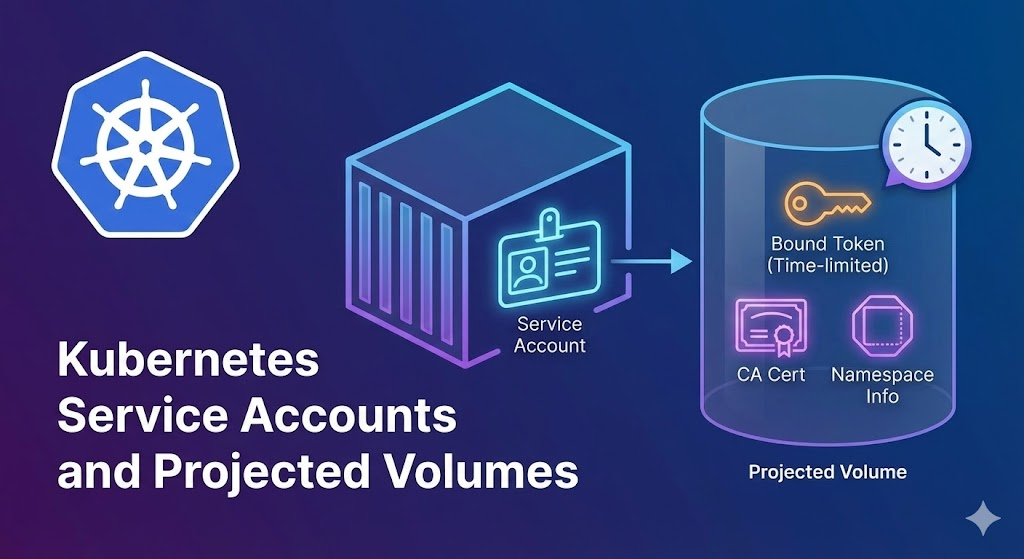
1. Service Account (SA): The ID Card for Pods 🪪
Just like we scan our employee ID to enter the company building, applications inside a Pod need an ID card to communicate with the API server within a Kubernetes cluster. This is the Service Account.
👤 User Account vs. 🤖 Service Account
- User Account: An account for humans (administrators, developers, etc.). It’s typically managed globally and linked to external systems like AWS IAM or Google Accounts.
- Service Account: An account for processes (bots). Its most significant characteristic is that it’s tied to a Namespace.
If you don’t specify one when creating a Pod, Kubernetes automatically assigns the default Service Account for that Namespace.
2. The Old Way: “An Eternal Key” (Legacy) 🗝️
In the old (Legacy) method, when a Service Account was created, a Secret resource was automatically generated. This Secret contained a token with no expiration date.
This method had a critical flaw:
- Security Vulnerability: Once the token was compromised, hackers could use it indefinitely until an administrator manually revoked it.
- Management Inconvenience: Rotating the token required the cumbersome task of deleting and recreating the Secret.
Therefore, the Kubernetes community introduced a new technology called Projected Volumes.
3. The Current Standard: Projected Volumes and “Living Tokens” ✨
In modern Kubernetes, tokens are not stored in static Secrets. Instead, Projected Volumes are used to issue a “temporary token” from the API server at the moment the Pod is created and inject it into the Pod.
📽️ Why is it called “Projected”?
While a typical volume mount connects a single storage source, a Projected Volume is a technology that aggregates (projects) multiple sources into one directory.
It usually mixes the following three pieces of information into a single folder (/var/run/secrets/kubernetes.io/serviceaccount):
- serviceAccountToken: JWT token for authentication
- configMap (kube-root-ca.crt): Certificate for trusting the API server
- downwardAPI: Pod’s namespace information
4. Core Technology: Bound Service Account Token 🔗
The tokens injected via Projected Volumes are called Bound Tokens. This is because they are strongly “bound” to something. This concept is the core of security.
① Time Bound (Time Limit) ⏳
These tokens have an expiration period (default is 1 hour).
- Legacy: No expiration.
- Modern:
expirationSecondsis set.
② Object Bound (Pod Dependency) 📦
This token shares its fate with the specific Pod (Pod UID) it was issued for.
- When the Pod is deleted, the token is immediately invalidated.
- If an attacker copies the token and tries to use it in another Pod, it may be rejected if the information within the token doesn’t match the execution environment.
③ Audience Bound (Usage Restriction) 🎯
The aud (Audience) field can be set in the token.
- If a token was issued for “Kubernetes API authentication,” attempting to hack the Kubernetes API server with it will result in rejection with a message like, “Hey, aren’t you for AWS authentication?”
- Service meshes like Istio actively utilize this feature for inter-service authentication.
5. Peeking into the YAML File 📝
If you look at the bottom of your Pod’s YAML file, you’ll see configurations automatically added by the kubelet:
YAML
volumes:
  - name: kube-api-access-xxxxx
    projected:
      defaultMode: 420
      sources:
      - serviceAccountToken:
          expirationSeconds: 3607  # 👈 Expires in 1 hour!
          path: token
      - configMap:
          items:
          - key: ca.crt
            path: ca.crt
          name: kube-root-ca.crt
      - downwardAPI:
          items:
          - fieldRef:
              apiVersion: v1
              fieldPath: metadata.namespace
            path: namespace
Thanks to this configuration, applications inside the Pod can read the file at /var/run/secrets/kubernetes.io/serviceaccount/token to communicate securely.
6. Will My App Die When the Token Expires? (Token Rotation) 🔄
“If it expires in an hour, will my service stop working then too?”
No! Don’t worry.
The Kubelet works diligently.
- As the token’s expiration approaches, the Kubelet automatically requests a new token from the API server.
- It then overwrites (updates) the token file mounted inside the Pod with the new token value.
- Applications (most K8s client libraries) periodically re-read the file to refresh the token.
⚠️ Important Note: If you are developing applications directly, you must implement logic to periodically re-read the token file (Reload), rather than just reading it once at the beginning. (Standard libraries like the Go client already have this implemented.)
7. In Summary 🎁
Let’s summarize today’s content in three points:
- Service Accounts are the ID cards for Pods to communicate with the Kubernetes API.
- For security, the Projected Volume method is used, employing short-lived, auto-rotating tokens (Bound Tokens).
- These tokens share the Pod’s lifecycle and are bound to a specific Pod, reducing risk even if stolen.
Now, you shouldn’t be intimidated by the complex projected syntax when you run kubectl get pod -o yaml, right? This is Kubernetes’ meticulous consideration for keeping your cluster secure. 🛡️
Have a safe and enjoyable Kubernetes journey today!
Leave a Reply