Hello everyone! Today, we’re going to dive deep into Kyverno’s architecture and its core components, which are essential for Kubernetes operations and a key topic for the KCA exam. 🕵️♂️
When operating Kubernetes, you might wonder, “Who deployed a Pod without security settings in my cluster?” This is where Kyverno comes in as a savior. Understanding how it works internally makes operations and troubleshooting much easier.
The most common phrase used to describe Kyverno is “Kubernetes Native.” This is because Kyverno leverages Kubernetes’ existing mechanisms as they are.
The most important concept is Admission Webhooks. When a resource creation/modification request comes to the Kubernetes API server, the API server asks Kyverno, “Is this okay?” before processing the request. Kyverno then approves, denies, or suggests modifications based on the configured policies.
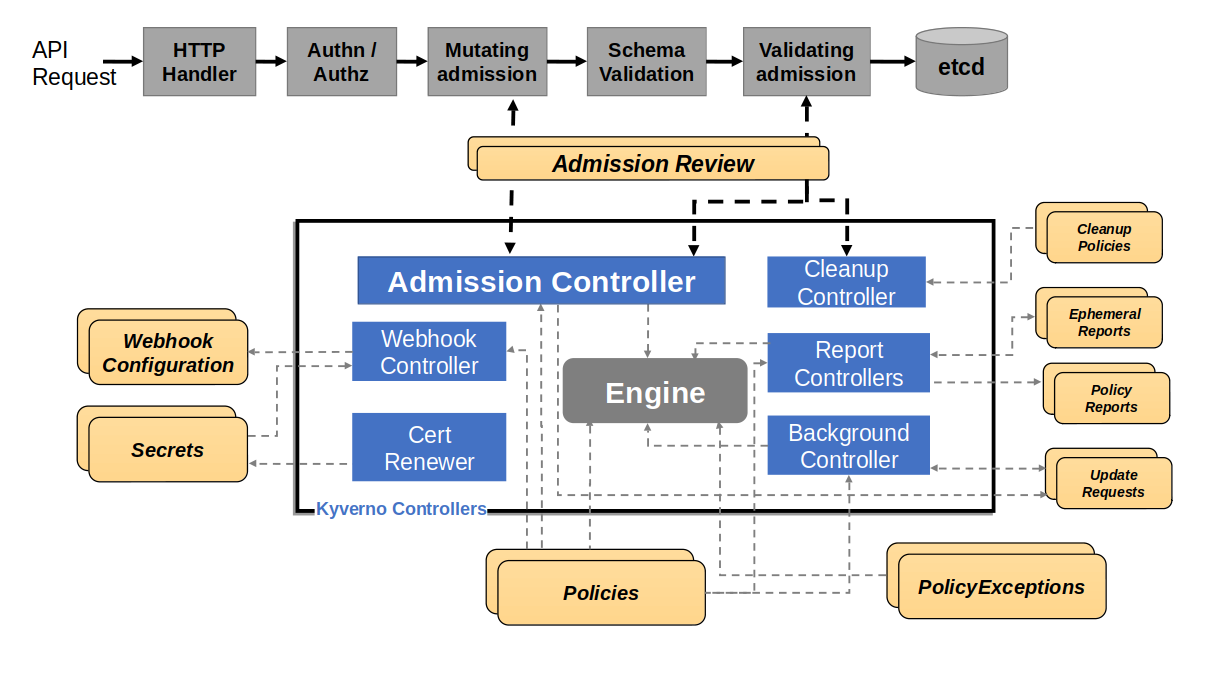
https://kyverno.io/docs/introduction/how-kyverno-works/
🧩 Kyverno’s 3 Core Components
Let’s explore in detail what role each controller plays, focusing on the main Pods created during Kyverno installation.
1. Admission Controller (The Gatekeeper) 🛡️
This is the heart of Kyverno. It directly handles all MutatingWebhook and ValidatingWebhook requests.
- Mutation: When a request comes in, it automatically modifies the resource’s content according to the configured policies. For example, it can add specific labels to all Pods or inject sidecar containers.
- Validation: It checks if the resource adheres to security rules. If “Privileged mode is not allowed!” is configured, it will immediately block (Enforce) or record (Audit) requests that violate this rule.
- Generation: It automatically creates default NetworkPolicies or Roles when a new namespace is created.
2. Background Controller (The Auditor) 📋
While the Admission Controller focuses on “incoming requests,” the Background Controller monitors “resources already running in the cluster.”
- Policy Application Check: If a policy is created later, it scans existing running Pods to check if they comply with the new policy.
- Report Generation: It periodically scans the cluster, compiles policy violations, and generates PolicyReports. This allows administrators to not only block real-time requests but also check the overall health of the cluster.
3. Cleanup Controller (The Janitor) 🧹
Introduced in Kyverno version 1.9, this component is dedicated to cleaning up messy resources within the cluster.
- Expiration Setting: If a policy is set to “delete this resource in 1 hour” for a specific resource, this controller will track the time and delete it.
- Temporary Resource Management: It automatically cleans up resources created for testing or expired certificates, saving cluster resources.
🔄 Policy Processing Flow: From Request to Execution
Let’s follow the sequence of events that occur within Kyverno when a resource is created.
- API Request Dispatch: The user issues the `kubectl apply -f pod.yaml` command.
- Mutating Webhook: The API server sends the request to Kyverno. Kyverno injects (Mutate) the necessary configurations and returns the result.
- Object Schema Validation: The API server performs its own validation to ensure the modified resource’s format is correct.
- Validating Webhook: It asks Kyverno again, “Is it really okay to create now?” Kyverno makes the final review (Validate) and decides to approve or deny.
- Persistence: If all gates are passed, the data is stored in etcd, and the resource is created.
🛠️ Tips for Operators: Troubleshooting Points
If Kyverno suddenly stops working, check these three things first!
- Webhook Certificate Check: Kyverno communicates with the API server via TLS. If the certificate expires or the configuration is tangled, all API requests may stop. It is recommended to use cert-manager.
- Resource Filters: Sometimes you might wonder, “Why isn’t this Pod affected by the policy?” Check if certain namespaces (e.g., kube-system) are filtered out in Kyverno’s default settings.
- Admission Report: The reasons why a policy is not applied are detailed in the PolicyReport custom resource. Actively use the `kubectl get polr` command.
🌟 Conclusion
Kyverno is more than just a security tool; it’s a powerful framework that drives automation and standardization in Kubernetes operations. Understanding its architecture is the first step to fully utilizing its powerful features.
If you can visualize how the three managers we’ve explained today—Admission, Background, and Cleanup—protect your cluster, you’ll be able to showcase your expertise not only in the Kyverno exam (KCA) but also in real-world scenarios! 🚀
Leave a Reply