Hello! This is the fifth installment of the GitOps series. So far, we’ve looked at concepts, principles, and operating models. Now it’s time to answer the most practical question: “So, which tool should I use?”
As of 2026, there are many excellent GitOps tools on the market, but choosing the right one for your team’s situation isn’t easy. Today, we’ll focus on the two most prominent players, Argo CD and Flux CD, and provide a detailed 10-minute comparison of the optimal choices for various scenarios! 🚀
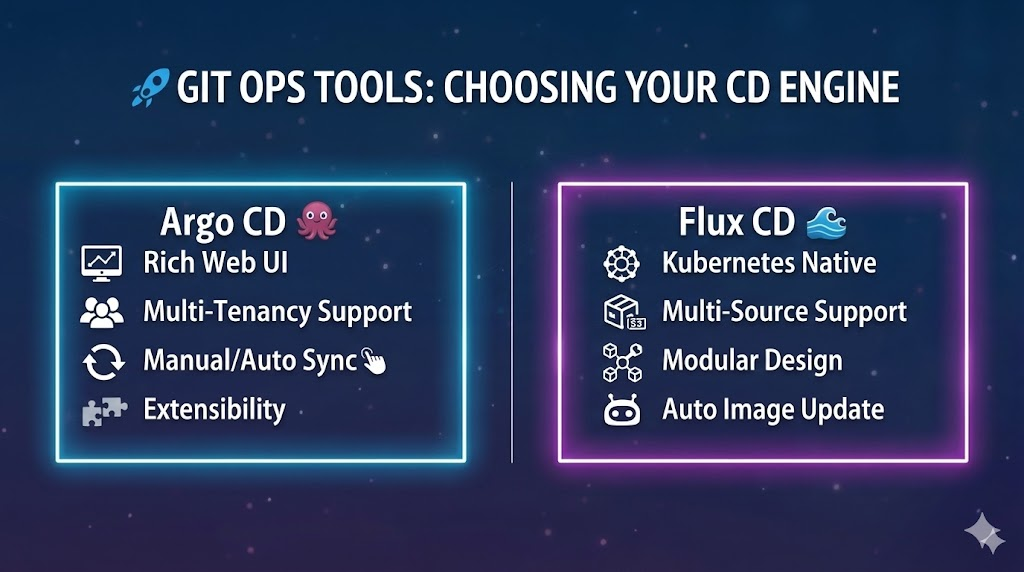
The most beloved tools in the GitOps ecosystem are undoubtedly Argo CD and Flux CD. Both tools are Graduated projects of the Cloud Native Computing Foundation (CNCF), with proven stability and performance.
1. Argo CD: Intuitive UI and the Enterprise Choice 📊
Argo CD specializes in a “user-friendly” experience.
- Features: It provides a very powerful and beautiful web UI. You can see at a glance how resources are connected within the cluster.
- Advantages:
- Excellent visualization enables quick incident response.
- Built-in SSO (Single Sign-On) and RBAC (Role-Based Access Control) settings make it suitable for large organizations.
- Integrates with ‘Argo Rollouts’ to easily implement advanced strategies like canary deployments.
- Recommendation: “We prioritize visual dashboards and are a large/medium-sized enterprise with multiple teams involved in complex permissions!”
2. Flux CD: The Essence of Lightweight and Powerful Automation ⚓
Flux aims for “simplicity” and “Kubernetes-native.”
- Features: Rather than a separate fancy UI, it has a modular structure centered around CLI (Command Line Interface) and Controller.
- Advantages:
- Low resource consumption and lightweight, making it ideal for edge computing or resource-constrained environments.
- Powerful Image Update Automation feature automatically commits to Git when a new container image is pushed to the registry.
- Leverages Kubernetes’ own RBAC, resulting in clean configurations.
- Recommendation: “We prioritize automation performance over UI, prefer lightweight tools, and are an engineering team with high Kubernetes proficiency!”
💻 GitOps Configuration Examples in Code
Let’s directly compare how the two tools differ by looking at the code that defines an application.
[Argo CD] Application Manifest
Argo CD defines deployments using a custom resource called Application.
YAML
apiVersion: argoproj.io/v1alpha1
kind: Application
metadata:
  name: my-cool-app
  namespace: argocd
spec:
  project: default
  source:
    repoURL: 'https://github.com/my-org/my-app-config.git'
    targetRevision: HEAD
    path: 'envs/prod'
  destination:
    server: 'https://kubernetes.default.svc'
    namespace: production
  syncPolicy:
    automated:
      prune: true
      selfHeal: true
[Flux CD] Kustomization & Source
Flux manages source and deployment (Kustomization) steps separately.
YAML
# 1. Source Definition (where to fetch from)
apiVersion: source.toolkit.fluxcd.io/v1beta2
kind: GitRepository
metadata:
  name: my-app-source
  namespace: flux-system
spec:
  interval: 1m
  url: https://github.com/my-org/my-app-config.git
  ref:
    branch: main
---
# 2. Deployment Definition (how to apply)
apiVersion: kustomize.toolkit.fluxcd.io/v1beta2
kind: Kustomization
metadata:
  name: my-app-deploy
  namespace: flux-system
spec:
  interval: 5m
  path: "./envs/prod"
  prune: true
  sourceRef:
    kind: GitRepository
    name: my-app-source
  targetNamespace: production
🤔 Guide to Choosing the Right Tool for You
If you’re still deliberating, follow this checklist!
- Is a visual dashboard absolutely necessary?
- YES ➡️ Argo CD
- NO (CLI is convenient) ➡️ Flux CD
- Is multi-tenancy (permission separation for multiple teams) complex?
- YES ➡️ Argo CD (its own RBAC is very powerful)
- NO ➡️ Flux CD
- Do you want to automate image tag updates?
- YES ➡️ Flux CD (excellent built-in feature)
- NO ➡️ Argo CD (requires a separate Image Updater)
- Do you need to minimize system resources?
- YES ➡️ Flux CD
- NO ➡️ Argo CD
🏗️ Other Options
- Jenkins X: Useful when you want a fully automated pipeline from CI to CD using GitOps.
- GitLab Agent for Kubernetes: If you primarily use GitLab, it integrates most seamlessly without needing separate tool installation.
🏁 Conclusion
Regardless of which tool you choose, the most important principle is to “treat Git as the single source of truth.” Whether it’s the convenience of Argo CD or the lightness of Flux, the best tool is the one that boosts your team’s productivity. 🏆
If you’re just starting, I recommend beginning with Argo CD to gain visibility. Later, if you want to increase the level of automation, considering Flux can be a good strategy.
Leave a Reply