Hello! This is the third installment of the Kyverno series, the magician of Kubernetes security policies. 🧙♂️
In the previous sessions, we learned how to robustly install and optimize Kyverno. Now it’s time to start creating policies. When you go to create a Kyverno policy, the first choice you encounter is:
“Should I create it as a Policy or a ClusterPolicy?” If you don’t know the difference between the two, your policies might get tangled later, or management efficiency could decrease. Let’s invest just 10 minutes today to perfectly clarify this concept! 🚀
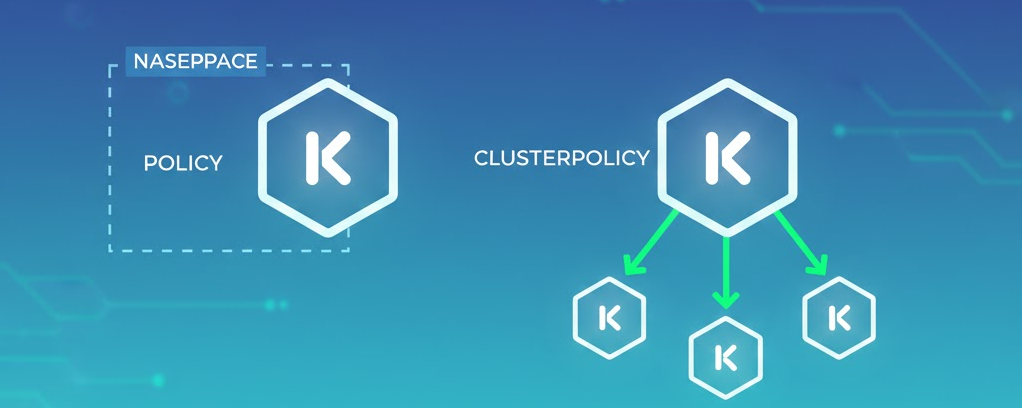
🏗️ 1. The Decisive Difference in Scope
The most crucial difference is “how far the policy’s influence extends.”
🔹 Policy (Namespace-scoped)
- Definition: A resource that belongs within a specific Namespace.
- Scope: Affects only resources within the namespace where the policy was created.
- Analogy: Like a family motto or rule that applies only to ‘our home’ within an apartment complex.
🔸 ClusterPolicy (Cluster-wide)
- Definition: A resource defined at the cluster-wide level.
- Scope: Monitors and controls resources across all namespaces within the cluster.
- Analogy: Like the ‘management regulations’ that apply to the entire apartment complex, or common rules that all residents must follow.
💻 2. Differences Seen in Code
The difference becomes clearer when you look at the YAML structure. Pay attention to the kind and metadata sections!
✅ Policy Example (For a Specific Namespace)
This policy performs label validation only for Pods created within the staging namespace.
YAML
apiVersion: kyverno.io/v1
kind: Policy # <--- This is just a Policy.
metadata:
  name: check-team-label
  namespace: staging # <--- A specific namespace must be specified.
spec:
  validationFailureAction: Enforce
  rules:
  - name: check-label
    match:
      any:
      - resources:
          kinds:
          - Pod
    validate:
      message: "The label 'team' is required in staging namespace."
      pattern:
        metadata:
          labels:
            team: "?*"
✅ ClusterPolicy Example (For the Entire Cluster)
This policy inspects all Pods, regardless of which namespace they are in within the cluster.
YAML
apiVersion: kyverno.io/v1
kind: ClusterPolicy # <--- This is a ClusterPolicy.
metadata:
  name: disallow-root-user # <--- There is no namespace field!
spec:
  validationFailureAction: Enforce
  background: true
  rules:
  - name: check-run-as-non-root
    match:
      any:
      - resources:
          kinds:
          - Pod
    validate:
      message: "Running as root is not allowed in this cluster."
      pattern:
        spec:
          securityContext:
            runAsNonRoot: true
⚖️ 3. When to Use Which? (Use Cases)
The criteria for selection are the ‘managing entity’ and the ‘target of application.’
🙋♂️ When to Use Policy (Team-level)
- Namespace-specific autonomy: When Team A requires strict security, and Team B needs relaxed policies for testing.
- Separation of duties: When each team’s namespace administrator wants to directly manage their own team’s policies.
- Local testing: When you want to pilot a policy only in a specific namespace.
👮♂️ When to Use ClusterPolicy (Enterprise Security Team-level)
- Global security standards: Enterprise-wide common rules such as “Prohibit Root account usage for any team” or “Prohibit using ‘latest’ for image tags.”
- Infrastructure automation: When you want to automatically inject (Generate) common NetworkPolicies or guidelines whenever a namespace is created.
- Centralized management: When an administrator wants to control all policies from one place and receive compliance status reports for the entire cluster.
📊 4. Summary Table at a Glance
| Category | Policy | ClusterPolicy |
| — | — | — |
| API Kind | Policy | ClusterPolicy |
| Resource Scope | Namespace-scoped | Cluster-scoped |
| Target Scope | Within a specific namespace | All namespaces in the cluster |
| Management Permissions | Namespace administrators can manage | Cluster administrators only |
| Use Cases | Team-specific custom rules, local testing | Enterprise security guidelines, PSS compliance |
—
💡 Practical Tips for Operators (Best Practices)
- 1. ClusterPolicy by default: Most security policies (Best Practices) should be applied consistently across the entire cluster, so prioritize ClusterPolicy.
- 2. Beware of name duplication: Even if Policy and ClusterPolicy have the same name, they can coexist because they are different resource types. However, it’s good practice to establish clear naming conventions (e.g., `cp-` prefix) to avoid confusion.
- 3. Check reports: Violations of ClusterPolicy are recorded in ClusterPolicyReport, and violations of Policy are recorded in the PolicyReport of the respective namespace.
🌟 Conclusion
Today, we deep-dived into the differences between the two main branches of Kyverno policies: Policy and ClusterPolicy.
If you’ve clearly grasped these concepts, you are now ready to formulate a strategy on “which policy to deploy where for maximum efficiency!” 👏
Next time, we’ll cover the essence of policy writing: “Precise Resource Selection using Match and Exclude Blocks.” Feel free to leave any questions in the comments! 😊
Leave a Reply