When deploying applications in a Kubernetes environment, it’s common for configurations to vary across Development (Dev), Staging, and Production environments. In the past, this often involved copying YAML files or using complex Helm templates. Kustomize emerged to solve these inconveniences as a ‘template-free’ configuration management tool. 🛠️
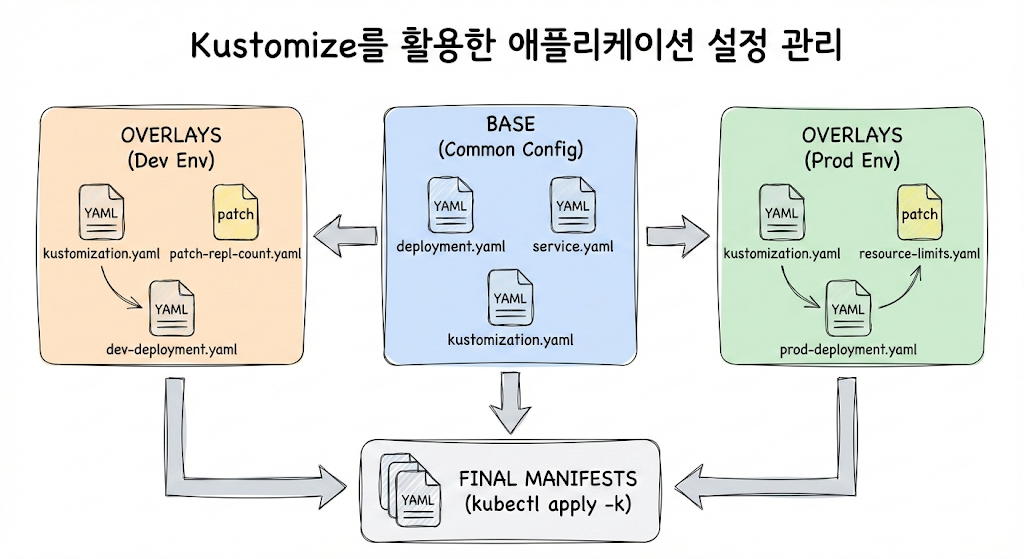
1. What is Kustomize?
Kustomize is a tool for customizing Kubernetes object configurations. Since Kubernetes version 1.14 in 2019, it has been built into kubectl, allowing immediate use with the kubectl apply -k command without separate installation.
Kustomize’s most significant feature is its Overlay approach. It leaves the original YAML files (Base) untouched and defines only the parts that change per environment in separate files, effectively overlaying them.
2. Core Concepts: Base and Overlays
To understand Kustomize, it’s crucial to grasp the relationship between Base and Overlays. 🏗️
- Base: A set of standard manifests used commonly across all environments. This includes basic Deployments, Services, ConfigMaps, etc.
- Overlays: Layers that redefine the Base for specific environments. For example, in a production environment, you might increase the number of replicas or strengthen resource limits.
3. Standard Directory Structure
When using Kustomize, the following directory hierarchy is recommended. 📂
.
└── deploy/
    ├── base/
    │   ├── deployment.yaml
    │   ├── service.yaml
    │   └── kustomization.yaml
    └── overlays/
        ├── dev/
        │   ├── kustomization.yaml
        │   └── patch-repl-count.yaml
        └── prod/
            ├── kustomization.yaml
            └── resource-limits.yaml
4. Key Features and Code Examples 💻
4.1 kustomization.yaml Components
This file acts as Kustomize’s engine. It defines which resources to include and which settings to modify.
# Example of base/kustomization.yaml
apiVersion: kustomize.config.k8s.io/v1beta1
kind: Kustomization

resources:
  - deployment.yaml
  - service.yaml
4.2 patches
Used when you want to modify only specific fields. For example, increasing the number of replicas to 5 only in the production environment.
# overlays/prod/kustomization.yaml
apiVersion: kustomize.config.k8s.io/v1beta1
kind: Kustomization

resources:
  - ../../base

patches:
  - target:
      kind: Deployment
      name: my-app
    patch: |-
      - op: replace
        path: /spec/replicas
        value: 5
4.3 Generators
Automatically create ConfigMaps and Secrets from files or lists of environment variables. When file content changes, the hash value is automatically updated, triggering a rolling update of pods. 🔄
# kustomization.yaml
configMapGenerator:
  - name: app-config
    files:
      - config.properties
secretGenerator:
  - name: db-secret
    envs:
      - .env.db
4.4 Transformers
Apply common attributes uniformly to all resources.
- namePrefix / nameSuffix: Add strings to the beginning/end of resource names.
- commonLabels: Assign labels to all resources.
- commonAnnotations: Assign annotations to all resources.
- namespace: Specify the namespace for all resources.
5. Kustomize’s Pros and Cons 📊
| Category | Pros | Cons |
| — | — | — |
| Readability | Maintains pure YAML format, easy to read | Cannot handle complex conditional statements (if-else) |
| Learning Curve | No need to learn template syntax (Go template) | Difficult to track if directory structure becomes complex |
| Integration | Built into kubectl, no separate tools needed | Potential for duplicate code if environment differences are extreme |
| Operations | Excellent compatibility with GitOps (ArgoCD, etc.) | Difficult to implement dynamic logic beyond simple value substitution |
—
6. How to Run
Once configured, you can check the final rendered YAML or deploy it directly using the following commands.
# Check rendering result (Dry-run)
kubectl kustomize ./overlays/prod

# Deploy to actual cluster
kubectl apply -k ./overlays/prod
Kustomize is a powerful tool that enhances configuration reusability and clearly manages environment-specific differences. It is an optimal choice for teams looking to manage infrastructure as code (IaC) without the complexity of templates. 🚀
Leave a Reply