AI’s hallucination is a phenomenon where it plausibly answers with content that differs from facts. This problem becomes more direct when installing development tools. It’s not just about misunderstanding an explanation; it’s about deciding what to run on your computer.
I also experienced such trial and error while installing the Samsung Cloud Platform CLI, a tool for managing services from the command line. I accepted the scloud from a personal GitHub repository, as guided by AI, as the official installation method. However, the tool guided by the official guide was scp-cli. The lesson learned from this experience is simple: the mere fact that a link actually opens does not confirm its official status, up-to-dateness, or compatibility with my environment.

Featured Image: A conceptual illustration, not an actual work screen or attack scene.
The Repository Existed, But It Wasn’t the Official Guide I Was Looking For
Initially, I followed the scloud installation guide provided by AI. I mistook a personal GitHub repository for the official installation path. In the process, I struggled considerably with an outdated version, incorrect configuration methods, and URL composition.
The problem wasn’t just a few differing command characters. It was fundamentally about which tool’s description should be used as the basis for installation and configuration. Upon belatedly checking the official documentation, I found that the basic guide was to execute via scp-cli.
I don’t want to say that personal repositories themselves are the problem here. Unofficial tools can also be useful if they fit the purpose. However, if an unofficial tool is introduced as an official installation path, users may find it difficult to distinguish between the scope supported by that tool and the current service requirements. There is no evidence that the repository in question is malicious. The focus of this article is not on evaluating administrators, but on the process of verifying recommendations.
It’s easy to feel reassured when an AI’s answer includes a real link. However, “that repository exists” and “it’s the official tool for my current purpose” are different claims. This time, I had to verify the latter.
Installation and Configuration Standards Confirmed in Official Documentation
While preparing this article, I directly read the Samsung Cloud Platform CLI Common official documentation on October 21, 2026. The document provides download links for Windows and Linux, and guides the following command to grant execute permissions to a downloaded file on Linux:
chmod +x scp-cliThis command is a step to change the execute permissions of a downloaded file. It does not replace the task of verifying where the file was obtained. The standard is to start downloads from the OS-specific links in the official documentation. The page I checked did not provide macOS downloads. Therefore, I will not add that the same file works as is on an iMac or that there are separate installation commands.
Configuration was also not something to be guessed from the tool’s name. The official documentation defines the execution environment as a JSON file, guiding to ~/.scp/cli-config.json on Linux and .scp/cli-config.json under the user’s home folder on Windows. Key items are authurl, accesskey, accesssecretkey, defaultscpregion, and an optional session_token when using temporary credentials. Actual authentication values are not included in this article.
In particular, auth_url varies depending on the target environment. The official table on the same page distinguishes: for Samsung is https://iam.s.samsungsdscloud.com/v1/endpoints, for Sovereign is https://iam.g.samsungsdscloud.com/v1/endpoints, and for Enterprise is https://iam.e.samsungsdscloud.com/v1/endpoints. This is why copying a single URL from an example as the correct answer for all environments should not be done. The default region must also be confirmed along with the actual target environment.
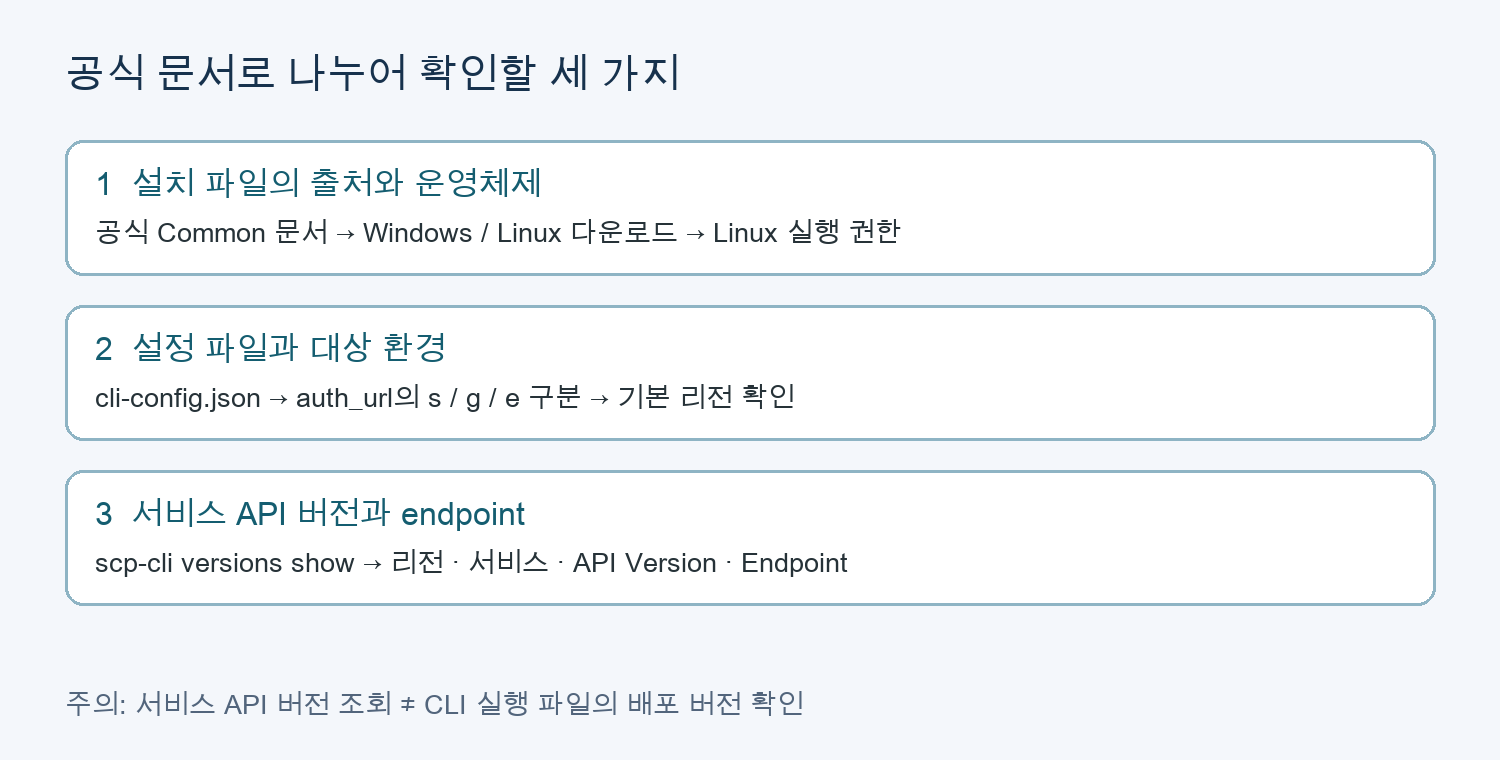
Figure 1. Verification sequence reconstructed based on official documentation. Source: CLI Common. The lookup below is not the result of execution on an actual account.
The basic command for service API version lookup guided by the document is as follows:
scp-cli versions showThe official example results show columns for Region Name, Service Name, Version, Status, and Endpoint. This can be referenced to check which region’s service endpoint and API version the installed tool handles. The document also presents optional arguments such as --region-name, --service, --status, and --timeout.
Here, Version refers to the service API version. It should not be confused with the distribution version of the CLI executable itself. I could not find a dedicated command to check the executable file version on the Common page I reviewed. Instead of guessing commands like --version by recalling other familiar CLIs, the limitation remains that the distribution version must be separately confirmed from official distribution information and the support guide for that file.
Options for each command can be checked with the help provided in the official documentation. For example, scp-cli iam policy create --help is an example of viewing the help for the policy creation command. In this article, I did not execute the policy creation command itself. Since I did not perform installation file execution, authentication, or actual endpoint lookup, I hope this is not read as a successful installation review or actual measurement result.
Where Incorrect Recommendations Lead to Supply Chain Risks
This experience was a matter of compatibility and configuration, but the same trust mechanism can lead to security issues. A software supply chain includes where the program I run is created and how it is delivered. The moment an installation command is copied, the name and distribution source recommended by AI enter my execution environment.
Depending on the tool, scripts may be executed during installation, and subsequently run programs may access files or the network. If broad permissions or authentication information are granted without verifying the source, the impact of an incorrect recommendation can increase. This does not mean all unofficial tools are dangerous. It means there is a need to verify the distributor before introducing code into your environment.
A more deliberate way to exploit this risk is hallucination squatting, often referred to as slopsquatting in the package context. This is a technique where an attacker registers a package or dependency name that AI has fabricated and that originally did not exist, and then distributes malicious code under that name. If a user trusts AI’s recommendation and installs it, a name that initially had no substance can be linked to code created by an attacker.
This scloud experience itself is not a case of hallucination squatting attack. It is a case of incorrectly being recommended an already existing unofficial repository, and it does not confirm that an attacker preempted an AI’s fictitious package name, or that malicious code or damage occurred. What connects the two cases is the trust mechanism of “using AI’s recommendation as an execution target without source verification.”
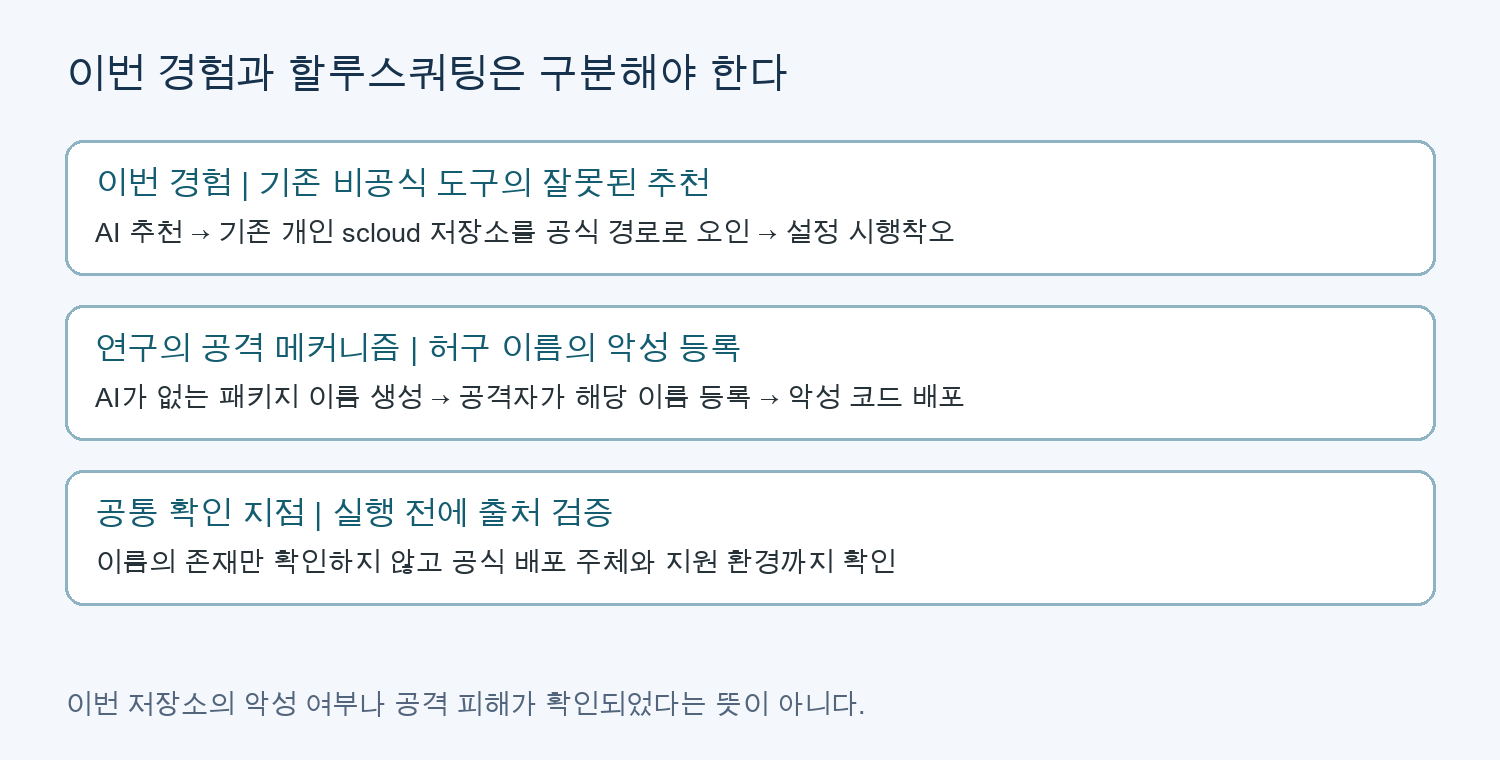
Figure 2. Original diagram distinguishing attack mechanisms explained in user experience and research. The attack section is reconstructed based on Lasso research and TrendAI research.
Research Shows Possibility and Recurrence
Lasso Security’s 2024 research addressed the problem of AI recommending non-existent packages, and how those names can lead to actual installation attempts. The core issue is not merely the existence of incorrect answers, but that the names appearing in those incorrect answers can be distribution names that attackers can preempt.
The original USENIX Security 2025 research analyzed 576,000 code samples generated by 16 models. The researchers reported that package hallucinations are a phenomenon observed across multiple models and configurations. This is evidence that it cannot be seen merely as a result of a specific user asking a wrong question. However, the results under the research conditions at that time should not be reinterpreted as the error rate or actual attack success rate of all AI tools today.
It is also necessary to distinguish between terminology and mechanisms. TrendAI’s own research explains the connection between fictitious package names and malicious registration under the name slopsquatting. Andrew Nesbitt’s article, who participated in the naming discussion, records the circumstances of the name emerging from a conversation with Seth Larson in April 2025. The issue of exploiting package hallucinations was being researched even before the name was coined.
After an attacker registers a name, merely checking “if the package exists” can pass. Therefore, simply verifying existence is insufficient. It is necessary to confirm whether that package is the official distribution of the original project.
Checklist to Verify Before Your Next Installation
Rather than not using AI, it is more practical to establish criteria to check just before execution. The necessary criteria from this experience are summarized as follows:
- Start with official documentation. Rather than immediately trusting a repository link provided by AI, verify if it’s a distribution source linked by the service’s official documentation. Search rankings or star counts are not proof of official distribution.
- Distinguish between product name, package name, and command name. Do not treat tools with similar purposes, like
scloudandscp-cliin this case, as the same. The installation name and the actual execution command may differ. - Check current support scope. Differentiate between operating system, distribution time and support status, service API version, region, and authentication environment. Do not conclude compatibility with current services based solely on an old README.
- Examine execution content before installation. For commands that directly execute remote scripts or steps requiring administrator privileges, verify the reason and content. If official signatures/hashes are provided, verify them, but obtain hashes from a trustworthy source.
- Grant secrets and permissions belatedly. Do not immediately input production authentication values into a tool you are checking for the first time. Use it with minimum privileges after necessary review, and do not attach configuration files or keys to AI queries or public logs.
- In teams, reuse verified distributions. Record approved sources and versions, and manage lock files and hashes in applicable ecosystems. These are means to consistently use reviewed distributions, not guarantees for automatic maliciousness detection.
You can ask AI: “First, show me the official documentation link and actual citation sources, and distinguish between package name, execution command name, supported operating system, and configuration path. Please do not guess commands you haven’t verified.” After receiving an answer, you must directly compare the link and the main text. Asking the same AI again does not constitute independent verification.
Continue Using AI, But Verify the Basis for Execution
AI can help quickly grasp document structures or understand the meaning of configuration items. I don’t want to negate that help because of this experience. However, if plausible explanations are accepted as evidence of official support, one might cling to a wrong starting point for a long time.
What I experienced was a trial and error resulting from accepting unofficial scloud guidance as the official path. Going a step further, there’s also the risk of hallucination squatting, where attackers fill AI-fabricated names with actual distributions. This is why, before executing a single installation command, one should verify not just “does the name exist?” but also “who distributes it, and is it suitable for my environment?”
References
- Samsung Cloud Platform CLI Common – Installation, JSON configuration, authentication URLs by environment, API version and endpoint lookup. Verified on 2026-10-21.
- Lasso Security: Diving Deeper into AI Package Hallucinations – 2024-03-28, original research institution material.
- Spracklen et al.: We Have a Package for You! – USENIX Security 2025 original research.
- TrendAI: Slopsquatting – 2025-06-05, internal research and defense explanation.
- Andrew Nesbitt: Slopsquatting meets Dependency Confusion – 2025-12-10, record by a party involved in the naming discussion.
Leave a Reply