Daybreak is an access program provided by OpenAI for approved cybersecurity tasks. Blue supports defensive tasks such as code review and vulnerability analysis, while Red supports specialized security research that requires separate approval. When actually using it, you need to check the program approval, model selection, and execution environment permissions separately.
For example, even if an organization has Red approval, it doesn’t always mean you should include daybreak_red in API requests. Some models require Red approval but use daybreak_blue as the request value. This is because the program’s name and the configuration values passed to the model are on different layers.
This article explains the differences based on official documentation released on October 9, 2026. It does not use emails sent to specific accounts or registration deadlines as conditions for general users. Nor is it a user review testing actual account access rights and API call success.

An AI-generated conceptual image illustrating the separation of approval and execution environment. Not an actual product screen.
1. The criteria for distinguishing Blue and Red are tasks and scope of approval
Typical tasks handled by Blue include vulnerability discovery and classification, secure code review, threat modeling, detection rule creation, incident investigation, malware analysis in controlled environments, and patch verification. Red is a path for specialized tasks requiring separate approval, such as controlled vulnerability reproduction and PoC verification, penetration testing, and red teaming. Blue application or identity verification alone does not grant Red privileges. Daybreak Official Guide
Thinking of this in terms of actual work makes the distinction easy. Finding parts missing authentication in a repository and explaining a fix, versus reproducing what results that defect creates in a running system, require different access permissions. Even when dealing with the same vulnerability, analysis that only reads and verification that sends requests to the system have different impacts.
The fact that a model’s response was received does not broaden the scope of work. An approved internal repository review does not mean it can extend to external service inspection. The target of execution, allowed actions, work time, and termination conditions must be determined separately by the team.
2. An actual request requires three conditions to be met
The first is an approved entity and project. Check if the individual or service, workspace or API organization/project, and allowed product screens are within the scope of approval. The second is the model available for use in that project. The third is the access program value appropriate for the model. Official Access Guide · Responses API Guide
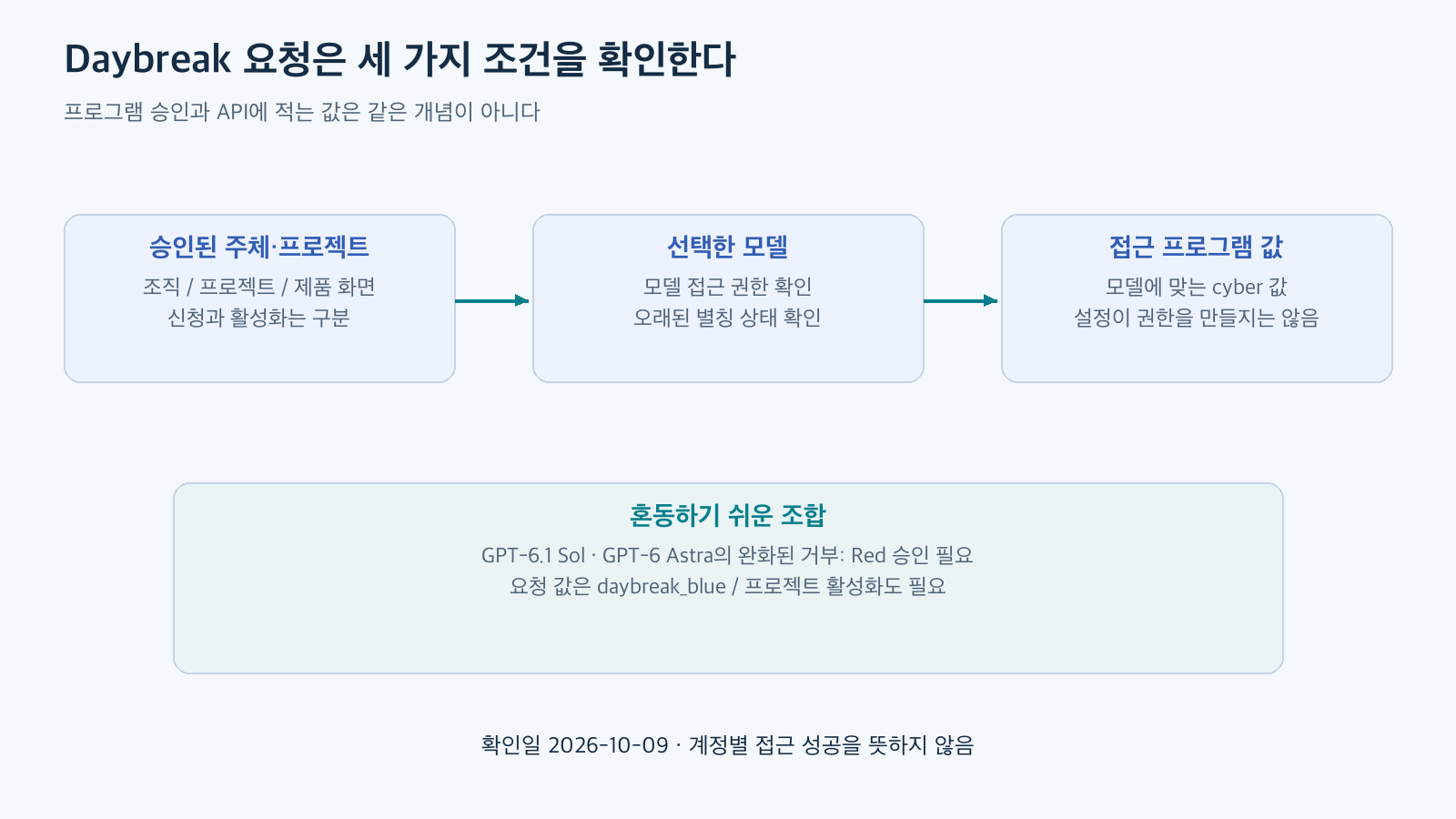
Reconstructed based on official documentation. This is the verification order according to Daybreak settings in the Responses API, and does not represent account-specific approval results.
Even if an API key is valid, if it was issued for a different project, you might not be able to access the desired program. Conversely, even if a program is active, if you don’t have permissions for the selected model, the request might fail. Therefore, when diagnosing issues, it’s more specific to check “Is the current project-model-program combination correct?” rather than “Why isn’t it working even though I have Red approval?”
3. How to match models and programs in the current API
The official API guide describes model and access_programs.cyber as separate fields. As of the verification date, typical combinations are as follows:
The configuration format is as follows. This is JSON for structural explanation and is not the result of actual execution on an account.
{
  "model": "gpt-6-sol",
  "input": "테스트 환경에서 보안 패치를 검증할 때 확인할 항목을 설명해 주세요.",
  "access_programs": {
    "cyber": "daybreak_blue"
  }
}
When fields are omitted, the selection varies depending on the model and approval status. To create reproducible operational settings, teams can consider explicitly stating intended values and recording actual selection results when program information is provided in the response. Request settings only select access; they do not create non-existent permissions.
4. Do not interpret the specifications of old aliases as the performance of the entire program
Currently, the gpt-daybreak-blue-latest and gpt-daybreak-red-latest model pages display a deprecation notice for aliases. If past default snapshots or context values remain on the same page, interpreting them as fixed specifications for the entire Daybreak program can lead to confusion. Blue Model Page · Red Model Page
Programs describe the conditions under which security tasks are accessed, and model documentation describes the input/output and functionality of individual models. For new integrations, it is better to check the currently accessible specific models and API guide together. If a system already uses aliases, do not assume that a simple string replacement will guarantee the same behavior as before.
For change verification, small fixed tasks such as synthetic code review, rejection of normal requests, output format, latency, and token usage can be used. Since the explanation method and tool selection may change with a different model, it is practical to compare results before broadening the scope of application. This comparison procedure is an operational suggestion and not a conclusion measuring the performance of a specific model.
5. Account authentication, API access, and execution permissions are managed separately
Account security deals with who can log in. Project access deals with which models can be requested. Sandbox and tool permissions deal with how far an agent can use files, networks, and commands. Passing one layer does not automatically prepare another.
Specific security key products or common registration deadlines applicable to all users are not confirmed as reference materials in this article. If an organization requires hardware keys or additional authentication, you should check the current account’s security settings and the target, method, and recovery procedures approved by the administrator. This is why guidance provided to individuals is not transferred as common conditions for public programs.
Login security keys and API keys also have different purposes. An API key is a credential used by an application when making requests. Even if a person uses strong authentication to log in, if the application logs the API key, another exposure path can be created. The official recommended configuration advises separating sensitive credentials from the context read by the model and, if necessary, recommends a separate intermediary layer that provides limited, short-term credentials. Recommended Security Configuration
6. Connecting approved models to a controlled environment
Reading source code with Blue and calling tools to change system state do not require the same level of execution permissions. First, define the minimum permissions required for the task, and place additional reviews at points where risk increases. Official documentation also distinguishes between general defensive tasks and higher-risk autonomous security testing. Scope of Recommended Configuration
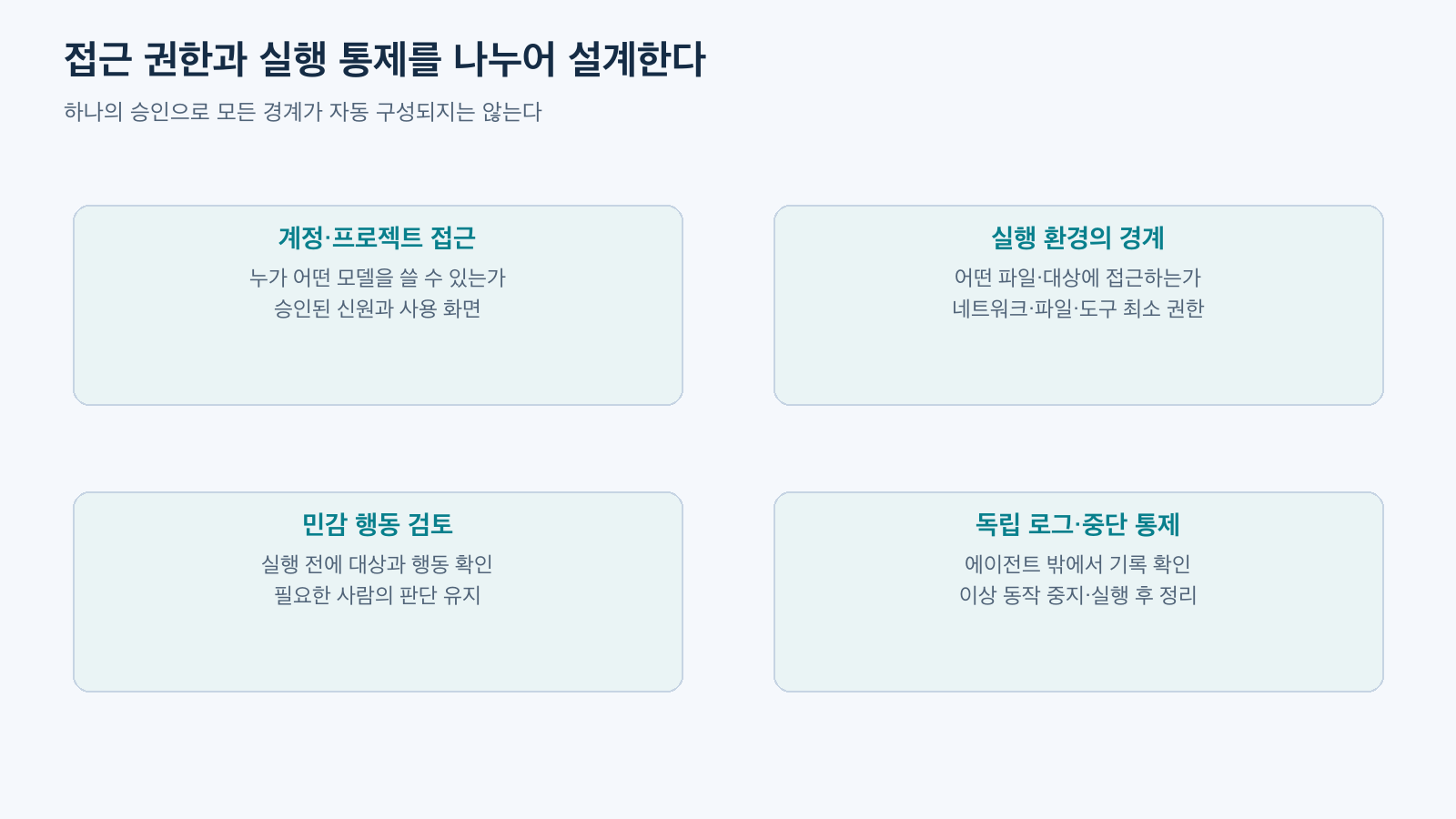
Reconstructed based on official documentation. This diagram distinguishes isolation, least privilege, review, and independent monitoring from Daybreak Recommended Configuration.
For small introductory tasks, you can start with an example repository owned by the team. The target directory should only allow read access, and no external network or actual operational credentials should be connected. Results should be received as file location, rationale, suggested modifications, and unconfirmed items. Even if patches are created in the next step, they must undergo change review and testing before being adopted as actual fixes.
Automated reviews like Auto-review do not replace the entire execution environment. It should not be assumed that general actions within allowed boundaries receive separate review every time. If you create your own API agent, you must directly configure a path to inspect targets and actions immediately before tool execution. Codex product features are not automatically attached to external harnesses. Action Review and Self-Agent Configuration
7. When failure occurs, first distinguish which layer it is from
invalid_access_program is a clue to check the combination of model and program values, unsupported_access_program for model’s program support, and access_program_not_enabled for the organization/project activation status. Model permissions are checked separately. Official Error Handling Guide
Even if a request succeeds, certain operations may be restricted by safety mechanisms. In such cases, rather than changing the request to bypass the approval scope, gather shareable information such as error type and request identifier and use the official troubleshooting path. There is no need to include sensitive original text or credentials in diagnostic materials.
Access approval, request success, and technical accuracy of results are separate verification items. For example, even if a code review response is received, whether it is an actual vulnerability must be verified separately. This distinction helps the team know which issues to consult with the administrator and which results developers need to reproduce.
Conclusion
When introducing Daybreak, you should check in the following order: approval scope → specific model → API program value → execution environment. Blue and Red are names that describe tasks and access conditions, and cannot be reduced to a single model’s performance metrics or tool permissions.
Currently available combinations should be checked in official documentation and project settings, and old aliases and account-specific notices should be treated separately. This configuration allows for distinguishing and managing access errors, model changes, and execution environment issues.
Leave a Reply