“ChatGPT is smart, but it doesn’t know my data. NotebookLM only knows my data.”
— This makes it the most powerful weapon for lectures, research, and learning.
>

>
What This Article Covers
- Why NotebookLM is fundamentally different from general chatbots (RAG-based)
- A comprehensive summary of key features newly added in 2026
- 7 verified use cases for instructors, students, and practitioners
- Limitations and pitfalls you shouldn’t blindly trust
Why NotebookLM Now?
ChatGPT, Claude, and Gemini are smart, but they have one fatal flaw: they don’t know the data you possess. This often leads to plausible falsehoods (hallucinations).
NotebookLM starts from the opposite direction. NotebookLM is a RAG (Retrieval-Augmented Generation) tool that allows users to directly converse with their own documents. This means the AI’s answers are based solely on the data you’ve uploaded. It even automatically provides citations for each answer, indicating which sentence it came from. GitConnected
According to Google Trends, NotebookLM has grown explosively in 2026, becoming more popular than Gemini. Yet, most users stop at the basic usage of “uploading a PDF and requesting a summary.” This is a huge waste. Jeff Su
Core Structure: 3-Panel Workflow
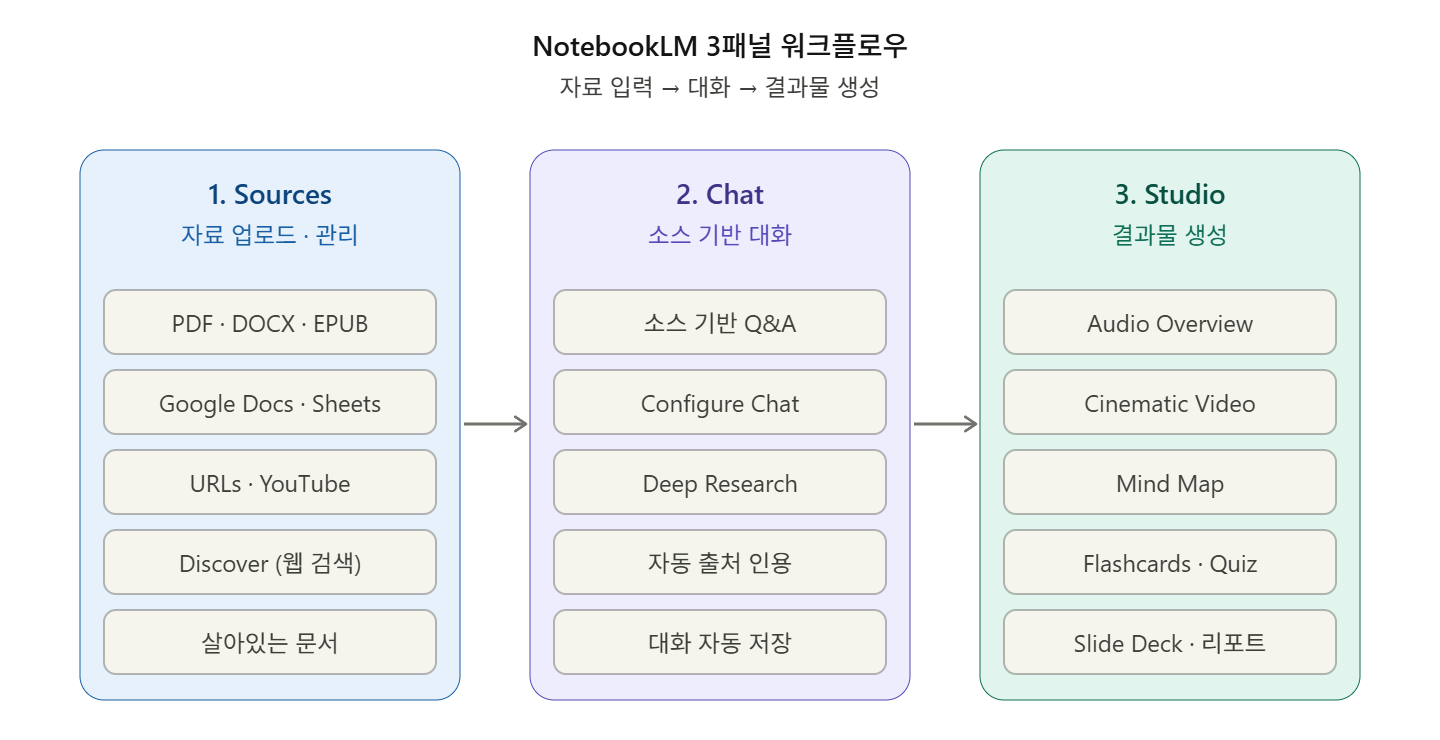
First, you need to understand its structure. With the April 2026 update, NotebookLM was redesigned with a 3-panel workflow: Sources / Chat / Studio. In the Sources panel, you upload and manage documents; in the Chat panel, you ask questions; and in the Studio panel, you generate outputs like reports, slides, infographics, and mind maps. Geeky Gadgets
Keeping the roles of these three panels in mind will make the following 7 use cases much clearer.
7 Use Cases That Will Change Your Life
1️⃣ Consolidate Dispersed Data into a Single Knowledge Base
Gather technical conference presentations (PDFs), official documents (URLs), internal wikis (Google Docs), and lecture video scripts (YouTube subtitles) into one notebook. With the November 2025 update, source types like Word and Sheets have been expanded, and EPUB is also supported. Fello AI
A significant advantage is that adding Google Docs, Slides, and Sheets as sources treats them as “living documents,” allowing you to fetch the latest changes. PDFs, on the other hand, are static uploads. Jeff Su
Tip for Instructors: Create one notebook per course (e.g., AWS Security Architecture) and include official documents updated during the semester as URLs to keep it current throughout the term.
2️⃣ Create Commute Learning Materials with Audio Overview
This is the feature that surprises people most. It automatically converts long, tedious PDFs into a podcast hosted by two AI hosts. It’s not monotonous TTS, but real radio-like content with jokes and analogies.
The true value emerges when combined with the Customize option. You can give instructions like “Explain this chapter for beginners” or “Focus on the OAuth 2.0 flow.”
Tip for Learners: Before an exam, upload thick standard documents (e.g., ISO 27001, NIST SP 800-53) and request, “Create a 30-minute podcast focusing on frequently tested control items.” It will stick in your head while you listen in the car.
3️⃣ Organize Lecture Structure at a Glance with Mind Map
When you need to explain complex topics (e.g., Kubernetes security, cloud governance) in a lecture, the hardest part is creating the outline.
The Mind Map tool shows all content within your sources at a glance, letting you know what’s worth delving into deeply before reading a single page. Moreover, it’s an interactive mind map, so clicking any branch opens a source-based chat on that topic. Jeff Su
I use this feature for designing lecture outlines. I put an entire standard document into it, generate a mind map, and then click on each branch to delve deeper and decide on lecture chapters.
4️⃣ Automatically Generate Assessment Materials with Flashcards & Quizzes
The most annoying task after a lecture is creating quizzes and review cards. Now, it’s just one click away.
With the 2026 update, Flashcards and Quizzes progress is saved between sessions, and features like “Got it” / “Missed it” marking, card shuffling, and re-solving only missed cards have been added. Specific cards/questions can also be deleted. Google Workspace
A big advantage is that when students check answers, a correct answer key with citations is also provided. This is useful for self-directed learning and differentiated instruction. Chrmbook
5️⃣ Enhance Lecture Materials with Deep Research
This is a real game-changer. Deep Research, added in November 2025, has transformed NotebookLM into an agent-like researcher. It automatically searches the web and generates cited reports on its own. Fello AI
While it previously only dealt with “my uploaded data,” Deep Research fills in missing parts from the web. For example, if you request “major cloud security incidents in the last 6 months,” it will produce a citable report without you having to collect the data yourself.
⚠️ However, always verify sources. To cite in lectures or research, you must open the original link directly and fact-check.
6️⃣ Create Video Content with Cinematic Video Overview
Cinematic Video Overviews, added in March 2026 and based on Veo 3, generate immersive AI videos from documents. However, it is currently only available to Google AI Ultra subscribers. Fello AI
While the existing Video Overview was a static slideshow, the Cinematic version features elegant animations and rich visual expressions that go “beyond narrated slides.” For example, for a PC assembly notebook, it can visualize actions like CPU installation. XDA Developers
If the Ultra fee of $249.99 per month is too burdensome, you can still quickly create video drafts for lectures with the regular Video Overview.
7️⃣ Fix Response Tone/Perspective with Configure Chat
If you don’t know this feature, you’re only using 30% of NotebookLM.
The “Configure Chat” feature in the Chat panel allows you to add custom instructions so that all responses are structured around your specific goals. Jeff Su
For example, you can set it up for lectures like this:
text
모든 답변은 IT 입문자 기준으로 작성한다.
전문 용어는 첫 등장 시 한 줄로 정의한다.
실무 예시를 반드시 포함한다.
답변 끝에는 "추가 학습 추천" 섹션을 둔다.
This ensures that any question you ask in the same notebook will receive a consistent tone and structured answer. If you upload brand guidelines as a source and instruct it to “follow the colors, fonts, and design styles of the attached brand guidelines,” it will generate infographics, reports, and slides in that style. Jeff Su
⚠️ Limitations You Shouldn’t Blindly Trust
Even RAG based on your data is not foolproof.
- Hallucinations still occur. Occasionally, it invents statistics or confidently asserts information that was correct in 2023 but is outdated in 2026. “Probably accurate” is never an acceptable standard for presentations, executive reports, or articles. Always cross-reference results with sources. Leadershipinchange
- YouTube videos are recognized only as subtitle text. Visual information in the video is not reflected.
- Weak for creative brainstorming. NotebookLM produces structured, accurate results, but its creativity and exploratory research capabilities are low, requiring supplementary tools like ChatGPT or Gemini for brainstorming or unstructured projects. Geeky Gadgets
- Caution with sensitive data uploads. For internal secrets, personal information, or unreleased code, you must first check your security policy.
✅ Summary
NotebookLM is no longer just an “AI summarization tool.” As of 2026, it is a full-fledged knowledge production platform with a source → chat → output workflow.
The recommended learning sequence for the next steps is as follows:
- Create a notebook for a frequently covered topic and upload 5-10 documents.
- Save custom instructions in Configure Chat tailored to your role and audience.
- Generate an Audio Overview and Mind Map first to grasp the overall structure.
- Fill in gaps with Deep Research.
- Produce outputs with Flashcards / Quizzes / Slide Deck.
The best way to use it is to use it daily. Just one week of use will truly change your workflow.
Leave a Reply