If your monthly bill makes your eyes pop, you’re not alone.
Token waste is everyone’s problem.
>

🎯 What This Article Covers
- How tokens are precisely billed (input vs. output differences)
- How to reduce costs by up to 90% with Prompt Caching
- Model selection strategy — When to use Haiku vs. Sonnet vs. Opus
- Practical tips applicable to regular claude.ai users
- Code-level optimization techniques for API developers
📌 Introduction — Why Token Optimization is Important
When you first start using the Claude API, you might encounter this situation: it’s fine at first, but then your monthly bill suddenly becomes much larger than expected.
If you trace the cause, the pattern is usually similar: repeatedly sending the same system prompt with every request, reprocessing the entire previous history as the conversation gets longer, or using the expensive Opus model for simple tasks.
In one developer’s real-world case, a session that initially used 1,000 tokens ballooned to over 15,000 tokens after just 5 message exchanges. This is because with each conversation, Claude doesn’t just process new questions, but reprocesses all previous prompts, previous responses, code snippets, and contextual information. BSWEN
This article systematically addresses how to solve this problem.
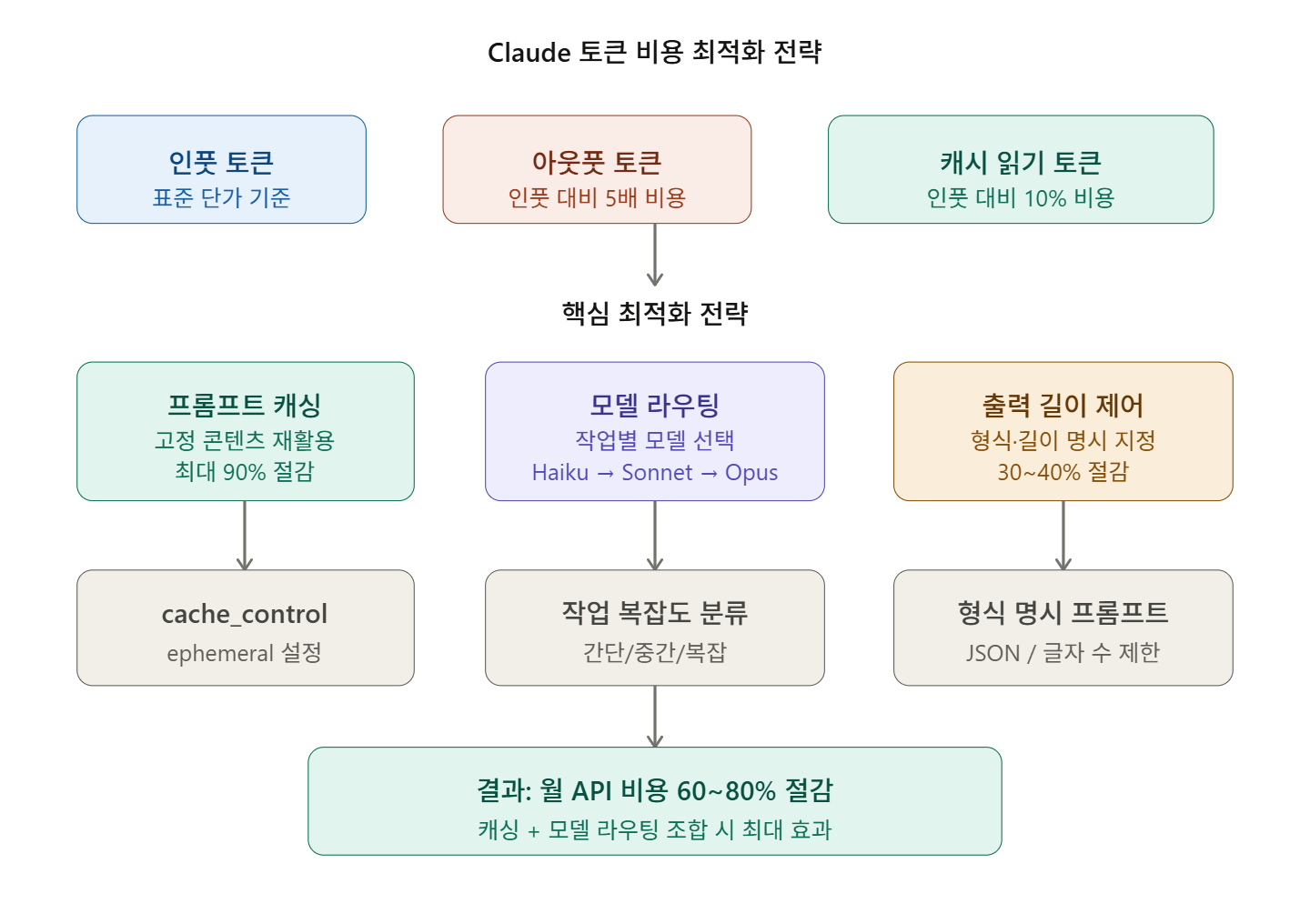
🔍 First, Understand the Token Cost Structure
Input vs. Output — Which is More Expensive?
There’s a key fact you need to know first in token optimization.
Output tokens are 5 times more expensive than input tokens. Based on Sonnet 4, 500 unnecessary output tokens cost the same as 2,500 wasted input tokens. Optimizing output length yields much greater savings than reducing input. SitePoint
In other words, simply saying “answer briefly” is a much more powerful cost-saving method than you might think.
Token Billing Structure at a Glance
| Category | Description | Billing Unit |
| Standard Input | Processed anew with each request | Standard Rate |
| Cache Write | When saving to cache | Standard Rate × 1.25 (5 min) |
| Cache Read | When loading from cache | Standard Rate × 0.1 (90% Savings!) |
| Output | Generated response | Standard Rate × 5 |
—
💡 Key Technique 1 — Prompt Caching
Concept: “Why read the same content every time?”
The concept of prompt caching is simple: fixed content (system prompts, documents, tool definitions, etc.) is processed only once, and subsequent requests reuse the cached results.
For example, if you operate a system where hundreds of users ask questions about the same document daily, you can save up to 90% of input token costs by maintaining a cache instead of reprocessing the same document every time. Brunch
How to Apply Caching in API
import anthropic

client = anthropic.Anthropic()

# Add cache_control to system prompt
response = client.messages.create(
    model="claude-sonnet-4-6",
    max_tokens=1024,
    system=[
        {
            "type": "text",
            "text": "당신은 AWS 클라우드 전문가입니다. 아래는 프로젝트 문서입니다...

[수천 토큰의 고정 문서]",
            # 👇 This one line is key!
            "cache_control": {"type": "ephemeral"}
        }
    ],
    messages=[
        {"role": "user", "content": "EC2 비용 최적화 방법을 알려주세요"}
    ]
)

# Check usage
print(f"캐시 읽기 토큰: {response.usage.cache_read_input_tokens}")
print(f"캐시 쓰기 토큰: {response.usage.cache_creation_input_tokens}")
###
Cache TTL (Time-to-Live) Strategy
Anthropic’s cache by default expires after 5 minutes of inactivity. However, the timer resets each time the cache is hit. So, in an active coding session with messages exchanged every 1-2 minutes, the cache will persist. Conversely, if there’s no input for more than 5 minutes, the cache expires, and the next request will be a cold start (cache write). Claude Code Camp
A 1-hour long-term cache is also possible:
# 1-hour cache (beta header required)
import anthropic

client = anthropic.Anthropic(
    default_headers={"anthropic-beta": "extended-cache-ttl-2025-04-11"}
)

response = client.messages.create(
    model="claude-sonnet-4-6",
    max_tokens=1024,
    system=[
        {
            "type": "text",
            "text": "[대용량 고정 문서...]",
            "cache_control": {
                "type": "ephemeral",
                "ttl": "1h"  # 1-hour cache
            }
        }
    ],
    messages=[{"role": "user", "content": "질문"}]
)
⚠️ Caution: A 1-hour cache costs 2 times the standard rate for writing. It is only economical if the number of requests is sufficiently high.
💡 Key Technique 2 — Model Selection Strategy
Using Opus for every task will ruin you
It is generally recommended to start with Sonnet for 80% of tasks and switch to Opus only when complex architectural decisions or deep analysis are required. Claude Fast
| Model | Suitable Tasks | Relative Cost |
| Haiku | Classification, simple Q&A, keyword extraction | Lowest |
| Sonnet | Coding, analysis, general tasks (most cases) | Medium |
| Opus | Complex reasoning, strategy formulation | Highest |
### Example of Actual Routing Pattern
def route_request(task_type: str, complexity: str) -> str:
    """작업 복잡도에 따라 모델 자동 선택"""

    if task_type in ["classification", "simple_qa", "keyword_extraction"]:
        return "claude-haiku-4-5-20251001"  # Lowest cost

    elif complexity == "high" or task_type in ["architecture", "deep_analysis"]:
        return "claude-opus-4-6"  # When high quality is needed

    else:
        return "claude-sonnet-4-6"  # Default (80% of cases)

# Usage example
model = route_request(task_type="code_review", complexity="medium")
# → Returns "claude-sonnet-4-6"
💡 Key Technique 3 — Control Output Length
Remember that output tokens are 5 times more expensive? That’s why controlling the response length has the most direct impact on cost savings.
❌ Token-Wasting Prompt
"EC2 비용 최적화 방법을 알려주세요"→ Claude responds with verbose explanations, background knowledge, examples, and elaborations.
✅ Token-Saving Prompt
"EC2 비용 최적화 방법을 3가지만, 각 50자 이내로 간결하게 알려주세요"→ Delivers only the necessary information.
There are cases where adding explicit length constraints to the prompt alone reduced token usage by up to 40%. The core principle is: “Don’t let Claude explore what you want; specify exactly what you want.” BSWEN
Tips for Specifying Response Format
# Bad example
messages=[{"role": "user", "content": "이 코드 리뷰해줘"}]

# Good example
messages=[{
    "role": "user",
    "content": """다음 코드를 리뷰해주세요.
    형식: JSON으로만 응답
    {"issues": [...], "improvements": [...]}
    각 항목은 한 줄 이내로 작성"""
}]
💡 Key Technique 4 — Context Management
Costs increase linearly as conversations get longer
Context accumulation is a major source of token consumption, and if not managed, the 200K token context window will gradually fill up. DeepWiki
Always start a new conversation for unrelated tasks
# In Claude Code
/clear          # Reset current session
/compact        # Compress context with conversation summary (~50% savings)
/cost           # Check current token usage
Paste only necessary parts of files
# ❌ Paste entire 500-line file
with open("app.py") as f:
    code = f.read()  # 500 lines = ~3,000 tokens wasted

# ✅ Extract only necessary functions
# "Please fix the bug in the calculate_cost function (lines 42-67)"
💡 Key Technique 5 — Token-Efficient Tool Use (Advanced API)
This feature is particularly useful for developers who directly use the API.
Token-Efficient Tool Use is currently available in Claude Sonnet 4.6 and Opus 4.6 and can be applied immediately by adding the beta header token-efficient-tools-2025-02-19. Combining these optimizations in agent applications can reduce monthly API costs by 60-80%. Claude Lab
# Enable Token-Efficient Tool Use
curl https://api.anthropic.com/v1/messages
  -H "content-type: application/json"
  -H "x-api-key: $ANTHROPIC_API_KEY"
  -H "anthropic-version: 2023-06-01"
  -H "anthropic-beta: token-efficient-tools-2025-02-19"   # This one line!
  -d '{
    "model": "claude-sonnet-4-6",
    "max_tokens": 1000,
    "tools": [...],
    "messages": [...]
  }'
💡 Key Technique 6 — Utilize Batch API
For non-urgent bulk tasks, using the Batch API offers a 50% discount.
import anthropic

client = anthropic.Anthropic()

# Process bulk requests in batches
batch_requests = [
    {
        "custom_id": f"request-{i}",
        "params": {
            "model": "claude-haiku-4-5-20251001",
            "max_tokens": 100,
            "messages": [{"role": "user", "content": f"텍스트 {i} 분류해줘"}]
        }
    }
    for i in range(100)
]

# Create batch (processed within 24 hours, 50% discount)
batch = client.messages.batches.create(requests=batch_requests)
print(f"배치 ID: {batch.id}")
⚠️ Common Mistakes & Cautions
Actions that break the cache:
Adding MCP tools, inserting timestamps into system prompts, switching models mid-session — these actions can invalidate the entire cache, making the cost of that request more than 5 times higher. Claude Code Camp
# ❌ Cache-breaking pattern
system_prompt = f"현재 시각: {datetime.now()}
당신은 전문가입니다..."
# Time changes with each request, causing cache misses

# ✅ Correct pattern
system_prompt = "당신은 전문가입니다..."
# Apply cache only to fixed content
MCP Server Management:
Deactivate unnecessary MCP servers. Each active MCP server adds tool definitions to the system prompt, consuming context window space. ClaudeLog
✅ Summary — Cost Saving Priorities
Here’s a summary in order of practical application:
| Priority | Technique | Estimated Savings |
| 1st Priority | Apply Prompt Caching | Up to 90% |
| 2nd Priority | Explicitly Limit Output Length | 30~40% |
| 3rd Priority | Model Routing (Haiku/Sonnet/Opus) | 40~70% |
| 4th Priority | Start New Conversation for Unrelated Tasks | 20~30% |
| 5th Priority | Batch API (Non-urgent bulk tasks) | 50% |
| 6th Priority | Token-Efficient Tool Use Header | Additional 10~20% |
By properly applying just Prompt Caching + Model Routing, you can reduce costs by more than half in most cases.
For the next steps, we recommend using Anthropic’s official Prompt Engineering Guide and the /compact, /cost commands in Claude Code.
Leave a Reply