Hello! Today, we’ll delve deep into Load Balancing strategies for efficiently distributing traffic in Istio, a core component of Microservices Architecture (MSA).
Istio controls traffic using Envoy proxy as a sidecar, enabling very precise load balancing configurations through the DestinationRule resource. Beyond simply “dividing traffic,” we’ll outline how to choose the strategy best suited for your specific situation.
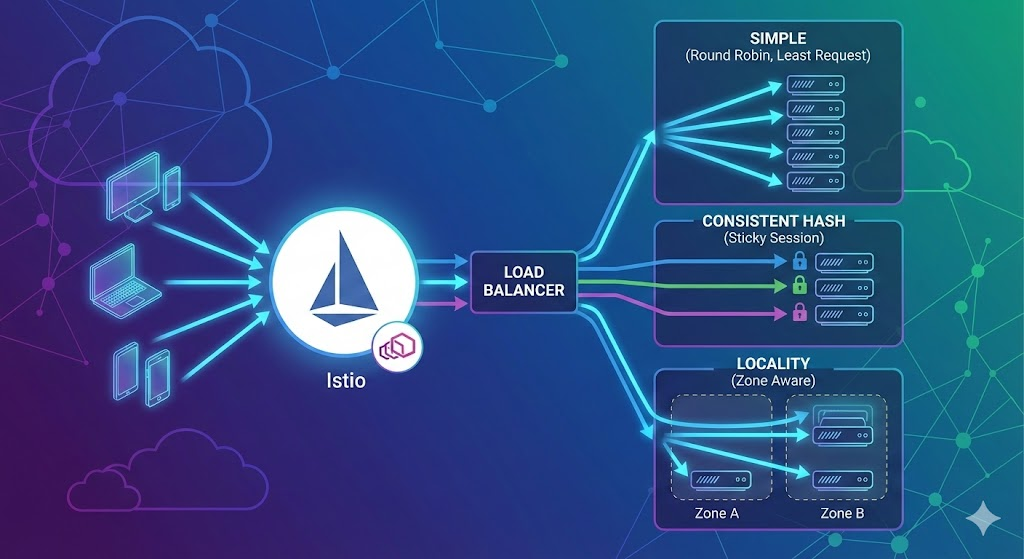
1. Load Balancer Configuration Location 📍
All configurations are made in the trafficPolicy.loadBalancer section of the DestinationRule resource.
apiVersion: networking.istio.io/v1beta1
kind: DestinationRule
metadata:
  name: my-destination-rule
spec:
  host: my-service
  trafficPolicy:
    loadBalancer:
      # Your configuration goes here!
2. Simple Load Balancer: The Most Basic and Powerful Distribution ⚖️
Used for general API servers or web services that do not require separate state maintenance. These are the most commonly used methods.
| Mode | Description | Recommended Scenario |
|---|---|---|
| ROUND_ROBIN | (Default) Sends requests one by one in sequence. It’s the most straightforward and predictable. | When all Pods have similar specifications and request processing times. |
| LEAST_REQUEST | Sends requests to the Pod with the fewest active requests. (Randomly selects two and chooses the less busy one) | When request processing times vary (e.g., some take 1 second, others 10 seconds). |
| RANDOM | Selects randomly. This method has the lowest computational overhead for the load balancer itself. | When there is an extremely large number of Pods. |
| PASSTHROUGH | Does not perform load balancing and connects directly to the IP requested by the client. | When direct connection is required, such as for Headless services or databases. |
💡 YAML Configuration Example (LEAST_REQUEST)
trafficPolicy:
  loadBalancer:
    simple: LEAST_REQUEST
3. Consistent Hash: “You go to the same one as before!” (Sticky Session) 🔗
Used when a specific user’s requests must always be sent to the same Pod. It’s essential for maintaining login sessions or improving local cache efficiency. This is also known as a Sticky Session.
It is divided based on what is chosen as the ‘Key’.
- 🍪 HTTP Cookie: Fixes based on browser cookies (e.g., JSESSIONID).
- 📡 Source IP: If the client’s IP address is the same, sends to the same Pod. (Useful for TCP connections, etc.)
- 🏷️ HTTP Header: Distributes based on a specific header value (e.g., x-user-id).
- 🔍 Query Parameter: Bases distribution on a parameter in the URL (e.g., ?shard_id=1).
💡 YAML Configuration Example (Cookie-based)
trafficPolicy:
  loadBalancer:
    consistentHash:
      httpCookie:
        name: JSESSIONID
        ttl: 0s # Persists for the duration of the browser session
4. Locality Load Balancer: “The closer, the faster” 🌍
This is not so much an algorithm as it is a traffic distribution priority policy. If you are operating Multi-AZ (Availability Zone) or Multi-Region in a cloud environment, you must know this for cost savings and speed.
- How it works: Prioritizes calling Pods located in the same region/zone as the requesting Pod.
- Failover: What if all Pods in the same region are down or unhealthy? In that case, traffic is automatically routed to the next closest region.
- Advantages: Minimizes network latency, reduces cloud data transfer costs (Cross-zone traffic cost).
💡 YAML Configuration Example
trafficPolicy:
  loadBalancer:
    simple: ROUND_ROBIN
    localityLbSetting:
      enabled: true
📝 Summary and Conclusion
Choose the appropriate tool for the situation!
- General web/API servers 👉 simple: ROUND_ROBIN (just leave it as default)
- Servers with mixed heavy workloads 👉 simple: LEAST_REQUEST
- Websites requiring login 👉 consistentHash (using Cookie)
- Cloud users (AWS/Azure, etc.) 👉 localityLbSetting (cost/speed optimization)
Build more stable and faster services with Istio’s powerful load balancing features! 🚀
Leave a Reply