Hello! Today, I’d like to talk about one of the most important concepts in Kubernetes: ‘Volume’.
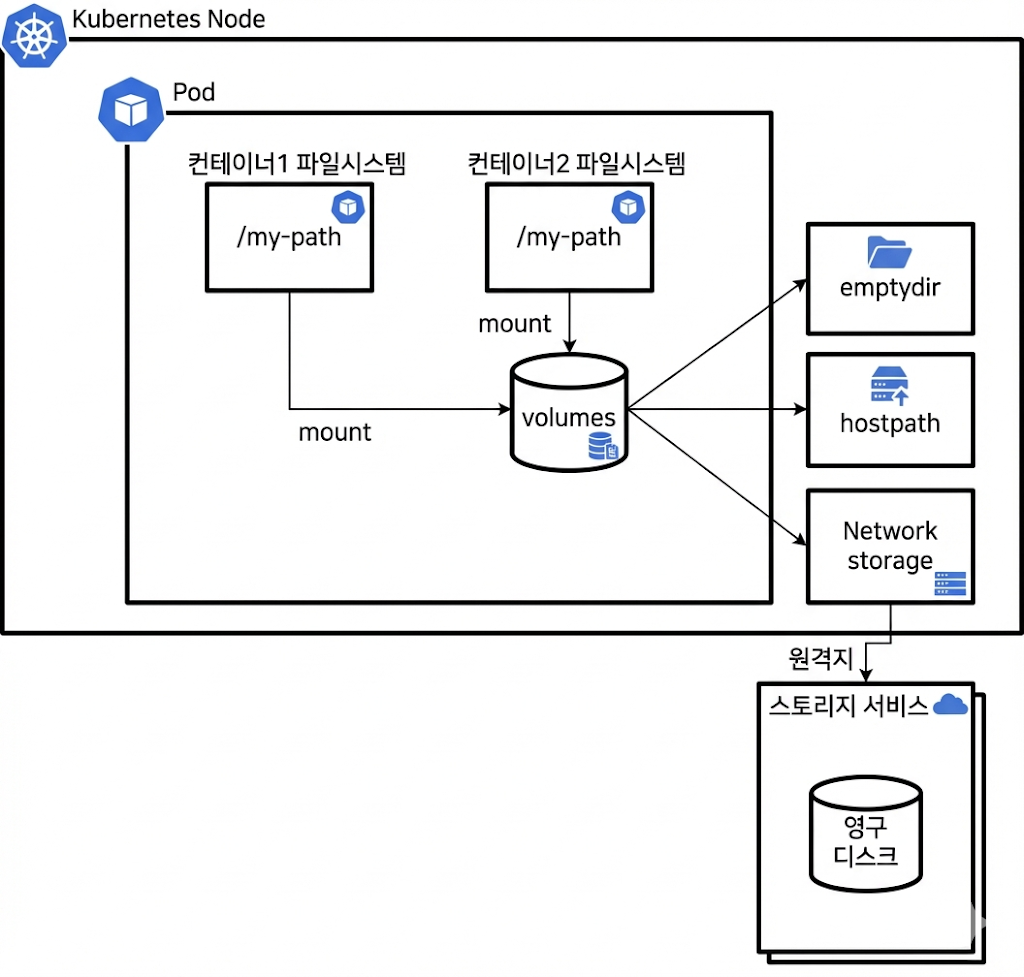
When you first encounter Kubernetes, the most confusing part is often, “What happens to my data if a container dies?” By breaking down the diagram above, I will perfectly explain how Kubernetes safely stores data and shares it between containers. 🚀
1. Why do we need ‘Volumes’? 🤷♂️
Basically, containers are ‘ephemeral’. Even if you create and save files inside a container, if the container restarts or is deleted, the data within it vanishes like smoke.
However, there’s data that should not disappear, like databases or log files, right? Or there might be cases where multiple containers within a single Pod need to share data. This is where Volumes come in.
2. Structure Analysis with a Diagram 🔍
The diagram above is broadly divided into inside the Pod and external storage. Shall we take a look?
① Relationship between Pod and Container
Looking at the innermost part of the diagram, you’ll see Container 1 and Container 2 inside a large box called Pod.
- File System: Each container has its own independent file system.
- Mount: However, in the diagram, both containers have a path /my-path connected via an arrow to the central ‘volumes’ cylinder, right? This is called mounting.
- Data Sharing: This means if Container 1 writes a file to /my-path, Container 2 can read the exact same file from /my-path. It’s like two families under one roof sharing a refrigerator! 🏠
② Various Types of Volumes (Right-side Boxes)
Where are the ‘volumes’ in the center of the Pod actually stored? The three boxes on the right side of the diagram provide the answer.
- 📁 emptyDir (Temporary Storage)
- As the name suggests, it’s an ’empty’ directory at first.
- It’s created when a Pod is created and deleted when the Pod is deleted.
- Purpose: Primarily used for cache data or for temporary data exchange between containers. It’s fast and simple, but not for permanent storage!
- 💻 hostPath (Direct Node Connection)
- It directly uses the file system of the Kubernetes Node, which is the largest border in the diagram.
- This method allows a Pod to directly look at a specific path on the node (e.g., /var/log).
- Purpose: Mainly used when monitoring tools or system-related containers need to read the node’s status. Security precautions are necessary! ⚠️
- ☁️ Network Storage (Network Storage)
- This is the core of permanent data preservation.
- Can you see the arrow in the diagram going out of the Kubernetes Node and connecting to the persistent disk of a storage service?
- It connects external storage like AWS EBS, Azure Disk, NFS.
- Advantage: Even if a Pod dies, or even if a node fails and the Pod moves to another node, the data remains safely in external storage, so it can be reconnected and used as is. 🛡️
3. Summary: Data Flow 🌊
The flow in the diagram can be summarized in one sentence:
“When data is stored in /my-path inside a container ➡️ it goes through the volume inside the Pod ➡️ and is written to the actual storage (emptyDir, hostPath, or external disk).”
Thanks to this structure, developers can safely manage and utilize data without worrying whether a container lives or dies.
💡 Conclusion
Kubernetes Volumes may seem complex, but it’s easy to think of them as “a bridge connecting containers and storage.”
- Data to be used temporarily and discarded 👉 emptyDir
- When node information is needed 👉 hostPath
- Data that must never be lost 👉 Network Storage (PVC/PV)
Just remembering these three will help you understand half of Kubernetes storage! In the next post, we’ll cover how to write actual configuration files (YAML). 👋
Leave a Reply