Hello! Argo CD enables Declarative Continuous Delivery (CD) in Kubernetes environments. Behind the simple outcome of “push to Git, and it’s deployed” lies a meticulously designed microservices architecture.
Today, we will delve deeply into the main components that make up Argo CD, the data flow between them, and why this structure was designed this way. 🛠️
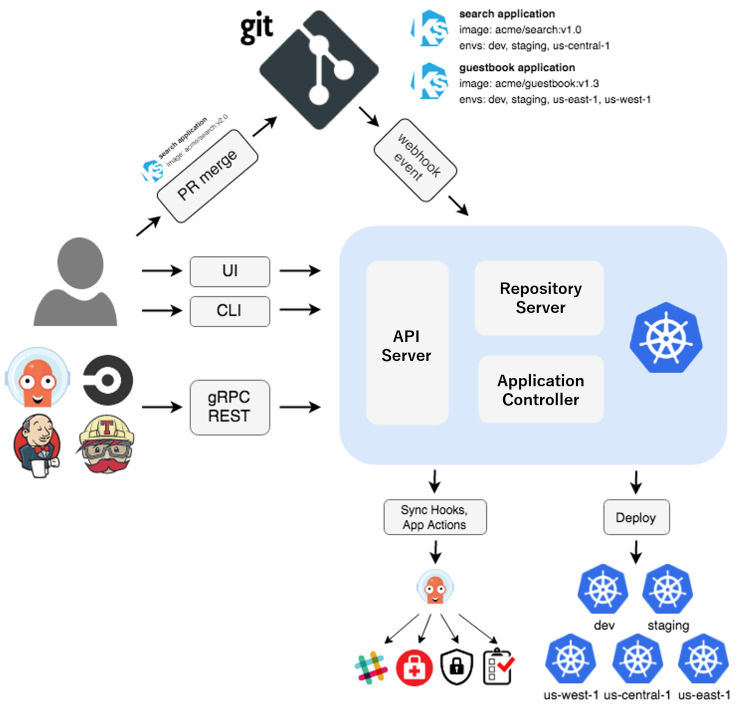
https://argo-cd.readthedocs.io/en/stable/operator-manual/architecture/
1. 🌐 Argo CD Architecture Overview (High-level View)
Argo CD is a microservices architecture composed of three main services. Each service performs an independent role and communicates organically within the cluster.
Core Components
- API Server: Gateway for users and external tools
- Repository Server (Repo Server): The center of source code (Git) management
- Application Controller: The brain that monitors cluster state
2. 🚦 API Server: Gateway and Security
The API Server is the sole interface through which users (UI/CLI) or external systems (CI tools) interact with Argo CD. It is implemented as a gRPC/REST server.
- Authentication and Authorization (AuthN/AuthZ): Verifies who the user is and checks permissions as defined in argocd-rbac-cm.
- Application Management: Handles requests for application creation, modification, and deletion.
- RBAC Enforcement: Performs access control for specific projects (AppProject).
💡 Tip: The Scoped Token we discussed previously is also a key security element validated and processed by this API Server.
3. 📂 Repository Server: Source of Truth
The Repository Server maintains an internal cache and manages manifests from Git repositories.
- Manifest Generation: Renders Helm, Kustomize, or raw YAML files from Git into pure Kubernetes objects that Argo CD can understand.
- Caching Engine: Since fetching from Git every time would be slow, it leverages a local cache to maximize performance when there are no changes.
- Kustomize/Helm Support: This is where rendering operations are performed using specific binary versions, as discussed earlier with kustomize.path settings.
💻 (Reference) Repo Server Custom Configuration Example
Check the architectural location of the setting that pre-registers Helm repos in the Repo Server using the InitContainer technique learned earlier.
YAML
# The argocd-repo-server must be ready to communicate with external Helm repos for rendering.
containers:
- name: argocd-repo-server
  env:
  - name: ARGOCD_REPO_SERVER_HELM_BIN
    value: "/usr/local/bin/kustomize-v5" # When using custom binaries
4. 🧠 Application Controller: Guardian of State
This component is the ‘brain’ of Argo CD and the core engine of GitOps.
- Continuous Monitoring: Constantly compares the current running cluster state (Live State) with the state defined in Git (Desired State).
- Health Assessment: This is where the resource.customizations.health Lua script, which we defined in argocd-cm, is executed.
- Self-Healing: Performs the task of reverting to the Git state when someone manually changes settings in the cluster.
5. 🔄 Data Flow: The Deployment Process
Let’s look at what happens inside the architecture step-by-step when a user clicks the Sync button.
- User Request: The user sends a Sync command to the API Server via UI/CLI.
- Manifest Request: The API Server requests the Repo Server to “render manifests with the latest commit version.”
- Rendering: The Repo Server fetches code from Git (or from cache) and executes Helm/Kustomize to create the final YAML.
- Comparison and Execution: The Application Controller compares the received YAML (Desired) with the current cluster state (Live) and applies only the changes to the cluster.
- Status Update: After deployment, the Controller records the final state and displays a Synced or Healthy badge on the UI.
6. 🏗️ Advanced Architecture: HA (High Availability) Configuration
In production environments, each component is operated in high-availability mode to prevent service interruptions.
- Redis: Acts as an external storage for Repo Server’s cache data, allowing multiple Repo Servers to share state.
- Sharding: If thousands of clusters are managed, the Application Controller is split into multiple instances (Sharding) to distribute the load.
💻 Controller Sharding Configuration Example (argocd-cmd-params-cm)
YAML
apiVersion: v1
kind: ConfigMap
metadata:
  name: argocd-cmd-params-cm
data:
  # Limit the number of clusters a single controller is responsible for to induce sharding. ⚖️
  controller.replicas: "2"
  controller.cluster.sharding.algorithm: "round-robin"
📝 Summary Table: Architecture Component Comparison
| Component | Key Role | Related Config File | Analogy |
| — | — | — | — |
| API Server | Authentication, Authorization, API Provision | argocd-rbac-cm | Information Desk |
| Repo Server | Manifest Rendering, Caching | argocd-cm (kustomize) | Translation and Design Office |
| Controller | State Comparison, Synchronization, Recovery | argocd-cm (health) | Site Supervisor |
| Redis | Shared Data Caching | Shared Notepad |
—
💡 Conclusion
Argo CD’s architecture is thoroughly specialized to bridge the gap between “where the state is defined (Git)” and “where the state is maintained (Cluster)”. Understanding this structure clarifies which component’s logs to check when troubleshooting occurs.
- If login fails? → API Server
- If Git changes are not reflected? → Repo Server
- If deployment is done but still Progressing? → Application Controller
We hope this helps you understand the structure of these invisible heroes protecting your clusters! 🎯
Leave a Reply